Every Domain India hosting plan is managed through a control panel: cPanel, DirectAdmin or Webuzo on Linux hosting, and Plesk on Windows hosting. This page is the index to our own step-by-step guides for each panel, grouped by task, followed by the official manuals from each panel's maker. Our guides describe how the panels are set up on Domain India servers, so start with them; use the vendor manuals for features we do not cover.
Find your task below (logging in, files, email, databases, DNS, SSH, PHP, resource usage, errors, backups) and open the Domain India guide for it. Most guides cover cPanel, DirectAdmin and Webuzo together. For anything not listed, the official manuals are at docs.cpanel.net, docs.directadmin.com, docs.plesk.com and webuzo.com/docs.
1. Which control panel do you have?
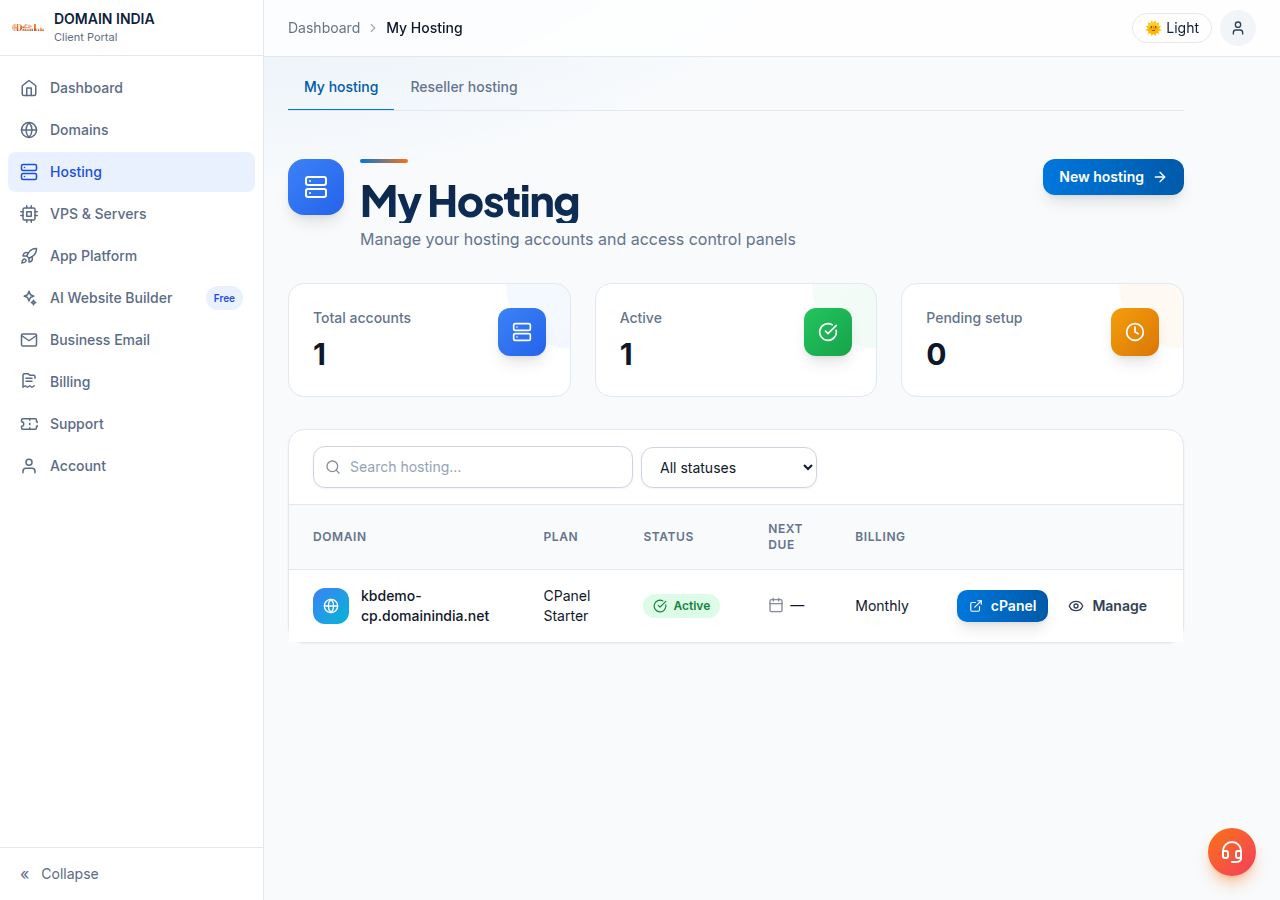
Your panel depends on the hosting plan you bought. The quickest way to see it: sign in to the client area and open My Hosting. The button on your domain's row is labelled after your panel, cPanel, DirectAdmin, Webuzo or Plesk, and opens it in a new tab. On Webuzo, log in at https://yourdomain.com:2003 instead.
| Panel | Plans | Direct login address | Port |
|---|---|---|---|
| cPanel | cPanel shared and reseller hosting | https://yourdomain.com:2083 | 2083 |
| DirectAdmin | DirectAdmin shared hosting | https://yourdomain.com:2222 | 2222 |
| Webuzo | Webuzo shared hosting | https://yourdomain.com:2003 | 2003 |
| Plesk | Windows (ASP.NET) hosting | https://yourdomain.com:8443 | 8443 |
These ports were measured open on our servers. If the direct address does not load, your domain may not point at our server yet, or your network may block the port. The full list is in Domain India hosting port numbers.
2. Logging in and passwords
On Webuzo plans, log in at https://yourdomain.com:2003 with your Webuzo username and password. The client-area password reset does not currently work for Webuzo. If you need a new Webuzo password, ask support through live chat or a ticket.
New to control panels? Start with Hosting basics and What is cPanel.
3. Files and uploading your website
- How to use the File Manager in cPanel, DirectAdmin and Webuzo: upload, extract, edit and set permissions in the browser.
- What settings do I need to upload my website: FTP host, username, port and folder for each panel.
- Download files securely with FTP over TLS.
- Parked, addon and subdomains explained: adding more sites and subdomains to one account.
4. Email
- Create email accounts for your domain in cPanel, DirectAdmin and Webuzo.
- How to log in to webmail: the webmail address for each panel and for Business Email.
- I can receive mail but cannot send it: SMTP settings, ports and sending limits.
- Autoresponders: in cPanel and in DirectAdmin.
- Sending email from PHP:
mail(), sendmail path and SPF for website forms.
5. Databases
- How to connect to your MySQL database in cPanel, DirectAdmin and Webuzo, with the right host name.
- Database troubleshooting: connection errors, privileges and repairs.
- Securing MySQL access with SSH tunnels: MySQL port 3306 is closed to the outside on our shared servers, so remote tools connect through an SSH tunnel.
6. Domains, nameservers and DNS
- How do I change my nameservers: point a domain at your hosting.
- How to change your domain's DNS settings: A, CNAME, MX and TXT records.
- What is a nameserver and why do I need it.
7. SSH and developer tools
Jailed SSH access is available on every shared hosting plan (cPanel, DirectAdmin, Webuzo). It is off by default; ask support to enable it for your account. Login is by SSH key. Windows (Plesk) hosting has no SSH.
- Enabling and accessing jailed SSH on cPanel hosting
- Enabling and accessing SSH on DirectAdmin hosting
- Deploy your website with Git
- Node.js and Python apps on cPanel: deploy a Node.js app and deploy a Python app.
8. PHP settings
| Task | Guide |
|---|---|
| Change PHP version in cPanel | MultiPHP Manager guide |
| Change PHP version in DirectAdmin | Changing PHP version in DirectAdmin |
| Fix "allowed memory size exhausted" | PHP memory errors and custom php.ini |
| Functions that are disabled, and alternatives | PHP disabled functions on shared hosting |
| Speed up PHP | PHP OPcache configuration |
| Which versions are available | Software versions on Domain India hosting |
9. Resource usage, errors and speed
- How to check resource usage and understanding hosting resource limits.
- "Resource Limit Is Reached" error.
- Reviewing error logs in cPanel and DirectAdmin.
- 500 Internal Server Error, 403 Forbidden and enabling mod_rewrite.
- My website is slow.
10. Apps, WordPress, backups and plan changes
- WordPress: install it by hand, or with the one-click installers (Softaculous and WP Toolkit on cPanel; Softaculous on DirectAdmin and Webuzo). Then read Mastering WordPress.
- Laravel: install with Softaculous or by upload.
- Backups: shared hosting includes weekly backups. Before a big change, make your own copy too: download your files from the File Manager and export your databases. To restore from our backup, ask support.
- Upgrade your hosting package when you outgrow your plan.
Our Plesk guides are being brought up to date. Until then, use the official Plesk guide below for day-to-day tasks, and ask support for anything specific to our Windows servers. Remember that Windows hosting has no SSH, and Plesk opens on port 8443.
11. Official manuals from the panel makers
These are the vendors' own manuals. They describe every feature a panel can have; some features may be switched off or configured differently on our servers, so where our guide and the vendor manual differ, follow our guide or ask support.
| Panel | Official documentation | Best starting point |
|---|---|---|
| cPanel | docs.cpanel.net | The cPanel user guide, organised by the same sections you see in cPanel |
| DirectAdmin | docs.directadmin.com | The documentation home, with a search box for any feature |
| Plesk | docs.plesk.com | The Plesk Obsidian documentation; choose the customer guide for website owners |
| Webuzo | webuzo.com/docs | The Webuzo user documentation |
The WordPress project's own manual is at wordpress.org/documentation.
How do I know which control panel my hosting uses?
Sign in to the Domain India client area and open My Hosting. The button on your domain's row is labelled cPanel, DirectAdmin, Webuzo or Plesk, depending on your plan, and clicking it opens your panel. On Webuzo, log in at https://yourdomain.com:2003 with your Webuzo username and password; if the button doesn't open the panel, use that address.
What is the login address for each control panel?
cPanel opens at https://yourdomain.com:2083, DirectAdmin at port 2222 and Plesk at port 8443. Webuzo is at https://yourdomain.com:2003. For cPanel, DirectAdmin and Plesk, the one-click button is usually quicker because it needs no panel password.
Should I follow the Domain India guide or the official vendor manual?
Start with the Domain India guide, because it describes how the panel is set up on our servers. Use the vendor manual for features our guides do not cover.
Is SSH included with my control panel?
Jailed SSH access is available on every shared hosting plan (cPanel, DirectAdmin, Webuzo). It is off by default; ask support to enable it for your account. Windows (Plesk) hosting has no SSH.
Can I connect to my MySQL database from my own computer?
Port 3306 is closed to the outside on our shared servers. Connect through an SSH tunnel once SSH is enabled on your account.
How often are my files backed up?
Shared hosting includes weekly backups. Keep your own copy as well before major changes, and ask support if you need a restore.
I cannot find a guide for my task. What should I do?
Search the knowledge base, check the official manual for your panel, or contact support by 24/7 live chat or a ticket. There is no phone support.
Ready to manage your site? Open My Hosting in the client area, browse the knowledge base, or open a ticket if you are stuck. Looking for a plan? Compare cPanel hosting, DirectAdmin hosting, Webuzo hosting and Windows hosting.
Our support team is available on 24/7 live chat, and tickets get a first response within 15 minutes.
Open a ticket