Web hosting is the service that keeps your website's files on a server connected to the internet, so anyone can open your site at any time. If you are about to put your first website online, or you have just bought hosting and are not sure what to do next, this guide explains the pieces in plain language: what hosting is, which kind you need, what comes with a Domain India plan, and the exact path from order to a live website.
You need two things for a website: a domain (your address, such as yourbusiness.in) and hosting (the server space where the site lives). Most small business and WordPress sites fit shared hosting with a control panel (cPanel, DirectAdmin or Webuzo); the AI Website Builder suits owners who want no technical work, the App Platform suits developers deploying code, and a VPS suits people who want a whole server to manage. After ordering: watch for the "Your Hosting Account is Ready" email, log in from the client area, point your domain at the hosting, then install WordPress or upload your files.
1. What web hosting is
Every website is a set of files (pages, images, code) and often a database. For visitors to see it, those files must sit on a computer that is connected to the internet all the time. That computer is a server, and renting space on one is web hosting. A hosting account usually gives you:
- Storage for your website files and databases;
- A web server that sends your pages to visitors' browsers;
- Email at your own domain, such as
[email protected]; - A control panel, a web page where you manage all of this without typing server commands;
- SSL, the certificate that puts the padlock and
https://in front of your address.
2. Domain and hosting: two different things
| Question | Domain | Hosting |
|---|---|---|
| What it is | Your address on the internet, such as yourbusiness.in | The server space where your website and email live |
| What happens without it | Nobody can find your site by name | Your address points nowhere |
| Where you manage it | Domains, My domains in the client area | Hosting, My hosting in the client area |
| Renewal | Yearly, per domain | Yearly or every 2 or 3 years, per plan (VPS and App Platform plans can also be monthly) |
The domain has to be pointed at the hosting, through its nameservers or DNS records, before visitors reach your site. You can have a domain with one company and hosting with another; it simply means changing the setting at the company where the domain is registered. If you are new to domains, start with what is a domain name.
Domain India is a NIXI-accredited .IN registrar. Domain India list prices on 19 September 2026, excluding 18% GST: a .in domain costs ₹575 to register and ₹625 a year to renew, and a .com costs ₹1,150 a year. Search for a name on the domain registration page.
3. The main types of hosting
Choose by what you are building, not by the most powerful plan.
| Type | What you get | Best for | You manage |
|---|---|---|---|
| Shared hosting | An account on a server shared with other customers, with a control panel | Business websites, WordPress, PHP sites, email at your domain | Your website and its apps; the server is managed for you |
| AI Website Builder | A website built by AI from a description of your business, edited by chat | Owners who want a site without technical work | Only the content |
| App Platform (PaaS) | Your code deployed from GitHub or your terminal, with a PostgreSQL database | Developers building apps, APIs and SaaS | Your code; the servers are run for you |
| VPS | A virtual server with full root access and dedicated resources | Custom software, Docker, several apps, full control | Everything, including the operating system and security updates |
Shared hosting
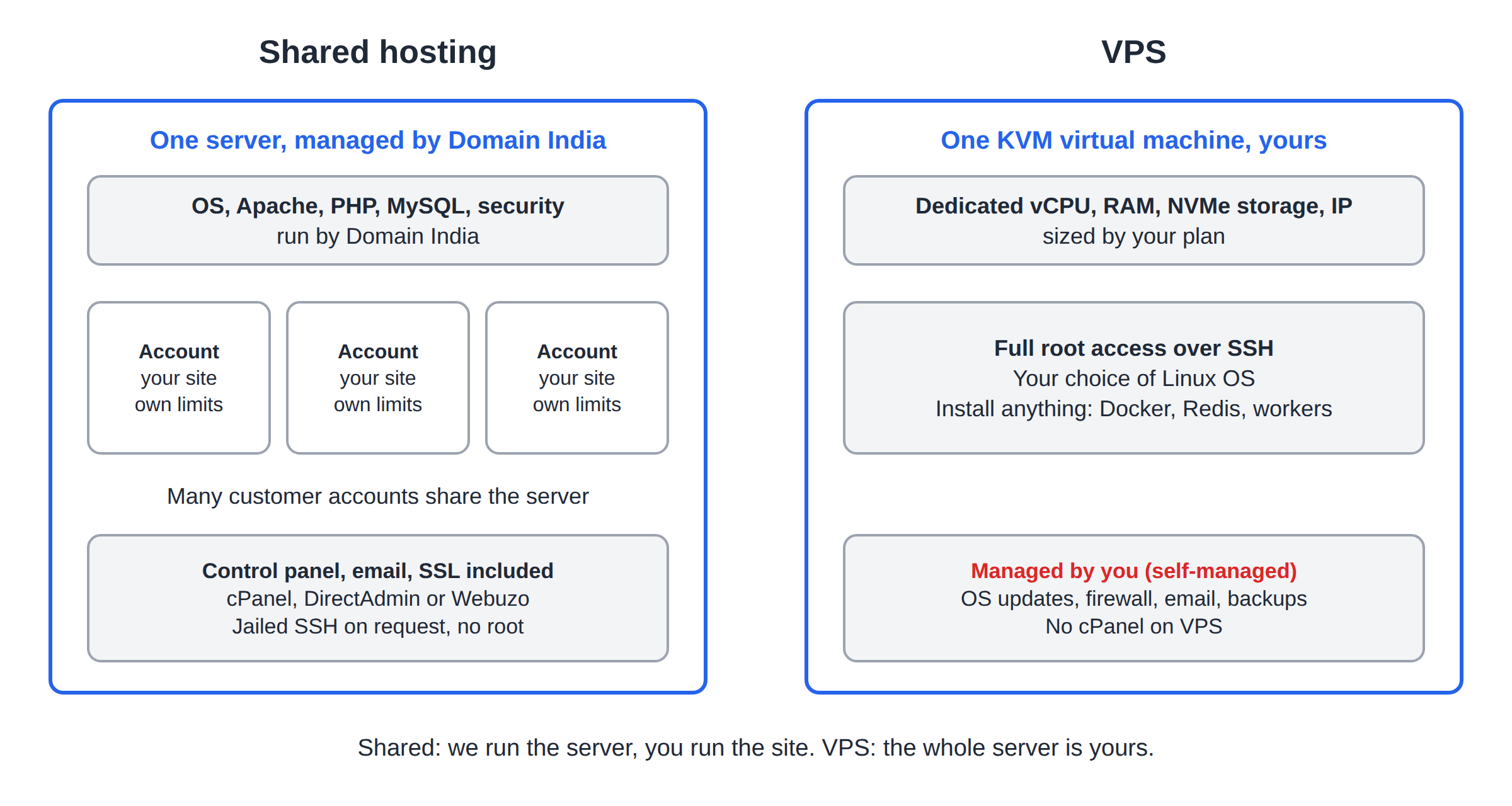
This is where most websites start. Your account has its own storage and limits on a server that hosts other customers too, which keeps the cost low. Domain India's Linux shared hosting runs the Apache web server, supports .htaccess, lets you choose the PHP version per account, and includes email accounts; CloudLinux account isolation and Imunify360 run server-wide for every account (measured 20 September 2026). For ASP.NET and MSSQL instead of PHP and MySQL, Windows hosting runs IIS with Plesk.
AI Website Builder
You describe your business, and the builder creates the pages, text, logo and photos; you then change the site by chatting with it. Paid plans connect your own domain with free SSL, while the free plan gives a preview only. There is no control panel, no files and no code. Builder plans include no mailboxes, so add business email if you need it. See the AI Website Builder page and the getting started guide.
App Platform (PaaS)
For developers who want to deploy code, not run servers. Connect a GitHub repository or upload with a deploy token; Node.js, Python, PHP and custom Dockerfile apps are supported, and every plan includes a managed PostgreSQL database and automatic SSL. See App Platform and getting started with the App Platform.
VPS
A virtual private server gives you your own slice of a server, with dedicated CPU, RAM and NVMe storage and full root access. It is self-managed by default: you install the software and keep the operating system updated. Linux choices include Ubuntu, Debian, AlmaLinux and Rocky Linux, and you can run it with no panel or add Webuzo or DirectAdmin; cPanel is not offered on VPS. Read VPS vs shared hosting first.
4. The control panels Domain India offers
On shared hosting, the control panel is where you will spend your time. Each plan comes with one panel, and the plan name tells you which.
All three Linux panels run WordPress well. The differences are covered in cPanel, DirectAdmin and Webuzo compared, and what is cPanel explains the most common panel section by section.
5. What you get with a Domain India shared hosting plan
Limits depend on the plan. From the Domain India catalogue on 19 September 2026:
| Plan | Websites | NVMe storage | Email accounts | MySQL databases |
|---|---|---|---|---|
| DA Starter | 1 | 10 GB | 5 | 5 |
| cPanel Starter | 1 | 25 GB | 10 | 5 |
| cPanel Growth | 5 | 50 GB | 50 | 10 |
Every Linux shared plan also includes free SSL certificates, weekly backups, a file manager, FTP access and a one-click installer for WordPress and other applications. Support is 24/7 live chat and tickets, with a first response to tickets within 15 minutes; resolution takes longer depending on the issue. There is no phone support.
Your client area password signs you in to Domain India, where you pay invoices and manage services. Your control panel password signs you in to cPanel, DirectAdmin, Webuzo or Plesk. They are separate, and changing one never changes the other.
6. From order to live website, step by step
- Choose and order a plan.Pick one from the hosting plans and add your domain, new or one you already own. Pay the invoice.
- Wait for the welcome email.Most hosting accounts are created automatically within a couple of minutes of payment; a small number need a manual check and take longer. You then receive an email titled "Your Hosting Account is Ready" with your panel address and username.
- Log in to your control panel.Sign in to the client area, open Hosting › My hosting, and click the button labelled after your panel on your domain's row. On cPanel and DirectAdmin it signs you straight in; on Webuzo, log in at
https://yourdomain.com:2003instead. Manage › Access shows your username, server IP and panel address. - Point your domain at the hosting.Open your hosting service in the client area: the Point a domain to this hosting card gives you the nameservers to use (Option 1) or the server IP for two A records (Option 2). Enter them where your domain is registered.
- Wait for DNS to update.A nameserver change usually takes effect within a few hours and can take up to 24-48 hours to reach every network. You can log in to your panel and start building in the meantime.
- Check your SSL.Free SSL can be issued for your domain once it points at the server (on cPanel this happens automatically). After that, your site opens on
https://. - Build your site.Install WordPress with the panel's installer, or upload your own files to the
public_htmlfolder with File Manager or FTP. - Create your email accounts.Add addresses such as
[email protected]in the panel's Email section, then read your mail in webmail or your phone's mail app.
Lost the welcome email? Everything in it is also in the client area: see I didn't get my welcome email. The full login walk-through is how to log in to cPanel.
Nameservers or A records?
Use the hosting nameservers (Option 1) if your website and email will both live on this hosting; the panel then manages every DNS record for you. Keep your current DNS and add A records for @ and www (Option 2) if your email already runs elsewhere. Changing nameservers moves all of your DNS, including email, so check what you use first, and copy values only from your own account. Details: how do I change my nameservers, how to change your domain DNS settings and understanding DNS propagation.
7. Putting your website online
You have two ways to build a site on shared hosting.
Install WordPress. The panel's installer (Softaculous on all three Linux panels, and WP Toolkit as well on cPanel) creates the database, installs WordPress and gives you an admin login in minutes. Guides: install WordPress on cPanel, on DirectAdmin and on Webuzo. Then the complete WordPress guide covers themes, plugins and security.
Upload your own files. If a designer built your site, upload it to the folder your domain serves: public_html on cPanel and Webuzo, domains/yourdomain.in/public_html on DirectAdmin. The home page file must be called index.html or index.php. Use the panel's File Manager for a few files or a ZIP you extract on the server, or an FTP program for a large site. See how do I use the File Manager and what settings do I need to upload my website.
Your account also holds folders the panel creates for email, settings and logs. Work only inside your website's folder. Deleting system files can break your email or the account itself.
8. Where Domain India fits
For most first websites, a Linux shared hosting plan is the right start. Domain India list prices on 19 September 2026, excluding 18% GST: DirectAdmin and Webuzo Starter from ₹100 a month, cPanel Starter ₹125 a month, and the AI Website Builder Starter ₹200 a month. If you are unsure, cPanel Starter covers a single business or WordPress site with room for email:
- 25 GB NVMe SSD Storage
- 50 GB Monthly Bandwidth
- 1 Website
- 10 Email Accounts
If you would rather not touch a control panel at all, the AI Website Builder builds and hosts the site for you:
- 1 website
- Publish on your own domain + free SSL
- AI creates your website
- AI chat editor
You can move to a bigger plan later without starting again. Renewals work by invoice: one is emailed up to 30 days before the due date, and nothing is charged to a saved card automatically (how auto-renewal works).
Frequently asked questions
Do I need both a domain and hosting?
For a normal website, yes. The domain is your address, such as yourbusiness.in, and hosting is the server space where the website and email live. The domain must be pointed at the hosting through its nameservers or DNS records before visitors reach your site.
Which type of hosting should a small business choose?
Most small business and WordPress websites fit shared hosting with a control panel such as cPanel, DirectAdmin or Webuzo. Choose the AI Website Builder if you want no technical work, the App Platform if you are a developer deploying code, and a VPS only if you need a whole server and can manage it.
How long does it take for my hosting account to be ready?
Most Domain India hosting accounts are created automatically within a couple of minutes of payment, and you then receive an email titled "Your Hosting Account is Ready". A small number of orders need a manual check and take longer.
How long after changing nameservers will my website work?
A nameserver change usually takes effect within a few hours and can take up to 24 to 48 hours to reach every network, because internet providers cache the old values. You can log in to your control panel and build the site while you wait.
Where do I find my control panel login details?
In the Domain India client area, open Hosting, My hosting, click Manage, then the Access tab. It shows your username, server IP and panel address, and has a Reset password button. The same details are in the "Your Hosting Account is Ready" email.
Where do I upload my website files?
Into your website's folder, which is public_html on cPanel and Webuzo and domains/yourdomain/public_html on DirectAdmin, using the control panel's File Manager or an FTP program. The home page must be named index.html or index.php.
Ready to get started? Compare shared hosting plans, register a domain, or try the AI Website Builder. If you already have an account, log in to your control panel, and if anything is unclear, open a support ticket.
Shared hosting with cPanel, DirectAdmin or Webuzo, free SSL, email at your domain and a one-click WordPress installer.
See hosting plans