Almost every dynamic website, from WordPress to a Laravel app, stores its data in a MySQL database. To connect, your website needs four details: the database host, the database name, a database user and that user's password. This guide shows how to create them in cPanel, DirectAdmin and Webuzo on Domain India shared hosting, how to use them in PHP, WordPress and Laravel, and how to fix the errors people meet most often.
Create a database and a database user in your control panel, then add the user to the database with the privileges it needs. For a website on the same hosting account, connect with host localhost, the full prefixed names (for example cpaneluser_shop) and the user's password. To manage the database, use phpMyAdmin in your control panel. Port 3306 is closed to outside connections on our shared servers, so a desktop tool can connect only through an SSH tunnel. Jailed SSH is available on every shared plan but is off by default; ask support to enable it. Never use a root account for a website.
1. The four details every connection needs
Whatever software you use, a MySQL connection needs the same four values. Collect them first.
| Setting | What to use on shared hosting | Example |
|---|---|---|
| Host | localhost when the website is on the same hosting account | localhost |
| Database name | The full name, including the account prefix | cpaneluser_shop |
| Database user | The full user name, including the prefix | cpaneluser_shopuser |
| Password | The password you set for the database user, not your panel password | a long random password |
The port is the MySQL default, 3306. With localhost you usually do not need to enter it at all. Port 3306 answers only code running on the server itself; it is closed to connections from outside.
Your database may run on MySQL or on MariaDB, a drop-in replacement for MySQL, so the same code and settings work with both. phpMyAdmin shows the exact database version on your server.
2. Create a database and user in cPanel
cPanel's Database Wizard does the three jobs (database, user, privileges) in one flow.
- Open the wizard.Log in to cPanel and, under Databases, click Database Wizard.
- Name the database.Type a short name such as
shopand click Next Step. cPanel createscpaneluser_shop, wherecpaneluseris your cPanel username. - Create the user.Type a user name such as
shopuser, generate a strong password with the Password Generator, copy it somewhere safe and click Create User. - Set privileges.Tick ALL PRIVILEGES for a normal website such as WordPress, or only the privileges the application needs, then click Next Step.
- Note the details.You now have the database name, user name and password. The host is
localhost.
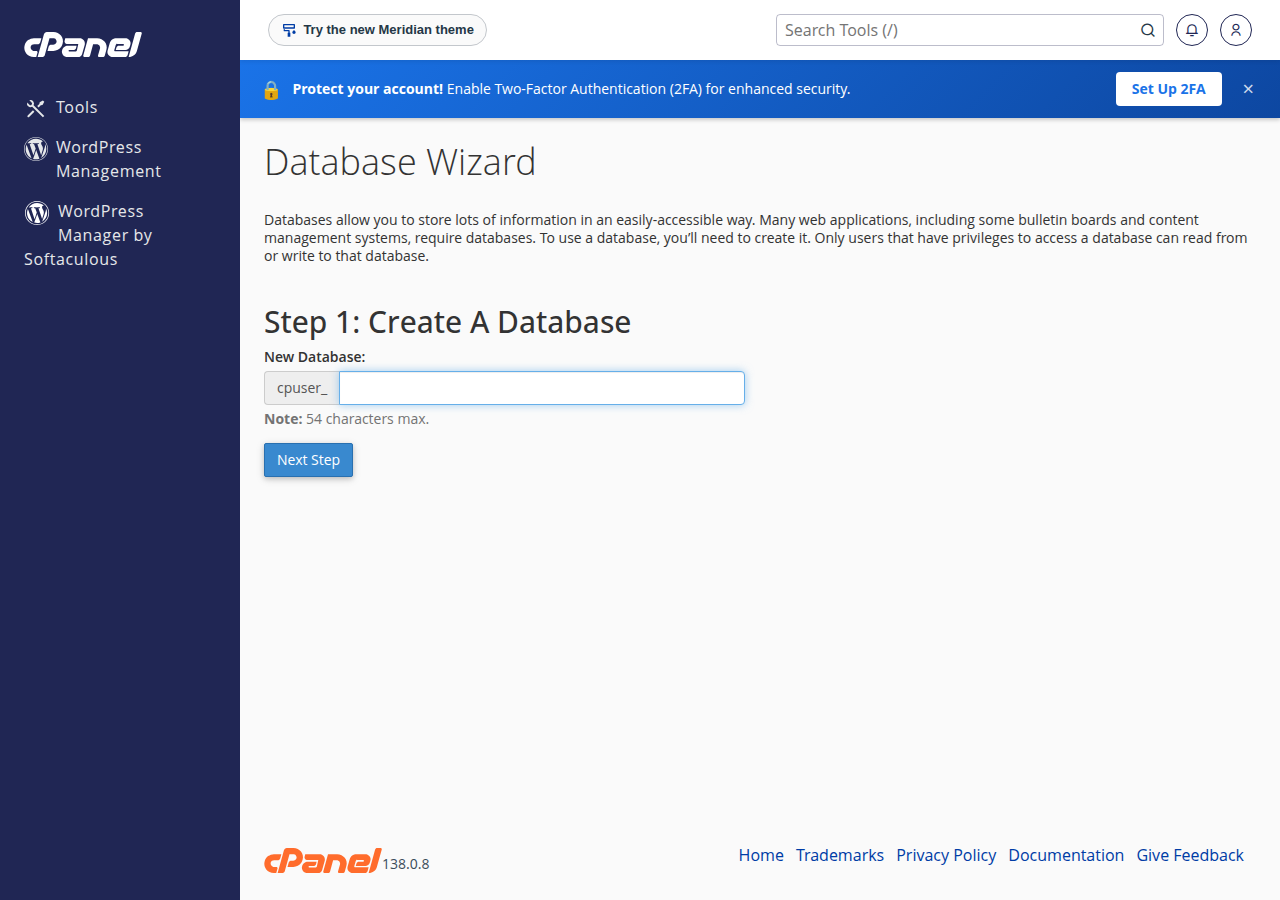
The Manage My Databases page does the same steps separately and lists every database and user. Use it later to change a password or add a user to another database.
Why your names have a prefix
cPanel puts your account username and an underscore in front of every database and database user name. If your cPanel username is acme and you type shop, the real database name is acme_shop. Your website must use the full name. Forgetting the prefix is the most common cause of "Access denied" and "Unknown database" errors. There is also a length limit on names, so keep the part you type short.
3. Create a database and user in DirectAdmin
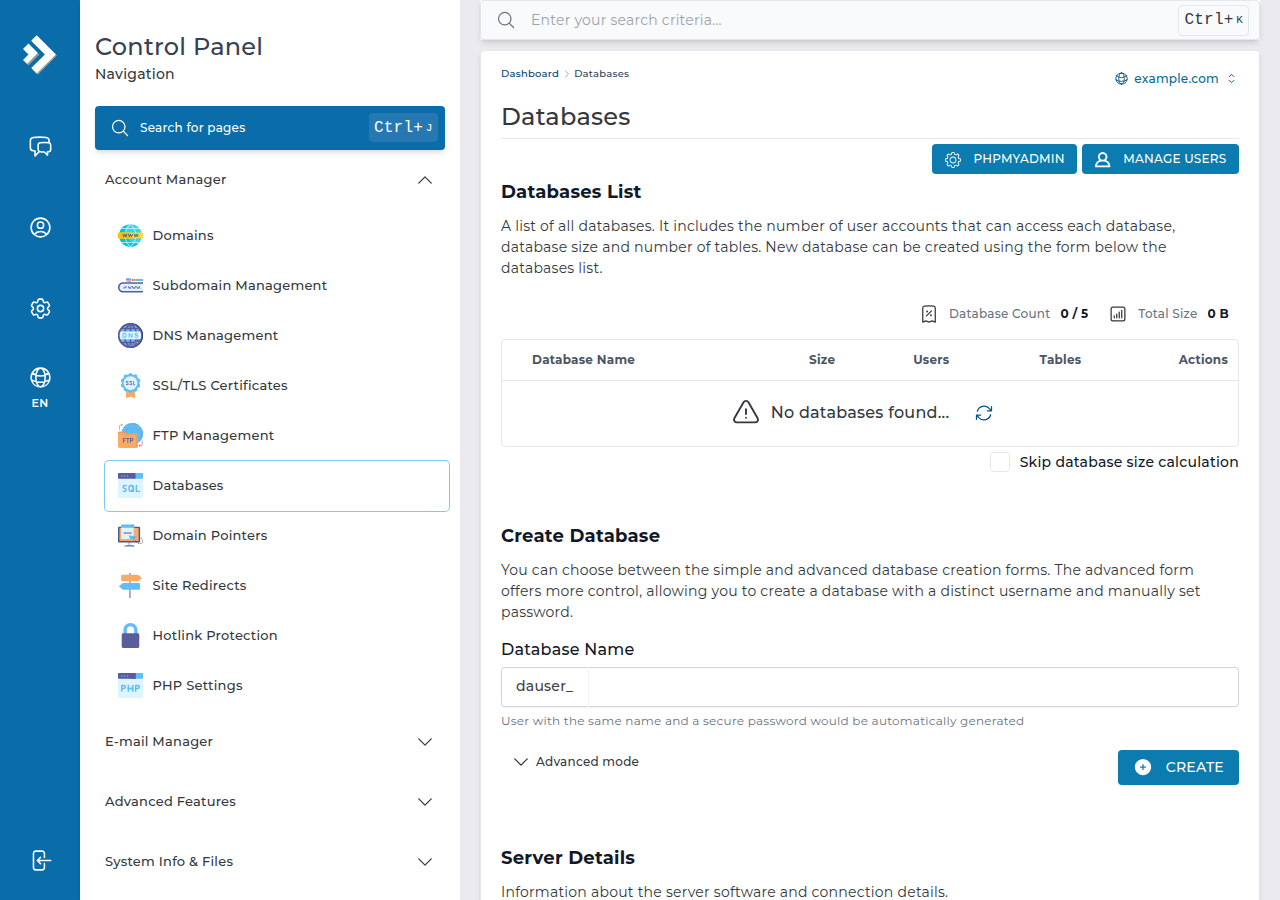
In DirectAdmin, databases live under Account Manager › Databases.
- Open Databases.Log in to DirectAdmin and open Account Manager › Databases (use the search box at the top if you cannot see it).
- Create the database.In the Create Database form, enter a database name and click CREATE. DirectAdmin creates a user with the same name and a secure password; open Advanced mode first if you want a separate user name and your own password.
- Save the details.DirectAdmin shows the database name, user, password and host once creation finishes. Copy them.
- Manage users later.Click the database name to add another user, change a password or adjust privileges.
Like cPanel, DirectAdmin adds your account username as a prefix, so a database called shop becomes username_shop.
4. Create a database and user in Webuzo
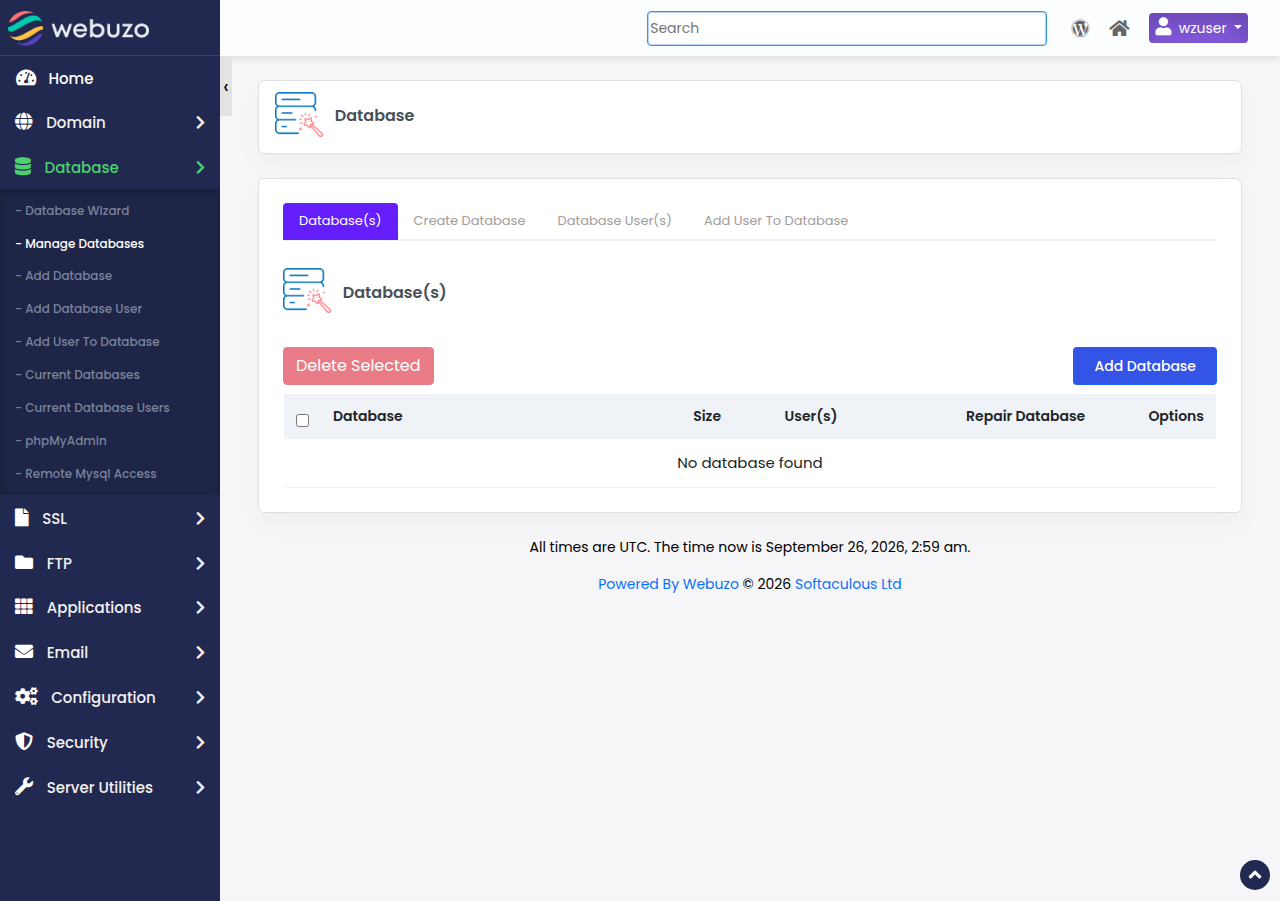
In Webuzo, go to Database › Manage Databases. Create the database, create a database user with a strong password, then add the user to the database and choose its privileges. The names may be prefixed with your Webuzo username, so copy the full names that Webuzo shows after creation. The host is localhost.
If you install WordPress or another app with Softaculous or the WordPress installer in your panel, it creates the database, the user and the configuration file automatically. You only need these manual steps for custom code, a migration or a manual install.
5. Connect from PHP: PDO and mysqli
Use PDO or mysqli. The old mysql_* functions such as mysql_connect() were removed from PHP years ago; a script that still uses them must be updated.
PDO (recommended)
<?php
$host    = 'localhost';
$db      = 'cpaneluser_shop';
$user    = 'cpaneluser_shopuser';
$pass    = 'your-database-password';
$charset = 'utf8mb4';

$dsn = "mysql:host=$host;dbname=$db;charset=$charset";
$options = [
    PDO::ATTR_ERRMODE            => PDO::ERRMODE_EXCEPTION,
    PDO::ATTR_DEFAULT_FETCH_MODE => PDO::FETCH_ASSOC,
    PDO::ATTR_EMULATE_PREPARES   => false,
];

try {
    $pdo = new PDO($dsn, $user, $pass, $options);
} catch (PDOException $e) {
    error_log('Database connection failed: ' . $e->getMessage());
    http_response_code(500);
    exit('Sorry, the site is having a problem. Please try again later.');
}

// Always use prepared statements for values that come from users
$stmt = $pdo->prepare('SELECT id, name FROM products WHERE category = ?');
$stmt->execute([$_GET['category'] ?? '']);
$products = $stmt->fetchAll();
mysqli
If your code already uses mysqli, turn on exceptions so a failed connection is never silently ignored.
<?php
mysqli_report(MYSQLI_REPORT_ERROR | MYSQLI_REPORT_STRICT);

try {
    $mysqli = new mysqli('localhost', 'cpaneluser_shopuser', 'your-database-password', 'cpaneluser_shop');
    $mysqli->set_charset('utf8mb4');
} catch (mysqli_sql_exception $e) {
    error_log('Database connection failed: ' . $e->getMessage());
    http_response_code(500);
    exit('Sorry, the site is having a problem. Please try again later.');
}

$stmt = $mysqli->prepare('SELECT id, name FROM products WHERE category = ?');
$category = $_GET['category'] ?? '';
$stmt->bind_param('s', $category);
$stmt->execute();
$products = $stmt->get_result()->fetch_all(MYSQLI_ASSOC);
Both examples log the real error and show visitors a plain message. Never print database errors on a live page: they can reveal user names, tables or file paths.
Put your connection settings in a separate file, ideally one level above public_html, and include it from your code. Never commit database passwords to a public Git repository, and never paste them into a support chat or a screenshot.
6. Where the settings go in WordPress and Laravel
WordPress: wp-config.php
WordPress reads its database settings from wp-config.php in the site's main folder. Edit it with the File Manager or over FTP (see what settings you need to upload your website).
define( 'DB_NAME', 'cpaneluser_wp' );
define( 'DB_USER', 'cpaneluser_wpuser' );
define( 'DB_PASSWORD', 'your-database-password' );
define( 'DB_HOST', 'localhost' );
define( 'DB_CHARSET', 'utf8mb4' );
define( 'DB_COLLATE', '' );

$table_prefix = 'wp_';
After moving a site, the four DB_ values almost always need changing, because the prefix changes with the account username. $table_prefix must match the table names already in the database.
Laravel: .env
Laravel reads its settings from the .env file in the project root.
DB_CONNECTION=mysql
DB_HOST=localhost
DB_PORT=3306
DB_DATABASE=cpaneluser_app
DB_USERNAME=cpaneluser_appuser
DB_PASSWORD="your-database-password"
Put the password in double quotes if it contains spaces or a #. If you have cached the configuration, Laravel keeps using the old values until you clear the cache: run php artisan config:clear if SSH is enabled on your account, or delete bootstrap/cache/config.php with the File Manager. Make sure your domain points to Laravel's public folder so .env can never be downloaded from the web.
7. Manage your database with phpMyAdmin
phpMyAdmin is included in the control panel on our cPanel, DirectAdmin and Webuzo plans. Use it to browse tables, run SQL queries, and import or export .sql files.
- cPanel: under Databases, click phpMyAdmin. It opens already logged in and shows every database on the account.
- DirectAdmin: open Account Manager › Databases, click phpMyAdmin, and sign in with a database user if asked.
- Webuzo: go to Database and open phpMyAdmin.
Export a copy before any big change. For step-by-step help, read how to access and manage your MySQL database with phpMyAdmin.
8. Connecting from your own computer
Desktop tools such as MySQL Workbench, DBeaver or HeidiSQL cannot connect to your database directly. Port 3306 is closed to outside connections on our shared servers (measured September 2026), so a direct connection times out.
cPanel's Remote Database Access page and DirectAdmin's access hosts only tell the database which addresses may log in. They do not open port 3306 in the server firewall, so a direct connection still times out. Use phpMyAdmin, or an SSH tunnel if SSH is enabled on your account.
Use phpMyAdmin first
phpMyAdmin (section 7) works on every plan with no setup. It covers browsing tables, running queries, and importing or exporting .sql files, which is what most people need a desktop tool for.
An SSH tunnel, once jailed SSH is enabled
Jailed SSH access is available on every shared hosting plan (cPanel, DirectAdmin, Webuzo). It is off by default; ask support to enable it for your account. You log in with an SSH key, not a password, so add your public key first: see enabling and accessing jailed SSH. Once you have an SSH login, a tunnel carries the database connection inside the encrypted SSH session, so MySQL never has to be open to the internet.
# Forward port 3307 on your computer to MySQL on the hosting server
ssh -N -L 3307:localhost:3306 [email protected]
Leave that window open and point your tool at host 127.0.0.1, port 3307, with your normal database name, user and password. MySQL Workbench and DBeaver can also create the tunnel themselves. For more, read securing MySQL access with SSH tunnels. The ports that are open on our servers are listed in our port numbers guide.
9. Common connection errors and how to fix them
| Error | What it usually means | Fix |
|---|---|---|
| Access denied for user ... (using password: YES) | Wrong password, a user name without the prefix, or the user is not added to the database | Reset the database user's password in the panel, use the full prefixed name, and add the user to the database with privileges |
| Unknown database | The database name is wrong or missing its prefix | Copy the exact name from your panel's database list |
| Error establishing a database connection (WordPress) | One of the four DB_ values in wp-config.php is wrong, or the database is unreachable | Check DB_NAME, DB_USER, DB_PASSWORD and DB_HOST against your panel, and try logging in with the same user in phpMyAdmin |
| Too many connections, or max_user_connections exceeded | Your site opened more simultaneous connections than your account allows, often from heavy traffic, bots or slow queries | Close connections in your code, avoid persistent connections, add page caching and find slow queries |
| Connection refused, or cannot connect (2002) | Wrong host, such as an IP address or remote hostname used where localhost is needed | Use localhost for a site on the same account |
| Connection timed out from a remote tool | Port 3306 is closed to outside connections on our shared servers | Use phpMyAdmin, or an SSH tunnel if SSH is enabled on your account |
A quick test: if you can log in to phpMyAdmin with the same database user and password, the credentials are right and the problem is in your configuration file. For WordPress, follow troubleshooting "Error establishing a database connection". If you see "connection refused", read resolving MySQL connection refused errors on shared hosting. For crashed tables, import errors, max_user_connections and character-set problems, see database troubleshooting.
10. Keep your database secure
% wildcard as a Remote Database Access host, and remove hosts you no longer use.11. Where Domain India fits
Every Domain India cPanel, DirectAdmin and Webuzo plan includes MySQL-compatible databases and phpMyAdmin. Starter plans include 5 databases, the middle plans (Growth, or Developer on Webuzo) include 10, and the higher plans include 50 or more, which is enough for most small businesses running several sites. Prices on the cards below are live and exclude 18% GST.
- 25 GB NVMe SSD Storage
- 50 GB Monthly Bandwidth
- 1 Website
- 10 Email Accounts
- 10 GB NVMe SSD Storage
- 50 GB Monthly Bandwidth
- 1 Website
- 5 Email Accounts
If you are building an application and prefer PostgreSQL managed for you, the App Platform includes a PostgreSQL database with every plan. If you need your own MySQL server with full control, including remote access, look at a VPS.
New to WordPress? The complete WordPress guide takes you from install to a secure, fast site.
Frequently asked questions
What is the MySQL hostname on Domain India shared hosting?
Use localhost for any website or application running on the same hosting account as the database. You do not need the server IP address or your domain name as the database host.
Why does my database name start with my username?
cPanel and DirectAdmin add your account username and an underscore in front of every database and database user name, for example cpaneluser_shop. Your website must use the full name, including the prefix, or the connection fails with "Access denied" or "Unknown database".
Can I connect to my database remotely?
Not directly. Port 3306 is closed to outside connections on our shared servers, and adding your IP address under Remote Database Access does not open it. Use phpMyAdmin in your control panel, or an SSH tunnel once jailed SSH is enabled on your account. Jailed SSH is available on every shared plan but is off by default, so ask support to enable it; you log in with an SSH key.
Should I use PDO or mysqli?
Both are current and supported. PDO is recommended for new code because it has a clean interface for prepared statements and works with other databases too. Do not use the old mysql_ functions such as mysql_connect, which no longer exist in modern PHP.
How do I fix "Error establishing a database connection" in WordPress?
Open wp-config.php and check that DB_NAME, DB_USER, DB_PASSWORD and DB_HOST match your control panel exactly, including the username prefix. Then try logging in to phpMyAdmin with the same user and password. If that works, the problem is in the file; if not, reset the database user's password and add the user to the database.
How many databases can I create?
It depends on your plan. On Domain India cPanel, DirectAdmin and Webuzo hosting, Starter plans include 5 MySQL databases, the middle plans include 10, and the higher plans include 50 or more.
Ready to get started? Compare cPanel hosting, DirectAdmin hosting and Webuzo hosting, or open a support ticket if your database still will not connect.
Every shared hosting plan includes MySQL databases and phpMyAdmin, with free SSL.
See cPanel hosting plans