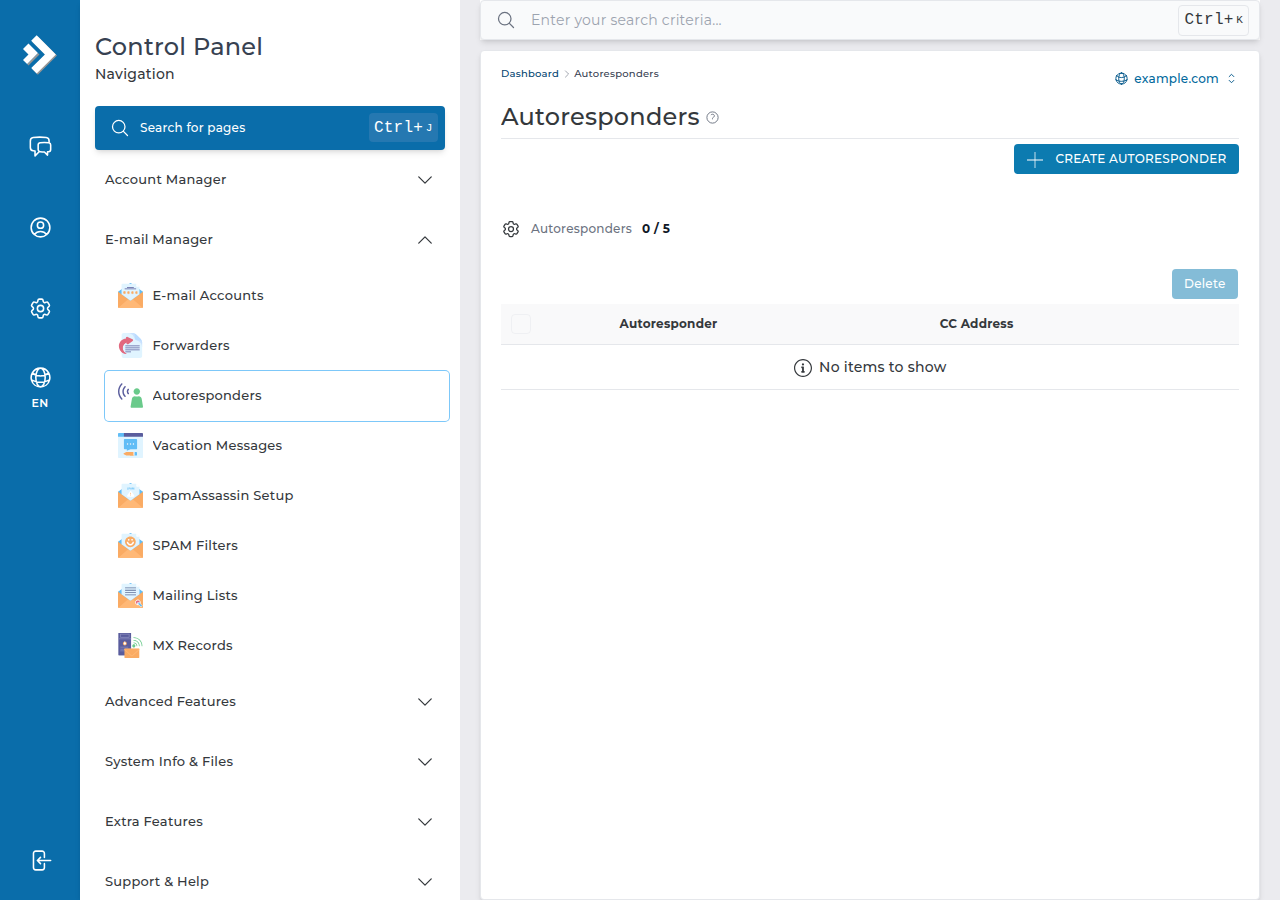
An autoresponder sends a fixed reply to everyone who emails a particular address: an out-of-office note, a "we got your enquiry" message, or your business hours. DirectAdmin has its own autoresponder feature under E-mail Manager › Autoresponders. You choose the address, write the message, optionally set dates, and save.
The settings, the reply-loop rules and a sample message are covered in full in How to create an autoresponder in cPanel. Everything there except the cPanel menu names applies on DirectAdmin too.
Log in to DirectAdmin, open E-mail Manager › Autoresponders, pick the address, write the subject and message, set how often the same sender can get a reply if the form offers it, and save. Keep that gap to several hours so you don't start a reply loop. Autoresponders only work for email hosted on your DirectAdmin account; Business Email has its own auto-reply support.
1. Before you start
- Your email must be on DirectAdmin. If your domain's MX records point to Google Workspace, Microsoft 365 or Domain India Business Email, set the auto-reply there, because your DirectAdmin server never receives that mail.
- The address must exist. Create the email account first if it doesn't. See How to create an email account in DirectAdmin.
- You need to log in to DirectAdmin. Use your hosting service in the client area; the Access tab shows your username and panel address.
2. Set up an autoresponder in DirectAdmin
- Open E-mail Manager › Autorespondersin DirectAdmin.
- Create a new autoresponderand choose the address it should answer for.
- Write the subject and message.Keep it short: say when you will reply and give another contact for urgent matters. Plain text shows correctly everywhere.
- Set the reply interval, if offered.This is how long DirectAdmin waits before replying again to the same sender. Several hours, or a day, suits most messages.
- Set start and end dates, if offered.For leave or a holiday, set both, so the reply stops by itself when you return.
- Save,then test by emailing the address from a different account, such as a personal Gmail.
To change or remove an autoresponder, go back to the same page: every autoresponder on the domain is listed there with options to edit or delete it. Copy the message somewhere first if you'll reuse it.
3. Avoid reply loops and mailing list trouble
A reply loop happens when two automatic systems keep answering each other. It can send hundreds of messages in minutes and count against your account's outgoing mail limit, which on our DirectAdmin servers is 1,000 messages per day per account (200 per mailbox by default).
Replying to every message invites a loop with another autoresponder, a ticket system or a no-reply address. A gap of several hours means each sender gets at most a few replies a day, whatever happens.
- Don't autoreply on an address subscribed to mailing lists or newsletters. Well-run lists mark their mail as bulk, and autoresponders are designed to skip it, but not every list does this.
- Don't autoreply on a catch-all address. Spam sent to made-up addresses would all get replies, which harms your domain's sending reputation.
- Keep one autoresponder per path. If the address forwards to a mailbox that also has one, senders get two replies.
4. If you can't find the option
Open a support ticket and tell us which address the reply should go on and what it should say. We will point you to the right place in your panel. Support is on 24/7 live chat, and tickets get a first response within 15 minutes. There is no phone support.
If your mail is on Business Email instead, its webmail at https://mail.yourdomain.com:8443/ has server-side filters and rules, and its mail server supports vacation auto-replies. Not sure which email you have? See Business Email vs the email included with your hosting.
Where is the autoresponder option in DirectAdmin?
In the DirectAdmin control panel, open E-mail Manager › Autoresponders.
What interval should I use for a DirectAdmin autoresponder?
Several hours to a day between replies to the same sender suits most out-of-office and acknowledgement messages. Replying to every message can start a reply loop with another automatic system.
Will my autoresponder reply to mailing lists and spam?
Autoresponders are designed to skip mail marked as bulk, but not every mailing list or spammer marks messages correctly. Don't use an autoresponder on an address subscribed to lists or on a catch-all address, and keep an interval of several hours.
Does the DirectAdmin autoresponder work for Business Email?
No. Domain India Business Email runs on a separate platform that DirectAdmin cannot see. Its mail server supports vacation auto-replies, and its webmail at https://mail.yourdomain.com:8443/ has server-side filters and rules.
Ready to set up your reply? Log in from your hosting services, follow the full autoresponder guide for the details, or open a support ticket if the option isn't where you expect.
Tell us the email address and what the automatic reply should say, and we will help you set it up on DirectAdmin or on Business Email.
Open a support ticket