Every domain name needs nameservers. They are the part of the internet's address system that knows where your website and email actually live, and they are the setting you change when you connect a domain to hosting. This guide explains what a nameserver is in plain terms, how a web address is looked up step by step, how nameservers differ from DNS records, and where to find the right nameservers for your domain.
A nameserver is a server that answers questions about your domain, such as "what is the IP address of this website?" and "where should email for this domain go?". Your registrar publishes your domain's nameservers at the registry, and whichever provider runs those nameservers controls all of your DNS: website, email and subdomains. Use the nameservers given for your own account, from your hosting service page or welcome email, and never copy them from an old article or forum post.
1. What is a nameserver?
Computers find each other by IP address, a number such as 203.0.113.10 (IPv4) or 2001:db8::10 (IPv6). People prefer names such as yourbusiness.in. The Domain Name System (DNS) connects the two, and a nameserver is a server that holds the DNS information for a domain and answers questions about it.
When someone types your domain into a browser or sends you an email, their system asks your domain's nameservers:
- Which IP address serves the website for
yourbusiness.inandwww.yourbusiness.in? - Which mail server accepts email for
@yourbusiness.in? - Is there a verification or SPF record for this domain?
The nameserver replies with the records you (or your hosting provider) have set. Nameservers themselves have ordinary hostnames, such as ns1.example-dns.com and ns2.example-dns.com, which is why a domain's settings show names rather than numbers.
2. How a web address is looked up, step by step
Every visit to a website starts with a DNS lookup, usually in a fraction of a second.
- Your device asks a resolver.Your phone or computer sends the question "where is www.yourbusiness.in?" to a DNS resolver, usually run by your internet provider or a public service.
- The resolver asks the root servers.The root servers do not know your domain, but they know which servers handle each extension, such as
.inor.com. - The resolver asks the extension's registry servers.The
.inservers do not hold your website's address either. They answer with the nameservers your registrar published for your domain. This is the delegation. - The resolver asks your nameservers.These are authoritative for your domain, so they give the real answer: the IP address in your A record, for example.
- Your device connects.The browser connects to that IP address and loads the site. The resolver keeps the answer in its cache for a while, so the next visitor gets it faster.
Step 3 is the key point. The registry does not store your website's address; it only stores which nameservers to ask. That is why changing the nameservers at your registrar changes who answers for everything else.
3. Nameservers vs DNS records
Two different settings are often both called "DNS", and mixing them up causes most mistakes.
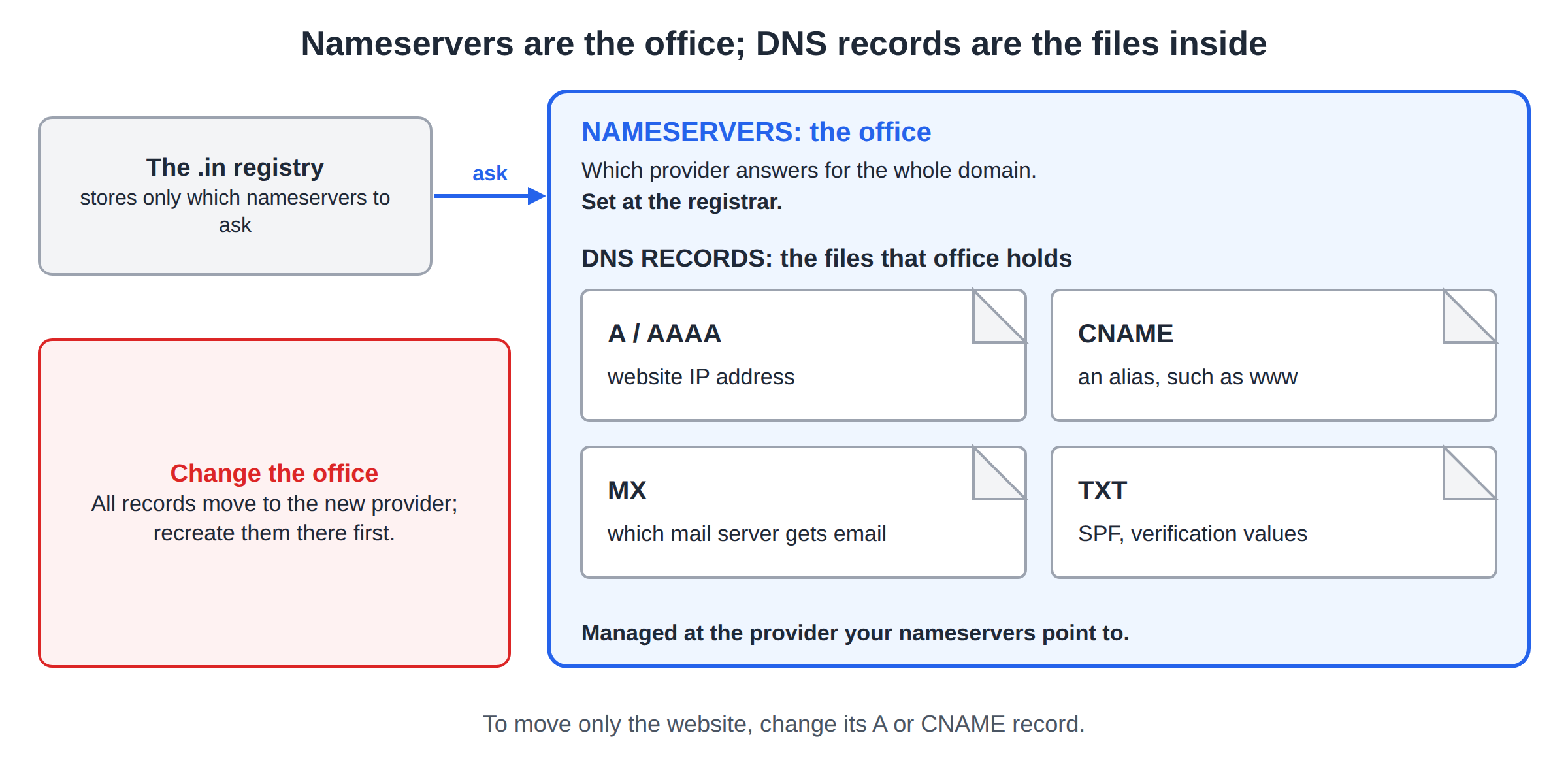
- Nameservers decide who answers for your domain. They are set at the registrar where the domain is registered.
- DNS records are the answers themselves. They live at whichever provider your nameservers point to.
| Setting | What it controls | Where you change it |
|---|---|---|
| Nameservers | Which provider answers for the whole domain | At the registrar (for a Domain India domain, the Nameservers tab in the client area) |
| A and AAAA records | The IPv4 and IPv6 address of the website or a subdomain | At the provider your nameservers point to |
| CNAME record | Makes one name an alias of another, such as www | At the provider your nameservers point to |
| MX record | Which mail server receives your email | At the provider your nameservers point to |
| TXT record | SPF, domain verification and similar text values | At the provider your nameservers point to |
For every record type in detail, read DNS records explained.
4. Why changing nameservers moves all of your DNS, including email
Because the registry sends every question to the nameservers you set, a nameserver change hands your whole domain to the new provider at once. From the moment the change takes effect, the new provider answers for the website, email, subdomains and verification records.
If your email works today and the new provider does not have the same MX, SPF, DKIM and DMARC records, email stops arriving once the change spreads. Before you switch, write down your current records and make sure every one you still need exists at the new provider. If you only want to move the website, change its A or CNAME records instead and leave the nameservers alone.
This is also why the choice of nameservers is really a choice of where you will manage your DNS:
- Your hosting server's nameservers: the records are managed in your hosting control panel (cPanel, DirectAdmin, Webuzo or Plesk). The simplest choice when the website and email are both on the hosting plan.
- An outside DNS provider, such as Cloudflare: the records are managed in that provider's dashboard.
- A website platform's nameservers: the platform manages the records for you, which can make it harder to keep email elsewhere.
5. Why every domain has at least two nameservers
Using at least two nameservers is standard practice, and many registries require it. The reason is redundancy. If one nameserver is unreachable, resolvers simply ask the next one, and your website and email keep working. The nameservers are treated as equals: there is no real "primary" that answers first, and resolvers may use any of them.
Enter every nameserver your provider gives you: if you were given four, enter all four. If you run your own, put them on different servers and networks, and keep the records identical on all of them. When you use a hosting company's or DNS provider's nameservers, this redundancy is their job.
6. Where to find the right nameservers for your domain
Use only nameservers given to you for your account. Nameserver hostnames differ from server to server and can change over time, and lists copied from articles, forums or another customer's email are often out of date. A wrong or retired nameserver can take your website and email offline.
If your email or other services live somewhere else and you do not want to move them, you do not have to change nameservers at all. The same hosting card offers Option 2: keep your current DNS and add two A records, @ and www, pointing to the server IP address shown there.
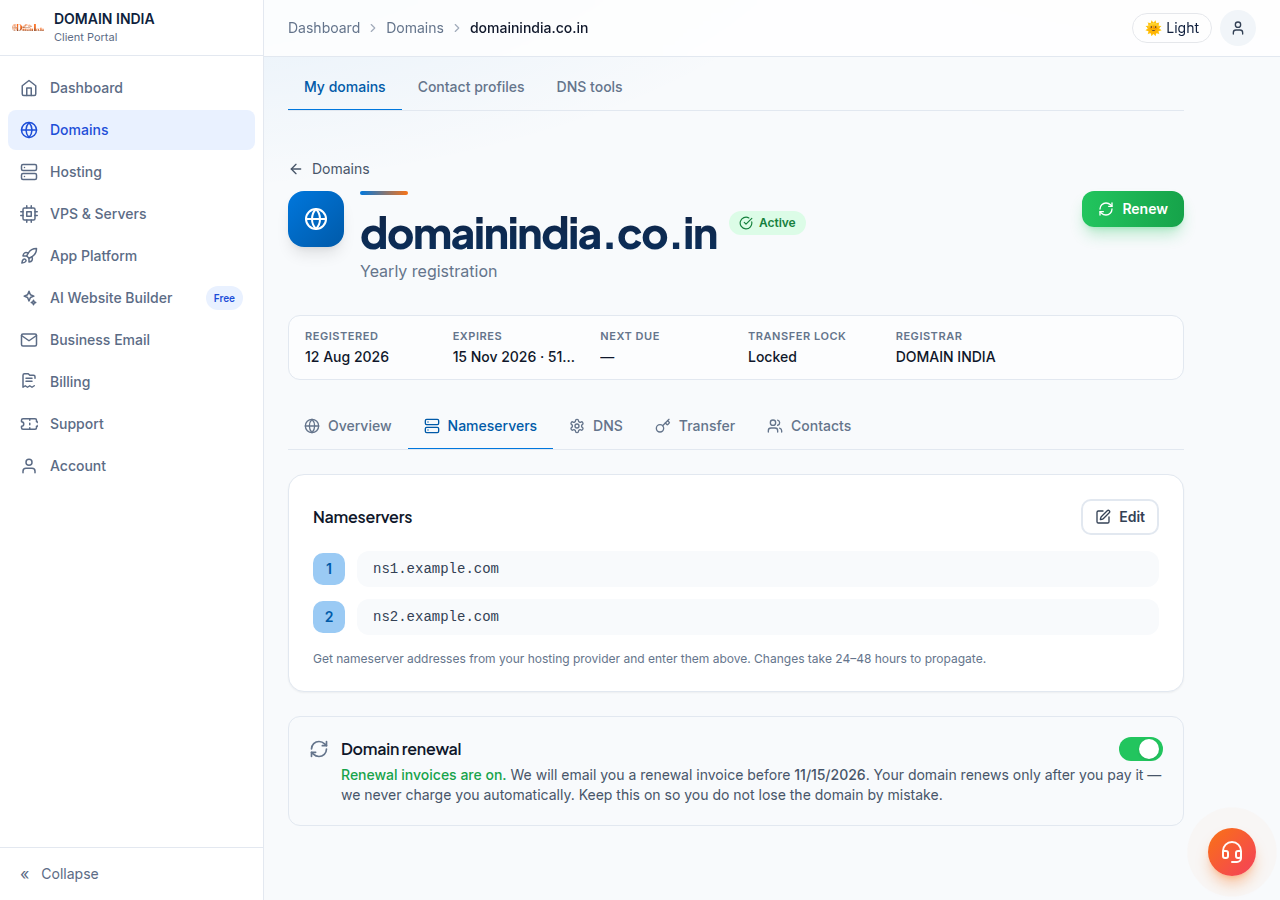
When you have the values, follow How do I change my nameservers for the exact steps: open Domains → My domains, select the domain, open the Nameservers tab, click Edit, enter the new nameservers and click Save. If the domain is registered with another company, make the change in that company's control panel, because nameservers are always set at the registrar.
7. How long a nameserver change takes
A nameserver change usually takes effect within a few hours and can take up to 24-48 hours to reach every network. There is no guaranteed time.
The delay comes from caching, not from a queue. Resolvers remember the old nameservers and records for as long as the registry and the records' TTL (time to live) allow. Until their copies expire, some visitors reach the old provider and others the new one.
Keep the website and email running at both the old and the new provider until the change has spread, and do not cancel the old hosting on the day you switch. For more detail, read Understanding DNS propagation.
8. How to check which nameservers your domain uses
A browser can show a cached page, so check with a DNS lookup instead. On macOS or Linux:
dig NS yourbusiness.in +short           # the nameservers answering for the domain
dig NS yourbusiness.in @8.8.8.8 +short  # the same question to a public resolver
On Windows, in Command Prompt or PowerShell:
nslookup -type=ns yourbusiness.inIf the answer shows the nameservers you set, the change has reached that resolver; if not, wait a few hours and check again. If the nameservers are right but the website or email is wrong, the records are missing at the new provider. Debugging nameserver and DNS issues walks through the common cases.
9. Custom and private nameservers
Some businesses want nameservers with their own name, such as ns1.yourbusiness.in. These are called custom, private or child nameservers. Because the nameserver's name sits inside the domain it serves, the registry must also store its IP address, in a glue record, so resolvers can find it.
You only need this if you run your own DNS server, for example on a VPS, or if you sell hosting under your own brand as a reseller. Everyone else should use their provider's nameservers. Shared hosting plans use the provider's nameservers.
- Resellers who want clients to see their own brand
- VPS owners who run their own DNS server
- Moving hosting later without asking every client to change nameservers
- You, or your server, must keep DNS running at all times
- The glue records must point to the IP addresses of servers that actually answer DNS
- Not needed, and not useful, for a single website on shared hosting
For how glue records are registered, read Registering and managing child name servers.
10. Where Domain India fits
When you register a domain and buy hosting with Domain India, both are in one client area. Your hosting service page shows the nameservers for that account, and the domain's Nameservers tab is where you enter them, so there is nothing to copy between two companies. Most hosting accounts are created automatically within a couple of minutes of payment, and the welcome email includes the nameservers. A small number need a manual check and take longer.
Domain India list prices on 19 September 2026, excluding 18% GST: a .in domain is ₹575 for the first year (₹625 to renew) and a .com is ₹1,150 a year. DirectAdmin hosting starts at ₹100 a month and cPanel hosting at ₹125 a month, both with email accounts included, and the control panel manages your DNS records once the domain uses the hosting nameservers.
- 10 GB NVMe SSD Storage
- 50 GB Monthly Bandwidth
- 1 Website
- 5 Email Accounts
- 25 GB NVMe SSD Storage
- 50 GB Monthly Bandwidth
- 1 Website
- 10 Email Accounts
If you want to run your own nameservers, a VPS gives you full root access and your own IP address. If you plan to host clients under your own brand, see reseller hosting.
- 1 vCPU
- 2 GB DDR4 RAM
- 64 GB NVMe SSD Storage
- 2 TB Monthly Bandwidth
Support is available by 24/7 live chat and support tickets. Tickets get a first response within 15 minutes; resolution can take longer depending on the issue. There is no phone support.
Frequently asked questions
What is a nameserver in simple words?
A nameserver is a server that holds the DNS information for a domain and answers questions about it, such as which IP address serves the website and which mail server receives the email. Your registrar publishes your domain's nameservers at the registry, so the whole internet knows whom to ask.
What is the difference between a nameserver and a DNS record?
Nameservers decide which provider answers for your domain. DNS records are the answers that provider gives, such as an A record for the website's IP address or an MX record for email. Changing nameservers moves all of your DNS to a new provider; changing a record changes only one service.
Why do I need at least two nameservers?
Two or more nameservers are standard practice, and many registries require them, because they give redundancy. If one nameserver cannot be reached, resolvers ask another, so your website and email keep working. Always enter every nameserver your provider gives you.
Will changing my nameservers affect my email?
Yes. Changing nameservers moves all of your DNS, including the MX, SPF, DKIM and DMARC records that email depends on. Make sure the new provider has all of your email records before you switch, or email will stop arriving.
Where do I find the nameservers for my Domain India hosting?
On your hosting service page in the Domain India client area, in the "Point a domain to this hosting" card, and in your hosting welcome email. Different servers use different nameservers, so do not copy them from an article or another account.
Do I need my own private nameservers?
Usually not. Private or child nameservers such as ns1.yourbusiness.in are for people who run their own DNS server, such as on a VPS, or resellers who want their own brand. A single website on shared hosting should use the hosting provider's nameservers.
Ready to connect your domain? Sign in to the client area to see your domains and hosting, follow How do I change my nameservers, register a new domain, or open a support ticket if you are not sure which values to use.
Register your domain with Domain India and connect it to your hosting from the same client area.
Search for a domain