Before you move a website or install an application, you need to know what the server runs: the operating system, the PHP versions, the web server and the security tools. This page lists what we measured on Domain India's shared hosting servers between 20 and 22 September 2026, and shows you how to check the exact versions on your own account.
Domain India's cPanel and DirectAdmin shared servers run CloudLinux 8.10 with the Apache web server, Imunify360 and the CSF firewall. cPanel offers PHP from 5.1 to 8.5, with 8.3 as the default. DirectAdmin offers PHP 5.6, 7.2, 7.3, 7.4, 8.1, 8.2 and 8.3. Databases are MariaDB/MySQL; phpMyAdmin shows the exact version on your server. Versions change with updates, so always check your own control panel.
Every version on this page was measured on our live servers between 20 and 22 September 2026. Servers are updated regularly, so a number here can be newer on your account by the time you read it. Your control panel is always the final word.
1. The software at a glance
| Component | cPanel hosting | DirectAdmin hosting | Webuzo hosting |
|---|---|---|---|
| Operating system | CloudLinux 8.10 | CloudLinux 8.10 | AlmaLinux 8.10 |
| Web server | Apache, with nginx in front | Apache | Apache |
| PHP versions | 5.1 to 8.5 (default 8.3) | 5.6, 7.2, 7.3, 7.4, 8.1, 8.2, 8.3 | 8.0, 8.1 (default 8.1) |
| mod_rewrite and .htaccess | Yes | Yes | Yes |
| OPcache | On for websites | On, except PHP 8.3 | On |
| Security suite | Imunify360 | Imunify360 | ImunifyAV (malware scanning) |
| Firewall | CSF 16.31 | CSF 15.00 | CSF 15.00 |
| Database | MariaDB/MySQL | MariaDB/MySQL | MariaDB/MySQL |
| App installers | Softaculous and WP Toolkit | Softaculous | Softaculous |
The sections below explain each row and what it means for your website.
2. Operating system: CloudLinux 8.10
Our cPanel and DirectAdmin shared servers run CloudLinux release 8.10. CloudLinux is built for shared hosting. It gives each account its own share of CPU, memory and processes, so one busy site can't slow down everyone else on the server, and CageFS keeps each account's files separate from every other account's.
That share is what your resource limits measure. To learn what each limit means and what happens when you reach it, see Understanding hosting resource limits.
3. PHP versions
cPanel
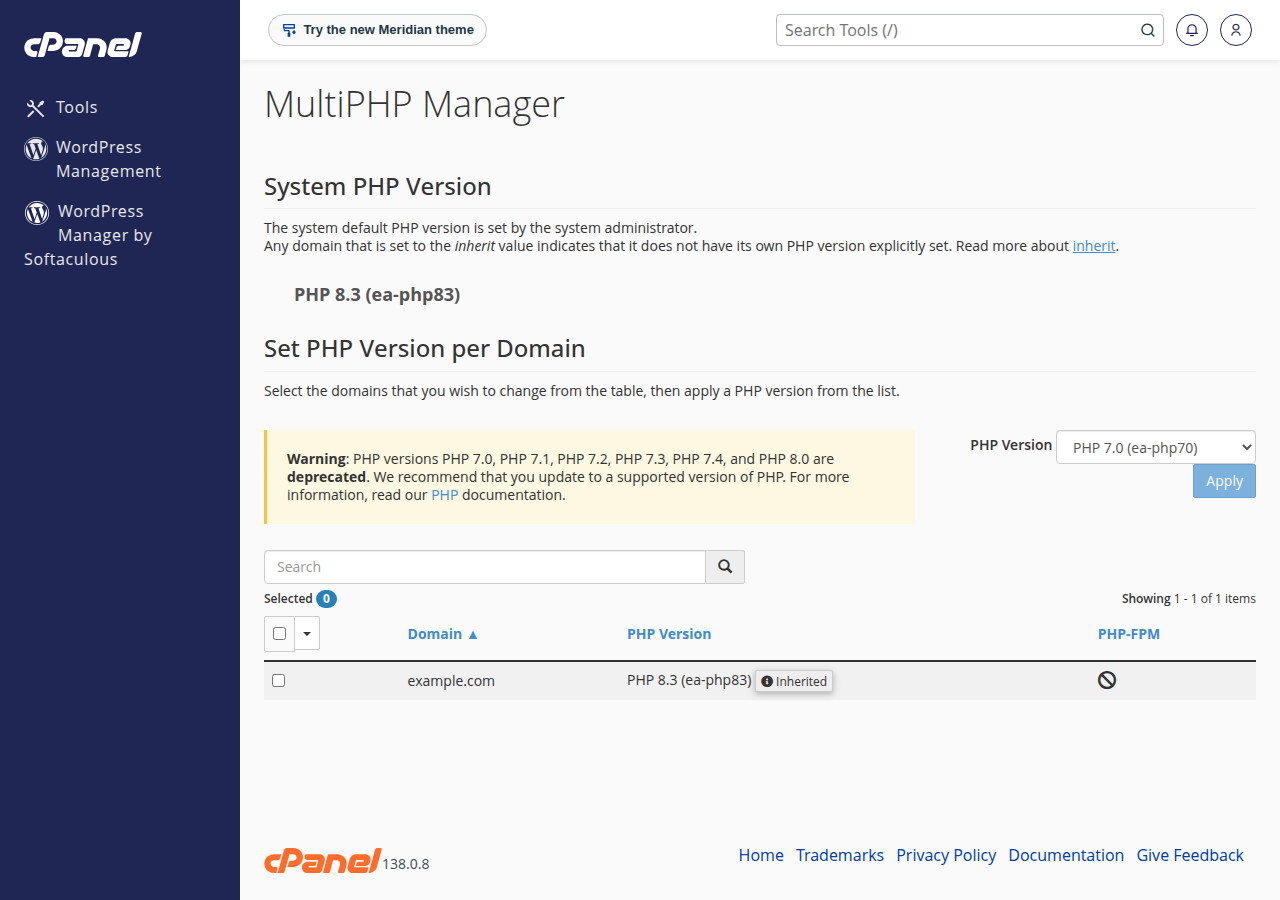
The cPanel servers have PHP 5.1 through PHP 8.5 installed (the ea-php51 to ea-php85 packages), and you can choose a version for each domain. New accounts use PHP 8.3 by default. You switch versions in cPanel's MultiPHP Manager.
DirectAdmin
The DirectAdmin server offers PHP 5.6, 7.2, 7.3, 7.4, 8.1, 8.2 and 8.3. Change it under Account Manager › PHP Settings (PHP Version, then UPDATE VERSION); if you can't find it, open a ticket and we will point you to it.
Webuzo
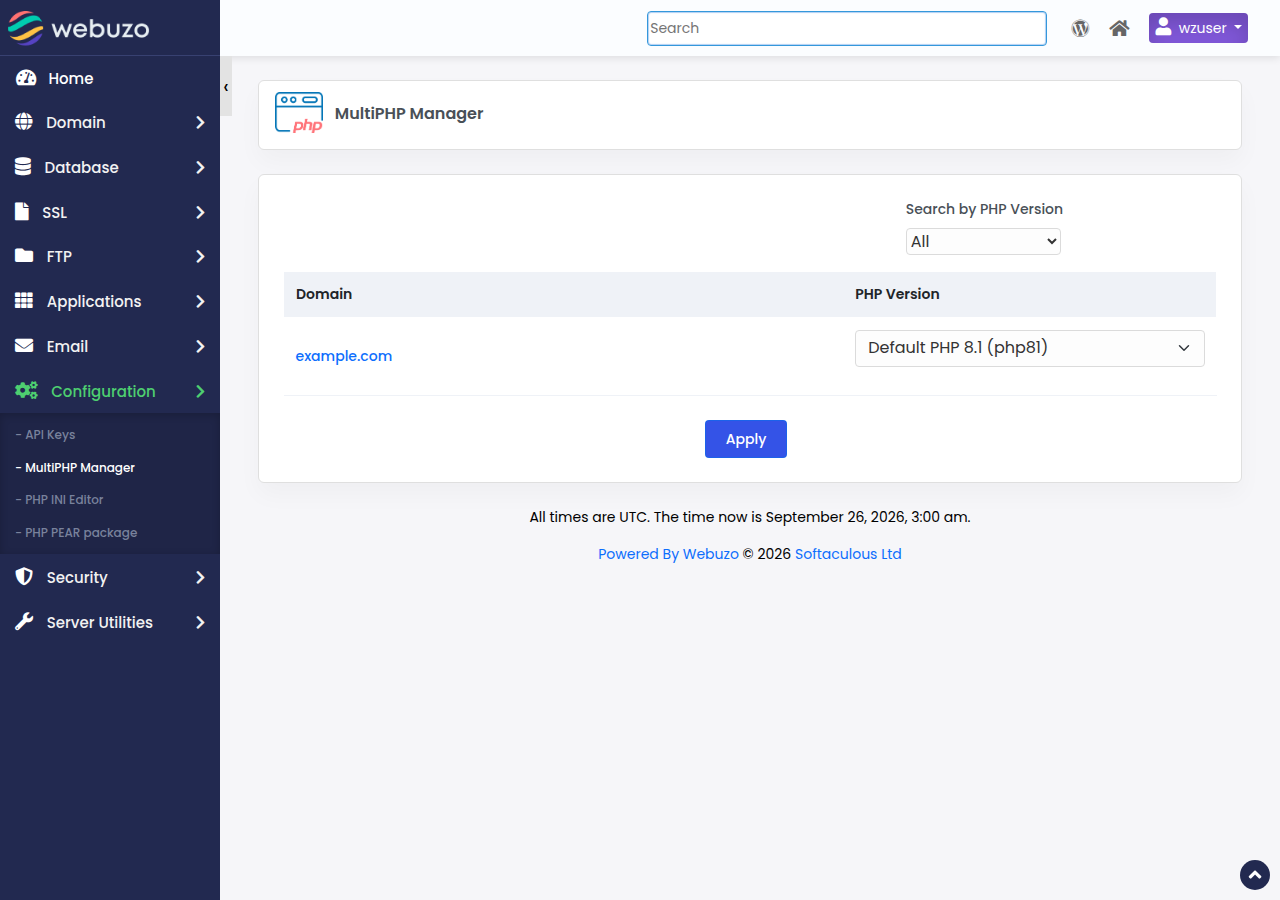
Our Webuzo server offers PHP 8.0 and 8.1, with 8.1 as the default (measured 30 September 2026). Choose the version per domain in MultiPHP Manager. Both versions no longer receive security fixes from the PHP project, so a site that needs PHP 8.2 or newer belongs on cPanel or DirectAdmin hosting.
Older PHP versions are available so that legacy sites keep running, but they no longer get security fixes. Use a supported version for anything new: PHP 8.3 or newer is the safe choice in 2026. PHP 8.2 gets security fixes only until 31 December 2026, and every version older than 8.2 is already out of support.
How PHP runs on our servers
No shared server runs PHP as an Apache module. PHP runs through PHP-FPM or CGI, which has two practical effects:
- A
php_valueorphp_flagline in.htaccesscauses a 500 error. Change PHP settings through your panel's PHP options or a.user.inifile instead. See Resolving PHP memory errors and custom php.ini configuration. - Some PHP functions are switched off for security on shared hosting, including
phpinfo()on cPanel. The full list, and what it means for tools like Composer and Laravel, is in PHP disabled functions on shared hosting.
OPcache
OPcache stores compiled PHP code in memory so pages load faster. On our cPanel servers it is enabled for websites and disabled for command-line PHP. On DirectAdmin it is enabled for every PHP version except PHP 8.3. For how to check and use it, see the PHP OPcache guide.
4. Web server: Apache
All Domain India shared hosting runs the Apache web server, not LiteSpeed. On cPanel, nginx sits in front of Apache and caches some responses. What this means for you:
.htaccessworks.mod_rewriteis loaded on the cPanel, DirectAdmin and Webuzo servers, so redirects, pretty URLs and WordPress permalinks work. See How to enable the mod_rewrite module.- Use an Apache-friendly cache plugin. For WordPress, choose WP Super Cache or W3 Total Cache, not LiteSpeed Cache.
- DirectAdmin limits
.htaccessOptions. OnlyIndexes,IncludesNOEXEC,MultiViews,SymLinksIfOwnerMatch,FollowSymLinksandNoneare allowed. Any other value gives a 500 error. - On cPanel, test changes with a fresh URL. The nginx cache can keep serving an old page for up to 120 minutes. Add
?t=1(any value) to the address to see the live result.
5. Databases: MariaDB/MySQL
Every shared hosting plan includes MySQL-compatible databases, managed with phpMyAdmin. We don't list a version number here, because it depends on the server and changes with updates. To see yours:
- Open phpMyAdminfrom your control panel's database section.
- Look at the Database server panelon the phpMyAdmin home page, on the right.
- Read the Server version line.It shows the exact MariaDB or MySQL version.
If you are importing a database from another host, check this version first. A dump made on MySQL 8 can use settings that MariaDB rejects; Database troubleshooting explains the common fixes. The MySQL port 3306 is closed to outside connections; to connect from your own computer, use an SSH tunnel as described in How to connect to the MySQL database.
6. Security software
These tools run server-wide on the cPanel and DirectAdmin servers. The same protection applies to every account on a server, whichever plan you're on.
On cPanel, AutoSSL issues free Let's Encrypt certificates for your domains. If your site was hacked anyway, start with the security checklist.
7. App installers and backup tools
- cPanel has Softaculous and WP Toolkit (version 6.11.2), for one-click installs of WordPress and hundreds of other applications.
- DirectAdmin and Webuzo plans include Softaculous Premium.
- JetBackup 5.4.1.4 runs on both the cPanel and DirectAdmin servers. You can download or restore your backups from JetBackup in your panel. On cPanel, use JetBackup rather than cPanel's own Backup or Backup Wizard, which are switched off.
Backups included with shared hosting are weekly.
8. Node.js, Python and other languages
Our shared hosting plans list Node.js support, and the languages available differ by panel. We haven't measured the Node.js, Python or Perl versions for this article, so check the application tools in your control panel, or ask support before you build on a particular version. For a wider list of what runs where, see Hosting compatible technologies.
If you need a specific runtime version, root access or Docker, a VPS or the App Platform is a better fit than shared hosting.
9. How to check versions on your own account
- PHP version: your panel's PHP settings (MultiPHP Manager on cPanel). In WordPress, go to Tools › Site Health › Info › Server. You can also upload a one-line file containing
<?php echo PHP_VERSION;and open it in your browser. Delete the file afterwards. - Database version: phpMyAdmin's Database server panel (section 5).
- Over SSH, where your plan has it:
php -vshows the command-line PHP version, which can differ from the one your website uses.
10. Where Domain India fits
For most PHP and WordPress sites, cPanel hosting gives you the widest PHP choice, from legacy versions to the newest. DirectAdmin is a lower-cost option with the same CloudLinux, Apache and Imunify360 stack. Both are shown here at today's live prices:
- 25 GB NVMe SSD Storage
- 50 GB Monthly Bandwidth
- 1 Website
- 10 Email Accounts
- 10 GB NVMe SSD Storage
- 50 GB Monthly Bandwidth
- 1 Website
- 5 Email Accounts
Prices on the cards exclude 18% GST. Compare all plans on the cPanel hosting and DirectAdmin hosting pages.
Which operating system do Domain India shared hosting servers use?
Our cPanel and DirectAdmin shared servers run CloudLinux release 8.10, measured in September 2026. CloudLinux gives each account its own share of CPU, memory and processes and keeps accounts isolated from each other.
Which PHP versions are available on Domain India cPanel hosting?
The cPanel servers have PHP 5.1 through 8.5 installed, and you can choose a version per domain in MultiPHP Manager. New accounts use PHP 8.3 by default. We recommend PHP 8.3 or newer; older versions are there only for legacy sites.
Which PHP versions does Domain India DirectAdmin hosting offer?
The DirectAdmin server offers PHP 5.6, 7.2, 7.3, 7.4, 8.1, 8.2 and 8.3, measured in September 2026. Use 8.3 for new sites unless your application needs something else.
Does Domain India use LiteSpeed or Apache?
Domain India shared hosting runs Apache, not LiteSpeed. On cPanel, nginx sits in front of Apache as a cache. .htaccess and mod_rewrite work on cPanel, DirectAdmin and Webuzo. For WordPress caching, use WP Super Cache or W3 Total Cache.
Which MySQL or MariaDB version will my database use?
Shared hosting uses MariaDB/MySQL, and the exact version depends on the server and changes with updates. Open phpMyAdmin from your control panel and read the Server version line in the Database server panel.
Can I set PHP options with php_value in .htaccess?
No. Our shared servers run PHP through PHP-FPM or CGI, not as an Apache module, so php_value and php_flag lines in .htaccess cause a 500 error. Use your panel's PHP settings or a .user.ini file instead.
Can I use phpinfo() to check the server configuration?
Not on our cPanel servers, where phpinfo() is disabled for security. Check the PHP version in your control panel or WordPress Site Health, or use a one-line PHP_VERSION script, and the database version in phpMyAdmin.
Ready to check your site against these versions? Open your panel from your hosting services, or open a support ticket if your application needs a version that isn't listed.
Tell us the application and the PHP, database or runtime version it needs, and we will confirm what your server offers before you move your site.
Ask our support team