OPcache is the part of PHP that remembers your code after it has been compiled once, so the next visitor doesn't pay for compiling it again. On shared hosting it is a server setting rather than something you install. This guide explains what OPcache does, how to check whether it is on for your site, where it is enabled on Domain India servers, and which settings you can and cannot change.
OPcache stores compiled PHP code in memory so each request skips reading and compiling your scripts. It is enabled for websites on our cPanel servers, and on our DirectAdmin servers for every PHP version except PHP 8.3 (measured 20 September 2026). To check your own site, open a temporary file containing ini_get('opcache.enable'), which works even where phpinfo() is blocked. Memory and file-count settings are server-wide and can't be changed from a shared hosting account; on a VPS you control all of them.
1. What OPcache does
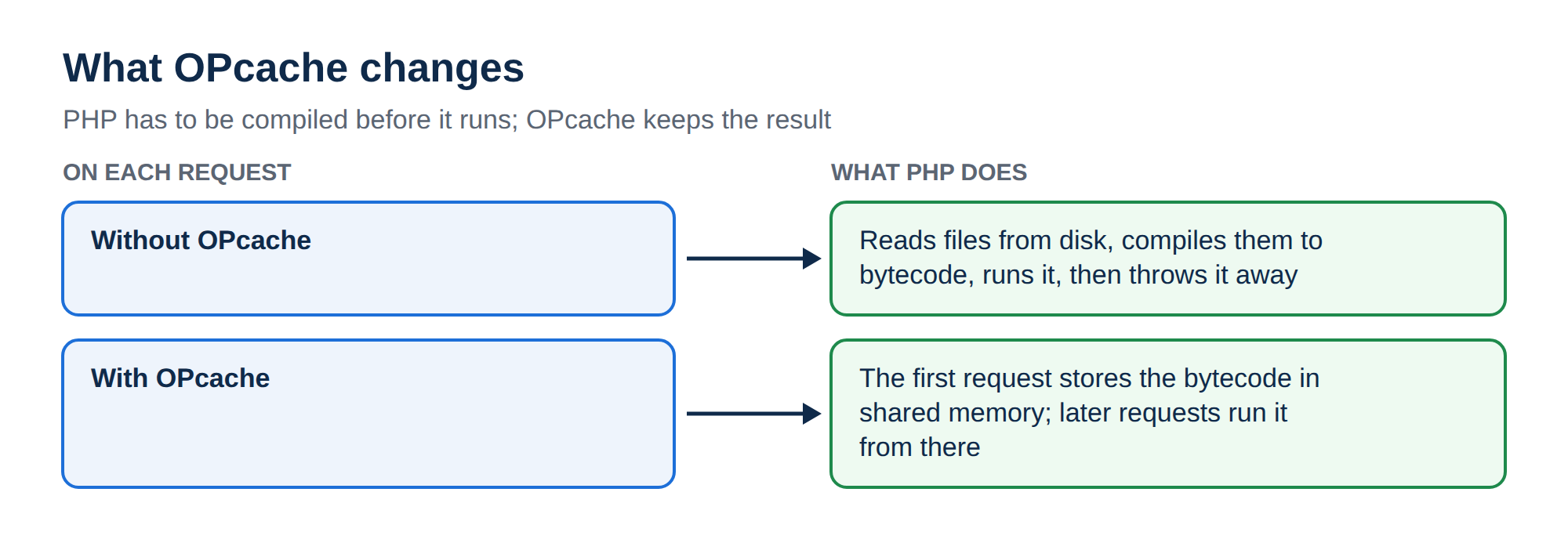
PHP is compiled each time it runs. Without OPcache, every request reads your .php files from disk, turns them into bytecode (opcodes), runs that bytecode and then throws it away. A WordPress page loads hundreds of files, so this repeats hundreds of times per visit.
With OPcache, the compiled bytecode stays in shared memory after the first request, and later requests run it straight from memory. That saves CPU time on every PHP page, most of all for large applications such as WordPress, WooCommerce and Laravel. It is not a page cache: your PHP code and database queries still run on every request (see section 6).
2. Is OPcache on at Domain India?
These are the settings we measured on our shared servers on 20 September 2026:
| Server type | OPcache for websites | OPcache on the command line (SSH, cron) |
|---|---|---|
| cPanel | Loaded and enabled | Off (opcache.enable_cli=0) |
| DirectAdmin | Enabled on every PHP version we offer, except PHP 8.3 | Not measured separately |
| Webuzo | Not measured; ask support | Not measured |
OPcache being off on the command line is normal: a script run over SSH or from cron runs once and exits, so there is nothing to reuse. It does not affect your website.
On our DirectAdmin servers, PHP 8.3 had opcache.enable=0 when we measured it. It can't be switched on from inside your account. If your site runs on PHP 8.3 on DirectAdmin and you want OPcache, open a ticket and we will tell you the options for your account.
Settings can differ between PHP versions and can change after server updates, so check your own site with the method below rather than rely on this table alone.
3. How to check OPcache for your own site
The dependable check is ini_get(), which reads the value actually in force for your site. Create a file such as oc-check.php in your public_html folder:
<?php
header('Content-Type: text/plain');
echo 'PHP version: ', PHP_VERSION, "\n";
echo 'OPcache loaded: ', extension_loaded('Zend OPcache') ? 'yes' : 'no', "\n";
echo 'opcache.enable: ', ini_get('opcache.enable') ? 'on' : 'off', "\n";
echo 'opcache.validate_timestamps: ', ini_get('opcache.validate_timestamps'), "\n";
echo 'opcache.revalidate_freq: ', ini_get('opcache.revalidate_freq'), "\n";

if (function_exists('opcache_get_status')) {
    $s = @opcache_get_status(false);
    if (is_array($s)) {
        printf("Hit rate: %.1f%%\n", $s['opcache_statistics']['opcache_hit_rate']);
    } else {
        echo "Status: not available to this account\n";
    }
} else {
    echo "opcache_get_status() is disabled on this server\n";
}
Open https://yourdomain.com/oc-check.php, note the result, then delete the file.
If it shows opcache.enable: on, your website uses OPcache and there is nothing to do. off or loaded: no means it isn't active for that PHP version: contact support. The hit-rate line is a bonus: opcache_get_status() may be disabled or restricted on shared hosting, and the script says so rather than failing.
Why not phpinfo()? You can search a <?php phpinfo(); page for "opcache.enable", but on our cPanel servers phpinfo() is itself disabled for security (checked 22 September 2026) and the page comes up blank or with a "disabled for security reasons" warning. ini_get() is never on that list. For how to read your server's disabled-functions list, see PHP disabled functions on shared hosting.
Over SSH, php -i | grep opcache.enable reports the command-line PHP, where OPcache is off on our cPanel servers. That tells you nothing about your website, so use the browser check above.
A phpinfo() or status page left in public_html shows your server paths and PHP configuration to anyone who finds it, and bots look for these filenames. Check, note what you need, delete.
4. What you can and cannot change on shared hosting
OPcache's memory is set up when PHP starts, for every site that PHP serves, so most of its settings can only be set by the server administrator, not by an individual account.
| Setting | What it does | Can a shared hosting account change it? |
|---|---|---|
| opcache.enable | Turns OPcache on or off | It can be turned off for your site, but not turned on if the server has it off |
| opcache.memory_consumption | Size of the cache in MB | No, server-wide only |
| opcache.interned_strings_buffer | Memory for repeated strings in MB | No, server-wide only |
| opcache.max_accelerated_files | How many scripts can be cached | No, server-wide only |
| opcache.validate_timestamps | Whether PHP checks for changed files | Set by the server; ask support if you need a different value |
| opcache.revalidate_freq | Seconds between those checks | Set by the server; ask support if you need a different value |
So tuning snippets found online, such as memory_consumption=256, do nothing in a .user.ini or per-site php.ini on shared hosting: PHP ignores server-only settings there. A normal website needs no tuning; if you think yours does, open a ticket and tell us why.
5. "I changed a file but the site still shows the old version"
With opcache.validate_timestamps on, PHP checks whether a file has changed at most once every opcache.revalidate_freq seconds, and recompiles it when it has. Your check script in section 3 shows both values. In practice:
- wait for that interval and reload the page;
- make sure you uploaded the file to the folder the site actually serves, and that the upload finished;
- clear your page cache and your browser cache too: a caching plugin or a CDN serving old HTML is a far more common cause than OPcache.
6. OPcache, page caching and object caching
Most small sites get the biggest gain from page caching plus a current PHP version. For the full diagnosis order, see My website is slow. To change your PHP version, see How to change your PHP version.
7. Configuring OPcache on a VPS
On a VPS you run PHP yourself, so every setting is yours. A sensible starting point for a server running a few WordPress or Laravel sites:
opcache.enable=1
opcache.enable_cli=0
opcache.memory_consumption=128
opcache.interned_strings_buffer=16
opcache.max_accelerated_files=20000
opcache.validate_timestamps=1
opcache.revalidate_freq=2
opcache.save_comments=1- Put it in your PHP version's OPcache configuration file (the location depends on your OS and PHP packages), then reload PHP-FPM.
max_accelerated_filesis rounded up by PHP to the next value in an internal list of primes, so 20000 becomes 32531. Count your PHP files and leave headroom.- Keep
save_comments=1: many frameworks read docblock annotations. - Setting
validate_timestamps=0is faster, but PHP then never notices changed files. Use it only if your deploy process reloads PHP-FPM after every release. opcache.fast_shutdown, still found in older guides, was removed in PHP 7.2. Leave it out.opcache_reset()and restarting PHP-FPM both clear the cache. Runningphp -r "opcache_reset();"over SSH clears only the command-line cache, not your website's.
Check with opcache_get_status() once the site has been busy: the hit rate should be high and cache_full false. If the cache fills, raise memory_consumption or max_accelerated_files.
8. Where Domain India fits
For most websites, shared hosting is enough: OPcache is already on for websites on our cPanel servers, and you pick your PHP version per account. See cPanel hosting and DirectAdmin hosting.
- 25 GB NVMe SSD Storage
- 50 GB Monthly Bandwidth
- 1 Website
- 10 Email Accounts
If you need to tune OPcache, PHP-FPM and the database yourself, or need PHP functions that shared hosting disables, a VPS gives you full root access. In exchange, you look after the server's updates and security.
Prices on the cards are live Domain India list prices and exclude 18% GST.
Support is available on 24/7 live chat, and tickets get a first response within 15 minutes; how long a fix takes depends on the issue. We do not offer phone support.
Is OPcache enabled on Domain India shared hosting?
On our cPanel servers, OPcache is loaded and enabled for websites. On our DirectAdmin servers it is enabled for every PHP version except PHP 8.3 (measured 20 September 2026). On our Webuzo server it is enabled for PHP 8.0 and 8.1 (measured 30 September 2026). Check your own site with ini_get('opcache.enable') in a temporary PHP file.
How do I check if OPcache is working on my site?
Create a temporary PHP file that prints ini_get('opcache.enable') and extension_loaded('Zend OPcache'), open it in your browser, then delete it. This works even on servers where phpinfo() is disabled. Don't check over SSH: command-line PHP has OPcache off, which is normal.
Can I change OPcache memory or other settings on shared hosting?
No. opcache.memory_consumption, interned_strings_buffer and max_accelerated_files are server-wide settings, and PHP ignores them in a .user.ini or per-site php.ini. A normal website doesn't need them changed; ask support if you think yours does.
Why does my site still show old code after I upload a file?
PHP checks for changed files only every few seconds, set by opcache.revalidate_freq. Wait for that interval and reload. More often the cause is a page-caching plugin, a CDN or the browser serving old HTML, so clear those too.
Is OPcache the same as a caching plugin?
No. OPcache caches compiled PHP code but still runs PHP and your database queries on every request. A page-caching plugin such as WP Super Cache or W3 Total Cache saves finished pages so PHP is skipped for most visitors. Use both.
Ready to check your site? Run the test file from section 3, read My website is slow for the full speed checklist, or open a ticket if OPcache is off for your PHP version.
Send us your domain, the PHP version your site uses and the output of the check script, and we will tell you what your server has enabled.
Open a support ticket