Laravel is the most popular PHP framework for building web applications, from a simple company portal to a small SaaS product. This guide shows beginners how to install Laravel on Domain India shared hosting in 2026: in one click with Softaculous, or by building on your own computer and uploading the finished project.
The quickest start is Softaculous, which installs Laravel from your control panel in a few clicks. For your own project, the most reliable manual route is to build on your computer, including the vendor folder, and upload it with File Manager; no shell is needed on the server. Composer isn't pre-installed on Domain India shared hosting, but with jailed SSH (on request) you can download composer.phar and run php composer.phar install; if it stops with a proc_open message, run it again with --no-scripts, then run php artisan package:discover. With both routes, point your domain at Laravel's public folder, fill in .env, set APP_KEY, make storage and bootstrap/cache writable, create the database tables and add a cron job for the scheduler.
1. Before you start: what you need
| Requirement | What you need | Where to get it |
|---|---|---|
| PHP version | Laravel's current version needs a recent PHP 8.x | Select it in your control panel |
| Database | One MySQL database and a database user | Manage My Databases in your control panel |
| A domain or subdomain | The address your app will run on | Addon domain or subdomain in your control panel |
| For route 2 | PHP and Composer on your own computer | php.net and getcomposer.org, or Laravel Herd on Windows and macOS |
| Optional: SSH | Jailed SSH, for the symbolic link and artisan commands | Off by default; ask support to enable it |
Set the PHP version before you install (how to change your PHP version). Laravel also needs common extensions such as mbstring, pdo_mysql, xml and fileinfo. If you see an error about a missing one, enable it in your control panel's PHP extensions section.
2. Choose your install route
| Route | Best for | Shell needed on the server? |
|---|---|---|
| 1. Softaculous | Beginners, learning, a quick test | No |
| 2. Build locally and upload | Your own project, the reliable manual route | No |
Domain India's cPanel and DirectAdmin shared servers disable PHP functions such as exec, proc_open, popen and shell_exec for security, and the block applies to PHP on the command line too. Composer downloads and installs packages without these functions, but its scripts, such as Laravel's package:discover step, need them, so on the server you may need --no-scripts (section 5). Route 2 avoids that: all the Composer work happens on your computer.
3. Route 1: install Laravel with Softaculous
Softaculous is the one-click installer in your control panel. Domain India lists Softaculous on its cPanel, DirectAdmin and Webuzo hosting.
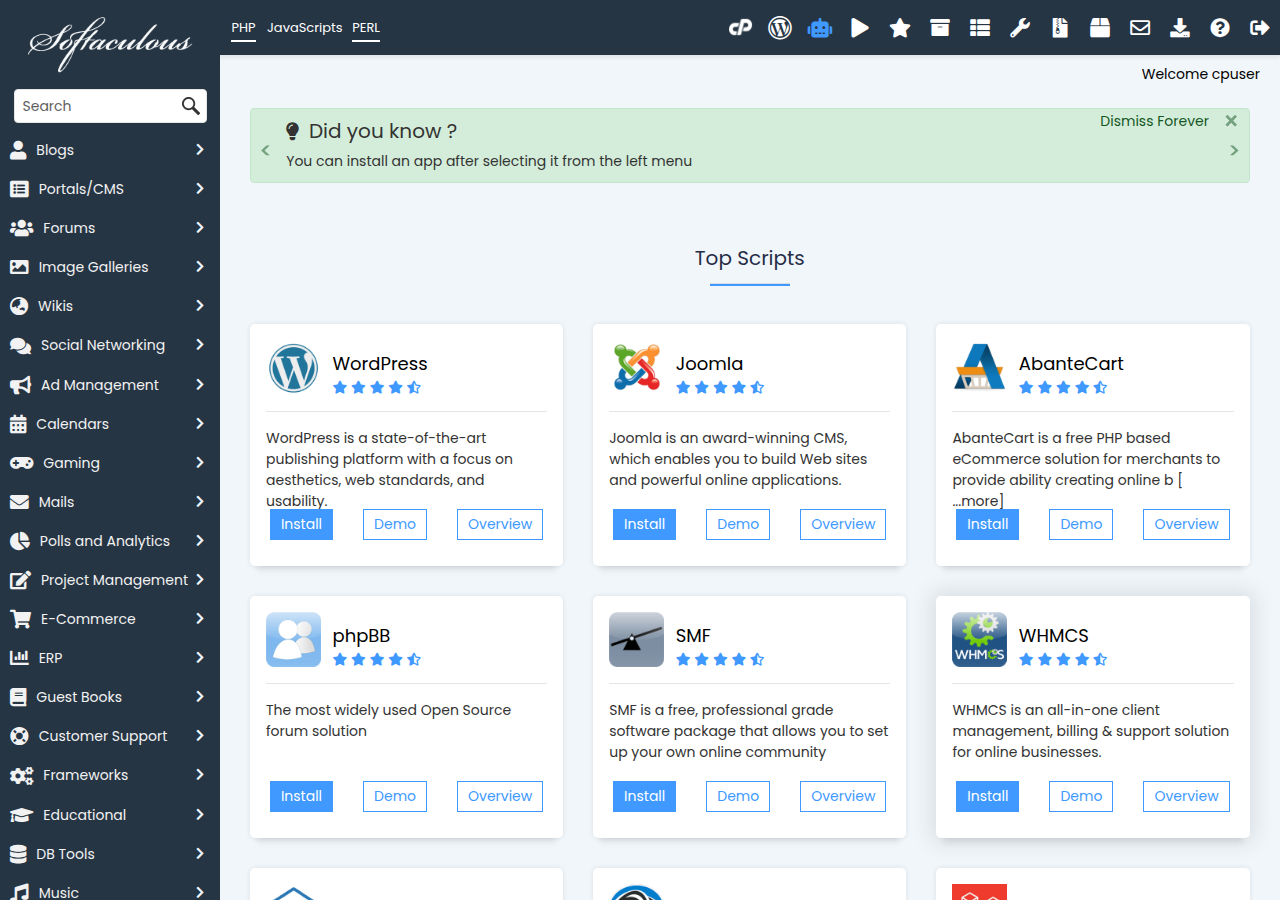
- Open Softaculous.In cPanel, click Softaculous Apps Installer. In DirectAdmin and Webuzo, open the Softaculous or Apps section.
- Find Laravel.Search for "Laravel". It is usually listed under Frameworks.
- Click Install.Open the Laravel page and click Install (or Install Now).
- Choose the protocol and domain.Pick
https://, because our plans include free SSL, then choose the domain or subdomain. - Set the directory.Leave In Directory empty to install at the root of the domain, or type a folder name such as
app. - Fill in the remaining fields.Enter the site details and database name the form asks for. Softaculous creates the database and user for you.
- Install and check.Click Install, save the URL and path it shows, and open the URL. You should see the Laravel welcome page.
Afterwards, open the installation folder in File Manager and check three things:
- The version, in
composer.json. Softaculous may offer an older Laravel release than the latest one. - The document root. If you have to add
/publicto the URL, oryourdomain.com/.envopens in a browser, fix it now (section 6). - The
.envfile. Softaculous fills in the database andAPP_KEY. SetAPP_URL,APP_ENVandAPP_DEBUGas shown in section 7.
4. Route 2 (recommended): build on your computer and upload
You run Composer on your own computer and upload the finished project. The server only has to run PHP.
- Install PHP and Composer locally.Use the same PHP 8.x version as your hosting, so Composer picks packages your server can run. Laravel Herd sets up both on Windows and macOS.
- Create or prepare the project.For a new app, run
composer create-project laravel/laravel laravel-app. For an existing project, runcomposer install --no-dev --optimize-autoloaderin its folder. If your app uses Vite for CSS and JavaScript, also runnpm run build. - Generate the app key.Run
php artisan key:generate --showand copy thebase64:...value it prints. You will paste it into the server's.env. - Clear local caches.Run
php artisan optimize:clear. Cached config contains your computer's file paths, which do not exist on the server. - Zip the project with the vendor folder.Leave out
node_modules,.gitand your local.env. - Upload and extract.In File Manager, upload the zip to your home folder, outside
public_html, and extract it to a folder such aslaravel-app. - Finish the setup.Point the domain at
public(section 6), create.env(section 7), then set permissions and create the database tables (section 8).
For redeploys and more detail, read Laravel on cPanel and DirectAdmin: what works, what doesn't.
5. Composer on shared hosting (and what SSH is for)
Jailed SSH access is available on every shared hosting plan (cPanel, DirectAdmin, Webuzo). It is off by default; ask support to enable it for your account. Login is with an SSH key; see Enabling and accessing jailed SSH.
SSH is useful for Laravel on shared hosting. Use it to create the public_html link (section 6), to run php artisan commands such as migrations, and to check logs. Composer isn't pre-installed, but you can download composer.phar and run php composer.phar install --no-dev --optimize-autoloader; if it stops with a proc_open message, run it again with --no-scripts, then run php artisan package:discover. Or run Composer on your computer or in CI and upload the project with its vendor folder.
That error means a Composer script, or another command that starts a process, tried to run on the server. Run Composer again with --no-scripts, then run the commands from the scripts section of composer.json yourself with php (for Laravel, php artisan package:discover). Or use route 2. Also check that php -v in SSH shows the same version as your website: if it is older, ask our support team for the path to the right PHP binary.
6. Point your domain to the public folder
Only Laravel's public folder should be reachable from the web; otherwise visitors may be able to download your .env file with your database password.
For the link option, keep a backup of your old files:
cd ~
mv public_html public_html_old
ln -s ~/laravel-app/public ~/public_html
The copy option is explained step by step in Path A of our Laravel deployment guide. To give your app its own domain, see How to add an addon domain in cPanel.
7. Configure the .env file and APP_KEY
The .env file holds your settings and secrets. It lives in the project folder, never in public_html. First create a database and user in your control panel (on cPanel the names get your username as a prefix, such as youruser_laravel). Then, in File Manager, copy .env.example to .env and edit it:
APP_NAME="My App"
APP_ENV=production
APP_DEBUG=false
APP_KEY=base64:paste-the-key-you-generated
APP_URL=https://yourdomain.com

DB_CONNECTION=mysql
DB_HOST=localhost
DB_PORT=3306
DB_DATABASE=youruser_laravel
DB_USERNAME=youruser_dbuser
DB_PASSWORD=your-strong-password

QUEUE_CONNECTION=database
Recent Laravel versions default to SQLite, so change DB_CONNECTION to mysql.
APP_KEY encrypts sessions and cookies. Without it you see "No application encryption key has been specified". Generate it on your computer with php artisan key:generate --show and paste it in, or run php artisan key:generate over SSH. Never change the key on a live site: it logs every user out and breaks data encrypted with the old key.
With debug mode on, an error page can show your file paths, settings and database details to anyone. Keep APP_DEBUG=false in production and read errors in storage/logs/laravel.log instead.
8. Permissions, database tables and the storage link
Laravel writes logs, cache and compiled views to storage and bootstrap/cache, so both must be writable by your account. In File Manager, use Change Permissions to set them to 755, or over SSH run chmod -R 755 storage bootstrap/cache. Use 644 for files. Never use 777; it is a common way sites get hacked.
Next, create the database tables. If SSH is enabled on your account, try:
php artisan migrate --forceIf php artisan commands fail on the server with a "disabled for security reasons" error, or you have no shell, do the work on your computer instead. Run the migrations against a local MySQL database, export it as a .sql file, and import that file into your hosting database with phpMyAdmin (Import tab). See How to manage databases with phpMyAdmin.
If your app serves uploaded files from storage/app/public, it needs a public/storage link. php artisan storage:link uses a PHP function that shared hosting disables, so create the link from the shell instead: ln -s ~/laravel-app/storage/app/public ~/laravel-app/public/storage. Without SSH, ask our support team. For the full list, see PHP disabled functions on shared hosting.
9. The scheduler and queues
Scheduler: one cron job
Laravel's scheduler runs your timed tasks. Add one cron job in your control panel's Cron Jobs page (on Domain India shared hosting the shortest interval is every 4 minutes):
* * * * * cd /home/youruser/laravel-app && php artisan schedule:run >> /dev/null 2>&1Replace youruser with your username. On our shared servers, jobs set to every 1, 2 or 3 minutes are changed to every 4 minutes, so the scheduler runs every 4 minutes; plan tasks with that in mind. And schedule:work will not work, because shared hosting stops long-running processes. For cron basics, read How to set up a cron job.
Because proc_open is disabled on shared hosting, scheduled artisan commands (Schedule::command(...)) cannot start, because the scheduler launches each one as a separate process. Schedule closures (Schedule::call(...)) and queued jobs (Schedule::job(...)) run inside the same process, or you can give each command its own cron line.
Queues: the database driver and cron
Queues let your app do slow work, such as sending email, after the page has loaded. On shared hosting, use the database driver. Recent Laravel versions include the jobs table in their default migrations; if yours does not, run php artisan make:queue-table and migrate. Then add a second cron job:
* * * * * cd /home/youruser/laravel-app && php artisan queue:work --stop-when-empty --max-time=50 >> /dev/null 2>&1It suits light background work: a few emails, notifications or small reports. Jobs can wait up to a minute before they start. If queue:work fails on your server with a "disabled" error, set QUEUE_CONNECTION=sync so jobs run during the request. Permanent workers, Horizon, Redis queues, Octane and Reverb websockets need long-running processes, so they need a VPS.
10. Sending email from Laravel
A fresh Laravel install writes email to the log file (MAIL_MAILER=log). Laravel's built-in sendmail transport fails on our cPanel and DirectAdmin servers, because it starts a process. The SMTP transport fails on cPanel, because the socket functions it needs are disabled; on DirectAdmin, test it on your plan. Two methods to use instead:
- A small custom transport that calls PHP
mail(), with an envelope sender on your own domain. This works wherevermail()works. - A transactional email API over HTTPS, such as Amazon SES, Postmark, Mailgun or Brevo, using Laravel's ready-made API mailers. On most DirectAdmin sites
curl_execis disabled, so test first.
The full explanation, with the SPF, DKIM and DMARC setup, is in Sending email from PHP on shared hosting.
11. Where Domain India fits
Our shared hosting plans run the Apache web server and include File Manager, MySQL databases with phpMyAdmin, cron jobs, a choice of PHP versions and free SSL. Softaculous is listed on our cPanel, DirectAdmin and Webuzo hosting. Jailed SSH is available on every shared plan on request (it is off by default); Composer isn't pre-installed, but you can run composer.phar there, or build vendor/ locally and upload it.
- 25 GB NVMe SSD Storage
- 50 GB Monthly Bandwidth
- 1 Website
- 10 Email Accounts
- 10 GB NVMe SSD Storage
- 50 GB Monthly Bandwidth
- 1 Website
- 5 Email Accounts
If your app needs permanent queue workers, Redis or websockets, choose a VPS, where you control the server, or the App Platform to deploy from Git without managing a server.
Can I install Laravel with Softaculous on Domain India hosting?
Yes. Softaculous is listed on Domain India's cPanel, DirectAdmin and Webuzo hosting. Open Softaculous, search for Laravel, click Install, choose your domain and directory, and it creates the database and configuration for you. Afterwards, check the Laravel version and make sure the domain points to Laravel's public folder.
Why does composer fail with "proc_open() has been disabled for security reasons"?
Domain India shared hosting disables proc_open and the other process functions for security, on the command line as well as the web, and Composer scripts such as Laravel's package:discover need them. Run Composer again with --no-scripts, then run php artisan package:discover yourself. Or run Composer on your own computer instead, upload the project with its vendor folder through File Manager, and create .env on the server. If your project must run Composer on the server, use a VPS or an App Platform.
Can I run Composer over SSH on shared hosting?
Yes. Jailed SSH is available on every Domain India shared hosting plan on request. Composer isn't pre-installed, so download composer.phar and run php composer.phar install; if it stops with a proc_open message, run it again with --no-scripts, then run php artisan package:discover. Or build the project with its vendor folder on your computer or in CI and upload it, or use a VPS or the App Platform.
Why does my Laravel site need /public in the URL?
The domain's document root points to the project folder instead of Laravel's public folder. Change the document root to the public folder, link public_html to it, or copy its contents into public_html and update the paths in index.php. Never leave the whole project in public_html, because it can expose your .env file.
How do I fix "No application encryption key has been specified"?
Your .env file has no APP_KEY. On your computer, run php artisan key:generate --show in the project folder and paste the printed value into APP_KEY in the server's .env, or run php artisan key:generate over SSH if it is enabled on your account. Do not change the key on a live site, because it logs out all users.
How do I create the database tables without running artisan on the server?
Run the migrations on your computer against a local MySQL database, export the database as a .sql file, and import it into your hosting database with phpMyAdmin.
Can I run Laravel queue workers on shared hosting?
Only in a limited way. Use the database queue driver and a cron job that runs php artisan queue:work --stop-when-empty every 4 minutes, the shortest interval on shared hosting. Permanent workers, Horizon, Redis queues and websockets need long-running processes, so they need a VPS.
Ready to build your Laravel app? Compare cPanel hosting, DirectAdmin hosting and Webuzo hosting, read the Laravel deployment guide when you are ready to go live, or open a support ticket if an install step fails.
File Manager, phpMyAdmin, cron jobs, a choice of PHP versions and free SSL on every shared hosting plan, with 24/7 live chat support when you get stuck.
See hosting plans