cPanel is the control panel that comes with Domain India's cPanel hosting plans. It is a web page where you run your hosting account yourself: upload files, create email addresses, add databases, install WordPress and switch on SSL, without typing server commands. This guide explains what cPanel is, what each part of it does, how it differs from WHM, and how it compares with the other control panels Domain India sells.
cPanel is a graphical control panel for one hosting account. Its sections (Files, Databases, Domains, Email, Metrics, Security and Software) cover everything a small website needs, and WHM is the separate panel a reseller uses to create and manage many cPanel accounts. At Domain India you reach cPanel from the cPanel button in the client area or at https://yourdomain.com:2083. Our cPanel servers run CloudLinux, Imunify360, free Let's Encrypt SSL through AutoSSL, and both Softaculous and WP Toolkit.
1. What a control panel is
A hosting account is a share of a server: storage for your files, a mail system, a database server and a web server that shows your site to visitors. Managing that directly means typing commands on the server. A control panel puts those jobs behind buttons and forms in your browser.
cPanel is the best-known control panel for Linux hosting. It is made by cPanel, L.L.C. and licensed to hosting companies, who install it on their servers. You never install it yourself on shared hosting: when your cPanel plan is activated, your account and its panel are created for you. Most hosting accounts are created automatically within a couple of minutes of payment; a small number need a manual check and take longer.
What cPanel is not:
- It is not your website builder. It hosts the site; WordPress, or the code you upload, is the site.
- It is not the Domain India client area. The client area is where you pay invoices, renew and manage domains. cPanel is where you manage what is on the hosting account.
- It is not the whole server. Each cPanel account is one user's share of a shared server, with its own limits.
2. The main sections of cPanel
When you open cPanel you land on a page of tools grouped into sections. The exact list depends on the server's setup, so use the search box at the top of cPanel if a tool is not where you expect it.
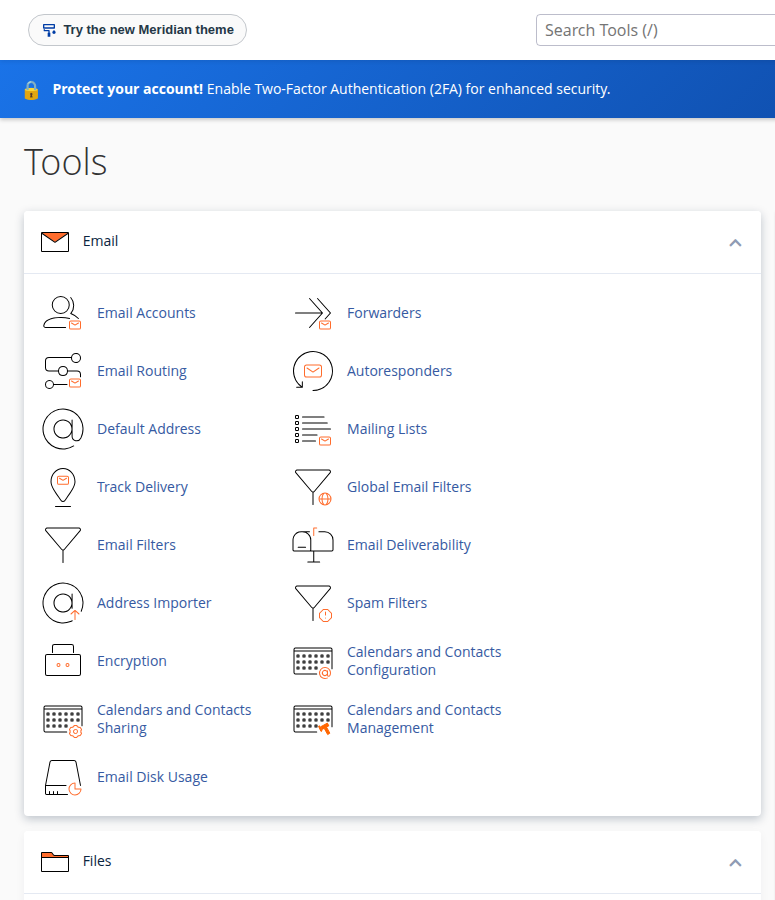
| Section | What it contains | Use it to |
|---|---|---|
| Files | File Manager, Directory Privacy, Disk Usage, FTP Accounts | Upload and edit website files, create FTP logins, see what uses your space |
| Databases | Manage My Databases, Database Wizard, phpMyAdmin, Remote Database Access | Create a database and user for WordPress or your app, import or export data |
| Domains | Domains, Redirects, Zone Editor | Add another website or a subdomain, redirect addresses, edit DNS records |
| Email Accounts, Forwarders, Autoresponders, Spam Filters, Email Deliverability | Create [email protected] addresses, forward mail, check SPF and DKIM | |
| Metrics | Visitors, Errors, Bandwidth, Raw Access, Resource Usage | See who visited, read error logs and check whether you are hitting account limits |
| Security | SSL/TLS Certificates, Two-Factor Authentication, IP Blocker, Hotlink Protection | Check your free SSL, protect the login, block abusive addresses |
| Software | Softaculous, WP Toolkit, MultiPHP Manager, MultiPHP INI Editor | Install WordPress and other apps, choose the PHP version for your site |
Files
The File Manager is a file browser in your web page. Your website lives in public_html: whatever you put there is what visitors see at your domain. You can upload and extract a ZIP, edit files and change permissions. See How do I use the File Manager.
Databases
WordPress, Joomla and most PHP applications store their content in a MySQL database. In cPanel you create the database, create a database user, then give that user access to the database. phpMyAdmin lets you browse tables, import a .sql file and export a copy. On our shared servers the MySQL port (3306) is closed to the outside, so tools on your own computer need an SSH tunnel. See How to connect to the MySQL database.
Domains
One cPanel account can host more than one website if your plan allows it. The Domains page adds another domain or a subdomain such as shop.yourdomain.com, each with its own folder. The Zone Editor changes DNS records, but those records only take effect if your domain uses the DNS that serves this account. If you are unsure, read How to change your domain DNS settings.
Create mailboxes, set a storage quota for each, forward one address to another and set out-of-office replies. Email Deliverability shows whether the SPF and DKIM records that help your mail avoid spam folders are in place. Read your mail in webmail at https://yourdomain.com/webmail; see How to log into webmail.
Metrics
Resource Usage is the page to check when your site is slow or shows a "Resource Limit Is Reached" error. It shows CPU, memory, entry processes and I/O over time, with a Faults column that counts the moments your account hit a limit. Errors shows recent web server errors, which is often the fastest way to find out why a page fails. See How to check hosting resource usage.
Security
SSL/TLS Certificates shows the free certificates issued for your domains on its Status tab. Two-Factor Authentication adds a code from your phone to the cPanel login. Because the client area's cPanel button signs you in without a cPanel password, protect the client area too; see Enable two-factor authentication. IP Blocker and Hotlink Protection stop specific addresses or other sites from using your resources.
Software
Softaculous installs WordPress and hundreds of other applications in a few clicks. WP Toolkit installs and manages WordPress sites, including updates and security checks. Both are installed on our cPanel servers (measured 22 September 2026). This section also holds the PHP settings, where you choose the PHP version for each site. Check your control panel for the versions available. See WordPress Toolkit compared with Softaculous.
3. cPanel and WHM: what is the difference?
cPanel and WHM (WebHost Manager) come from the same company, but they are two panels for two different people.
| Question | cPanel | WHM |
|---|---|---|
| Who uses it | The owner of one hosting account | A reseller, or the owner of a whole server |
| What it manages | One account: its files, email, databases and domains | Many cPanel accounts: creating, suspending and resizing them |
| Login port | 2083 (2082 without encryption) | 2087 (2086 without encryption) |
| Domain India plans | cPanel shared hosting | cPanel reseller hosting |
If you buy a cPanel hosting plan, you only ever use cPanel. If you buy a cPanel reseller plan, you log in to WHM, create hosting packages and a cPanel account for each of your customers, and each customer then logs in to their own cPanel. See How to log in to WHM and reseller hosting.
4. How to log in to cPanel
The quickest way needs no cPanel password at all.
- Sign in to the client area.Open your hosting list under Hosting › My hosting.
- Click the cPanel button.On your domain's row, click cPanel. A new tab opens, already signed in. The button appears only while the account is Active.
- Or log in directly.Go to
https://yourdomain.com:2083and use the cPanel username and password. Your username, server IP and panel URL are under Manage › Access.
Your client-area password and your cPanel password are separate. If your domain does not point to us yet, use the server hostname or server IP on port 2083 instead. The full guide, with troubleshooting, is How to log in to cPanel.
These are the ports we measured as open on our cPanel servers on 20 September 2026:
| Port | What it is for |
|---|---|
| 2083 (2082 unencrypted) | cPanel |
| 2087 (2086 unencrypted) | WHM, for reseller accounts |
| 2096 (2095 unencrypted) | Webmail |
| 21 | FTP |
| 22 | SSH |
| 465 and 587 | Sending mail from an email app |
| 993 and 995 | Receiving mail by IMAP and POP3 over SSL |
Port 3306 for MySQL is closed from outside. The full list for every panel is in Domain India web hosting port numbers.
The shared servers block an IP address automatically after repeated failed logins. If cPanel, your website and webmail all stop loading at the same moment but work from mobile data, that is what happened. Stop retrying, reset the password from the client area, and send us your IP address through a support ticket.
5. What runs on Domain India's cPanel servers
Every cPanel host sets up its servers differently. This is what we measured on our cPanel shared servers on 20 and 22 September 2026:
.htaccess rules work. For WordPress caching, use WP Super Cache or W3 Total Cache.On shared hosting a set of PHP functions is disabled, and phpinfo() is one of them. Tools that need those functions, such as some Composer commands and SMTP libraries, fail on shared hosting. The details are in PHP disabled functions on shared hosting.
Hourly sending limits apply to outgoing email per account; ask support for yours, and see Do you limit the amount of mails I can send per hour?. For newsletters to large lists, use a dedicated sending service.
6. cPanel compared with DirectAdmin, Webuzo and Plesk
Domain India sells four control panels. cPanel, DirectAdmin and Webuzo all run Linux hosting for PHP sites and WordPress; Plesk is for Windows hosting and ASP.NET.
| Panel | Best for | Login port | App installer | Included backups | Starter plan |
|---|---|---|---|---|---|
| cPanel | Most websites; the panel most tutorials are written for | 2083 | Softaculous and WP Toolkit | Weekly; JetBackup installed | ₹125/month |
| DirectAdmin | A lighter, lower-cost panel for the same kinds of sites | 2222 (the login button uses 2280) | Softaculous Premium | Weekly; JetBackup installed | ₹100/month |
| Webuzo | Budget PHP and WordPress hosting | 2003 | Softaculous Premium | Nightly (restores through support) | ₹100/month |
| Plesk (Windows) | ASP.NET and MSSQL applications | 8443 | Not listed | Varies by plan | ₹165/month |
Domain India list prices on 19 September 2026, excluding 18% GST.
A few differences matter in practice:
- JetBackup is installed on both our cPanel and DirectAdmin servers. Your weekly backups are in JetBackup in your panel, where you can download or restore them. cPanel's own Backup and Backup Wizard tools are switched off, so use JetBackup instead.
- Webuzo: the client area's password reset and one-click login do not work reliably for Webuzo accounts. If you need to get into Webuzo, contact support.
- Plesk on Windows has no SSH (port 22 is closed) and no port 587 for mail. Use it only for Windows applications.
- You want the panel most WordPress and hosting tutorials show
- You want both Softaculous and WP Toolkit for WordPress
- You may later move to cPanel reseller hosting with WHM
- The lowest monthly price matters most: DirectAdmin and Webuzo start lower
- Your application is ASP.NET: choose Windows hosting with Plesk
For a longer comparison, see cPanel, DirectAdmin and Webuzo compared and What is DirectAdmin.
7. Domain India cPanel plans
All three plans below include cPanel, free SSL, CloudLinux, Imunify360, weekly JetBackup backups and the Setup Node.js App tool. Jailed SSH is available on request: it is off by default, so ask support to enable it. The prices on these cards are live and exclude 18% GST.
- 25 GB NVMe SSD Storage
- 50 GB Monthly Bandwidth
- 1 Website
- 10 Email Accounts
- 50 GB NVMe SSD Storage
- 100 GB Monthly Bandwidth
- 5 Websites
- 50 Email Accounts
- 100 GB NVMe SSD Storage
- Unmetered Bandwidth
- 25 Websites
- 150 Email Accounts
| Plan | Websites | Storage | Email accounts | MySQL databases | Monthly bandwidth |
|---|---|---|---|---|---|
| cPanel Starter | 1 | 25 GB NVMe | 10 | 5 | 50 GB |
| cPanel Growth | 5 | 50 GB NVMe | 50 | 10 | 100 GB |
| cPanel Business | 25 | 100 GB NVMe | 150 | 50 | Unmetered |
Starter suits one website; Growth suits a business running several. An active cPanel plan can be upgraded at any time; you pay only the difference for the time left until renewal. See Can I upgrade my web hosting package at any time?
8. Four habits for new cPanel users
- Know your limits. Check your plan's websites, email accounts and databases before you add more. Look at Metrics › Resource Usage before you decide you need a bigger plan.
- Protect both logins. Use a long, unique cPanel password, turn on two-factor authentication for the client area and for cPanel, and never send your password to anyone, including support.
- Keep WordPress updated. Most hacked sites are hacked through an old plugin or theme, not through cPanel. See Why and how your WordPress website gets hacked.
- Keep your own copy. Your plan includes weekly backups, and Domain India does not sell a separate backup add-on, so download your important files and export your databases from phpMyAdmin before any big change.
Frequently asked questions
What is cPanel in web hosting?
cPanel is a web-based control panel for a Linux hosting account. It lets you manage files, email accounts, databases, domains, SSL certificates and application installs from your browser, without using server commands.
What is the difference between cPanel and WHM?
cPanel manages one hosting account. WHM (WebHost Manager) manages many cPanel accounts on a server and is used by resellers and server owners. A Domain India cPanel hosting customer uses cPanel only; a cPanel reseller customer uses WHM to create cPanel accounts for their own clients.
How do I log in to cPanel with Domain India?
Sign in to the client area, open Hosting › My hosting and click the cPanel button on your domain's row; it signs you in with no cPanel password. You can also go to https://yourdomain.com:2083 and use your cPanel username and password.
Is cPanel free?
cPanel is licensed software, and the cost of the licence is included in the hosting plan. Domain India cPanel hosting starts at ₹125 a month excluding 18% GST (list price on 19 September 2026). There is no separate charge for the panel.
Can I install WordPress from cPanel?
Yes. Domain India's cPanel servers have both Softaculous and WP Toolkit, and either one installs WordPress in a few clicks and creates the database for you.
Does Domain India cPanel hosting include SSL?
Yes. AutoSSL issues free Let's Encrypt certificates automatically for domains that point to your cPanel account, and renews them. You can check them on the Status tab of Security › SSL/TLS Certificates in cPanel.
Is cPanel better than DirectAdmin?
Neither is better for every site. cPanel is the most widely documented panel and has WP Toolkit on our servers; DirectAdmin starts at a lower price. Both run on CloudLinux with Imunify360 and include weekly JetBackup backups at Domain India.
Ready to try cPanel? Compare the plans on cPanel hosting, or if you already have an account, open your hosting list and click the cPanel button. Questions about which panel suits your site? Open a ticket: support is on 24/7 live chat, and tickets get a first response within 15 minutes.
CloudLinux isolation, Imunify360, free SSL and both Softaculous and WP Toolkit, with plans for one website up to twenty-five.
See cPanel plans