Most websites send email from PHP: contact forms, order confirmations, password resets. On shared hosting, how you send that email decides whether it reaches the inbox, lands in spam or never leaves the server. This guide covers PHP mail() and the sendmail path, the envelope sender, SMTP with PHPMailer, SPF/DKIM/DMARC, testing, common errors and WordPress, for cPanel, DirectAdmin and Webuzo hosting in 2026.
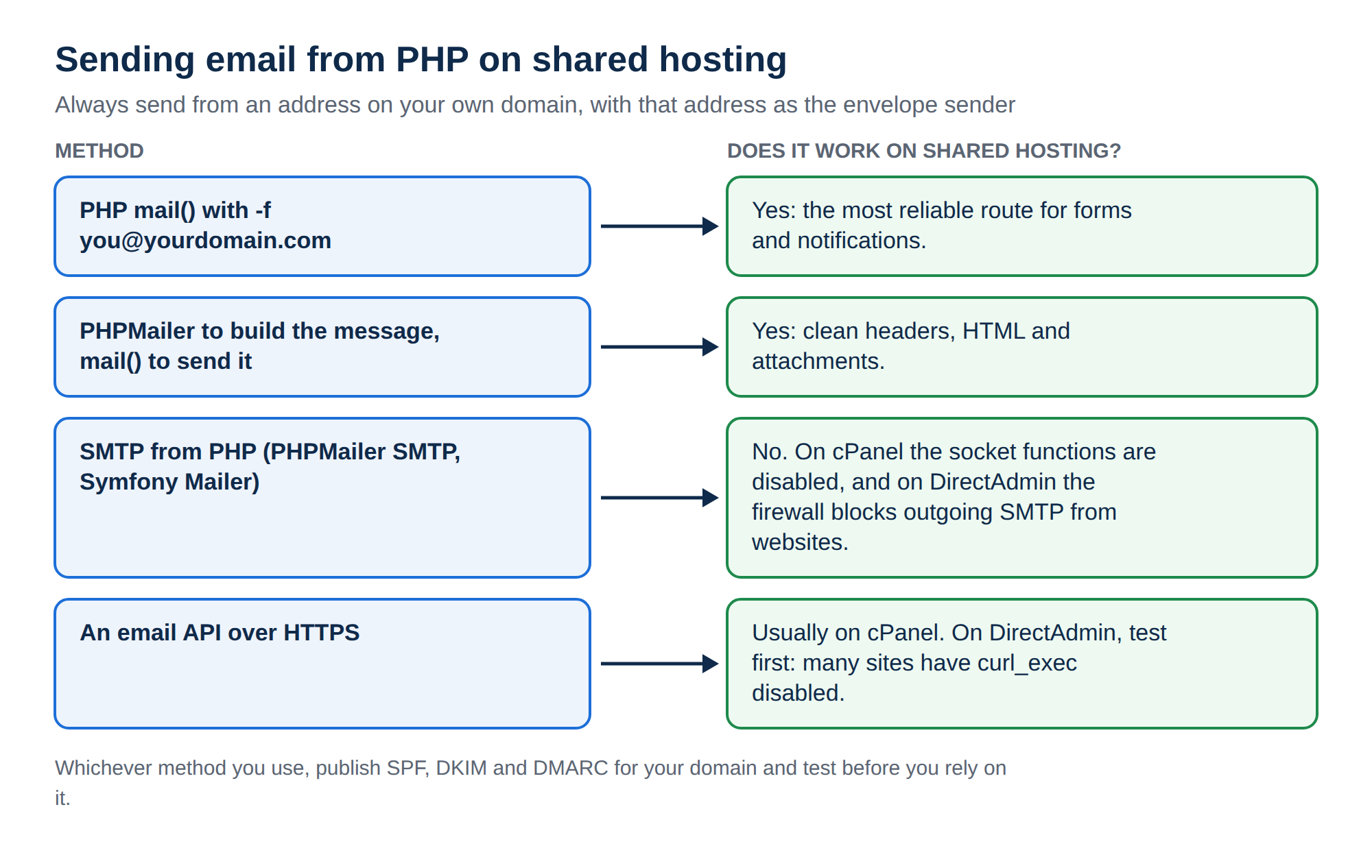
On shared hosting, PHP's mail() hands your message to the server's local mail system through sendmail_path, and it is the most reliable route. Always send from an address on your own domain, and pass that address as the envelope sender with the fifth parameter (-f [email protected]) so SPF lines up. SMTP from PHP doesn't work on our shared hosting: on cPanel the socket functions it needs are disabled, and on DirectAdmin the server firewall blocks outgoing SMTP from websites. If a library fails with a "disabled for security reasons" error, switch to mail() with -f, or an HTTPS email API. Then add SPF, DKIM and DMARC and test before you go live.
1. How PHP sends email on shared hosting
PHP has no mail server of its own. When your script calls mail(), PHP runs the program named in the sendmail_path setting (usually /usr/sbin/sendmail -t -i). That program passes the message to the server's mail transfer agent, which delivers it to the recipient's mail server.
A few things follow from that:
sendmail_pathis a server-level setting. You cannot change it withini_set()or.user.inion shared hosting, and you do not need to.phpinfo()is disabled on our cPanel servers, so to see the current value create a file containing<?php echo ini_get('sendmail_path');, open it in your browser, then delete the file.mail()returningtrueonly means the local mail system accepted the message. It does not mean the message was delivered.- Every message your account sends counts towards your hosting account's hourly sending limit. See Do you limit the amount of mails I can send per hour.
Your options, from simplest to most flexible:
| Method | How it sends | Works on shared hosting? | Best for |
|---|---|---|---|
PHP mail() with -f | Local sendmail program | Yes, the most reliable route | Contact forms, notifications, small sites |
PHPMailer builds, mail() sends | PHPMailer composes, you call mail() with -f | Yes | Clean headers, attachments, HTML email |
| SMTP with a mailbox (PHPMailer, Symfony Mailer) | Socket connection to a mail server | No: socket functions are disabled on cPanel, and outgoing SMTP from websites is blocked on DirectAdmin | Sending as a real mailbox, apps on VPS or PaaS |
| Framework sendmail transport | Starts the sendmail process directly | Fails where process functions are disabled | VPS and servers you control |
| Transactional email API over HTTPS | cURL request to a provider | Usually on cPanel; on most DirectAdmin sites curl_exec is disabled, so test | High volume, detailed delivery tracking |
2. The two "from" addresses: header From and envelope sender
Every email has two sender addresses, and deliverability depends on both.
- Header From is what the recipient sees in their inbox. You set it in the
From:header. - Envelope sender (also called Return-Path or bounce address) is what mail servers use behind the scenes. Bounces go here, and SPF is checked against this domain.
If you do not set the envelope sender, the server uses a default. This is often your hosting username at the server's own hostname, for example [email protected]. The receiving server then checks SPF against the server's domain, not yours. DMARC needs the SPF domain or the DKIM domain to match your From domain, so your mail can fail DMARC even though nothing looks wrong.
The fix is the fifth parameter of mail(): -f followed by an address on your own domain. This sets the envelope sender, so it matches your From address.
Never put a visitor's email address (for example a Gmail address typed into your contact form) in the From header. You are not allowed to send as gmail.com, so Gmail, Outlook and others will mark it as spoofed and reject it or send it to spam. Send from your own address, such as [email protected], and put the visitor's address in Reply-To. When you click Reply, your email program still answers the visitor.
3. Sending with PHP mail() the right way
Create a real mailbox for sending first (for example [email protected] or [email protected]) in your control panel. The mailbox makes the address exist, and bounces then have somewhere to go.
This contact-form handler sends from your own domain, uses the visitor's address only as Reply-To, and sets the envelope sender with -f:
<?php
// contact.php - receives a POST from your HTML form
$from    = '[email protected]';   // a mailbox on YOUR domain
$to      = '[email protected]';      // where you want to receive the form

$name    = trim($_POST['name'] ?? '');
$visitor = trim($_POST['email'] ?? '');
$message = trim($_POST['message'] ?? '');

// Validate input. Stop header injection: no line breaks in name or email.
if (!filter_var($visitor, FILTER_VALIDATE_EMAIL) || preg_match('/[\r\n]/', $name . $visitor)) {
    http_response_code(400);
    exit('Please enter a valid email address.');
}

$subject = 'Website enquiry from ' . $name;
$body    = "Name: $name\nEmail: $visitor\n\n$message\n";

$headers = [
    'From'         => 'Your Business <' . $from . '>',
    'Reply-To'     => $visitor,
    'MIME-Version' => '1.0',
    'Content-Type' => 'text/plain; charset=UTF-8',
];

// The fifth parameter sets the envelope sender (Return-Path) so SPF aligns.
$sent = mail($to, $subject, $body, $headers, '-f' . $from);

echo $sent ? 'Thank you, your message has been sent.' : 'Sorry, the message could not be sent.';
Notes on this example:
- Passing headers as an array has been supported since PHP 7.2, and PHP formats them correctly for you.
- Use
-fwith no space, as'-f' . $from, and use only a fixed address you control. Never build the-fvalue from form input. - For HTML email with attachments, use PHPMailer (next section) instead of building MIME parts by hand.
4. PHPMailer: mail mode and SMTP mode
PHPMailer is still the standard PHP email library. Composer isn't pre-installed on shared hosting, but with jailed SSH (on request) you can download composer.phar and run the command below as php composer.phar require phpmailer/phpmailer. Or install it on your own computer (or in CI) and upload the project with its vendor/ folder:
# on your own computer, not on the server
composer require phpmailer/phpmailer
Mail mode: sends, but check the envelope sender
In mail mode, PHPMailer builds a correct message and then calls mail(). On a server where PHPMailer can pass -f, setting Sender gives you the envelope sender:
<?php
use PHPMailer\PHPMailer\PHPMailer;
use PHPMailer\PHPMailer\Exception;

require __DIR__ . '/vendor/autoload.php';

$mail = new PHPMailer(true);
try {
    $mail->isMail();                                    // send through PHP mail()
    $mail->CharSet = 'UTF-8';
    $mail->setFrom('[email protected]', 'Your Business');
    $mail->Sender = '[email protected]';           // envelope sender (-f); ignored on our cPanel servers
    $mail->addAddress('[email protected]');
    $mail->addReplyTo($visitorEmail, $visitorName);     // visitor goes in Reply-To
    $mail->Subject = 'Website enquiry';
    $mail->Body    = $messageText;
    $mail->send();
} catch (Exception $e) {
    error_log('Mail error: ' . $mail->ErrorInfo);
}
PHPMailer passes -f only when the PHP function escapeshellcmd is available, and it is disabled on our cPanel servers. There, Sender is silently ignored and the Return-Path becomes the server's address. The reliable pattern on shared hosting is to let PHPMailer build the message with preSend(), then send it yourself with mail() and -f. The complete handler is in How to use PHPMailer for contact forms. For plain-text messages, plain mail() with -f from section 3 is enough.
SMTP mode: sending through an authenticated mailbox
SMTP mode logs in to a real mailbox and sends through it, the same way Outlook does. Use the full email address as the username, and take the server name and port from your control panel's email client settings. The server name is often mail.yourdomain.com.
$mail->isSMTP();
$mail->Host       = 'mail.yourdomain.com';            // from your control panel
$mail->SMTPAuth   = true;
$mail->Username   = '[email protected]';         // full email address
$mail->Password   = getenv('SMTP_PASSWORD');          // keep it out of your code
$mail->SMTPSecure = PHPMailer::ENCRYPTION_SMTPS;      // port 465; or ENCRYPTION_STARTTLS with port 587
$mail->Port       = 465;
$mail->setFrom('[email protected]', 'Your Business'); // must match the mailboxShared hosting disables some PHP functions for security. On our cPanel servers these include the socket functions (stream_socket_client, fsockopen) that SMTP needs, and on cPanel and DirectAdmin the process functions (proc_open, popen) that sendmail transports need. If you see an error like stream_socket_client() has been disabled for security reasons, SMTP from PHP will not work on that server. Send with mail() and -f (with PHPMailer composing the message if you like), use an HTTPS email API, or ask our support team. mail() itself keeps working.
For the full list and the reasons behind it, read PHP disabled functions on shared hosting.
5. Laravel, Symfony Mailer and other frameworks
Modern Laravel (version 9 onwards) and Symfony send email through Symfony Mailer. Its built-in transports are SMTP, which needs socket functions, and sendmail, which starts a process. Neither uses PHP's mail() function. On a server where those functions are disabled, both fail, and the error names the disabled function.
You have three working options:
curl_exec is disabled, so test first). Laravel and Symfony have ready-made API transports for most providers.For choosing a provider, see Email services compared: SendGrid, SES, Mailgun, Postmark, Resend and Transactional email with SMTP, SendGrid and SES. Whichever you choose, add the provider's SPF and DKIM records to your domain before you send.
6. SPF, DKIM and DMARC: the three records every sending domain needs
Since 2024, Gmail and Yahoo require authenticated email, and mail without it goes to spam or is rejected. Set up all three records for any domain your website sends from.
| Record | What it proves | What to do |
|---|---|---|
| SPF | The sending server is allowed to send for your domain | Publish one TXT record starting v=spf1 that lists every service you send through (your hosting server, Business Email, any API provider). Only one SPF record per domain. |
| DKIM | The message was signed by your domain and not altered | Enable DKIM for the domain in your control panel, or add the provider's DKIM record. Mail sent through your hosting server is then signed. |
| DMARC | What receivers should do when SPF or DKIM does not match your From domain | Start with a TXT record at _dmarc.yourdomain.com such as v=DMARC1; p=none; rua=mailto:[email protected], watch the reports, then tighten to quarantine. |
Where to find them:
- cPanel: Email → Email Deliverability shows whether SPF and DKIM are valid and can install the suggested records.
- DirectAdmin: enable DKIM for the domain under your email or DNS settings, then check the SPF TXT record in DNS Management.
- Webuzo: check the TXT records in the DNS zone for your domain.
If your domain's DNS is hosted somewhere else (Cloudflare, for example), copy the records there. Records in the control panel only take effect when the control panel runs your DNS.
For step-by-step setup, read Email authentication: SPF, DKIM, DMARC.
7. Testing before you rely on it
- Send a test to a Gmail address.Use your real form or a short test script with
mail()and-f. - Open the original message.In Gmail, open the email, click the three dots and choose Show original. SPF, DKIM and DMARC should all show PASS.
- Check the Return-Path.In the same view, the Return-Path must be your own address, not the server's hostname. If it is not, your
-fparameter is missing or was not applied. - Check the From domain.The From address must be on your domain, and the DKIM domain (
d=) should match it. - Score the message.Send one to a free checker such as mail-tester.com, and fix anything it flags.
- Ask support to check the delivery log.The mail log belongs to the whole server and cPanel's Track Delivery tool is not available on our servers, so open a ticket with the sender, the recipient and the time, and support can tell you whether the message was accepted, deferred or rejected, and why.
More detail: How to test email deliverability for your own website.
8. Common errors and how to fix them
| Symptom or error | Likely cause | Fix |
|---|---|---|
| mail() returns false | The message was refused locally: bad headers, invalid From, or the sending limit was reached | Check the From address and headers, and try again after the hour resets |
| stream_socket_client() or fsockopen() has been disabled for security reasons | SMTP transport on a server that disables socket functions | Use mail() with -f (PHPMailer can build the message with preSend()), or an HTTPS API |
| proc_open() or popen() has been disabled | Sendmail transport in Symfony, Laravel or PHPMailer isSendmail() | Use mail() with -f or a custom mail() transport |
| SMTP Error: Could not authenticate | Wrong username or password | Use the full email address as the username, and reset the mailbox password |
| SMTP Error: Could not connect to SMTP host | Wrong host or port, or outbound SMTP blocked for scripts | Check host and port in the control panel, or use the mail() route |
| Mail arrives but goes to spam | No DKIM, SPF not aligned, or From on another domain | Add -f, send from your own domain, and set up SPF, DKIM and DMARC |
| Bounce says SPF or DMARC fail | Envelope sender is the server hostname, or SPF record missing | Add -f with your own address and fix the SPF record |
| Visitors' messages never arrive | Form sets From to the visitor's address | Send from your own address, and put the visitor in Reply-To |
If mail stops suddenly and you did not change anything, check for a contact form being abused by spam bots. Add a CAPTCHA or a honeypot field, and read Email going to spam: how to fix.
9. WordPress: an SMTP plugin, or mail() with a correct From
WordPress sends all email through wp_mail(), which uses PHPMailer in mail mode. Two things go wrong by default: the From address is [email protected], which is usually not a real mailbox, and no envelope sender is set, so SPF is checked against the server instead of your domain.
Option A: stay on mail() and fix the addresses. This works on every shared server. Create the noreply@ mailbox, then add the code below to a small must-use plugin (wp-content/mu-plugins/mail-sender.php) or your child theme's functions.php:
<?php
add_filter('wp_mail_from', fn() => '[email protected]');
add_filter('wp_mail_from_name', fn() => 'Your Business');
add_action('phpmailer_init', function ($phpmailer) {
    $phpmailer->Sender = $phpmailer->From;   // envelope sender matches From
});
On our cPanel servers escapeshellcmd is disabled, so WordPress cannot pass this envelope sender and the Return-Path still shows the server's address (see section 4). DMARC can still pass through an aligned DKIM signature, so check that DKIM is valid for your domain in Email Deliverability.
Option B: an SMTP plugin. Plugins such as WP Mail SMTP, FluentSMTP or Post SMTP send through an authenticated mailbox or an email API. Set the From address to a mailbox on your domain and send a test email from the plugin. If the test fails with a disabled-function error, choose the plugin's API mailer (Amazon SES, Brevo, Mailgun and others connect over HTTPS), or go back to Option A.
In contact form plugins, set the form's From to your own address and map the visitor's email field to Reply-To.
10. Where Domain India fits
Our cPanel, DirectAdmin and Webuzo hosting plans include email accounts on your own domain and a choice of PHP versions. Jailed SSH access is available on every shared hosting plan; it is off by default, so ask support to enable it for your account. Composer isn't pre-installed, but you can run composer.phar over jailed SSH, or build vendor/ locally and upload it. PHP mail() sends through the server's local mail system, so the method in section 3 works without extra setup.
- 25 GB NVMe SSD Storage
- 50 GB Monthly Bandwidth
- 1 Website
- 10 Email Accounts
- 10 GB NVMe SSD Storage
- 50 GB Monthly Bandwidth
- 1 Website
- 5 Email Accounts
If you want mailboxes that are separate from your website hosting, Business Email is priced per mailbox, from ₹60 a month per mailbox excluding 18% GST (Domain India list price on 19 September 2026). Every message sent from it is DKIM-signed, you get the SPF and DMARC records for your domain, and it supports IMAP and SMTP over TLS. From a VPS, an App Platform app or any server that allows SMTP connections, your code can send through a Business Email mailbox with authenticated SMTP. Before you use it for automated sending, read Business Email sending limits and Business Email vs the email included with your hosting.
- Priced per mailbox - start with one
- Email at your own domain ([email protected])
- Add and remove mailboxes yourself
- Webmail with calendar, contacts and tasks
Why does my PHP mail() go to spam?
Usually the envelope sender is the server's hostname instead of your domain, so SPF does not align, or the domain has no DKIM or DMARC record. Pass your own address as the fifth parameter of mail() (for example [email protected]), send from an address on your own domain, and publish SPF, DKIM and DMARC records.
What does the -f parameter in PHP mail() do?
It sets the envelope sender, also called the Return-Path. Bounces go to this address, and receiving servers check SPF against its domain. Setting it to an address on your own domain lets SPF pass and align with your From address for DMARC.
Can I change sendmail_path on shared hosting?
No. sendmail_path is a server-level PHP setting that cannot be changed with ini_set() or .user.ini on shared hosting. You do not need to change it: use the fifth parameter of mail() to set your envelope sender.
Can I use the visitor's email address as the From address in a contact form?
No. Sending as someone else's domain fails SPF and DMARC checks, so the message is rejected or marked as spam. Send from an address on your own domain and put the visitor's address in the Reply-To header, so replying still reaches them.
Why does PHPMailer SMTP or Laravel mail fail with "has been disabled for security reasons"?
Shared hosting disables some PHP functions for security. On our cPanel servers these include the socket functions SMTP uses, and on cPanel and DirectAdmin the process functions sendmail transports use. Use PHP mail() with the -f envelope sender (PHPMailer can compose the message), a custom mail() transport for Laravel or Symfony, or a transactional email API over HTTPS. Our support team can confirm what your server allows.
Should I use SMTP or mail() for WordPress on shared hosting?
On our cPanel servers, SMTP plugins fail when they try a direct SMTP connection, because socket functions are disabled. Use mail() with the From address set to a mailbox on your domain and a valid DKIM record, or the plugin's HTTPS API mailer. On DirectAdmin, the server firewall blocks SMTP connections from websites, so use mail() or an HTTPS API there too.
How do I check whether my email passes SPF, DKIM and DMARC?
Send a test message to a Gmail address, open it, and choose Show original from the three-dot menu. Gmail shows PASS or FAIL for SPF, DKIM and DMARC, and you can check that the Return-Path is your own address.
Ready to send email your customers actually receive? Compare cPanel hosting, DirectAdmin hosting and Webuzo hosting, look at Business Email for separate mailboxes on your domain, or contact support if your framework's mail transport fails with a disabled-function error.
Email accounts on your own domain, PHP mail() that works out of the box, and a support team that can check your mail setup with you.
See hosting plans