mod_rewrite is the Apache module that lets you redirect and rewrite URLs: forcing HTTPS, choosing www or non-www, turning product.php?id=42 into /product/42, and sending old pages to new ones. On Domain India's Linux shared hosting there is nothing to install or switch on. The module is already loaded on every server, and you use it by writing rules in a .htaccess file.
You don't need to enable mod_rewrite on Domain India cPanel, DirectAdmin or Webuzo hosting: it is loaded server-wide and .htaccess files are allowed. Put RewriteEngine On and your rules in the .htaccess file in your website's folder, usually public_html. Test with a temporary 302 redirect and curl -I before making it permanent, and if the site shows a 500 error after an edit, restore your backup copy of the file. Windows (Plesk) hosting runs IIS, which ignores .htaccess; rules there go in web.config.
1. mod_rewrite is already on: there is nothing to enable
Many older guides tell you to run a2enmod rewrite, edit httpd.conf or restart Apache. Those steps are for someone who runs their own server. On shared hosting the server configuration is managed for you, and on ours the module is already there.
We checked the live servers on 22 September 2026:
| Hosting type | Web server | mod_rewrite | .htaccess rules |
|---|---|---|---|
| cPanel | Apache, with nginx in front | Loaded | Allowed |
| DirectAdmin | Apache | Loaded | Allowed (a few limits on Options, see section 8) |
| Webuzo | Apache | Loaded | Allowed |
| Windows (Plesk) | IIS | Not used | Not read: use web.config |
So "enabling mod_rewrite" on our Linux hosting means one thing: adding the line RewriteEngine On to a .htaccess file. That line switches the rewrite engine on for that folder and its subfolders. Without it, any RewriteRule below it is ignored.
A harmless two-minute test is in how to see if mod_rewrite is enabled on your site. If you run your own VPS, enabling the module there is your job, because you manage the server.
2. Where your .htaccess file lives
Rules go in a file called .htaccess (with the leading dot, no extension) in your website's root folder. Apache reads it on every request, so changes take effect as soon as you save. No restart is needed.
| Control panel | Main website folder | Addon or extra domains |
|---|---|---|
| cPanel | public_html | The folder you chose when adding the domain |
| DirectAdmin | domains/yourdomain.com/public_html | domains/otherdomain.com/public_html |
| Webuzo | public_html | The folder set for that domain |
To create or edit it:
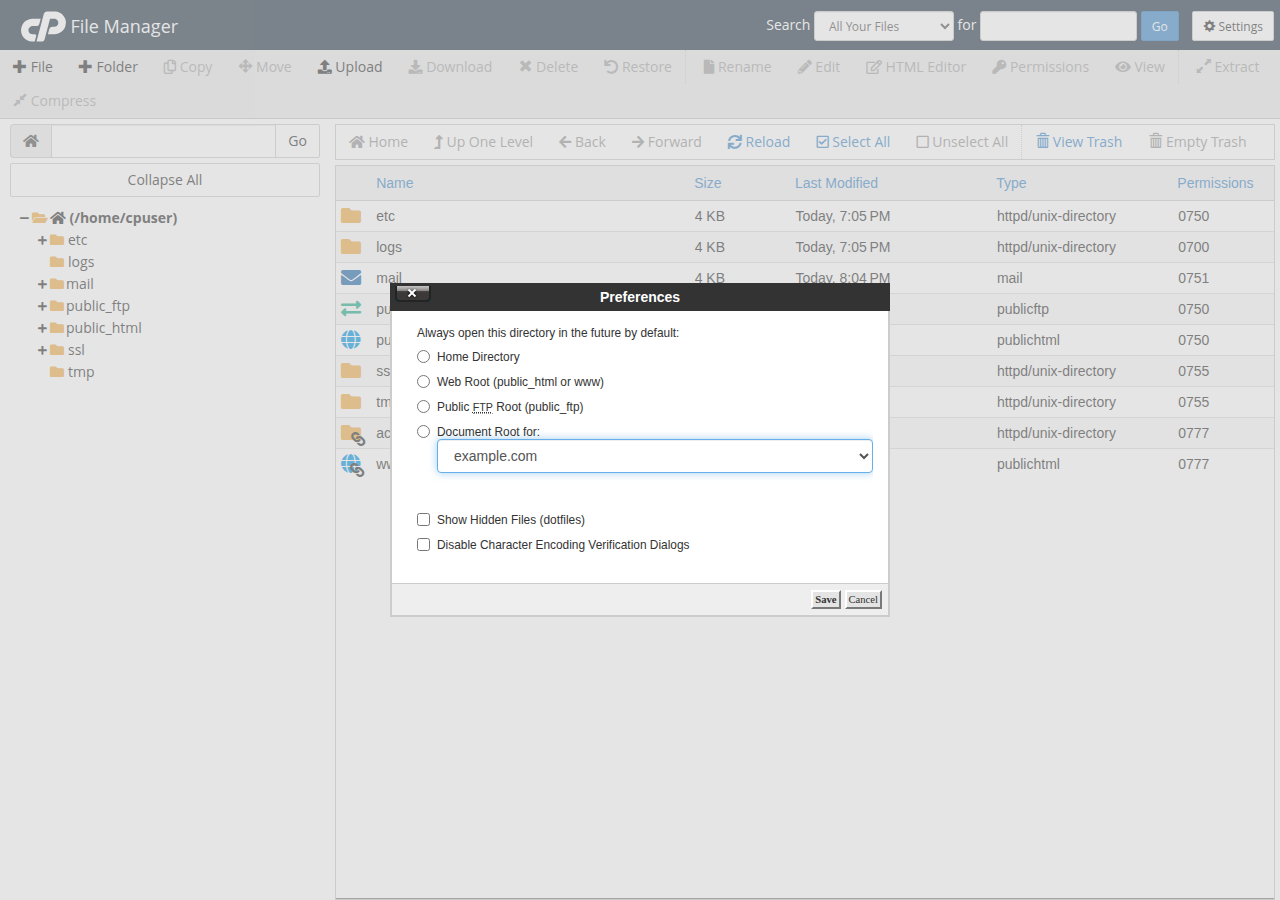
- Open your file manager.In the client area, open Hosting › My hosting, click your panel's button on the domain's row, then open File Manager. Guides: cPanel File Manager and DirectAdmin File Manager.
- Show hidden files.Files starting with a dot are hidden by default. In cPanel, use Settings and tick "Show Hidden Files".
- Back up the existing file.If
.htaccessexists, download it or copy its contents into a text file first. This is your one-click undo. - Create or edit.If there is no
.htaccess, create a new file with exactly that name. Open it in the editor. - Add your rules and save.Put
RewriteEngine Onnear the top, then your rules. Save, then test (section 7).
You can also edit the file over FTP, or over SSH if it is enabled on your account.
3. How a rewrite rule works
Every rule has the same parts. Once you can read them, most rules you find online make sense.
RewriteEngine On
RewriteCond %{HTTPS} off
RewriteRule ^(.*)$ https://%{HTTP_HOST}/$1 [R=301,L]RewriteCondis an optional test. The rule below it runs only if the condition matches. Here: "the request did not use HTTPS". Several conditions in a row must all match, unless you add[OR].RewriteRule pattern target [flags]. The pattern is a regular expression tested against the requested path. The target is where the request goes.$1inserts whatever the first( )in the pattern captured.- Flags in square brackets change the behaviour.
Inside .htaccess, Apache strips the folder path before testing the pattern. A request for /blog/post is tested as blog/post. So write ^blog/ not ^/blog/. A pattern that starts with a slash is the most common reason a copied rule "does nothing".
The flags you will use most:
| Flag | Meaning | Use it when |
|---|---|---|
| R=301 | Permanent redirect; the browser address changes | A page or domain has moved for good |
| R=302 | Temporary redirect | Testing a rule, or a short-term move |
| L | Last: stop processing further rules for this pass | Almost every rule |
| NC | No case: match upper and lower case | Host names and file extensions |
| QSA | Query string append: keep the original ?parameters | Rewriting to a script that also needs the visitor's parameters |
| NE | No escape: don't encode characters such as # or % in the target | Targets that contain special characters |
A rule without R is an internal rewrite: Apache serves a different file, but the visitor's address bar does not change. That is how clean URLs work.
4. Rules most websites need
Put redirect rules above any application block (such as # BEGIN WordPress), because rules run from top to bottom.
Force HTTPS, and choose www or non-www
Make sure your free SSL certificate is active first, then:
RewriteEngine On
RewriteCond %{HTTPS} off
RewriteRule ^ https://%{HTTP_HOST}%{REQUEST_URI} [R=301,L]
If you also want to settle on www or non-www, don't stack a second rule under this one. That makes a two-hop redirect chain. Use the single combined rule in how to redirect non-www to www, which handles HTTPS and the host name in one hop and covers Cloudflare loops. cPanel also has a "Force HTTPS Redirect" switch on its Domains page. Use either the switch or the rule, not both.
Redirect one old page to a new one
RewriteRule ^old-page\.html$ /new-page/ [R=301,L]
RewriteRule ^example\.html$ /example.php [R=301,L]
Escape dots in the pattern with a backslash (\.), because a bare dot means "any character".
Move a whole domain to a new one
Put this in the old domain's .htaccess. Every path is carried over, so olddomain.in/contact lands on newdomain.in/contact:
RewriteEngine On
RewriteCond %{HTTP_HOST} ^(www\.)?olddomain\.in$ [NC]
RewriteRule ^ https://www.newdomain.in%{REQUEST_URI} [R=301,L]
Clean URLs for a hand-written PHP site
Serve about.php at /about, and send visitors who type the old .php address to the clean one:
RewriteEngine On

# 1. Redirect /about.php to /about (only for what the visitor typed)
RewriteCond %{THE_REQUEST} \s/+(.+?)\.php[\s?] [NC]
RewriteRule ^ /%1 [R=301,L,NE]

# 2. Internally serve /about from about.php
RewriteCond %{REQUEST_FILENAME} !-d
RewriteCond %{REQUEST_FILENAME}.php -f
RewriteRule ^(.+?)/?$ $1.php [L]
The first block checks THE_REQUEST, the original request line, so it never fires on the internal rewrite made by the second block. That is what stops it looping. Don't add these blocks to a WordPress or Laravel site: those already route everything through index.php.
A pretty URL for a script that takes a parameter:
RewriteRule ^product/([0-9]+)/?$ product.php?id=$1 [L,QSA]/product/42 now runs product.php?id=42, and QSA keeps any extra parameters such as ?ref=ad.
5. WordPress and Laravel defaults
Most applications ship their own rules. You rarely write these by hand, but it helps to recognise them.
WordPress writes this block when you save Settings, then Permalinks. If pretty permalinks return "Not Found", open that page and click Save to rewrite it, or paste it back yourself:
# BEGIN WordPress
<IfModule mod_rewrite.c>
RewriteEngine On
RewriteBase /
RewriteRule ^index\.php$ - [L]
RewriteCond %{REQUEST_FILENAME} !-f
RewriteCond %{REQUEST_FILENAME} !-d
RewriteRule . /index.php [L]
</IfModule>
# END WordPress
WordPress may overwrite anything between the BEGIN and END lines, so keep your own rules above it. For a WordPress site in a subfolder, RewriteBase and the last line change to that folder: see section 6, and how to create a default .htaccess file for WordPress.
Laravel ships an .htaccess inside its public folder. Its main parts look like this:
<IfModule mod_rewrite.c>
    <IfModule mod_negotiation.c>
        Options -MultiViews -Indexes
    </IfModule>

    RewriteEngine On

    # Handle Authorization Header
    RewriteCond %{HTTP:Authorization} .
    RewriteRule .* - [E=HTTP_AUTHORIZATION:%{HTTP:Authorization}]

    # Redirect Trailing Slashes If Not A Folder...
    RewriteCond %{REQUEST_FILENAME} !-d
    RewriteCond %{REQUEST_URI} (.+)/$
    RewriteRule ^ %1 [L,R=301]

    # Send Requests To Front Controller...
    RewriteCond %{REQUEST_FILENAME} !-d
    RewriteCond %{REQUEST_FILENAME} !-f
    RewriteRule ^ index.php [L]
</IfModule>
Keep it with the contents of public/. Don't solve Laravel's folder layout with a rewrite that exposes the whole project from public_html: that can make your .env file readable from the web. The safe layout is in deploying Laravel on cPanel.
6. RewriteBase and sites in a subfolder
RewriteBase tells Apache which URL path to put in front of a relative target (one that doesn't start with / or http). You need it when a site lives in a subfolder and its rules use relative targets.
For WordPress installed in public_html/blog, the block in public_html/blog/.htaccess becomes:
RewriteEngine On
RewriteBase /blog/
RewriteRule ^index\.php$ - [L]
RewriteCond %{REQUEST_FILENAME} !-f
RewriteCond %{REQUEST_FILENAME} !-d
RewriteRule . /blog/index.php [L]
Two more things about folders:
- Each folder's
.htaccesstakes over from its parent's rewrite rules. A subfolder whose.htaccesscontains rewrite rules does not also run the parent folder's rules unless you addRewriteOptions Inherit. This surprises people when a parent's HTTPS rule stops working inside a subfolder app. - Subdomains and addon domains stored inside
public_htmldo inherit its rules when they have no rewrite rules of their own. A domain-wide redirect inpublic_htmlcan therefore catch them too. Add aRewriteCond %{HTTP_HOST}line to limit the rule to the right host.
7. Test your rules safely
- Start with a 302.Browsers remember 301 redirects, sometimes for a long time. Use
R=302while testing and change it toR=301only when the rule is right. - Test in a private window, or clear the browser cache, so an old redirect doesn't fool you.
- Check with curl.
curl -I https://yourdomain.in/old-page.htmlshows the status code and theLocation:header without following it.curl -sIL --max-redirs 5follows the whole chain and exposes loops. - Add a test parameter on cPanel.Our cPanel servers have a caching proxy in front of Apache that can keep answering with a stored copy of a page or redirect for up to two hours (measured 22 September 2026). Add a unique query string, such as
?t=123, so the request reaches Apache and your new rule. - Check a few different URLsthe home page, a deep page, a page with a query string, and an image or CSS file, to be sure you haven't redirected your assets.
curl -I "http://yourdomain.in/old-page.html?t=123"
curl -sIL --max-redirs 5 "http://yourdomain.in/?t=124" | grep -Ei '^(HTTP|location)'On cPanel, if a bad rule makes Apache return a 500 error, visitors may still get the cached copy of pages they opened recently, so the site looks fine for a while. Always check an uncached URL (with a fresh ?t= value) right after saving.
8. Fixing 500 errors and redirect loops
A rewrite mistake shows up in one of two ways: the whole site returns 500 Internal Server Error, or the browser says "too many redirects". In either case, put your backup .htaccess back first so the site works, then fix the rule calmly.
| Symptom | Likely cause | Fix |
|---|---|---|
| 500 error right after saving | A typo (for example RewriteEngin), a missing space, or curly quotes pasted from a word processor | Restore the backup; retype the rule in plain text |
| 500 error with an Options line | DirectAdmin allows only these in .htaccess: Indexes, IncludesNOEXEC, MultiViews, SymLinksIfOwnerMatch, FollowSymLinks, None | Remove the line or use one of the allowed options |
| 500 error with a php_value or php_flag line | PHP on our shared servers does not run as an Apache module, so Apache rejects these lines | Remove them and set PHP values in your control panel |
| "Too many redirects" in the browser | A rule redirects to a URL it also matches, or two redirects point opposite ways | Add a RewriteCond that excludes the target; keep one redirect method |
| Error log says "exceeded the limit of 10 internal redirects" | An internal rewrite matches its own result | Add a condition such as !-f, or exclude the target path |
| Rule does nothing | Pattern starts with a slash, RewriteEngine On is missing, or the rule sits below one that already stopped with L | Remove the leading slash, add the line, move the rule higher |
For PHP settings, use the panel as described in PHP memory errors and custom php.ini.
Read the error log. Apache writes the exact reason for a 500 error, such as Invalid command 'RewriteEngin' or RewriteRule: bad flag delimiters, to your site's error log. cPanel shows recent entries under Metrics, then Errors. DirectAdmin has per-domain logs. See reviewing error logs in cPanel and DirectAdmin.
Loops after an HTTPS rule usually come from Cloudflare's Flexible SSL mode or WordPress address settings: see how to redirect non-www to www.
If a 500 error isn't coming from .htaccess at all, see troubleshooting a 500 Internal Server Error and checking your hosting resource usage.
9. Windows (Plesk) hosting: IIS URL Rewrite, not .htaccess
Domain India Windows hosting runs IIS on Windows Server with the Plesk panel. IIS does not read .htaccess, so Apache rules have no effect there. Rewrite and redirect rules go in the web.config file in your site's root (httpdocs), in IIS URL Rewrite format. An HTTPS redirect looks like this:
<configuration>
  <system.webServer>
    <rewrite>
      <rules>
        <rule name="Force HTTPS" stopProcessing="true">
          <match url="(.*)" />
          <conditions>
            <add input="{HTTPS}" pattern="off" ignoreCase="true" />
          </conditions>
          <action type="Redirect" url="https://{HTTP_HOST}/{R:1}" redirectType="Permanent" />
        </rule>
      </rules>
    </rewrite>
  </system.webServer>
</configuration>
If your web.config already has a configuration section, add only the rewrite part inside its existing system.webServer section. A malformed web.config breaks the whole site, so keep a copy before editing. For HTTPS alone, Plesk's "Permanent SEO-safe 301 redirect from HTTP to HTTPS" option is simpler: see HTTPS redirect in Plesk.
10. Where Domain India fits
Every Domain India Linux shared hosting plan (cPanel, DirectAdmin and Webuzo) runs Apache with mod_rewrite loaded and .htaccess allowed, and includes free SSL and a file manager. That is everything the rules in this guide need. For a WordPress or PHP site, these are sensible starting points:
- 25 GB NVMe SSD Storage
- 50 GB Monthly Bandwidth
- 1 Website
- 10 Email Accounts
- 10 GB NVMe SSD Storage
- 50 GB Monthly Bandwidth
- 1 Website
- 5 Email Accounts
Frequently asked questions
How do I enable mod_rewrite on Domain India hosting?
You don't need to. mod_rewrite is already loaded on Domain India's cPanel, DirectAdmin and Webuzo servers and .htaccess files are allowed. Add the line RewriteEngine On to the .htaccess file in your website's folder, usually public_html, and put your rules below it.
Where do I put RewriteEngine On?
Near the top of the .htaccess file in your website's root folder, above your rewrite rules. It applies to that folder and its subfolders. Having it more than once in the same file is harmless.
Do I need to restart Apache after editing .htaccess?
No. Apache reads .htaccess on every request, so a change works as soon as you save the file. On cPanel servers a caching proxy can keep serving an older copy of a page or redirect for up to two hours, so add a unique query string such as ?t=123 when you test.
Why does my site show a 500 error after I edited .htaccess?
Almost always a syntax problem in the file: a typo, curly quotes from a word processor, a php_value line, or an Options setting the server does not allow. Restore your backup copy of .htaccess to bring the site back, then check the error log in your control panel for the exact line.
What is the difference between a 301 and a 302 redirect?
A 301 is permanent: browsers remember it and search engines move the old page's ranking to the new address. A 302 is temporary and is not cached the same way, which makes it the safer choice while you test a new rule.
What does RewriteBase do?
It sets the URL path Apache puts in front of a relative rewrite target. You need it when a site such as WordPress lives in a subfolder, for example RewriteBase /blog/ for a site in public_html/blog.
Does .htaccess work on Windows hosting?
No. Windows hosting runs IIS, which ignores .htaccess. Rewrite and redirect rules go in the site's web.config file using IIS URL Rewrite rules, and Plesk has its own option for a permanent HTTP to HTTPS redirect.
Ready to put your rules in place? Start with the non-www to www redirect guide for HTTPS and your canonical address, use the File Manager guide to edit .htaccess, or compare cPanel, DirectAdmin and Webuzo hosting if you need a plan. Stuck on a 500 error or a loop? Open a support ticket with your domain and the rule you added.
Apache with mod_rewrite loaded, free SSL and a file manager on every Linux shared plan. Add your rules and they work.
See cPanel hosting plans