Your website has outgrown its plan: the disk is nearly full, you need more mailboxes, or you want to host a second site. This page explains how changing a Domain India hosting plan works today, what an upgrade costs part-way through your term, and what happens when you move to a smaller plan.
Yes. You can upgrade an active cPanel or DirectAdmin hosting plan at any time from the client area: open your hosting service and choose Change plan. You pay only the difference between the two plans for the time left until your renewal date, plus 18% GST, and the plan changes as soon as that invoice is paid. A downgrade is scheduled for your renewal date instead, with no refund for the current term. Webuzo and Windows customers should contact support before changing plan.
1. Can I upgrade at any time?
Yes, as long as the hosting account is active. There is no waiting period and you do not have to wait for your renewal. The upgrade changes the plan of the hosting account you already have: you do not order a new account or move your website.
Two conditions apply:
- The account must be active. A suspended or cancelled account cannot change plan. Clear the unpaid invoice or the suspension first, then upgrade.
- The new plan must use the same control panel. A cPanel plan upgrades to a bigger cPanel plan, a DirectAdmin plan to a bigger DirectAdmin plan. Moving between panels, for example from DirectAdmin to cPanel, or from Linux hosting to Windows, is a migration to a new account, not a plan change. See section 7.
2. How to upgrade from the client area
- Sign inand open Hosting › My hosting (/client/services/hosting), then select your hosting service.
- Choose Change plan.The page shows your current plan and billing cycle, and every plan on the same control panel.
- Compare the plans.Each higher plan shows its monthly price, its features, and the exact amount due now, with the tax shown separately.
- Click Upgradeon the plan you want and confirm. You are taken straight to the invoice payment page.
- Pay the invoice.The plan on your account changes as soon as the payment is confirmed, and your new plan's limits apply.
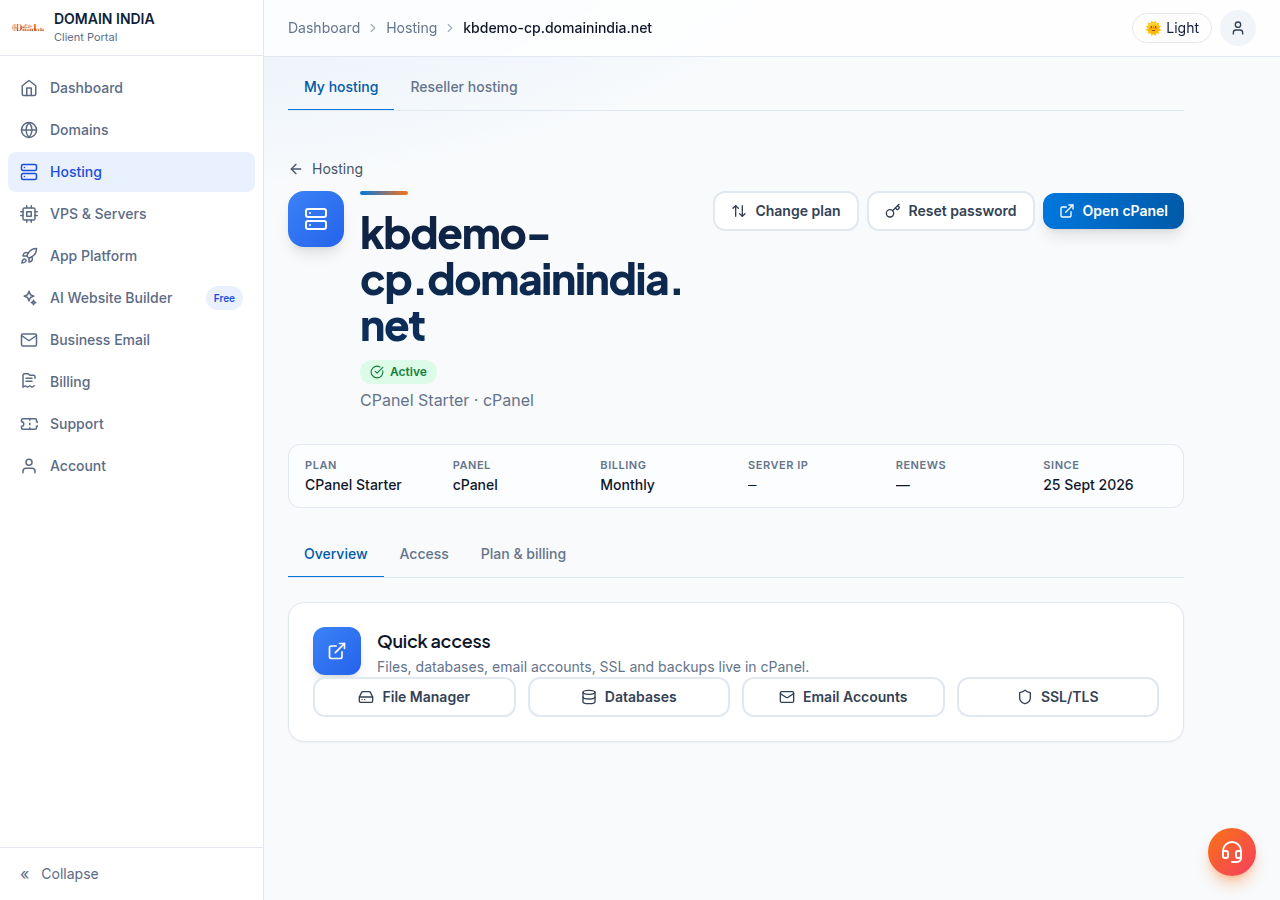
If the upgrade invoice is left unpaid, nothing changes: you stay on your current plan. You can only have one unpaid upgrade invoice for a service at a time, so pay it or ask support to cancel it before choosing a different plan. The invoice is due 7 days after it is raised, and it appears under Invoices with your other bills.
Before you pay for a bigger plan, look at your control panel's disk and resource usage. Old backups, unused WordPress installs and full mailboxes often explain a "disk full" warning, and deleting them costs nothing.
3. How much does an upgrade cost?
You are not charged the full price of the new plan. The client area works out the difference for the part of your term that is left:
Your renewal date does not change. You are paying to use the bigger plan for the rest of the term you have already bought. From your next renewal, the renewal invoice is for the new plan.
A worked example
Take cPanel Starter on a one-year term, upgraded to cPanel Growth with 180 days left until renewal. Domain India list prices on 19 September 2026, excluding 18% GST, are ₹1,350 a year for cPanel Starter and ₹2,160 a year for cPanel Growth on the 1-year cycle.
| Item | Amount |
|---|---|
| Days left of the term | 180 of 360 |
| Credit: unused cPanel Starter (half of ₹1,350) | ₹675 |
| Charge: cPanel Growth for the same 180 days (half of ₹2,160) | ₹1,080 |
| Subtotal you pay | ₹405 |
| GST at 18% | ₹72.90 |
| Total due now | ₹477.90 |
The system counts a month as 30 days, so a one-year term is 360 days in this calculation. The closer you are to your renewal date, the smaller the upgrade invoice. If the difference works out to nothing, for example on the last day of your term, the plan changes straight away with no invoice.
Do not work it out by hand. The Change plan page shows the precise amount due for each plan, for your own dates and billing cycle, before you click Upgrade.
4. What changes after an upgrade
- Your plan name and limits. Disk space, bandwidth, websites, mailboxes and databases follow the new plan.
- Your renewal price. Your next renewal invoice is for the new plan, at the same billing cycle.
- Nothing else about the account. It is the same hosting account, on the same domain, with the same control panel login. Your files, databases and mailboxes stay where they are.
If the new limits are not showing in your control panel shortly after payment, open a ticket with the invoice number so we can check the account.
5. How much does each plan cost?
Shared hosting is billed for 1, 2 or 3 years, and the order page shows any discount for a longer term before you pay. Here is what each tier gives you, by control panel, from the Domain India catalogue on 19 September 2026:
| Plan | Storage | Bandwidth | Websites | Email accounts | MySQL databases |
|---|---|---|---|---|---|
| cPanel Starter | 25 GB NVMe | 50 GB | 1 | 10 | 5 |
| cPanel Growth | 50 GB NVMe | 100 GB | 5 | 50 | 10 |
| cPanel Business | 100 GB NVMe | Unmetered | 25 | 150 | 50 |
| DA Starter | 10 GB NVMe | 50 GB | 1 | 5 | 5 |
| DA Growth | 30 GB NVMe | Unmetered | 5 | 50 | 10 |
| DA Business | 100 GB NVMe | Unmetered | 25 | 250 | 50 |
For live prices on every plan, including Webuzo and Windows, see the cPanel, DirectAdmin, Webuzo and Windows hosting pages, or compare everything on Plans. Domain India list prices exclude 18% GST, and the Change plan page shows the exact amount due for your own account.
6. Moving to a smaller plan
You can also move down, from the same Change plan page. A downgrade works differently from an upgrade:
- Choose Schedule downgrade on the smaller plan and confirm.
- The change is booked for your renewal date. You keep your current plan until then.
- Changed your mind? A banner on the Change plan page shows the scheduled downgrade with a Cancel downgrade button.
- Upgrading before the date cancels the scheduled downgrade automatically.
- There is no refund or credit for the rest of the current term.
- Your files, mailboxes and databases must fit the smaller plan's limits. Delete what you no longer need before the renewal date.
- Only one downgrade can be scheduled at a time.
7. Switching control panel, Webuzo and Windows
Different control panel or operating system. A plan change only moves between plans on the same panel. To go from DirectAdmin to cPanel, from Linux to Windows, or from shared hosting to a VPS, you order the new service and move the website across. Read Migrating your website to us and open a ticket so we can plan the move with you before you cancel anything.
Webuzo and Windows (ASP.NET) hosting. Contact support before changing plan on these. We will confirm the options available for your account and make the change with you.
8. Not sure which plan you need?
Tell us what you are running and what is running out, and we will suggest the smallest plan that fits. Support is available on 24/7 live chat, and tickets get a first response within 15 minutes; resolution time depends on the issue. We do not offer phone support. Open a ticket at /support/ticket, or from the client area at New ticket. Include your domain name and what you want to change.
Frequently asked questions
Can I upgrade my Domain India hosting plan at any time?
Yes. An active cPanel or DirectAdmin hosting account can be upgraded at any point in its term from the client area: open the hosting service and choose Change plan. You pay only the difference for the time left until your renewal date, plus 18% GST. Webuzo and Windows customers should contact support first.
How much does it cost to upgrade part-way through my term?
You get credit for the unused value of your current plan and pay for the new plan over the same remaining days, so you pay only the difference plus 18% GST. The Change plan page shows the exact amount due for each plan before you confirm.
When does the upgrade take effect?
As soon as the upgrade invoice is paid, the plan on your account changes and the new plan's limits apply. If the invoice is not paid, you stay on your current plan.
Does upgrading change my renewal date?
No. Your renewal date stays the same. You pay for the bigger plan for the rest of the term you already bought, and your next renewal invoice is for the new plan.
Can I downgrade my hosting plan?
Yes. On the Change plan page choose Schedule downgrade. The smaller plan starts on your renewal date, you keep your current plan until then, and there is no refund for the current term. You can cancel a scheduled downgrade from the same page before that date.
Will I lose my website or email when I upgrade?
No. An upgrade changes the plan of your existing hosting account. Your files, databases, mailboxes and control panel login stay the same, and you do not need to move anything.
Can I move from DirectAdmin to cPanel, or from Linux to Windows hosting, by upgrading?
No. A plan change stays on the same control panel. Moving to a different panel or operating system means ordering the new service and migrating your website, so open a support ticket first and we will plan the move with you.
I have an unpaid upgrade invoice and want a different plan. What do I do?
Only one unpaid upgrade invoice is allowed per hosting service. Pay it, or ask support to cancel it, and then choose the other plan from the Change plan page.
Ready to grow your hosting? Open Hosting › My hosting in the client area and choose Change plan on your hosting account, compare plans on the cPanel or DirectAdmin hosting pages, or open a ticket if you would like help choosing.
Open your hosting service, choose Change plan, and see the exact upgrade price for your own renewal date before you pay.
Go to My hosting