AI Website Builder
Website for coaching classes — made by AI in minutes
Describe your institute and the AI builds a site with your courses, batch timings, faculty and an enquire-for-admission button.
From ₹200/month + 18% GST
Build and preview one website free, no card needed. Publishing it needs a paid plan.
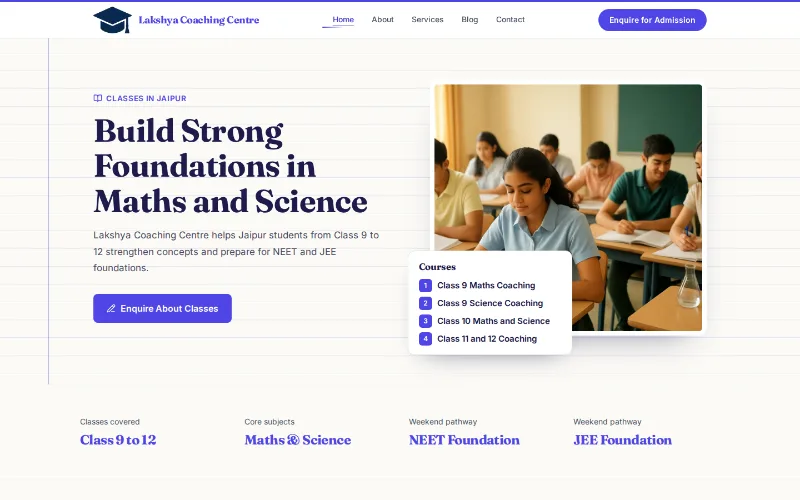
A website made for coaching classes
Parents and students compare coaching institutes online before they visit. They look for the subjects and classes you teach, batch timings, fees, the teachers, and how far you are from home or school. If that information lives only on pamphlets, many of them never call.
The builder writes for tuition classes, coaching centres and exam-prep institutes. A neighbourhood maths and science tutor gets a friendly site on a design like Vidya. An institute preparing students for JEE, NEET, UPSC or bank exams is usually given a bolder design like Pariksha, with the exams as tabs on a batch board. Online classes can be listed alongside classroom batches if you run both.
Either way, you see a private draft first, change what you like by chat and publish when it is right.
Admission season is short. A site that is ready before results week lets you share one link in parent WhatsApp groups and on school notice boards, with the batches, fees and contact details in one place.
What your coaching website includes
The AI picks a design that suits your trade, like Vidya below. You can switch to any of 190+ designs at any time, in any colour, without losing your words.
On a design like Vidya
- A ruled-notebook first screen with your institute name and an enquire-for-admission button
- Courses on a tabbed card, by class, board or exam
- Batch timings and the start date of the next batch
- Faculty with their subjects and qualifications
- Fee details if you choose to show them, and an enquiry form
- A WhatsApp button for parents' quick questions
In your trade's words
- Headings read "What We Teach", "Courses & Programmes", "Course Fees" and "Our Faculty".
- The visitor chat begins with the courses, the fees and when the next batch starts.
No result promises
- The Ministry of Education's 2024 guidelines for coaching centres warn against misleading claims about ranks, results or facilities. Avoid selection guarantees and do not show toppers without consent and records.
- Write fees and batch dates yourself; the AI cannot know them.
- Show only the facilities you really have, such as classroom size, library hours or a test series, and keep them up to date.
- Avoid wording that pressures students, such as warnings that seats are about to run out, unless it is true.
On every site
- Your own domain on any paid plan, with free SSL
- Made for phones first, so it reads well on a small screen
- Edit by chat: every change is saved and can be undone
- Add Hindi or another Indian language, with a language switcher
- Page titles and descriptions you can edit for search engines
Apps that fit coaching classes
Courses & Classes
from ₹299/month + GSTRun batches online: students enrol, pay fees in instalments and you see who has paid. Useful at admission time, when the phone rings all day.
Apps are optional add-ons. Every institute site carries an enquiry form, and enquiries arrive in your dashboard.
How to make your coaching website in 3 steps
- 1
Write one line, for example "Maths and science tuition for classes 8 to 12, CBSE and state board, Thane West".
- 2
The AI sets out courses, batches and faculty, and picks a design suited to your kind of institute.
- 3
Add real fees and dates, review the preview and publish on your domain.
The AI writes a first draft from what you tell it. Check prices, hours and every claim before you publish.
Questions from coaching classes
Can students enquire about admission from the site?
Yes. The enquire-for-admission button leads to a form, and enquiries reach your dashboard. A WhatsApp button on your number lets parents message you directly as well.
Can I collect fees online?
Yes, with the Courses & Classes app: students enrol in a batch and pay in instalments, and you can see who has paid and who has not.
Should I show my toppers and results?
Only real results you can prove, and only with the written consent of the student and a parent. A plain account of what you teach and how is the safer start. Never show a student's marks or photo without that permission.
We prepare students for JEE and NEET. Will the design suit that?
Mention the exams in your description. The AI then usually picks Pariksha, a design built around exam batches, demo classes and a next-batch strip. You can switch designs any time.
Can I update the timetable every term?
Yes. Ask the chat to change the batch timings or add a new batch whenever the term changes; the change shows on the site at once. Old batches can be removed the same way.
See a first draft of your coaching website
From ₹200/month + 18% GST
Build and preview one website free, no card needed. Publishing it needs a paid plan.