One hosting account can answer for more than one name. You can point a second domain at the website you already have, run a separate website on another domain, or split part of your site onto an address like blog.yourdomain.com. cPanel used to call these parked domains, addon domains and subdomains. This guide explains the difference, how current cPanel handles all three from one Domains page, what DNS each needs, and how many you can add on Domain India plans.
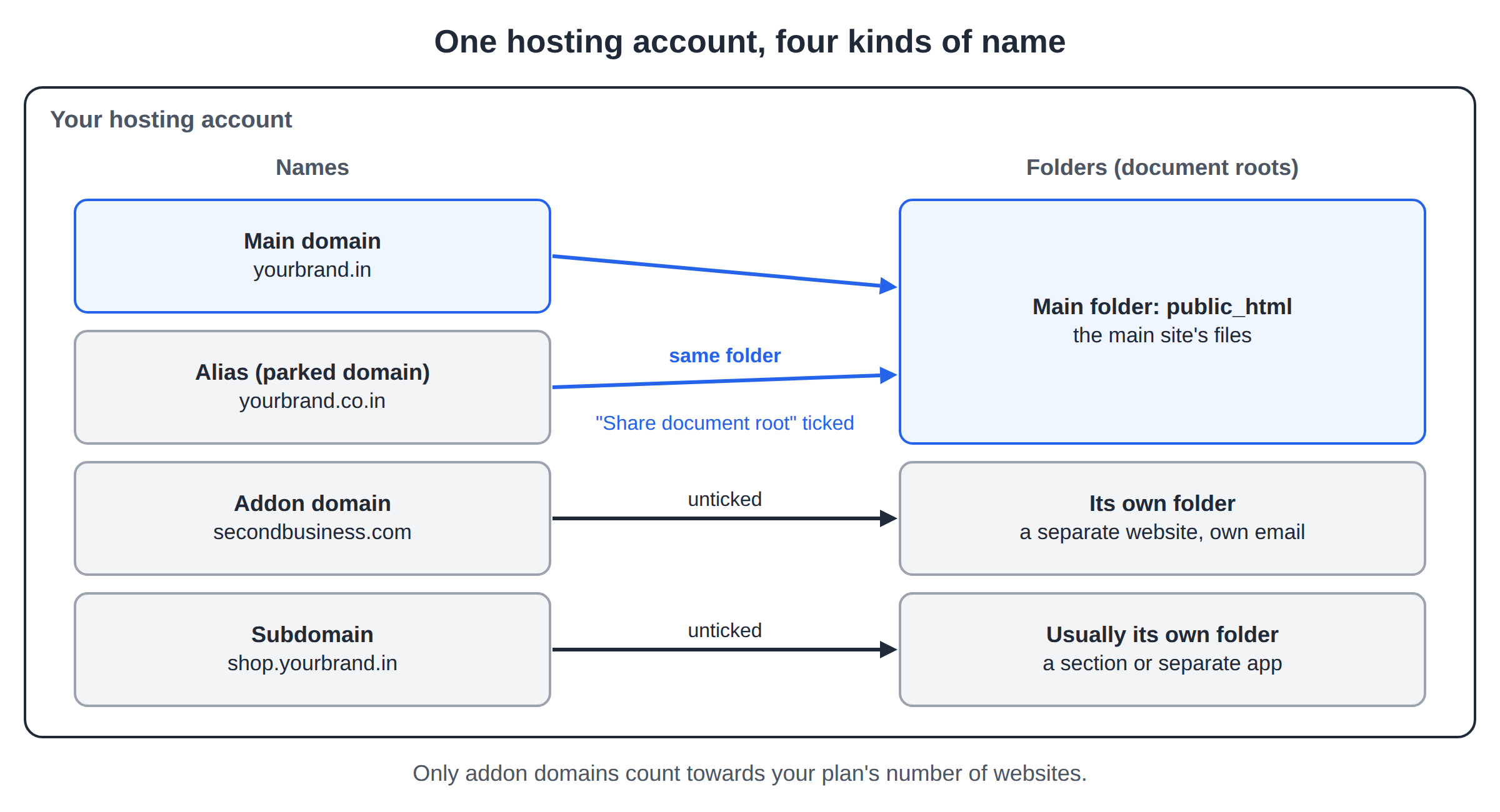
A parked domain, now called an alias, shows exactly the same website as your main domain. An addon domain is a separate website with its own folder, files and email, hosted in the same account. A subdomain is a prefix on a domain you already have, such as blog.yourdomain.com, usually with its own folder. In current cPanel you create all three from Domains › Create A New Domain, and each one works only when its DNS points to your hosting server.
1. The three types at a glance
| Type | What visitors see | Own files? | Example | Counts as a website? |
|---|---|---|---|---|
| Alias (parked domain) | The same site as your main domain | No, shares the main folder | yourbrand.co.in showing yourbrand.in | No |
| Addon domain | A different website | Yes, its own folder | secondbusiness.com in the same account | Yes |
| Subdomain | A section or separate app under your domain | Usually its own folder | shop.yourbrand.in | No |
The main domain is the one your hosting account was created with. Everything else is added on top of it.
2. How current cPanel organises them
Older cPanel had separate Parked Domains (later Aliases), Addon Domains and Subdomains icons. Current cPanel brings them together on one page: Domains, in the Domains section. If you still see an older icon, it opens the same tool or does the same job.
On the Domains page, Create A New Domain asks for a name and has one important checkbox: Share document root with your main domain.
- Ticked: the new domain shows the same files as your main domain. That is an alias, the old parked domain.
- Unticked: you choose a separate folder. For a new registered domain that is an addon domain; for a name like
blog.yourdomain.comit is a subdomain.
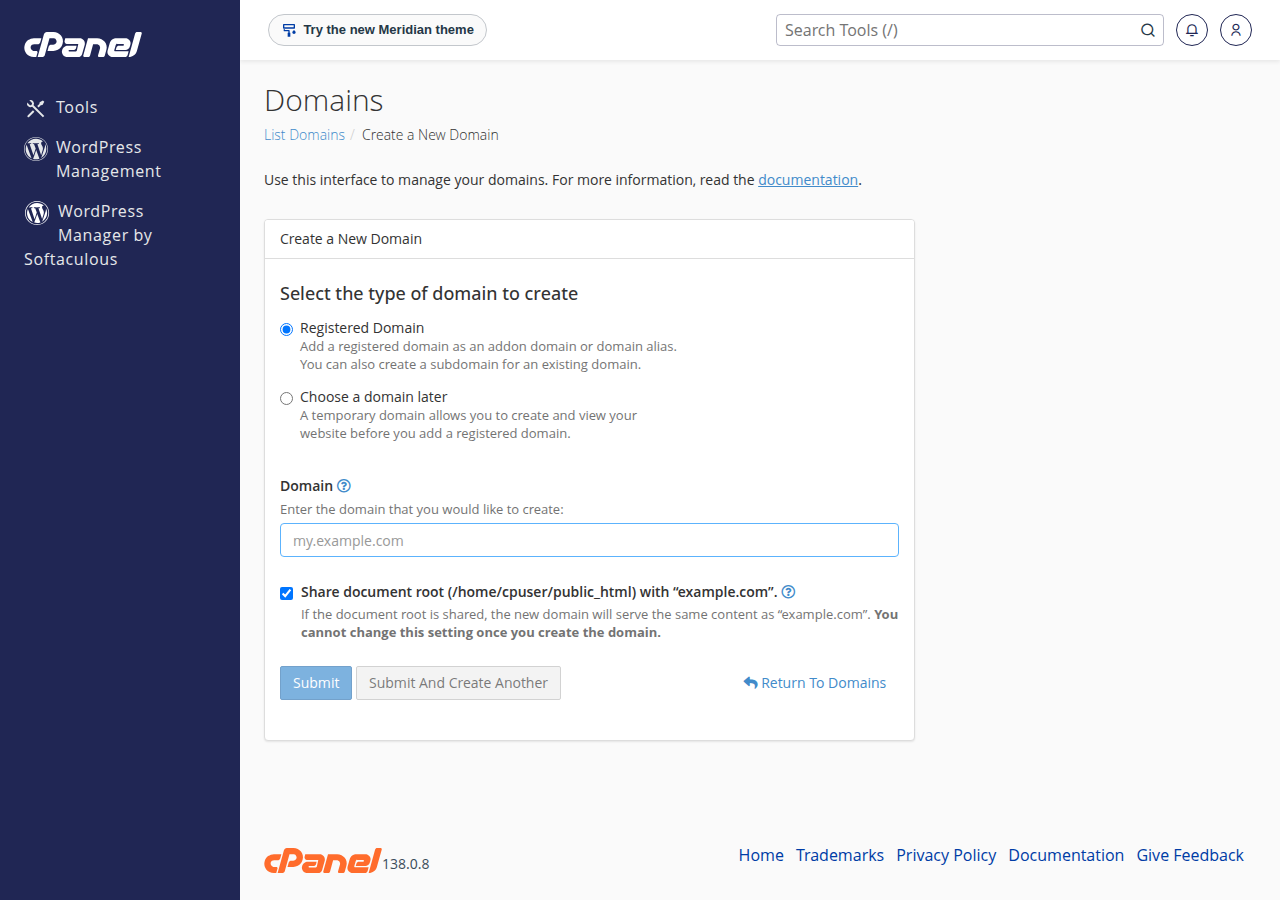
The same page lists every domain in the account, and lets you change a document root or remove a domain later.
3. Aliases (parked domains): one site, several names
An alias makes another domain show your existing website: the .in, .co.in and .com versions of your brand, a common misspelling of your name, or an old domain kept working after a rebrand. It has no files of its own, so there is nothing to upload.
- Making extra domains work in a minute, with no files to manage
- Protecting brand variants and misspellings
- Search engines see the same page on two addresses, which splits ranking signals
- Visitors stay on the alias address, so your brand appears two ways
If the extra domain should send people to your main site, use a permanent (301) redirect rather than a plain alias. The visitor ends up on your main address, and search engines treat the two as one site. cPanel has a Redirects tool in the same Domains section; see How do I redirect non-www to www for how redirects work.
4. Addon domains: a second website in the same account
An addon domain is a fully separate website run from the same hosting account, so you can have WordPress on one domain and a plain HTML site on another.
It gets its own document root for files, its own email addresses such as [email protected], and its own free SSL certificate once its DNS points to the server. What it shares is everything else: disk space, databases, mailboxes and resource limits all come from one plan, so a busy site on one addon domain can slow the others. It also counts towards your plan's number of websites (section 9).
When you create one, cPanel suggests a folder named after the domain. Accepting the suggestion is fine; just make sure the folder is not inside another site's folder, or files from one site will be visible through the other.
5. Subdomains: sections and separate apps
A subdomain is a name in front of a domain you already have: blog.yourdomain.com, shop.yourdomain.com, staging.yourdomain.com. You don't register or pay for it separately. It belongs to the domain.
Typical uses are a blog, shop or help centre running different software from the main site, a staging copy for testing changes, or a separate app such as a booking system. Most subdomains get their own folder, so they are separate sites technically, but they don't use up your plan's website count. www is itself a subdomain, and cPanel sets it up for every domain automatically.
A subdomain can be on any domain in the account, including an addon domain: blog.secondbusiness.com works the same way.
6. How to add a domain or subdomain in cPanel
- Open cPanel.In the client area go to Hosting › My hosting and click the cPanel button on your domain's row. See How to log in to cPanel for the other routes.
- Open Domains.In the Domains section, click Domains, then Create A New Domain.
- Type the name.Enter the full name, such as
secondbusiness.comfor an addon domain orblog.yourdomain.comfor a subdomain. - Choose the document root.Tick Share document root for an alias. Untick it for an addon domain or a subdomain, and accept or edit the suggested folder.
- Submit.cPanel creates the domain and its DNS zone or record on the server.
- Add content.Upload files with the File Manager or FTP, or install WordPress into the new folder with Softaculous or WP Toolkit.
If cPanel refuses the name, the usual reasons are a typo, the domain already existing in another hosting account, or the plan's limit being reached.
7. The DNS each one needs
Adding a domain in cPanel only prepares the server. Visitors reach it only when the domain's DNS points to your hosting server.
| Type | What DNS it needs | If your DNS is managed elsewhere |
|---|---|---|
| Alias | The domain must point to your hosting server | Add A records for @ and www with the server IP |
| Addon domain | The domain must point to your hosting server | Add A records for @ and www with the server IP |
| Subdomain | Nothing extra if the main domain uses your hosting nameservers | Add an A record for the subdomain name with the server IP |
There are two ways to point a domain at your hosting, and both are shown on the Point a domain to this hosting card on your hosting service page in the client area:
- Option 1: hosting nameservers. Set the domain's nameservers to the ones on that card. cPanel then manages all the domain's records, including subdomains. This suits a domain whose website and email are both with us.
- Option 2: A records. Keep your current DNS, such as Cloudflare or another provider, and add A records pointing to the server IP on that card. Use this if your email or other services live elsewhere.
Copy the values from the card, never from an old article. For step-by-step help see How do I change my nameservers and How to change your domain DNS settings. DNS changes can take several hours to reach every network.
Our cPanel servers issue free Let's Encrypt certificates through AutoSSL, and a certificate can be issued only once the name points to the server. If a new addon domain or subdomain shows a certificate warning, check its DNS first; the certificate follows once DNS has updated.
8. DirectAdmin and Webuzo: same ideas, different names
The concepts are the same on every control panel; only the menu names differ.
- Separate websites (cPanel's addon domains) are added as another domain in the account, each with its own folder.
- Aliases (cPanel's parked domains) are called domain pointers in DirectAdmin. A pointer can either show the same site as an alias or redirect visitors to the main domain.
- Subdomains are created per domain, as in cPanel.
The DNS rules in section 7 apply unchanged. Menu layouts vary between panel versions, so if you can't find an option, ask support and tell us which panel you are on.
9. How many domains Domain India plans allow
Each additional website counts towards your plan's website limit. These are the counts in the Domain India catalogue on 19 September 2026:
| Plan | Websites | Storage |
|---|---|---|
| cPanel Starter | 1 | 25 GB NVMe |
| cPanel Growth | 5 | 50 GB NVMe |
| cPanel Business | 25 | 100 GB NVMe |
| DA Starter | 1 | 10 GB NVMe |
| DA Growth | 5 | 30 GB NVMe |
| DA Business | 25 | 100 GB NVMe |
Webuzo Starter also hosts 1 website and Webuzo Developer 5. A 1-website plan runs your main domain only; a second separate site needs a larger plan. If the panel won't let you add an alias or subdomain, contact support and we will check your plan's limits.
If you plan to run more than one website, a Growth plan is the natural starting point. Prices below are live, per month and exclude 18% GST.
- 50 GB NVMe SSD Storage
- 100 GB Monthly Bandwidth
- 5 Websites
- 50 Email Accounts
- 30 GB NVMe SSD Storage
- Unmetered Bandwidth
- 5 Websites
- 50 Email Accounts
Already on a smaller plan? You can move up without losing your sites: see Can I upgrade my web hosting package at any time.
Frequently asked questions
What is the difference between a parked domain and an addon domain?
A parked domain, now called an alias in cPanel, shows exactly the same website as your main domain. An addon domain is a separate website with its own folder, files and email addresses, hosted in the same account.
Where are Parked Domains and Addon Domains in the new cPanel?
Current cPanel manages both from one page: Domains, then Create A New Domain. Tick Share document root to create an alias, the old parked domain. Leave it unticked and choose a folder to create an addon domain.
Do I need to buy a subdomain?
No. A subdomain such as blog.yourdomain.com belongs to a domain you already own. You create it in your control panel, and it does not need to be registered.
Does a subdomain count against my plan's website limit?
On Domain India plans the website count applies to separate domains, such as addon domains. Subdomains are not counted as extra websites. If the panel refuses to add one, contact support to check your plan's limits.
Why does my new addon domain not open?
Usually because the domain does not point to your hosting server yet. Set its nameservers to the ones on the Point a domain to this hosting card in the client area, or add A records with the server IP shown there. DNS changes can take several hours to spread.
Is an alias bad for SEO?
It can split ranking signals, because search engines see the same content on two addresses. If the extra domain only needs to send people to your main site, use a permanent 301 redirect instead.
Can each addon domain have its own email address?
Yes. Each addon domain can have its own mailboxes, such as [email protected], created in the Email section of your control panel. They share the email account limit of your plan.
Ready to add another website? Open your hosting list and click the cPanel button to get to the Domains page. If you still need the domain itself, register it here; to run more sites, compare cPanel hosting and DirectAdmin hosting plans.
Growth and Business plans host several websites in one account, each with its own folder, email and free SSL.
See cPanel hosting plans