A 500 Internal Server Error means the web server tried to run your website and something went wrong, but the page it shows visitors doesn't say what. The real reason is almost always written in an error log, and on shared hosting it is almost always something in your own site: a line in .htaccess, a PHP error, a permission, or a plugin. This guide shows you how to find the cause safely, in the order that finds it fastest.
Read the error log before you change anything: in cPanel open Metrics › Errors, and check for an error_log file in the folder of the failing page. Then test .htaccess by renaming it, never deleting it. On Domain India shared hosting, php_value and php_flag lines in .htaccess always cause a 500, and DirectAdmin allows only a short list of Options. Other common causes are wrong permissions (use 644 for files and 755 for folders, never 777), a PHP version change, memory limits and a broken WordPress plugin. On cPanel, test with ?t=123 added to the URL, because a cached copy can hide the real state of your site for up to two hours.
1. What a 500 error actually tells you
A 500 is a catch-all: Apache, the web server on our Linux shared hosting, returns it when it cannot finish a request. The code doesn't say which part failed; the error log does. Nearby codes point elsewhere:
| Code | What it usually means | Where to look |
|---|---|---|
| 500 Internal Server Error | A fault in .htaccess, PHP code, permissions or the account's memory or process limit | This guide |
| 503 Service Unavailable | The account hit its memory or process limit, or the site is in maintenance mode | Resource usage and the resource-limit guide |
| 508 Resource Limit Is Reached | Too many PHP requests running at once (the entry-process limit) | The resource-limit guide |
| 403 Forbidden | A permission, a rule or a security block refused the request | The 403 guide |
For a 508, see the "Resource Limit Is Reached" guide; for a 403, the 403 Forbidden guide.
Older advice says to delete every .htaccess file and change the permissions of public_html. Don't: you lose your redirects, permalinks and security rules, and can take the site offline or open it to attackers. Every step in this guide can be undone.
2. Step one: read the error log
The error log usually names the file, the line and the reason.
- Note the exact URL and time, so you can match them to a log line.
- Open the web server error log.In cPanel, open Metrics › Errors. It lists the most recent entries for your account, newest first. In DirectAdmin, open System Info & Files › Site summary & logs and click Error log next to the domain. On Webuzo, open the Error Log page (type its name in the search box at the top of the panel), or ask support to read it for you.
- Look for a PHP error_log file.When a PHP script fails, PHP often writes the error to a file called
error_login the same folder as that script, for examplepublic_html/error_logorpublic_html/wp-admin/error_log. Open it in File Manager and read the last lines. - Read the newest line that matches your time.Old entries don't matter.
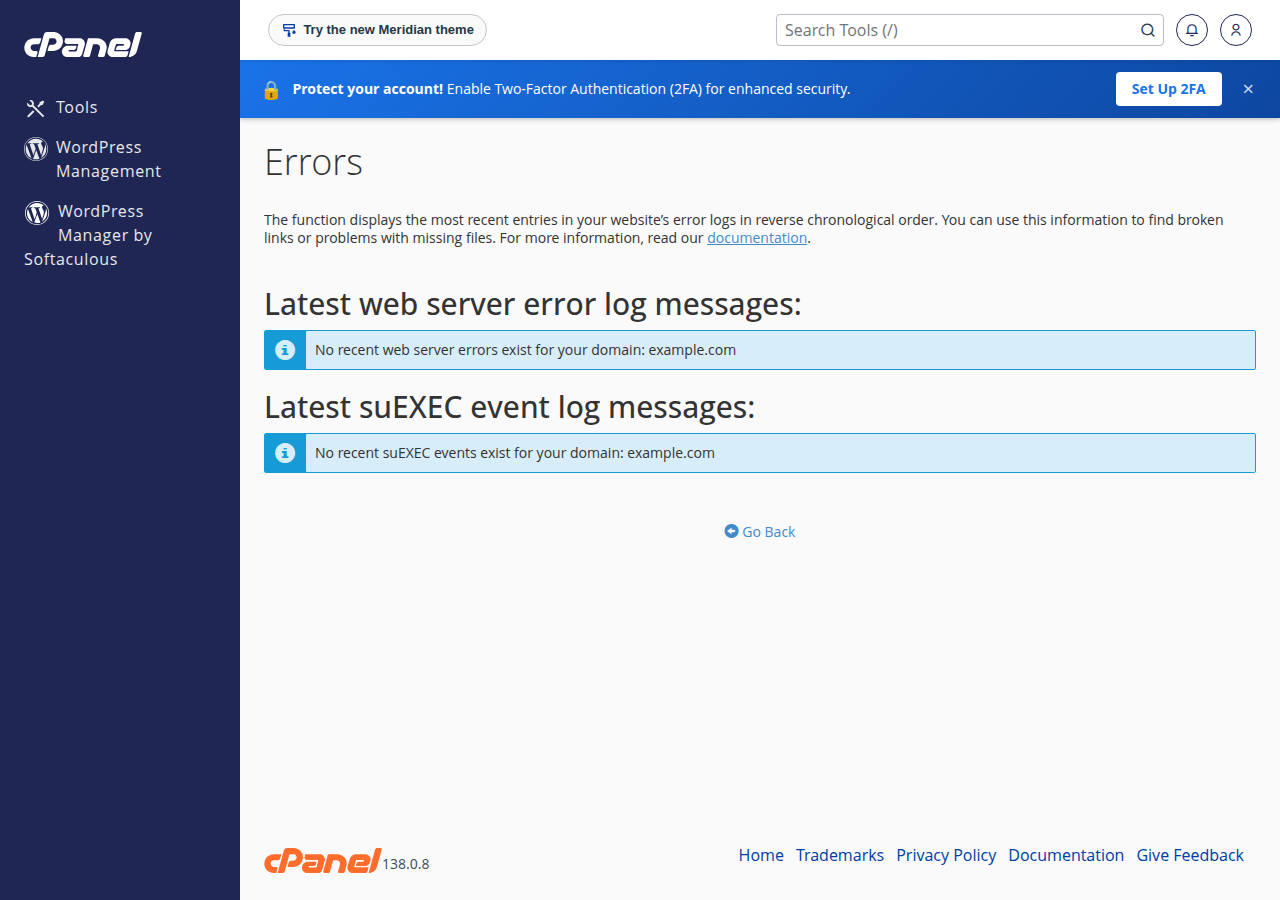
Common log messages and what they point to:
| Log message contains | Cause | Section |
|---|---|---|
| Invalid command 'php_value' or 'php_flag' | PHP settings in .htaccess | 3 |
| Invalid command, or RewriteRule: bad flag delimiters | A typo in .htaccess | 3 |
| Option ... not allowed here | A disallowed Options line (DirectAdmin) | 3 |
| exceeded the limit of 10 internal redirects | A rewrite rule looping on itself | 3 |
| Permission denied | File or folder permissions | 4 |
| PHP Fatal error: Call to undefined function | A missing PHP extension or old code on a new PHP version | 5 |
| Allowed memory size of ... bytes exhausted | PHP memory_limit reached | 6 |
| PHP Fatal error in wp-content/plugins/... | A WordPress plugin or theme | 7 |
For more on reading logs, see Reviewing error logs in cPanel and DirectAdmin.
3. .htaccess: test by renaming, then fix the line
.htaccess is the most common cause of a 500 that appears straight after a change, because Apache refuses to serve anything in a folder whose .htaccess it can't understand.
Test safely
- Open File Manager and show hidden files.Files starting with a dot are hidden by default. In cPanel, use Settings and tick "Show Hidden Files". Guides: cPanel, DirectAdmin and Webuzo File Manager and DirectAdmin File Manager.
- Rename the file.Rename
.htaccessin the site's folder to.htaccess-off. Nothing is lost; you can rename it back at any time. - Reload the page with a test parameter.Open
https://yourdomain.in/?t=1. If the site now loads (links may break, which is expected), the problem is inside that file. - Rename it back and fix the line.Restore the name, then remove or correct the bad line using the log message and the list below. If the site still fails with the file renamed, rename it back and move on to section 4.
Check subfolders too: a .htaccess in public_html/blog only affects that folder, and the log line names the file's path.
Lines that always give a 500 on our servers
We checked our shared servers on 22 September 2026. Two rules catch people most often:
php_valueandphp_flaglines. None of our Linux shared servers run PHP as an Apache module; they use PHP-FPM or CGI. Apache doesn't recognise these lines, so any.htaccessthat contains one returns a 500 for the whole folder. Delete the line and set the value in your control panel instead, as explained in How to fix "Allowed memory size exhausted" PHP errors. Plugins and old tutorials often add these lines, so check even if you didn't write them.Optionson DirectAdmin. DirectAdmin hosting allows only these values:Indexes,IncludesNOEXEC,MultiViews,SymLinksIfOwnerMatch,FollowSymLinksandNone. Any other value, such asExecCGIorAll, gives a 500. Remove it or use an allowed value.
Other causes are typos such as RewriteEngin, curly quotes pasted from a word processor, or a rewrite rule that loops on its own target. mod_rewrite is already loaded on every Linux shared server. For writing and testing rules, see How can I enable the mod_rewrite module. For WordPress, the standard file is in How to create a default .htaccess file for WordPress.
4. File and folder permissions
A wrong permission can stop the server reading your code, and some PHP setups refuse to run a script anyone can write to. The safe values:
| Item | Permission | Why |
|---|---|---|
| Folders | 755 | You can change them; the web server can open them |
| Files (PHP, HTML, images, CSS) | 644 | You can edit them; the web server can read them |
777 lets anyone on the server write to the file or folder. It is a common way sites get infected, and PHP handlers that check permissions refuse to run world-writable scripts, so it can cause a 500 rather than fix one. If a plugin asks for 777, use 755.
To change a permission, right-click the file in cPanel's File Manager and choose Change Permissions, or use the Permissions option in DirectAdmin's File Manager. Change only the items the log names, and leave public_html itself alone unless support asks. If permissions look right and the log still says "Permission denied", ask support to check file ownership. See also How to manage file permissions in DirectAdmin.
5. A PHP version or extension change
If the 500 started right after you (or a plugin update) changed the PHP version, the new version is the first suspect. Two things go wrong:
- Old code on a newer PHP. Functions removed in PHP 7 and 8, such as
each(),create_function()and the oldmysql_functions, cause a fatal error. The log showsCall to undefined functionor a syntax error in a file that used to work. - A missing extension. Each PHP version has its own list of enabled extensions. If your site needs
intl,imagick,zip,soapor the ionCube loader and it isn't enabled for the new version, the site fails.
Switch back to the version that worked, confirm the site loads, then update the code or enable the extension before trying again. In cPanel, the version is set in MultiPHP Manager; extensions come as a server-wide set for each PHP version that you can't switch on or off yourself, so check what is loaded (upload a file containing <?php print_r(get_loaded_extensions());, open it, then delete it; phpinfo() is switched off on some of our servers) and, if one you need is missing, open a ticket naming the extension and the PHP version; see How to change PHP versions in cPanel. On DirectAdmin, see Changing PHP version in DirectAdmin.
Some PHP functions are disabled on shared hosting for security, including phpinfo() on our cPanel servers: see PHP disabled functions on shared hosting.
6. Memory and resource limits
PHP memory_limit applies to one script. The log says Allowed memory size of ... bytes exhausted. Raise memory_limit in your control panel (256M is enough for almost every WordPress site), never with a php_value line in .htaccess. If the error continues at 256M or 512M, a plugin or script is using too much memory. Full steps: How to fix "Allowed memory size exhausted" PHP errors.
Your account's limits cover everything your site runs at once. Domain India shared hosting uses CloudLinux, which gives each account a fixed share. Running out of physical memory or processes gives visitors a 500 or 503; running out of entry processes gives a 508. In cPanel, check the Faults column in Metrics › Resource Usage for the time of the error: see How to check your hosting resource usage.
A broken .htaccess or a PHP fatal error fails every time. A 500 that appears only at busy times or during an import, then clears, usually means a memory or process limit. Match the error times to the Faults column before changing code.
7. WordPress: a plugin or theme
On WordPress, most 500 errors after an update come from one plugin or the theme. WordPress may show "There has been a critical error on this website" instead, and may email the admin address a recovery-mode link for deactivating the plugin.
If you can't reach the dashboard, use File Manager:
- Rename the plugins folder.In
wp-content, renamepluginstoplugins-off. WordPress deactivates every plugin; no settings are deleted. - Reload with a test parameter.If the site loads, a plugin is the cause.
- Rename the folder back.The plugins stay deactivated.
- Reactivate plugins one at a timefrom the dashboard, reloading after each. The one that brings the 500 back is the cause: leave it off and replace it or contact its developer.
- Test the theme the same way.Rename the active theme's folder in
wp-content/themes; WordPress falls back to a default theme if one is installed.
To see the exact error, turn on WordPress's debug log for a few minutes (WP_DEBUG and WP_DEBUG_LOG set to true in wp-config.php) and read wp-content/debug.log: see How to enable debugging in WordPress.
If the files themselves look damaged or unfamiliar, the site may have been hacked: see the security checklist for a hacked or defaced website.
8. The cPanel cache trap: always test with ?t=
Our cPanel servers run nginx in front of Apache as a caching proxy. It keeps copies of normal pages and redirects for up to 120 minutes (measured 22 September 2026), and when Apache returns a 500 it can keep serving the stored copy. That creates two traps:
- A broken site can look fine. A page you opened recently comes back from the cache while other pages still give visitors the 500.
- A fixed site can look wrong. A page or redirect stored while something was misconfigured can keep being served for up to two hours after your fix.
Make every test request unique: add a query string you change each time, such as ?t=1, then ?t=2. That request skips the stored copy and reaches Apache. Use a private browser window to avoid your browser's own cache too. From a terminal:
curl -sI "https://yourdomain.in/?t=$(date +%s)" | head -1This cache is on our cPanel servers; we have not measured the same behaviour on DirectAdmin or Webuzo.
9. Windows (Plesk) hosting
Domain India Windows hosting runs IIS with the Plesk panel, so .htaccess has no effect there. The common 500 causes are different:
- A malformed
web.config. A missing closing tag or a section IIS doesn't recognise breaks the whole site. Restore your last working copy first, then edit carefully. - Application errors. ASP.NET and PHP errors show as a plain 500 unless detailed errors are turned on.
To see the real error, check your domain's logs in Plesk (see How to check Plesk logs). For ASP.NET, you can briefly show detailed errors by adding these two lines to the matching sections of your existing web.config:
<!-- inside system.web -->
<customErrors mode="Off" />
<!-- inside system.webServer -->
<httpErrors errorMode="Detailed" />
Remove them once you have the message, because detailed errors show visitors your code and file paths.
10. Getting help, and where Domain India hosting fits
When to contact support, and what to send
Open a ticket if the log shows nothing, names a file you can't change, or the 500 affects every site on your account. Include:
- the exact URL and the time the error happened, with time zone;
- the error log line from Metrics › Errors or the
error_logfile; - what changed just before it started (a plugin update, a PHP version change, an
.htaccessedit, a file upload); - what you have already tried from this guide.
Support is on 24/7 live chat, and tickets get a first response within 15 minutes; how long a fix takes depends on the issue. There is no phone support. Open a ticket at /support/ticket or, when logged in, at New ticket. Please don't send passwords in the ticket.
Where Domain India hosting fits
Domain India Linux shared hosting (cPanel, DirectAdmin and Webuzo) runs Apache with mod_rewrite and .htaccess, and lets you choose your PHP version for each site. If your site still hits its account limits after you have fixed the cause, a larger plan or a VPS gives it more room.
- 50 GB NVMe SSD Storage
- 100 GB Monthly Bandwidth
- 5 Websites
- 50 Email Accounts
- 1 vCPU
- 2 GB DDR4 RAM
- 64 GB NVMe SSD Storage
- 2 TB Monthly Bandwidth
Prices on the cards are live and exclude 18% GST. Compare all plans on cPanel hosting, DirectAdmin hosting, Windows hosting and VPS servers.
What causes a 500 Internal Server Error?
A 500 means the web server could not finish the request. On shared hosting the usual causes are a bad line in .htaccess, a PHP fatal error, wrong file permissions, a PHP version or extension change, a memory or process limit, or a broken WordPress plugin or theme. The error log names the exact cause.
Where do I find the error log for a 500 error?
In cPanel, open Metrics › Errors to see the most recent web server errors for your account. PHP often also writes an error_log file in the same folder as the failing script. DirectAdmin keeps an error log for each domain in its logs section.
Should I delete my .htaccess file to fix a 500 error?
No. Rename it, for example to .htaccess-off, and reload the page. If the site loads, the problem is inside that file: rename it back and fix the bad line. Deleting it loses your redirects, WordPress permalinks and security rules.
Why does php_value in .htaccess cause a 500 error?
Domain India's Linux shared servers run PHP through PHP-FPM or CGI, not as an Apache module, so Apache does not recognise php_value or php_flag lines and returns a 500. Remove the line and set PHP values such as memory_limit in your control panel instead.
I fixed the problem but my site still shows an error. Why?
On Domain India cPanel servers, a caching proxy can keep serving stored copies of pages and redirects for up to 120 minutes. Add a unique query string such as ?t=123 to the URL and use a private browser window. If that loads correctly, your fix worked and the old copy will expire.
Can a resource limit cause a 500 error?
Yes. When a shared hosting account runs out of physical memory or processes, visitors see a 500 or 503 error; running out of entry processes gives a 508 instead. Check the Faults column in cPanel's Metrics › Resource Usage for the time of the error.
Ready to track it down? Start with your error log, then use the mod_rewrite guide for .htaccess fixes, or open a ticket with the URL, the time and the log line.
Send us the page address, the time it happened and the error log line, and we will look at your account's logs with you.
Open a support ticket