A port number is the door your software knocks on when it connects to your hosting server. Your control panel, webmail, email apps, FTP client and database tools each use a different one, and using the wrong number is the most common reason a connection simply times out. This guide lists every port a Domain India customer needs, grouped by the task you are trying to do, and shows how to test one when something will not connect.
On Domain India shared hosting, log in to cPanel on port 2083, DirectAdmin on 2222 and Plesk on Windows on 8443 (Webuzo is on 2003: log in at https://yourdomain.com:2003); webmail on cPanel is 2096, or just add /webmail to your domain. For email apps use 993 (IMAP), 995 (POP3) and 465 (SMTP), all with SSL/TLS. FTP is 21 with explicit TLS, and SSH and SFTP are 22, with an SSH key, once jailed SSH is enabled on your account (it is off by default; ask support). MySQL on port 3306 is closed from outside on every shared server: use an SSH tunnel.
1. Three things you need before any port
A port on its own is not enough. Every connection needs three settings, and they have to match.
| Setting | What to use | Where to find it |
|---|---|---|
| Hostname | Your domain, or the server hostname shown by the panel | Your hosting welcome email, and the panel's own dashboard |
| Port | The number for that service, from the tables below | This article |
| Encryption | SSL/TLS, STARTTLS or explicit TLS, as listed with the port | This article, and your panel's email settings page |
Your welcome email, sent when the hosting was activated, has the server hostname, your control panel username and the login URL for your account. Keep it. If your domain already points to the hosting server, your own domain usually works in place of the server hostname, but your browser or mail client may warn about the certificate name. The hostname the panel shows always matches its certificate.
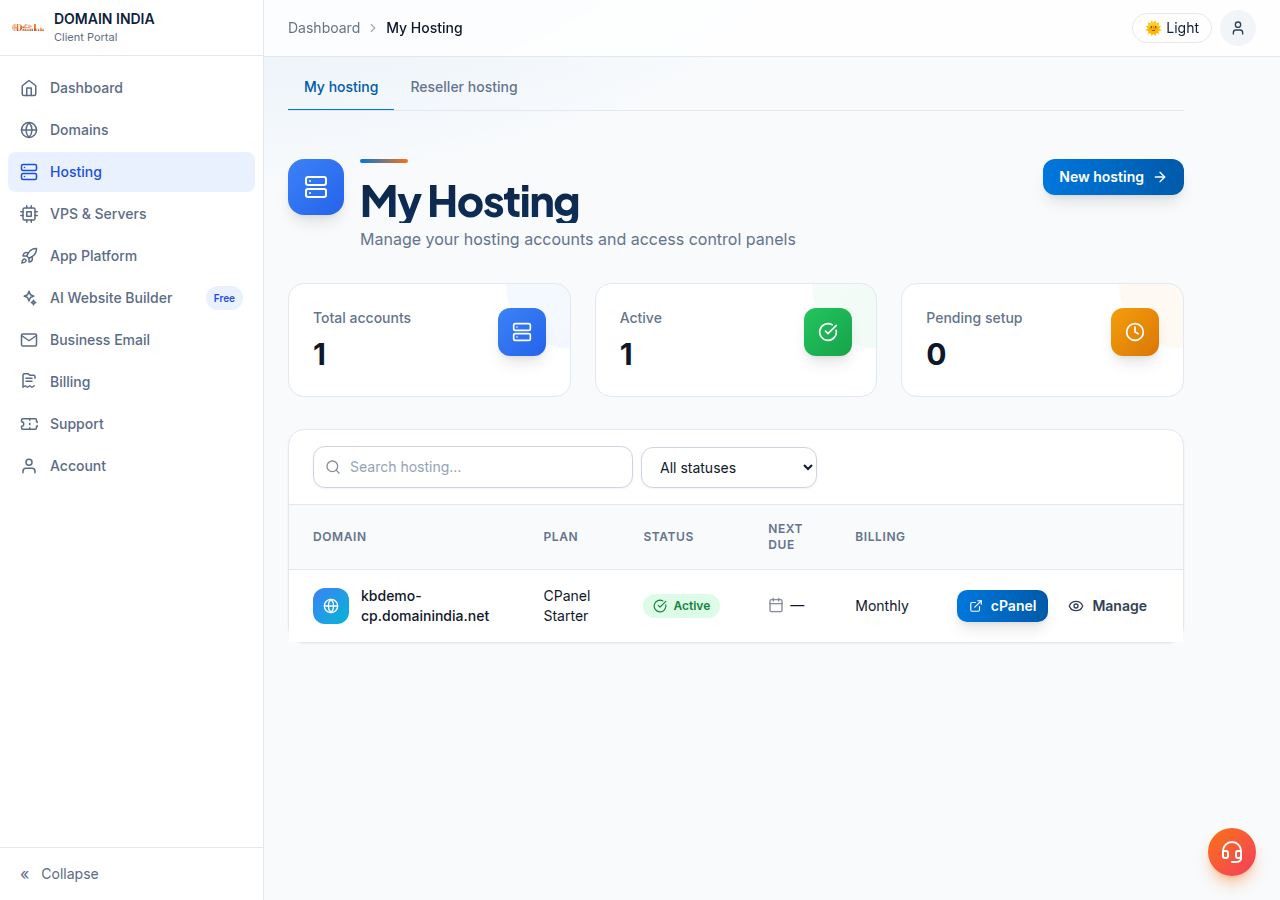
In your Domain India client area, open Hosting › My hosting, click your hosting service, and use the login button on that page. It signs you in to cPanel, DirectAdmin or Plesk without a port number or a second password. See How to Login to cPanel (SSO from Portal), How to Login to DirectAdmin and How to Login to Plesk Panel.
2. Control panel ports
This is the port you use to open your hosting control panel in a browser. Always prefer the secure port; the plain one sends your password unencrypted.
| Panel | Secure port | Plain port | Example address |
|---|---|---|---|
| cPanel (customer account) | 2083 | 2082 | https://yourdomain.com:2083 |
| WHM (reseller accounts) | 2087 | 2086 | https://server.hostname:2087 |
| DirectAdmin | 2222 | — | https://yourdomain.com:2222 |
| Webuzo | 2003 | — | https://yourdomain.com:2003 |
| Plesk (Windows hosting) | 8443 | — | https://yourdomain.com:8443 |
WHM on 2087 is only for reseller hosting customers, who manage the accounts they sell. If you have a normal hosting plan, cPanel on 2083 is yours; WHM will not accept your login.
DirectAdmin customers also see port 2280 in the address bar when they use the "Login to DirectAdmin" button in the client area: that is the Domain India portal's single sign-on door to DirectAdmin. You never type it yourself. If that button fails on a network that only allows ordinary web traffic, use https://yourdomain.com:2222 instead, or try another connection.
Older guides say "SSH for shared servers: 2222". On Domain India servers, 2222 is the DirectAdmin control panel. SSH and SFTP are on port 22. If you put 2222 into an SSH client, it will fail.
3. Webmail ports
Webmail lets you read your mail in a browser, with no setup at all. The easiest route on every panel is a path on your own domain, so there is no port to remember.
| Hosting type | Easiest address | Port address |
|---|---|---|
| cPanel | https://yourdomain.com/webmail or https://webmail.yourdomain.com | https://yourdomain.com:2096 |
| DirectAdmin | https://yourdomain.com/webmail or /roundcube | — (use the /webmail path) |
| Webuzo | https://yourdomain.com/webmail | — (use the /webmail path) |
| Business Email | https://mail.yourdomain.com:8443 | Same address; it also works without :8443 |
On cPanel, 2096 is the secure webmail port and 2095 is the plain one. yourdomain.com/webmail normally forwards you to the secure port anyway. There is no webmail.yourdomain.com address on DirectAdmin or Webuzo hosting, so use the /webmail path there. Log in with your full email address and the mailbox password, not your control panel login.
Full instructions for each panel are in How to Log In to Webmail.
4. Email ports for Outlook, Apple Mail and your phone
These are the ports your mail app uses. On hosting mailboxes the server name is normally mail.yourdomain.com for both incoming and outgoing mail, and the username is always the full email address.
| What it does | Port | Encryption | Use it when |
|---|---|---|---|
| IMAP (mail stays on the server) | 993 | SSL/TLS | Always, on every device. This is the recommended setup. |
| IMAP without encryption | 143 | None or STARTTLS | Only if an old device cannot do 993. Avoid it. |
| POP3 (mail downloads to one device) | 995 | SSL/TLS | Only if you genuinely want mail pulled off the server |
| POP3 without encryption | 110 | None | Avoid it |
| SMTP sending | 465 | SSL/TLS | The first choice for sending on every Domain India plan |
| SMTP submission | 587 | STARTTLS | An alternative on Linux hosting if 465 is blocked on your network |
Choose IMAP, not POP3. IMAP keeps your mail on the server and keeps every device in sync, so the same mailbox looks the same on your laptop, your phone and in webmail.
Port 25 is the port mail servers use to talk to each other. Most Indian internet providers block it on home and office connections, so it is not a reliable choice for sending from a mail app: use 465, or 587 on Linux hosting.
On Windows (Plesk) hosting, port 587 is not open. Use 465 with SSL/TLS for outgoing mail there.
Port 26 does not work on any Domain India server. Some older guides give it as an alternative SMTP port; it is closed on all of our servers.
Business Email is a separate product with its own settings: IMAP on 993 and SMTP on 465 (or 587 with STARTTLS), with the server name mail.yourdomain.com. Business Email does not offer POP3, and those ports are closed on purpose. Its webmail is https://mail.yourdomain.com:8443/. See Setting Up Outlook, Apple Mail and Your Phone for Business Email, and Business Email vs the Email Included With Your Hosting if you are not sure which one you have.
For step-by-step setup on hosting mailboxes, see Mail Server Settings.
5. FTP, SFTP and uploading files
| Method | Port | Encryption setting in the client | Available on |
|---|---|---|---|
| FTP | 21 | "Require explicit FTP over TLS" | cPanel, DirectAdmin, Webuzo, Windows (Plesk) |
| SFTP (file transfer over SSH) | 22 | SFTP protocol with your SSH key | cPanel, DirectAdmin, Webuzo, once jailed SSH is enabled |
| Web Disk (WebDAV) | 2078 secure, 2077 plain | SSL/TLS on 2078 | cPanel only |
In FileZilla, choose FTP with encryption set to Require explicit FTP over TLS and port 21, or SFTP with port 22 and your SSH key file (SFTP needs jailed SSH enabled on your account). Both are encrypted; plain FTP with no TLS sends your password in clear text, so do not use it. Implicit FTPS on port 990 is not available on any Domain India server, so if your client offers "Require implicit FTP over TLS", do not choose it.
Web Disk maps your hosting account as a drive in Windows Explorer or the macOS Finder. It is a cPanel feature, set up from Files → Web Disk in cPanel, and it uses port 2078 with SSL (2077 without). Those ports are open on the cPanel servers only, not on DirectAdmin, Webuzo or Windows hosting.
SFTP is not available on Windows (Plesk) hosting, because SSH is not offered there. Use FTP on port 21 with explicit TLS, the Plesk file manager, or Web Deploy.
On Linux plans, jailed SSH is available on every plan but is off by default, so an SSH or SFTP login on port 22 fails until support enables it for your account. Logins use an SSH key, not a password: see enabling and accessing jailed SSH. More on file transfer in FTP and SFTP Access and What settings do I need to upload my website.
6. MySQL: port 3306 is closed from outside
MySQL and MariaDB listen on port 3306, but on Domain India shared servers that port is blocked at the firewall for connections from the internet. Your website connects over localhost on the same server and is unaffected, so this only matters when you want to use a desktop tool such as MySQL Workbench, DBeaver or HeidiSQL from your own computer.
Three ways to work with your database from outside:
- phpMyAdmin in the control panel. Nothing to configure, nothing to open. This is enough for most people.
- An SSH tunnel (recommended for desktop tools). The database connection travels inside your SSH session on port 22, so nothing extra has to be open. It needs jailed SSH enabled on your account and an SSH key:
# Forward port 3307 on your computer to MySQL on the hosting server
ssh -N -L 3307:localhost:3306 [email protected]
Leave that window open, then point your tool at host 127.0.0.1, port 3307.
- Ask support. If your application genuinely needs a direct connection, add your IP address in the panel's Remote Database Access feature and open a ticket with your fixed public IP address. The server firewall may still block port 3306 for your address until we allow it.
Full instructions are in How to connect to the MySQL database and Connecting to a MySQL Database Remotely.
7. Every open port, by server type
These are the ports Domain India measured as reachable from the internet on 20 September 2026. If a port is not in your row, do not assume it is open.
| Your hosting | Panel | Web | Files | Other | |
|---|---|---|---|---|---|
| cPanel | 2082 / 2083, WHM 2086 / 2087 | 80, 443 | 25, 465, 587, 110, 995, 143, 993 | 21 FTP, 22 SSH and SFTP (key only, once enabled), 2077 / 2078 Web Disk | Webmail 2095 / 2096 |
| DirectAdmin | 2222 (portal sign-on 2280) | 80, 443 | 25, 465, 587, 110, 995, 143, 993 | 21 FTP, 22 SSH and SFTP (key only, once enabled) | Webmail at /webmail |
| Webuzo | 2003 | 80, 443 | 25, 465, 587, 110, 995, 143, 993 | 21 FTP, 22 SSH and SFTP (key, once enabled) | Webmail at /webmail |
| Windows (Plesk) | 8443 | 80, 443 | 25, 465, 110, 995, 143, 993 (no 587) | 21 FTP only (no SSH, no SFTP) | Plesk file manager |
Closed on all four server types: MySQL 3306, alternate SMTP 26, and implicit FTPS 990. Web Disk on 2077 / 2078 is open on the cPanel servers only. If an older guide gives you a port that is not in this table, it does not work on our servers; use the listed one instead.
8. Why can't I connect?
A connection that hangs and then times out is almost always blocked somewhere between you and the server, not broken on the server. Work through these in order.
| Cause | How to spot it | What to do |
|---|---|---|
| Wrong port or encryption | The app fails instantly, or complains about the certificate or "connection reset" | Re-check the port and encryption pair in the tables above |
| Your internet provider blocks the port | Port 25 fails but 465 works; the same settings work on another connection | Use 465 for sending, and the secure ports everywhere |
| Office or college firewall blocks unusual ports | The website opens but 2083, 2222 or 8443 time out | Test on mobile data. If it works there, ask your IT team to allow the port |
| The server firewall blocked your IP | Everything times out for you but works for colleagues and on mobile data | Send support your public IP address |
| Antivirus or VPN interference | Only one computer fails | Pause the VPN or the antivirus mail-scanning feature and retry |
Repeated failed logins, usually from a phone or mail app with an old saved password, get your IP address blocked automatically. That is the single most common cause of "it works for everyone but me". The full check-and-fix is in I can't reach my server: have I been blocked?.
9. How to test a port yourself
Before you open a ticket, test whether the port answers from your connection.
Windows PowerShell (built in, no install):
Test-NetConnection yourdomain.com -Port 2083
Test-NetConnection yourdomain.com -Port 993
Look at TcpTestSucceeded: True means the port is reachable.
macOS or Linux with netcat:
nc -zv yourdomain.com 2083
nc -zv yourdomain.com 993
Any system with telnet installed:
telnet yourdomain.com 2083A blank screen or a banner means it connected; press Ctrl+] then type quit to exit. "Connection timed out" means something is blocking the port, and "Connection refused" means nothing is listening on it. Run the same test on mobile data: if it succeeds there and fails at the office, the block is on your network, not on ours.
10. Which Domain India plan uses which panel
Not sure which panel you bought? Open your client area and look at the service name, or check that service's welcome email. cPanel plans use port 2083, DirectAdmin 2222 and Windows (ASP.NET) plans use Plesk on 8443; Webuzo uses 2003, at https://yourdomain.com:2003. Jailed SSH is available on all three Linux panels but is off by default: ask support to enable it, and then SFTP and SSH tunnels work on port 22 with an SSH key. Windows hosting has neither.
- 25 GB NVMe SSD Storage
- 50 GB Monthly Bandwidth
- 1 Website
- 10 Email Accounts
Compare the panels on cPanel hosting, DirectAdmin hosting, Webuzo hosting and Windows hosting, or read the Plesk Windows Hosting Guide.
Frequently asked questions
What port do I use to log in to cPanel on Domain India hosting?
Port 2083 over HTTPS, for example https://yourdomain.com:2083. Port 2082 is the unencrypted version and should be avoided. You can also open cPanel with one click from the Hosting › My Hosting page of your Domain India client area, with no port number needed.
What is the DirectAdmin port on Domain India?
DirectAdmin runs on port 2222, for example https://yourdomain.com:2222. When you use the "Login to DirectAdmin" button in the client area, the single sign-on opens on port 2280 instead; you never type that yourself. Port 2222 is a control panel, not SSH — SSH is port 22.
Which email ports should I use?
Use IMAP on 993 and SMTP on 465, both with SSL/TLS. POP3 with SSL is 995 if you really need POP3. The unencrypted versions are 143, 25 and 110, and should be avoided. On Windows (Plesk) hosting, port 587 is not open, so use 465.
Why is port 25 not working for sending email?
Most Indian internet providers block outgoing port 25 on home and office connections to limit spam. Change your mail app's outgoing port to 465 with SSL/TLS, which is the recommended setting on all Domain India plans.
Can I connect to MySQL on port 3306 from my computer?
Not directly. Port 3306 is closed from the internet on all Domain India shared servers. Use phpMyAdmin in your control panel, or an SSH tunnel on port 22, which forwards the database connection securely; the tunnel needs jailed SSH, which is off by default, so ask support to enable it and log in with an SSH key. If your application needs a direct connection, add your fixed IP in Remote Database Access and open a support ticket.
What port is webmail on?
On cPanel hosting, secure webmail is port 2096 (2095 is the plain version), but https://yourdomain.com/webmail works without typing a port. On DirectAdmin and Webuzo, use https://yourdomain.com/webmail. Business Email webmail is https://mail.yourdomain.com:8443/.
How do I check whether a port is open from my connection?
On Windows run Test-NetConnection yourdomain.com -Port 2083 in PowerShell and look for TcpTestSucceeded: True. On macOS or Linux run nc -zv yourdomain.com 2083. A timeout means something between you and the server is blocking the port; try the same test on mobile data.
Still stuck after checking the port, the encryption setting and a test on mobile data? Send us the exact port, the error message and your public IP address: open a ticket in the client area or use the public ticket form, and follow it on Track ticket. Live chat is available on every page of the site.
Tell us your domain, the service you are trying to reach and the error you see, and we will confirm the exact hostname, port and encryption setting for your account.
Ask Domain India support