cPanel is the control panel behind Domain India's cPanel shared, business and reseller hosting plans. If you are locked out right now, there are three ways in, and the quickest needs no cPanel password at all. This guide puts those routes first and the troubleshooting underneath, and describes the client area as it is on 21 September 2026.
Fastest: sign in to the client area, open Hosting › My hosting, and click the cPanel button on your domain's row — it signs you in with no cPanel password needed. Direct: go to https://yourdomain.com:2083 (or https://yourdomain.com/cpanel) and use the cPanel username and password from your welcome email. Domain not pointing at us yet: use the server hostname or server IP on port 2083 instead — both are shown in the client area under Manage › Access › Login details.
1. Route 1: one click from the client area
Use this when you have never seen your cPanel password, or the one you have stopped working.
- Sign in.Open the client area sign-in page with the email address and password of your Domain India account. Forgotten it? Use the password reset page.
- Open your hosting list.In the left menu choose Hosting › My hosting, or go straight to /client/services/hosting. Every account is listed with its domain, plan and status.
- Click the panel button.On the row for your domain, click the button with the external-link arrow, labelled after your control panel — on a cPanel plan it reads cPanel. A new tab opens, already signed in. The button appears only while the status is Active.
- Or open the account first.Click Manage, then Open cPanel at the top. Same result, and that page also shows your username and server details.
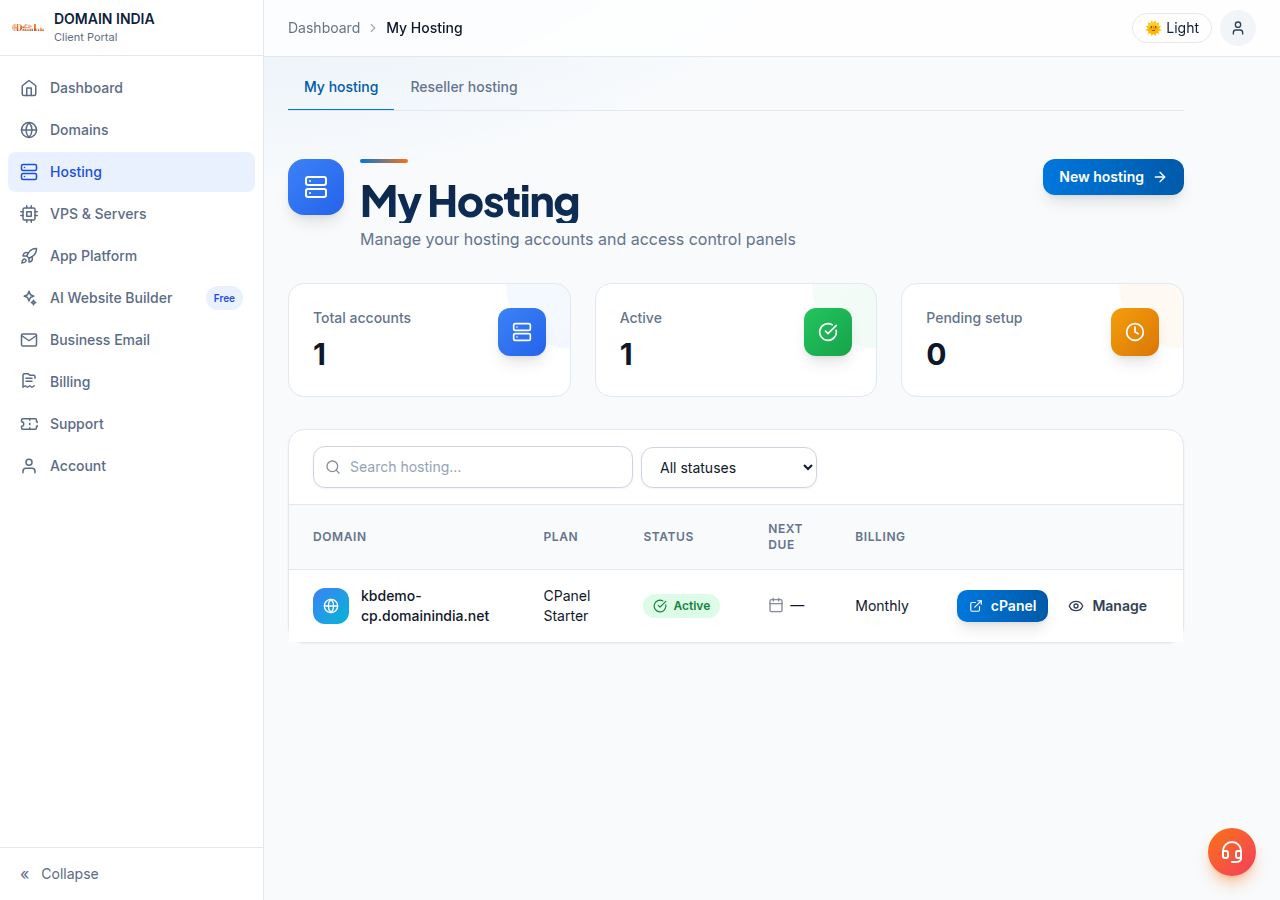
On a reseller account the button reads WHM — see How to log in to WHM. On other plans it reads DirectAdmin, Webuzo or Plesk. More on this route: cPanel SSO from the portal.
The panel opens in a new tab, so a pop-up blocker can swallow it: allow pop-ups for domainindia.com and click again. If you get a cPanel login form instead of the dashboard, the one-click session could not be created — sign in as in section 2.
2. Route 2: log in directly with your cPanel username
Use this to bookmark cPanel, hand access to a developer, or get in without the client area.
| Address | Use it when |
|---|---|
https://yourdomain.com:2083 | Your domain already points to Domain India |
https://yourdomain.com/cpanel | Same as above — cPanel redirects this to port 2083 |
https://server-hostname:2083 | Your domain is not pointing at us yet |
All three take your cPanel username and cPanel password.
Port 2083 is the encrypted one and the one to use; 2082 is the same panel without encryption. Two neighbours: WHM answers on 2087 (2086 unencrypted) and webmail on 2096 (2095 unencrypted), covered in How to log into webmail. The full list is in Domain India web hosting port numbers.
Where your username and server details are. Open Hosting › My hosting, click Manage, then the Access tab. The Login details card shows your username, server IP and panel URL, each with a copy button. They are also in the email titled "Your Hosting Account is Ready", but that email is not kept in the client area's Email history, so the Access tab is the place to look.
Your client-area password and your cPanel password are separate; changing one never changes the other. If you have only ever used the client area, your cPanel password is still the one from the welcome email.
3. Route 3: when your domain is not pointing at us yet
A new account, or a domain still using another provider's nameservers, will not answer on yourdomain.com:2083: the address times out or opens your old host's panel, because the domain still resolves elsewhere. DNS changes can take up to 48 hours to reach every network. Until then, go in by the server: https://server-hostname:2083, or https://server-ip:2083 using the Server IP from the Access tab. Your username and password are the same.
A certificate is issued for a name, not an IP address, so a browser opening https://server-ip:2083 will say the connection is not secure. That is normal in this one case: check the address bar shows the exact server IP from your client area, and never type your cPanel password into a login page you reached from a link in an email. Once your domain points to us, use https://yourdomain.com:2083 instead.
4. Reset your cPanel password
You can do this yourself; no ticket needed.
- Open the account.In the client area, go to Hosting › My hosting and click Manage.
- Open the Access tab.The Login details card has a Reset password button; the same action sits in the buttons at the top of the page.
- Confirm it is you.The form asks for your current client-area password first, then the new cPanel password, with a strength meter — aim for Strong.
- Sign in with the new one.Go to
https://yourdomain.com:2083and use the username on the same card.
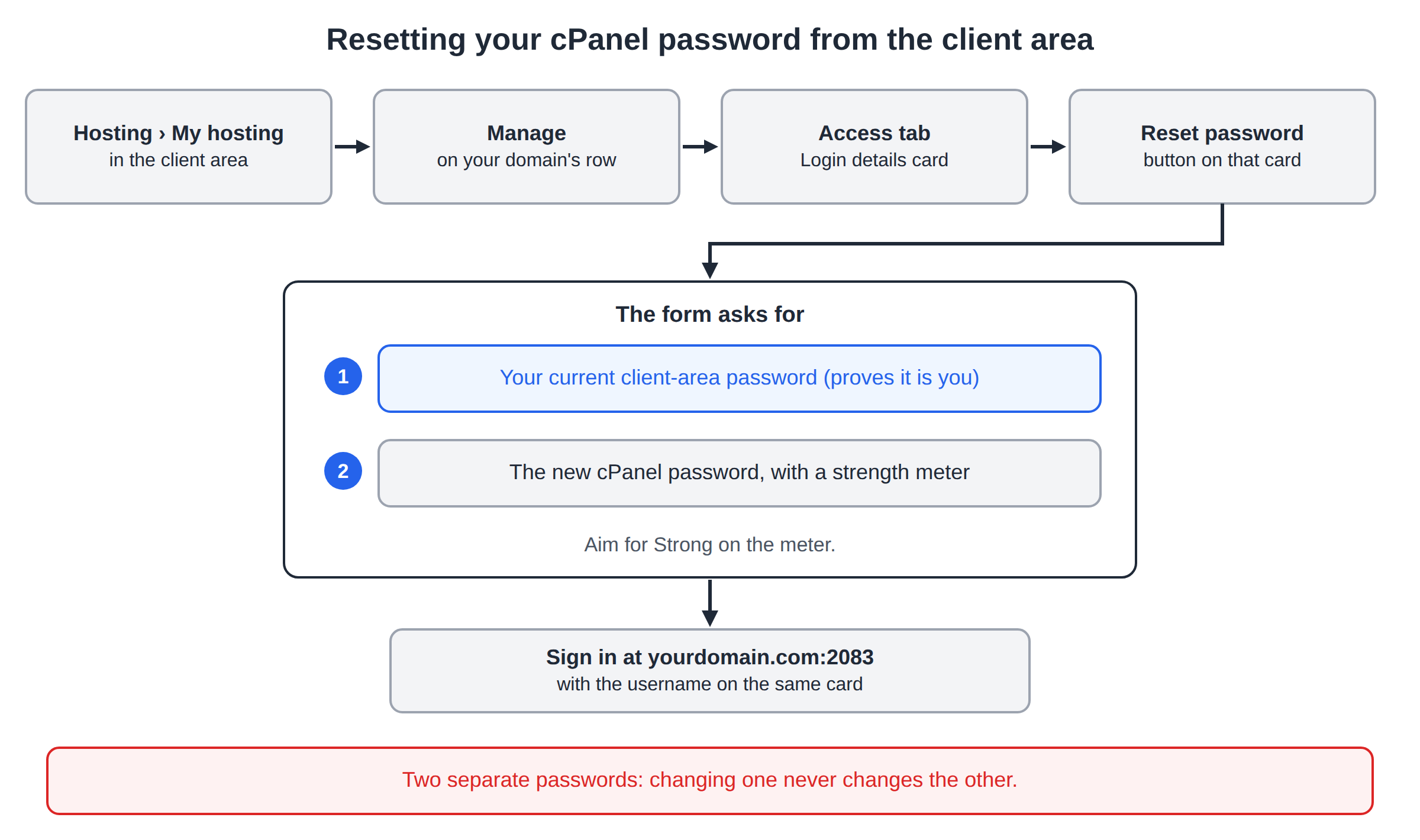
There is a step-by-step version in Reset cPanel password, and How to retrieve your control panel password covers finding the username.
5. Which control panel are you actually on?
Not every Domain India plan uses cPanel, and a cPanel guide will not get you into a DirectAdmin account. Two ways to tell: the button on your hosting row is labelled after your panel, and the Access tab shows a Control panel field.
| Panel | Direct login port | Guide |
|---|---|---|
| cPanel | 2083 | This article |
| WHM (reseller) | 2087 | Log in to WHM |
| DirectAdmin | 2222 (the client-area button signs you in through port 2280; you never type that one) | Log in to DirectAdmin |
| Webuzo | 2003 | Log in to Webuzo |
| Plesk (Windows) | 8443 | Log in to Plesk |
If you are unsure which panel you have, use the one-click button: the label tells you. It signs you straight in on cPanel and DirectAdmin; on Webuzo, log in at https://yourdomain.com:2003 instead.
6. It still will not let you in
| What you see | Likely cause | What to do |
|---|---|---|
| "Login invalid" on the cPanel form | The client-area password was typed into cPanel, or it changed | Reset the cPanel password (section 4) |
| No panel button; the row shows Pay now | Unpaid invoice, so the account is not active | Pay it; the button appears once the status is Active |
| The row shows Setting up… or Pending | The order is still being set up | Most accounts are created automatically within a couple of minutes of payment; a few need a manual check |
| The status says Suspended | Usually an overdue renewal | Pay the invoice; for any other reason, open a ticket |
yourdomain.com:2083 times out or shows a different site | The domain is not pointing at us yet | Use the server hostname or server IP (section 3) |
| The browser says the connection is not secure | You opened an IP address, or used http:// | Use https:// and the exact IP or hostname (section 3) |
| Nothing loads at all — site, webmail and panel are dead | Your IP address is blocked by the server firewall | See below, then have I been blocked? |
The firewall block is the one people miss. Measured on our servers on 20 September 2026, the shared servers run CloudLinux 8.10 behind the CSF firewall, and repeated failed logins get the offending IP address blocked automatically. So the pattern is: a wrong password typed five or six times, and then the login page stops loading at all. Two signs confirm it — your website and webmail go dark from the same connection at the same moment, and everything works from your phone on mobile data. To get it cleared, send us the blocked address from any "what is my IP" website.
7. When to ask us, and what to send
Open a ticket at /support/ticket if the account has been Active for more than a day and a freshly reset password is still rejected, if the Access tab shows no username, or if the domain is not in your client area at all — it may sit under a different Domain India account. Support is 24/7 live chat, and tickets get a first response within 15 minutes; resolution takes longer depending on the issue. There is no phone support.
Include your domain, your panel, the exact address you tried, the exact error text, whether it also fails on mobile data, and your IP address if you suspect a firewall block. Never send a password: support will not ask for one, and you set a new one yourself from the Access tab.
Frequently asked questions
What is the cPanel login URL for my Domain India hosting?
Use https://yourdomain.com:2083, or https://yourdomain.com/cpanel, which redirects to the same place. Port 2083 is the encrypted port; 2082 is the unencrypted version. If your domain is not pointing at Domain India yet, use the server hostname or server IP on port 2083.
Do I need a cPanel password to use the client area button?
No. The cPanel button on your hosting row signs you in with a one-time session created by the client area. You only need the cPanel username and password for direct logins on port 2083.
Where do I find my cPanel username?
Open Hosting › My hosting, click Manage and open the Access tab. The Login details card shows the username, server IP and panel URL, each with a copy button. They are also in your "Your Hosting Account is Ready" email, which is not kept in the client area's Email history.
Why does my browser say the connection is not secure on port 2083?
Usually because you opened the server's IP address, and certificates are issued for names rather than IP addresses. If the warning appears on your own domain instead, the free SSL certificate has not been issued yet, which happens once your domain points to our servers.
My whole website and cPanel stopped loading at once. What happened?
That usually means your IP address has been blocked by the server firewall after repeated failed logins. Check from mobile data: if everything works there, the block is on your other connection. Send us the blocked IP address and we will clear it.
My hosting is not cPanel. Where do I log in?
DirectAdmin is on port 2222 (the client-area button uses port 2280 behind the scenes, which you never type); Webuzo is on 2003; Plesk on Windows is on 8443. The one-click button in the client area signs you in on cPanel and DirectAdmin, usually on Plesk. On Webuzo, log in at https://yourdomain.com:2003; if the button doesn't open the panel, use that address.
Ready to get back in? Start at your hosting list, or reset the password from the Access tab. If the login page will not load at all, read have I been blocked?, then open a ticket. New to the panel? What is cPanel? and cPanel hosting explain what you get.
Click the panel button on your domain's row to go straight in, or open Manage, then the Access tab, to copy your username or reset the cPanel password.
Open My hosting