Git lets you ship a website change with one command instead of dragging files over FTP, and every version stays in history so you can roll back. How you use Git with Domain India depends on the product you have: shared hosting, the App Platform or a VPS. This guide shows each route, what it needs, and which one to choose.
On shared hosting (cPanel, DirectAdmin, Webuzo) you can push to your account over jailed SSH, which is off by default: ask support to enable it, and ask whether Git is available in your jail. cPanel also has a Git Version Control tool that clones a repository from GitHub or GitLab without SSH. If you have no SSH, build on your own computer and upload the result. For true git push deployment of an app, use the App Platform; for full control, use a VPS.
1. Choose your route
| Route | What it needs | Works on | Best for |
|---|---|---|---|
| Push to a bare repository | Jailed SSH enabled, Git in your jail | cPanel, DirectAdmin, Webuzo (ask support) | PHP and static sites you edit often |
| cPanel Git Version Control | Nothing extra for a public repository | cPanel | Pulling from GitHub or GitLab with a button |
| Build locally and upload | FTP or File Manager | Every shared plan | Anyone without SSH |
| App Platform | A GitHub repository or a deploy token | App Platform plans | Node.js, Python and other custom apps |
| VPS | Full root access | VPS plans | Any workflow, any tool |
Windows (Plesk) hosting has no SSH, so the Git-over-SSH method in section 3 does not apply to it.
2. What shared hosting gives you for Git
Jailed SSH access is available on every shared hosting plan (cPanel, DirectAdmin, Webuzo). It is off by default; ask support to enable it for your account through live chat or a ticket. A jailed shell is a restricted shell: you work inside your own account, with no root access.
What we measured on our servers on 23 September 2026:
- cPanel: Git is present inside the jailed environment, and the Git Version Control tool is enabled on the standard hosting plans.
- DirectAdmin: DirectAdmin has its own Git feature, but it is switched off for most accounts. Ask support if you want it.
- Webuzo: not measured. Ask support what is available.
- Sign-in method: on the cPanel and DirectAdmin servers, SSH password login is turned off. You sign in with an SSH key, on port 22.
Tools available inside the jailed shell vary by server, so ask support before you plan a workflow around a specific tool. For how to get SSH switched on and connect with a key, see Enabling and accessing jailed SSH.
Shared servers disable PHP functions such as proc_open and popen, for web and command-line PHP alike, so Composer scripts stop there. Composer isn't pre-installed, but over jailed SSH you can run php composer.phar install, adding --no-scripts if it stops with a proc_open message. Or do builds on your own computer or in CI, and deploy the finished files. The full list is in PHP disabled functions on shared hosting.
3. Method 1: push to a bare repository over jailed SSH
Use this method once support has enabled SSH on your account and confirmed that Git works in your jail. Your SSH username and server address are in the client area, on your hosting service's Manage › Access tab.
- Create a key on your computer.Run
ssh-keygen -t ed25519 -C "[email protected]"and add the public key to your hosting account, as described in the SSH guide linked above. - Create a bare repository on the server.Sign in with SSH and run the commands in the first block below.
- Add a post-receive hook.The hook checks out every push into your web folder.
- Add the remote on your computer.Point a remote called
productionat the bare repository. - Deploy.Run
git push production main.
On the server:
mkdir -p ~/repos/mysite.git
cd ~/repos/mysite.git
git init --bare
The hook, saved as ~/repos/mysite.git/hooks/post-receive:
#!/bin/bash
GIT_WORK_TREE="$HOME/public_html" git checkout -f main
Then make it executable with chmod +x ~/repos/mysite.git/hooks/post-receive. Replace public_html with the document root of your site if it is an addon domain, and main with your branch name.
On your computer:
git remote add production ssh://USERNAME@SERVER/home/USERNAME/repos/mysite.git
git push production main
Keep the repository outside public_html, as shown, so that nobody can download your .git history from the web.
4. Method 2: cPanel Git Version Control
cPanel's Git Version Control tool (in the Files section) clones a repository into your account and deploys it, without needing SSH for a public repository.
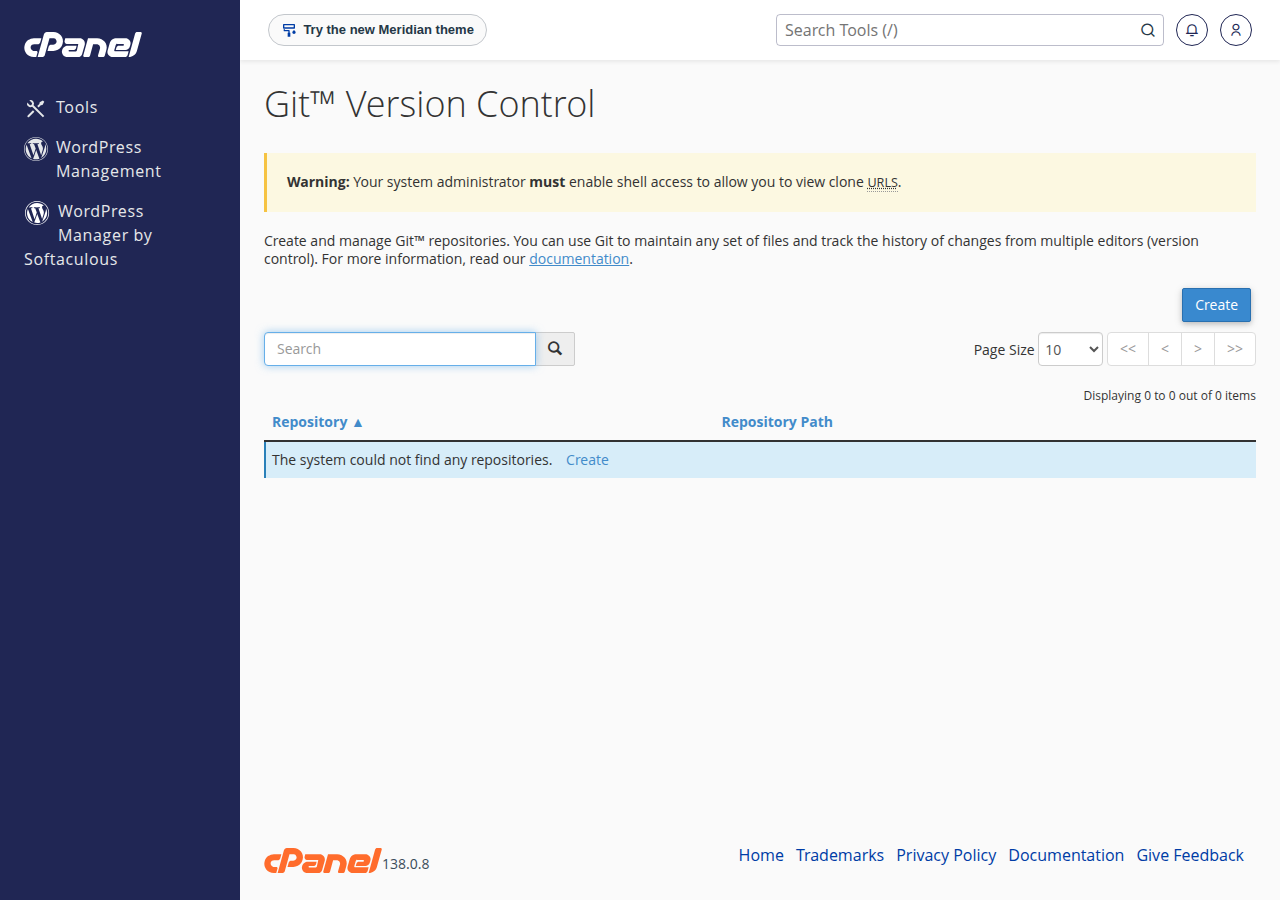
- Create.Open Git Version Control, click Create, paste the clone URL from GitHub, GitLab or Bitbucket, and choose a repository path outside
public_html. - Add a deploy file.Commit a
.cpanel.ymlfile to the root of the repository. It tells cPanel which files to copy where. - Update and deploy.In Manage › Pull or Deploy, click Update from Remote, then Deploy HEAD Commit.
A minimal .cpanel.yml:
---
deployment:
  tasks:
    - export DEPLOYPATH=/home/USERNAME/public_html/
    - /bin/cp -R public/* $DEPLOYPATH
cPanel deploys only when the repository has a .cpanel.yml file and no uncommitted changes. A private repository needs an SSH key that your Git host trusts; ask support to help set that up on your account.
5. Method 3: build locally and upload
If SSH is not enabled, or your project needs a build step, keep Git on your own computer and upload the output:
- Run your build locally, for example
composer install --no-devandnpm run build. - Upload the finished files with FTP, or zip them and extract the archive in File Manager.
- Keep secrets such as
.envout of the repository, and upload them once by hand.
The settings you need are in What settings do I need to upload my website, and the zip-and-extract steps are in How do I use the File Manager.
6. A note on webhook scripts
Older guides suggest a deploy.php script that GitHub calls on every push and that runs git pull with shell_exec. On our cPanel servers shell_exec is disabled, so that script cannot run. For deploy-on-push, use the App Platform with a deploy token in your CI, or a VPS.
7. The App Platform: Git deployment without managing a server
The App Platform runs your own application code in a container. It is the product built for Git-based deployment:
- Connect a GitHub repository, pick a branch and click Deploy Now.
- Or create a deploy token and deploy from your terminal or CI, which gives you a deploy on every push from GitHub, GitLab or Bitbucket.
- Node.js apps are detected and built automatically. Python, PHP and other languages run from your own Dockerfile.
- Each plan includes a PostgreSQL database, automatic SSL and custom domains.
The App Platform has no SSH or root access, and it is not meant for WordPress. See Getting started with the App Platform and Deploying from GitHub.
- 512 MB RAM per app
- 1 vCPU
- 5 GB NVMe SSD
- PostgreSQL Database
- 512 MB RAM per app
- 1.5 GB RAM total
- 2 vCPU
- 10 GB NVMe SSD
If you need a shell, background workers or software of your own choice, a VPS gives you full root access, so any Git workflow works there.
8. Troubleshooting
- Permission denied (publickey): your public key is not on the account, or SSH is not enabled yet. Check with support.
- Files do not change after a push: check that the hook is executable, that
GIT_WORK_TREEpoints to the right folder, and that the branch name matches (mainis notmaster). - The site shows old content after a deploy: the cPanel servers can serve a cached copy of a page for up to 120 minutes. Add
?t=1to the URL to see the fresh version. - cPanel will not deploy: commit or discard any changes in the cPanel copy of the repository, and check that
.cpanel.ymlis valid YAML.
Is SSH included with Domain India shared hosting?
Jailed SSH access is available on every shared hosting plan (cPanel, DirectAdmin and Webuzo). It is off by default; ask support through live chat or a ticket to enable it for your account.
Is Git available on shared hosting?
On the cPanel server Git is present inside the jailed shell, and the Git Version Control tool is enabled. DirectAdmin has a Git feature that is off for most accounts. Tools vary by server, so ask support to confirm for your account.
Can I use Git without SSH?
Yes. On cPanel, the Git Version Control tool can clone a public repository and deploy it from the panel. On any plan you can also build on your own computer and upload the files with FTP or File Manager.
Can I run composer install or npm install on shared hosting?
Composer, yes: download composer.phar over jailed SSH and run php composer.phar install, adding --no-scripts if it stops with a proc_open message. Run builds on your own computer or in CI and upload the result.
Does Windows hosting support Git over SSH?
No. Windows (Plesk) hosting has no SSH, so upload your built files with FTP instead.
Which Domain India product supports deploying from GitHub?
The App Platform. You connect a GitHub repository and click Deploy Now, or use a deploy token to deploy from your CI on every push.
Can a GitHub webhook trigger a git pull on shared hosting?
Not with a PHP script that shells out, because shell_exec is disabled on our cPanel servers. Use the App Platform with a deploy token, or a VPS, for deploy-on-push.
Ready to deploy? Ask for jailed SSH through a support ticket, start an app on the App Platform, or choose a VPS for full control.
Connect a GitHub repository or use a deploy token, and your app is built and served over HTTPS.
See App Platform plans