AI Website Builder
Website for salons — made by AI in minutes
From a one-line description, the AI builds a blush-and-charcoal salon site with your services, price list and a book-a-slot button.
From ₹200/month + 18% GST
Build and preview one website free, no card needed. Publishing it needs a paid plan.
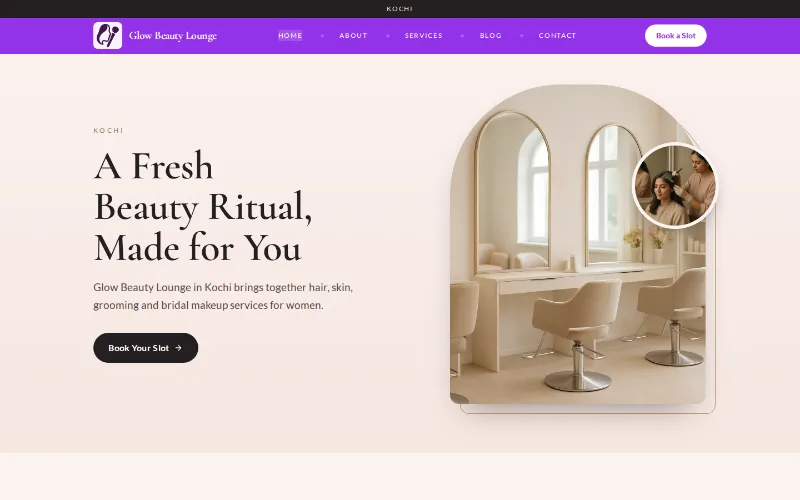
A website made for salons
Clients choose a salon by looking: at the work, the place and the price list. A neat website with your services and rates saves a lot of "price please?" messages, and lets a bride compare your bridal packages before she comes in for a trial.
The builder writes for salons, beauty parlours, unisex hair studios, nail bars and makeup artists. Describe yours, for example "ladies beauty parlour in Gomti Nagar, bridal makeup, threading, facials, home service on request", and it groups the services and lays out the price list.
Your draft stays private until you publish. Change rates, add a new service or swap photos by typing in the chat.
A salon site also helps in quiet weeks. Share the link on your Google profile, Instagram bio and WhatsApp status, and a new client can see the services and rates before she walks in, instead of asking at the counter.
What your salon website includes
The AI picks a design that suits your trade, like Studio below. You can switch to any of 190+ designs at any time, in any colour, without losing your words.
On a design like Studio
- A portrait-style first screen in blush and charcoal with a book-a-slot button
- A price list grouped by hair, skin, nails and bridal
- Bridal and party packages with what each one includes
- Working hours, the weekly off day and whether you do home visits
- A gallery of your work and the salon interior
- An enquiry form and a WhatsApp button on your salon number
In your trade's words
- Headings use salon language: "Our Treatments", "Salon & Spa Services" and "Our Transformations".
- The visitor chat starts with booking, treatments and prices, the three things clients ask first.
Photos and products
- Use photos of your own work, and get a client's permission before you show her face.
- Mention product brands only if you really stock or use them, and remove any the draft adds that you do not.
- Write prices as you charge them, including whether a rate is for short or long hair, so there is no argument at the counter.
- If a dermatologist treats patients at your premises, describe that part as a clinic: medical treatments fall under the NMC advertising rules, which are stricter than a salon's.
On every site
- Your own domain on any paid plan, with free SSL
- Made for phones first, so it reads well on a small screen
- Edit by chat: every change is saved and can be undone
- Add Hindi or another Indian language, with a language switcher
- Page titles and descriptions you can edit for search engines
Apps that fit salons
Appointments
from ₹299/month + GSTClients pick a service, a stylist and a time. You set each stylist's hours, and a deposit can hold a busy bridal date.
Apps are optional add-ons. Every salon site can carry a booking section with your working hours; requests arrive in your dashboard.
How to make your salon website in 3 steps
- 1
Type one line about your salon: services, area, and whether you are ladies-only, gents or unisex.
- 2
The AI builds your price list, packages and gallery layout, and writes a short introduction to the salon.
- 3
Put in your real rates, check the preview and publish on your own domain.
The AI writes a first draft from what you tell it. Check prices, hours and every claim before you publish.
Questions from salons
Can clients book an appointment on the website?
Yes. Ask the chat to add a booking section with your working hours, and requests come to your dashboard. The Appointments app adds stylist calendars, time slots and deposits.
Can I show bridal packages with prices?
Yes. List each package with what it covers, such as trial, makeup, draping and hairstyling, and its price. Update the prices by chat before each wedding season. Mention whether the trial is charged separately and how far ahead brides should book.
Should I show before-and-after photos?
For a salon you can, but only of real work you did and only with the client's consent. Edited or borrowed photos mislead clients and invite complaints.
I do home service too. How do I show that?
Mention it in your description, or ask the chat to add a home service section with the areas you cover and any extra charge.
Can I link my Instagram page?
Yes. Add your Instagram and other social profiles in the editor's social settings and they appear on the site. Your posts stay on Instagram; the site gives clients one place for services, prices and booking.
See a first draft of your salon website
From ₹200/month + 18% GST
Build and preview one website free, no card needed. Publishing it needs a paid plan.