Webmail lets you read and send your email from any web browser, with nothing to install. The address you log in at depends on which Domain India email product you have: the email included with a cPanel, DirectAdmin, Webuzo or Plesk hosting plan, or Business Email. This guide gives the address for each, the login steps, and fixes for the problems that stop people logging in.
For email on a cPanel hosting plan, go to https://yourdomain.com/webmail (or port 2096) and log in with your full email address and its password. DirectAdmin and Webuzo mail opens at https://yourdomain.com/webmail (DirectAdmin also answers at /roundcube). Business Email has its own address: https://mail.yourdomain.com:8443/. If login fails, check the password first, then whether your IP address has been blocked after too many failed attempts.
1. First, which email do you have?
Domain India sells email in two separate ways, and their webmail addresses are different. Using the wrong one is the most common reason a correct password "does not work".
| You have | Where the mail runs | Webmail address (replace yourdomain.com) |
|---|---|---|
| Email on a cPanel hosting plan | Your hosting server | https://yourdomain.com/webmail or https://yourdomain.com:2096 |
| Email on a DirectAdmin hosting plan | Your hosting server | https://yourdomain.com/webmail or https://yourdomain.com/roundcube |
| Email on a Webuzo hosting plan | Your hosting server | https://yourdomain.com/webmail |
| Email on a Windows (Plesk) hosting plan | Your hosting server | Usually https://webmail.yourdomain.com |
| Business Email | A separate mail platform | https://mail.yourdomain.com:8443/ |
If you bought a hosting plan and created mailboxes in its control panel, you have hosting email. If you bought Business Email (priced per mailbox), you have Business Email. Not sure? Read Business Email vs the Email Included With Your Hosting, or open a ticket with your domain name and we will tell you.
Whichever product you have, two rules always apply:
- The username is your full email address, such as
[email protected], not justyou. - The password is the mailbox password. It is not your Domain India client area password and not your control panel password.
2. Log in to webmail on cPanel hosting
cPanel gives you two ways in.
Directly from your browser
- Open the address.Go to
https://yourdomain.com/webmail. This usually forwards you to your server's secure webmail port,2096. You can also typehttps://yourdomain.com:2096orhttps://webmail.yourdomain.com. - Enter your details.Type your full email address and the mailbox password.
- Open Roundcube.Click Log in. Current cPanel versions use Roundcube as the webmail application, so your inbox opens in Roundcube.
Always use https://. The plain http:// address and port 2095 are unencrypted and send your password in clear text.
From cPanel, without a password
If you can log in to cPanel, you do not need the mailbox password at all:
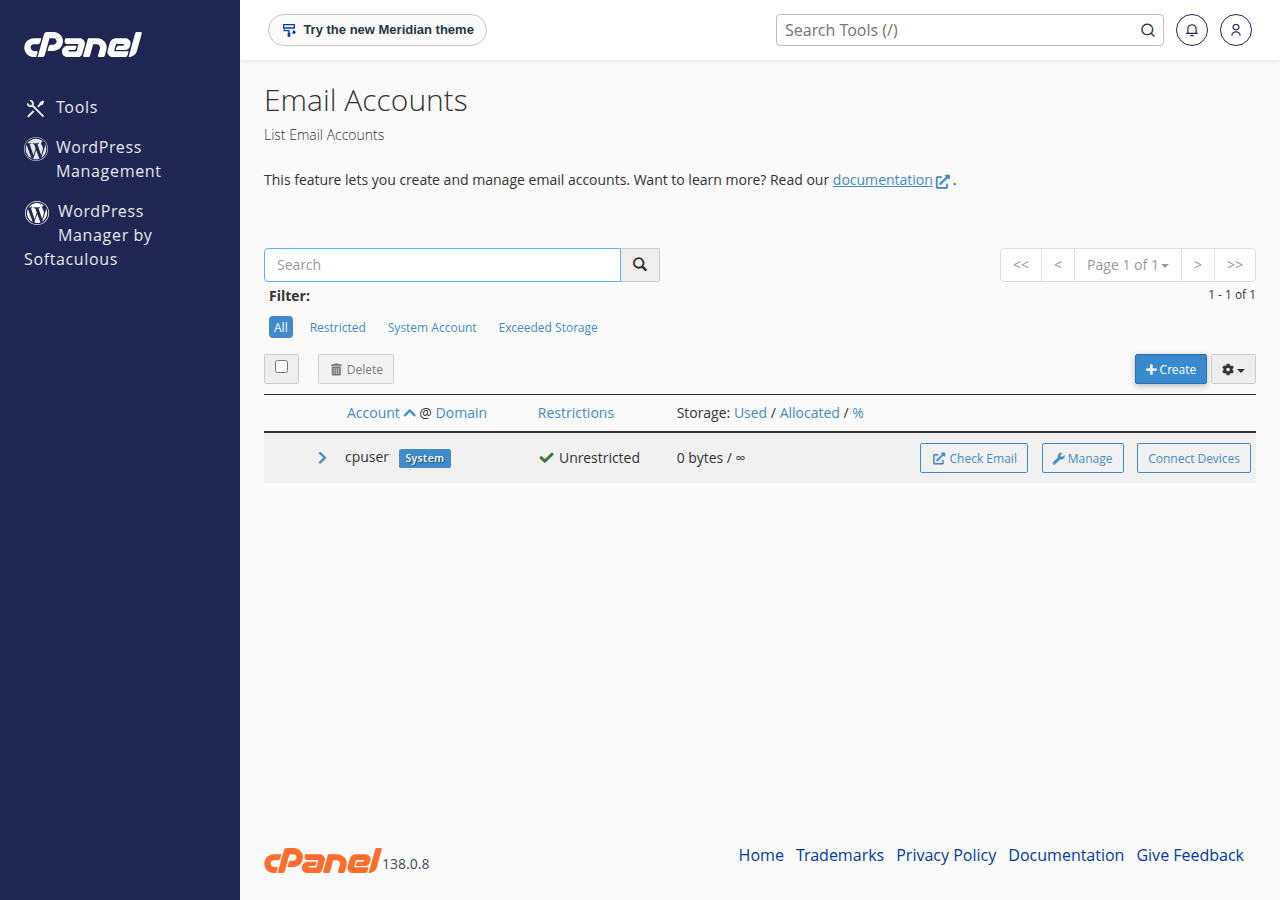
- Log in to cPanel.
- In the Email section, click Email Accounts.
- Find the mailbox and click Check Email next to it.
cPanel opens that mailbox's webmail directly. The same Email Accounts screen lets you set a new mailbox password.
3. Log in to webmail on DirectAdmin hosting
DirectAdmin also uses Roundcube for webmail.
- Go to
https://yourdomain.com/webmailorhttps://yourdomain.com/roundcube. Both open Roundcube on Domain India DirectAdmin hosting. - Log in with your full email address and the mailbox password.
There is no webmail.yourdomain.com address on DirectAdmin hosting; use one of the two paths above.
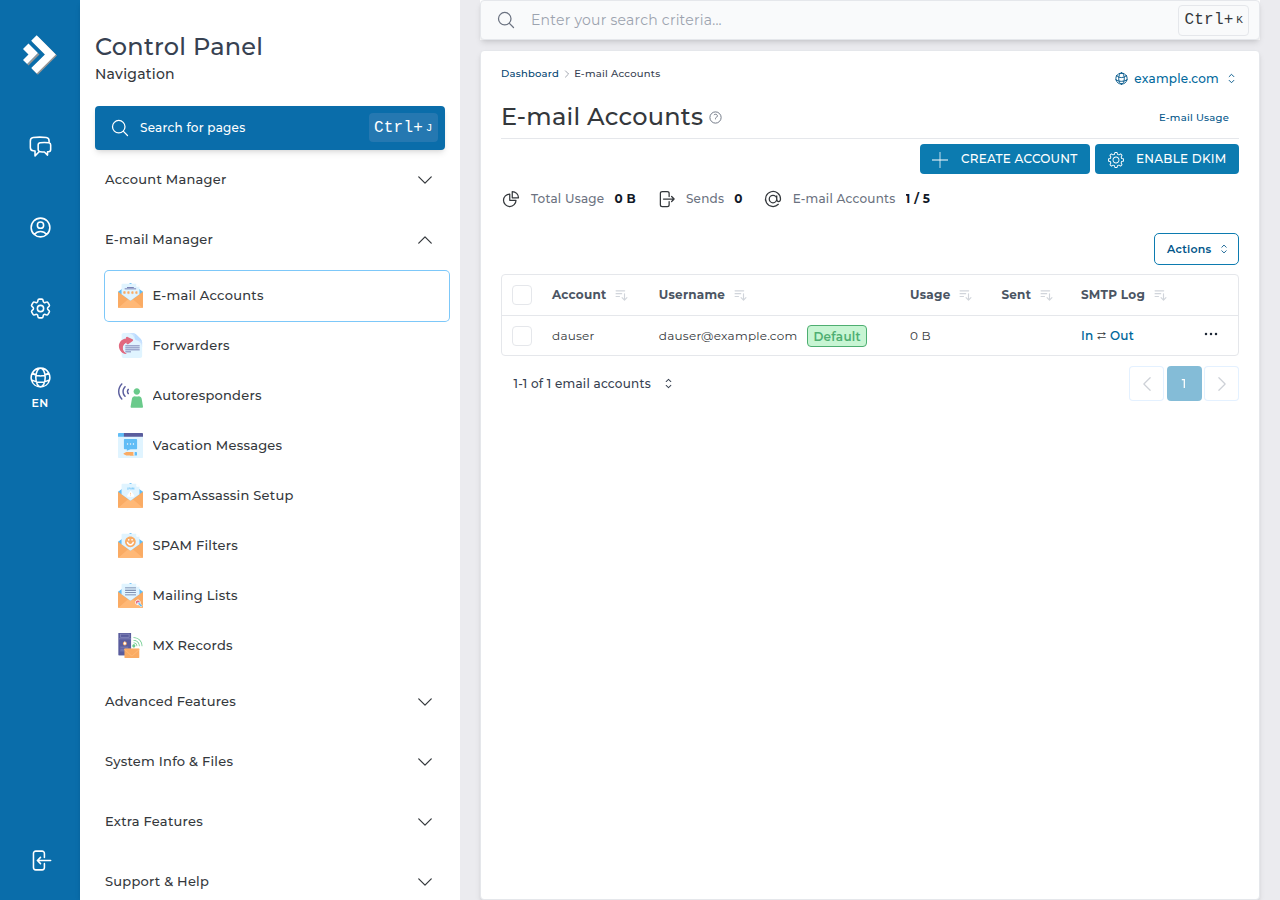
If you can log in to DirectAdmin, go to the E-mail Manager area and use the webmail (Roundcube) link there. To reset a mailbox password, open E-mail Accounts in the same area.
4. Log in to webmail on Webuzo hosting
- Go to
https://yourdomain.com/webmail. This opens Webuzo Email, the Webuzo webmail login. - Log in with your full email address and the mailbox password.
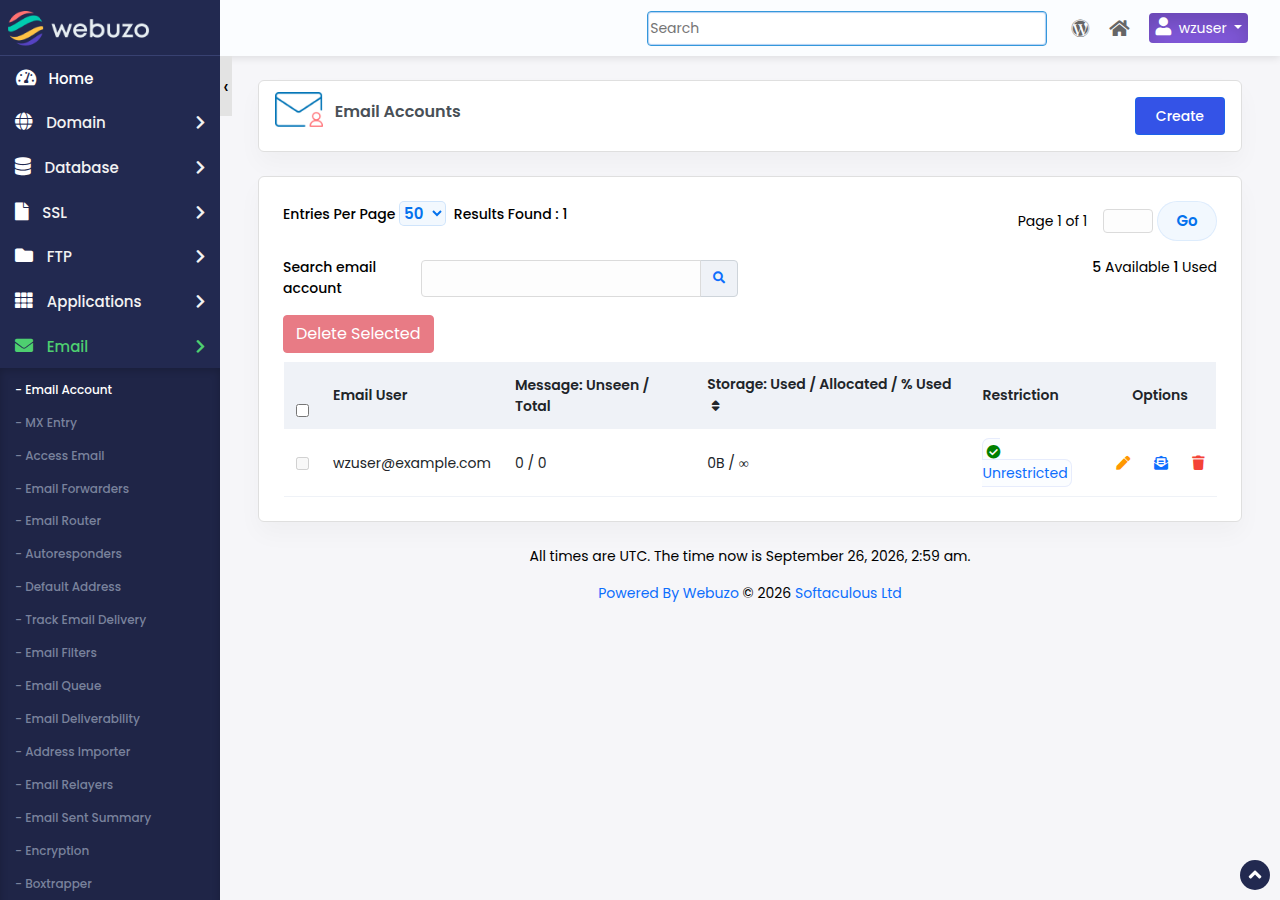
If that address does not load, log in to the Webuzo panel, open the Email section and use the webmail link there. Mailbox passwords are changed under Email → Email Account.
5. Log in to Business Email webmail
Business Email runs on its own mail platform, so none of the hosting addresses above will work for it.
- Open your address.Go to
https://mail.yourdomain.com:8443/. Type thehttps://; plainhttp://is refused. The address also works without:8443. - Sign in.Enter your full email address and the mailbox password.
- Choose your view.Every user gets their mailbox, calendar, contacts and tasks under
/dashboard. The person who manages the domain also sees/domain-admin, where mailboxes are added and removed.
If you type http://mail.yourdomain.com without the port, the server refuses the connection on purpose, so that your password is never sent unencrypted. Use the full address above and bookmark it.
For the first sign-in, see Signing In to Business Email for the First Time.
6. When webmail will not let you in
"Login failed" or wrong password
- Check that the username is the full email address.
- Check Caps Lock, and type the password rather than pasting it, since a pasted password often carries an extra space.
- Try a private or incognito window, in case an old saved login is getting in the way.
- Still failing? Reset the mailbox password. On hosting, do this in your control panel's email accounts screen. On Business Email, sign in to the client area, open your Business Email service and click Reset password for the mailbox.
Your IP address has been blocked
Our hosting servers protect logins against password guessing. After several failed attempts from one address, the server's firewall may block that IP address for a while. The login page then stops loading, or times out, from your office or home network, while it still works on mobile data.
Every further attempt can extend the block. Open a support ticket with your domain name and your public IP address (search "what is my IP" to find it). Also check for an old phone, laptop or printer still trying the wrong password in the background: it will trigger the block again.
A security warning about the certificate
The padlock only works when the address matches the site's SSL certificate. A warning usually means one of these:
- You typed an address the certificate does not cover. Use one of the addresses in this guide.
- Your domain is new or its DNS was just changed, so its free SSL certificate has not been issued yet. Wait a few hours, or use the webmail address given in your welcome email.
- On Business Email, DNS for
mail.yourdomain.comis not yet pointing to us.
Do not click through a certificate warning on a network you do not trust. If it continues, open a ticket.
Two-factor authentication codes
If two-factor authentication is turned on, you need the six-digit code from your authenticator app after the password. The code changes every 30 seconds, so enter the current one. If codes are always rejected, check that your phone's clock is set to update automatically; a phone clock that is a few minutes out produces wrong codes. If you have lost the phone, contact whoever manages the mailbox or open a ticket.
Webmail opens, but mail is stuck
If you can log in but new mail does not arrive, or sent mail fails, the mailbox may be full. Each mailbox has a storage quota. Empty the Trash and Junk folders, delete large old messages, or ask the account owner to raise the quota. See Managing Email Quotas.
7. Keep your mailbox secure
A hacked mailbox gets used to send spam, which can get your domain's mail blocked elsewhere.
On Business Email, you can also create a separate app password for each phone or mail app. If a device is lost, you revoke that one password instead of changing your main one everywhere.
Messages saying your mailbox is full, suspended or needs verification, with a login link, are usually phishing. Type your webmail address yourself instead of clicking the link.
Two-factor guides: cPanel hosting and your Domain India client area.
8. Prefer an app? Use a mail client instead
Webmail is ideal on a shared or borrowed computer. For daily use, a mail app on your phone or computer is often faster and notifies you of new mail. Choose IMAP, so the same mail shows everywhere, including in webmail.
- Phone: Android or iPhone and iPad
- Computer: Microsoft Outlook or Thunderbird
- Webuzo hosting: Configuring Email Clients with Webuzo
- Server names and ports: Email Server Details, Port Numbers, and SSL Settings
- Business Email: Setting Up Outlook, Apple Mail and Your Phone. Business Email is IMAP only; it has no POP3.
Once you are in, Roundcube Webmail Features Guide covers folders, filters, signatures and contacts.
9. Which Domain India email fits you
If you need a website and a few mailboxes, the email included with a hosting plan is enough. cPanel Starter includes 10 email accounts, alongside one website. Compare plans on the cPanel hosting page.
If you want email that runs separately from your website, with webmail including calendar, contacts and tasks, two-factor authentication and DKIM signing, choose Business Email. It is priced per mailbox, so you can start with one. Domain India list prices exclude 18% GST.
What is the webmail address for my Domain India hosting email?
On cPanel hosting it is https://yourdomain.com/webmail, https://webmail.yourdomain.com or https://yourdomain.com:2096. On DirectAdmin it is https://yourdomain.com/webmail or /roundcube, and on Webuzo https://yourdomain.com/webmail. Replace yourdomain.com with your own domain.
What is the webmail address for Domain India Business Email?
Business Email webmail is at https://mail.yourdomain.com:8443/, with your own domain in place of yourdomain.com. Type the https; the :8443 can be left out.
What username do I use to log in to webmail?
Your full email address, for example [email protected], together with that mailbox's own password. Your client area or control panel password will not work.
I forgot my email password. How do I reset it?
For hosting email, log in to your control panel (cPanel, DirectAdmin or Webuzo), open the email accounts screen and set a new password for the mailbox. For Business Email, sign in to the Domain India client area, open your Business Email service and use Reset password for that mailbox. If you cannot reach the client area, open a support ticket.
Why does webmail stop loading after I typed the wrong password several times?
The hosting server's firewall can block your IP address for a while after repeated failed logins. Stop retrying and open a support ticket with your domain name and your public IP address.
Why does my browser show a certificate warning on the webmail page?
The address you used does not match an SSL certificate, often because the domain is new or its DNS has just changed. Use the address from your welcome email and wait a few hours for the certificate; open a ticket if the warning continues.
Can I read my email on my phone instead of in webmail?
Yes. Set up your mailbox in your phone's mail app using IMAP, and your mail stays in sync with webmail and your computer.
Need email that runs separately from your website? See Business Email. Want a website with mailboxes included? Compare cPanel hosting, DirectAdmin hosting and Webuzo hosting.
Webmail with calendar, contacts and tasks, two-factor authentication and DKIM-signed mail. Start with one mailbox and add more when you need them.
See Business Email