Your website, cPanel, webmail, FTP or email stops working for you, but a colleague or customer says it opens fine for them. In most cases the server itself is running and its security firewall has blocked your IP address after too many failed logins. This guide shows how to confirm it, how to get unblocked with Domain India, and how to stop it from happening again.
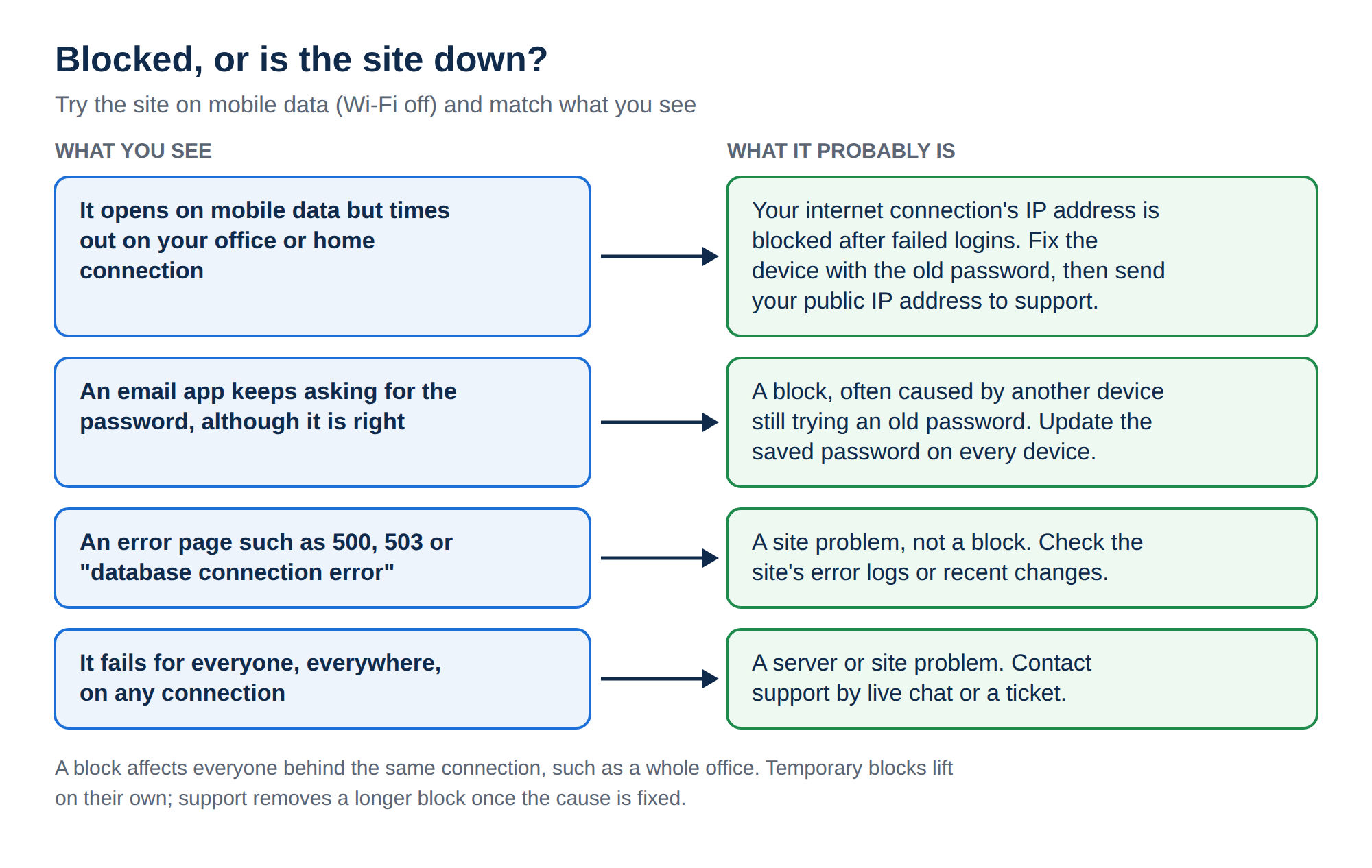
If a service works on mobile data or for someone else but times out on your office or home connection, your IP address has most likely been blocked after repeated failed logins. Wrong saved passwords in a phone or email app are the usual cause. Find your public IP address, send it to Domain India support in a ticket or on live chat, and fix the saved password on every device before the block is removed. If you run your own VPS, the firewall is yours and you remove the block yourself.
1. Blocked or down? The quick test
A two-minute test tells a block from an outage.
| What you see | Probably an IP block | Probably a server or site problem |
|---|---|---|
| Switch your phone to mobile data (Wi-Fi off) and open the site | It opens on mobile data | It fails on mobile data too |
| Ask someone in another city to open it | It works for them | It fails for them too |
| What the browser shows | The page spins, then "connection timed out" or "took too long to respond" | An error page such as 500, 503 or "database connection error" |
| Who is affected | Everyone in your office on the same connection | Everyone, everywhere |
| Email apps | Keep asking for the password, or cannot connect, although the password is right | Other people cannot send or receive either |
The timeout is the key sign: a blocked connection gets no reply, so your browser waits and gives up. A proper error page means the server is answering you, so the problem is in the website, not a block. For errors like 403, see Understanding and resolving HTTP error 403 Forbidden.
Most offices and homes share one public IP address through their router. When one device triggers a block, every computer and phone on that connection loses access at once, including people who never typed a wrong password.
2. Why servers block IP addresses
Bots guess passwords for email, FTP, SSH and control panels all day. This is a brute-force attack. To stop it, shared hosting servers watch for failed logins and block an IP address that fails too often. On cPanel servers this includes cPanel's own brute-force protection, called cPHulk, alongside the server firewall. The protection cannot tell a bot from your own phone with an old password.
3. What usually triggers a block
An app with the wrong port or SSL setting can also fail on every try. The correct settings for your service are in What settings do I need to upload my website (FTP) and How to log into webmail.
4. Find your public IP address
Support needs the IP address the server sees, which is your public IP. The address in your computer's network settings, such as 192.168.x.x or 10.x.x.x, is a private address and cannot be unblocked on its own.
- Use the connection that is blocked.Connect the computer or phone to the same office or home Wi-Fi that cannot reach the server. Do not use mobile data for this step, because it has a different IP address.
- Look up your IP.Search Google for "what is my IP", or open ifconfig.me in your browser.
- Copy both addresses if you see two.Many Indian broadband and mobile networks now use IPv6 as well as IPv4. An IPv4 address looks like 203.0.113.25; an IPv6 address is longer and contains colons. Send both, because a block on either one can cut you off.
- Note the time and the service.Write down what failed (webmail, FTP, cPanel, email app) and roughly when it started.
On a Linux or Mac terminal you can also run:
curl -4 ifconfig.me
curl -6 ifconfig.me
The second command returns nothing if your connection has no IPv6.
5. How to get unblocked on Domain India hosting
On Domain India shared hosting (cPanel, DirectAdmin and Webuzo), the block is on our server, so our support team removes it. The Domain India client area has no self-service unblock button.
- Fix the password first.Find the device or app with the wrong password and correct it, or turn it off for now (section 6). If it keeps retrying, you will be blocked again soon after the unblock.
- Contact support with your IP.Send your public IP addresses, your domain name, and the service that stopped working.
- Wait for confirmation.Our team checks the server firewall for your address and removes the block.
- Test from the blocked connection.Open webmail or your site from the office network, then bring your devices back online one at a time.
How to reach us. A block on your hosting server does not normally stop you from opening domainindia.com, so you can usually open a ticket in the client area. If that does not open either, switch to mobile data and use any of these:
- the public ticket form, which works without logging in;
- live chat, available 24/7 from the chat button on every page of domainindia.com.
Tickets get a first response within 15 minutes. Removing the block itself can take longer, depending on the issue. Domain India does not offer phone support. You can follow a ticket at Track ticket.
Support only needs your IP address, domain and the service that failed. Do not paste mailbox or cPanel passwords into a ticket or chat message.
6. Stop it from happening again
Most repeat blocks come from one forgotten device. Work through this list.
- List every device that uses the account. Include office desktops, laptops, personal phones, tablets, and any device an ex-employee returned.
- Update the saved password everywhere. In phone mail apps, remove the account and add it again if the app keeps the old password. In Outlook, update the password in the account settings, not only in the pop-up prompt.
- Check the server name, port and SSL setting. Use the settings shown for your mailbox in your control panel. A mismatch between the port and the SSL/TLS option is a common cause of silent failed logins.
- Remove old accounts from phones and apps, including devices former staff used.
- Fix saved FTP logins in FileZilla's Site Manager, and keep simultaneous connections low.
- Use SSH keys instead of passwords, and stop scripts from retrying in a loop.
- Bring devices back gradually. After the unblock, start one device at a time and check each one connects before adding the next.
7. VPS customers: the firewall is your own
On a Domain India VPS you have full root access, and the firewall on the server is the one you or your administrator installed. Domain India does not manage it, so you remove the block yourself. Connect from a different network, such as mobile data, and run the command for the tool your server uses. Replace 203.0.113.25 with your blocked IP.
CSF (ConfigServer Security & Firewall)
csf -g 203.0.113.25      # check whether the IP is blocked
csf -dr 203.0.113.25     # remove a permanent block
csf -tr 203.0.113.25     # remove a temporary block
csf -a 203.0.113.25      # allow the IP (only if it is a fixed office IP)
Fail2ban
fail2ban-client status              # list active jails
fail2ban-client status sshd         # see banned IPs in a jail
fail2ban-client set sshd unbanip 203.0.113.25
UFW
ufw status numbered      # find the rule that blocks the IP
ufw delete 3             # delete that rule by its number
If your VPS runs a control panel, check its own protection too. In WHM, look under cPHulk Brute Force Protection. In DirectAdmin, clear the IP in the Brute Force Monitor as well, or the firewall may block it again.
Only allow-list a fixed IP that belongs to you; home and mobile IPs change and are often shared. If you have locked yourself out with no other way in, open a ticket from the client area and tell us which VPS it is.
8. When the server really is down
If the site fails on mobile data and for other people too, it is not a block on you.
- Check your other sites. If other websites on the same hosting account also fail, the problem is likely on the server or account. If only one site fails, look at that site, for example a recent plugin update or a full disk quota.
- Check the domain. An expired domain or changed nameservers make a site disappear for everyone.
- Ask us. Open a ticket or use live chat, say which domain is affected and since when, and we will check the server.
How do I know if my IP address has been blocked by the server?
If your website, webmail, cPanel, FTP or email works on mobile data or for someone else, but only times out on your own connection, your IP address has most likely been blocked by the server's firewall after failed logins.
Why was my IP blocked when I typed the correct password?
Usually another device on the same connection kept trying an old or wrong password, such as a phone mail app after a password change. Your office shares one public IP, so everyone on it is blocked together.
Can I unblock my own IP on Domain India shared hosting?
No. On Domain India cPanel, DirectAdmin and Webuzo hosting, the block is on our server. Send your public IP address to support by ticket or live chat and our team removes it.
How do I contact Domain India if I cannot open the client area?
Switch to mobile data and use the public ticket form at domainindia.com/support/ticket or the 24/7 live chat on the website.
Which IP address should I send to support?
Your public IP address, looked up from the blocked connection by searching "what is my IP". Send both the IPv4 and IPv6 addresses if your connection has both. Private addresses such as 192.168.x.x are not useful.
Will my IP be blocked again after it is unblocked?
Yes, if the device with the wrong password is still trying to log in. Correct the saved password on every phone, computer and app, or turn those devices off, before the block is removed.
I have a VPS. Who removes the block?
You do. On a Domain India VPS you have root access and manage your own firewall, such as CSF, Fail2ban or UFW. Connect from another network and remove the IP with that tool's unblock command.
Ready to get back in? Send your public IP address through a new support ticket, or use the public ticket form if you cannot log in. For the correct mail settings, see How to log into webmail.
Tell us your public IP address, your domain and the service that stopped working, and our team will check the server firewall for you.
Open a support ticket