DirectAdmin is the control panel on Domain India's DirectAdmin hosting plans. From one screen you manage your website files, domains and subdomains, email accounts, databases, SSL certificates, backups and scheduled tasks. This guide walks through each area as it works on our servers, and links to the detailed guide for every task.
Open DirectAdmin with the DirectAdmin button in the client area (Hosting › My hosting), or log in at https://yourdomain.com:2222 with your DirectAdmin username and password. Your website lives in domains/yourdomain.com/public_html, email opens at https://yourdomain.com/webmail, and weekly JetBackup backups can be restored from the panel. If you cannot find a menu item, use the search box at the top of DirectAdmin or ask support.
1. Logging in
There are two ways into DirectAdmin:
- One click from the client area. Sign in, open My Hosting and click the DirectAdmin button on your domain's row. It opens DirectAdmin in a new tab, already signed in, through the Domain India DirectAdmin portal on port 2280. The button appears only while the account is Active.
- Direct login. Go to
https://yourdomain.com:2222and sign in with your DirectAdmin username and password. Until your domain points to us, use the panel URL shown on the Access tab (Hosting › My hosting › Manage › Access).
Your client-area password and your DirectAdmin password are separate. If you have lost the DirectAdmin password, reset it yourself from the Access tab; see how to reset your DirectAdmin password. The full list of login routes and fixes is in logging in to DirectAdmin from the client area.
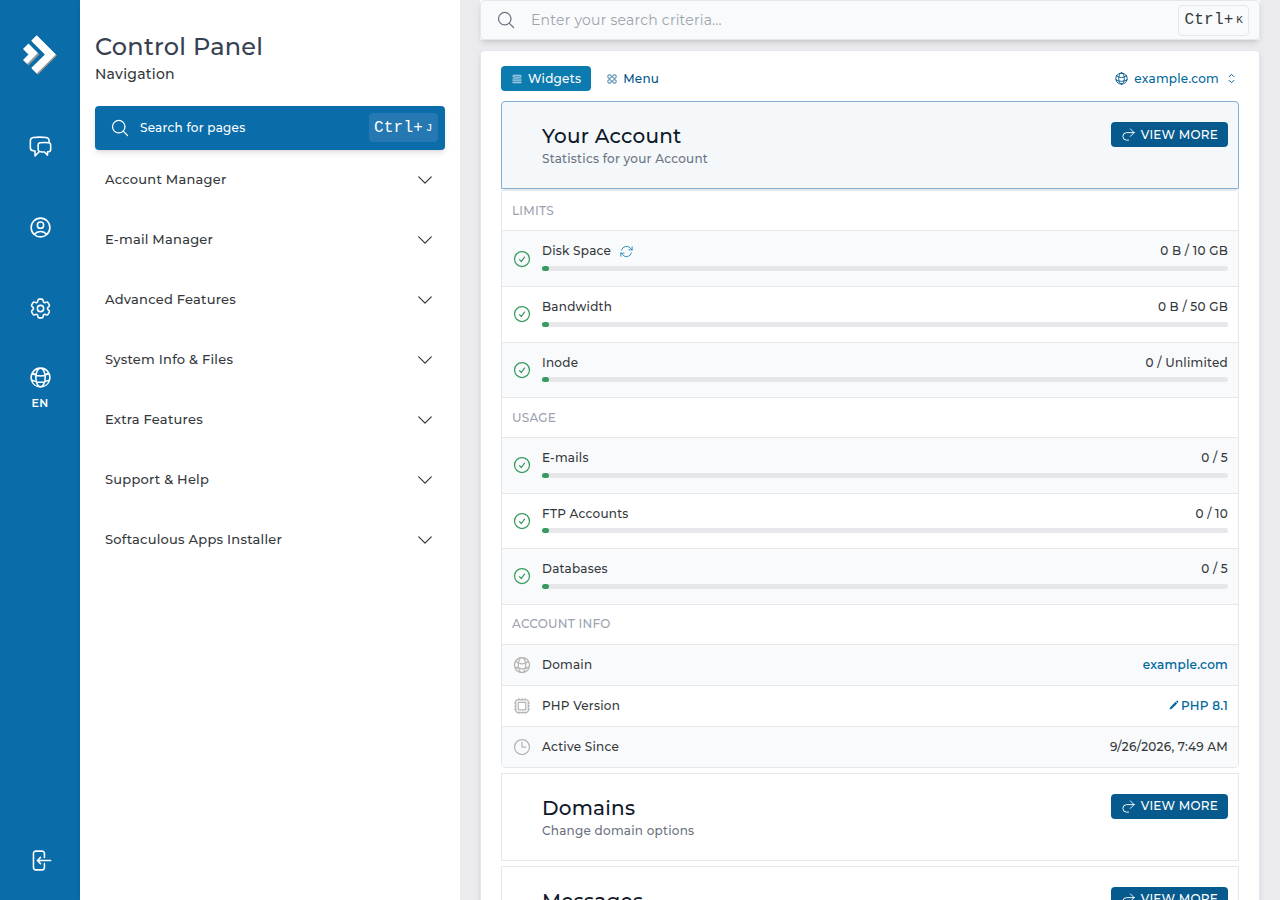
DirectAdmin's section names and layout change between versions and skins. Current versions have a search box at the top of the panel: type what you want, such as "email", "cron" or "ssl", and open the result. If a feature still isn't there, ask support.
2. Files and uploading your website
Each domain has its own folder. Your website's files go in:
/home/username/domains/yourdomain.com/public_html/The browser-based File Manager lets you upload, create, edit, rename, compress and extract files, and change permissions. On our DirectAdmin server it accepts uploads of up to 500 MB. For many files at once, FTP is more reliable: use port 21 with FTP over TLS (FTPS), which works on our DirectAdmin server.
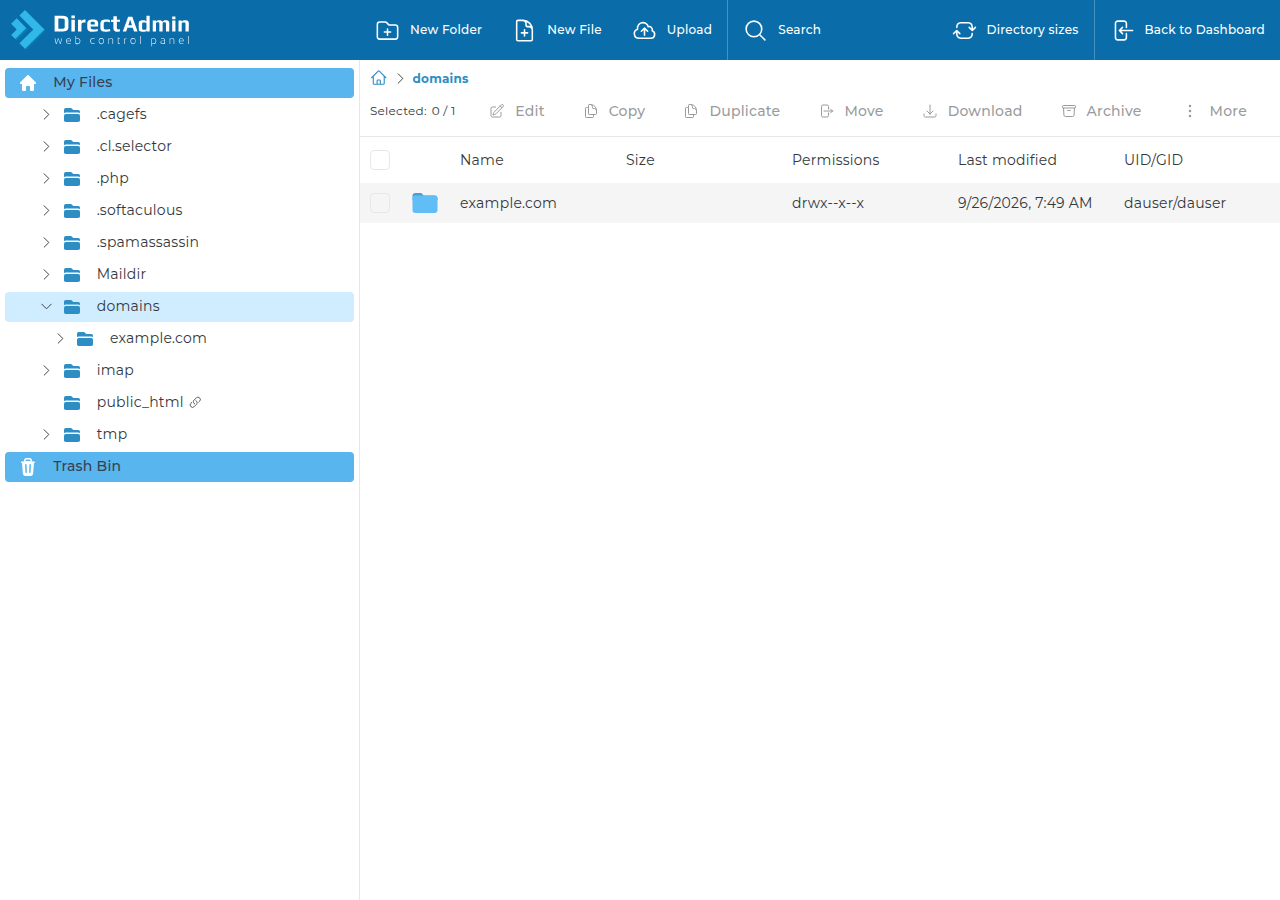
Two server details to know:
- DirectAdmin serves
index.htmlbeforeindex.php. If you upload a PHP site and still see an old placeholder page, delete or rename the leftoverindex.html. - The PHP upload limit for scripts such as WordPress is 64 MB on our DirectAdmin server, lower than the File Manager's limit.
Guides: using the DirectAdmin File Manager and what settings do I need to upload my website.
3. Domains, subdomains and DNS
Depending on your plan, you can host more than one website in the same account. In DirectAdmin you add another domain (each gets its own domains/ folder), create subdomains, and add domain pointers (aliases) that show the same site under a second name.
For a new domain to load, its DNS must point to your hosting. The simplest way is to use your hosting nameservers at the domain's registrar, or to set an A record to your server's IP address (shown on the Access tab). The steps are in how to change your nameservers. Changes can take a few hours to reach every network.
4. Email
Create mailboxes, forwarders and autoresponders in DirectAdmin's email area. Each mailbox has its own password and storage quota.
| Task | Where or how | Detail |
|---|---|---|
| Read mail in a browser | https://yourdomain.com/webmail or /roundcube | Opens Roundcube; log in with the full email address |
| Set up a phone or Outlook | IMAP with SSL/TLS | See the email client guide linked below |
| Sending limit | 1,000 messages per day per account (200 per mailbox by default) | Per account on our DirectAdmin server |
| DKIM signing | Selector x | Most domains already have a key |
There is no webmail.yourdomain.com address on DirectAdmin hosting; use one of the two paths in the table.
Guides: how to log in to webmail, creating email accounts, autoresponders in DirectAdmin, email client settings for DirectAdmin and checking DKIM in DirectAdmin.
5. Databases and phpMyAdmin
Create a MySQL database under Account Manager › Databases in DirectAdmin. By default DirectAdmin also creates a user with the same name and a secure password; use Advanced mode to choose your own. Both names carry your account prefix, such as username_shop. Your application connects to localhost.
Open phpMyAdmin from the panel to browse tables, run queries, and import or export a database.
MySQL port 3306 is closed to the outside on our shared servers, so desktop tools cannot connect to it directly. Use an SSH tunnel instead (see section 7). Guides: creating and connecting to a MySQL database in DirectAdmin and database troubleshooting.
6. SSL, PHP and installing apps
SSL. Free Let's Encrypt certificates are issued from DirectAdmin's SSL area. See enabling Let's Encrypt in DirectAdmin.
PHP version. Choose the PHP version per domain. PHP 8.3 is the one to pick for new sites. See changing the PHP version in DirectAdmin.
Installing apps. Softaculous is installed on our DirectAdmin server, so WordPress, Joomla, Laravel and hundreds of other applications install in a few clicks. SitePad, a drag-and-drop site builder, is also available: see building a website with SitePad.
.htaccess. The web server is Apache, and .htaccess rewrite rules work. PHP does not run as an Apache module, so php_value and php_flag lines in .htaccess cause a 500 error. In an Options line, only Indexes, IncludesNOEXEC, MultiViews, SymLinksIfOwnerMatch, FollowSymLinks and None are allowed; anything else also gives a 500 error.
7. Cron jobs and SSH
Cron jobs run a command on a schedule, such as a WordPress cron trigger or a nightly cleanup script. You set the minute, hour, day, month and weekday, and the command. Some PHP functions (exec, shell_exec, system, proc_open, popen) are disabled on our shared servers, so scripts that depend on them will fail. See setting up cron jobs in DirectAdmin and PHP disabled functions on shared hosting.
SSH. Jailed SSH access is available on every shared hosting plan (cPanel, DirectAdmin, Webuzo). It is off by default; ask support to enable it for your account. Login is by SSH key only, and port forwarding works, so you can open an SSH tunnel to MySQL. Tools available inside the jailed shell vary; ask support. See enabling SSH on DirectAdmin hosting.
8. Backups, logs and resource usage
Backups. JetBackup 5 takes a weekly backup of your account every Sunday and keeps five copies. You can restore files, databases or email from JetBackup in DirectAdmin, or download a copy. Take your own copy too before a big change. See creating a backup with JetBackup and restoring with JetBackup.
Logs and statistics. DirectAdmin shows each domain's error log, access log and traffic statistics. The error log is the first place to look when a page shows a blank screen or a 500 error. See how to access and analyse logs in DirectAdmin.
Resource usage. Each account has CPU, memory and process limits. When a site hits them, visitors see errors such as "Resource Limit Is Reached". See checking resource usage in DirectAdmin.
9. DirectAdmin hosting at Domain India
DirectAdmin plans start at the same entry price as our other Linux panels. Every plan includes free SSL, Softaculous, jailed SSH on request and weekly JetBackup backups. Prices on the cards are Domain India list prices on 19 September 2026, excluding 18% GST.
- 10 GB NVMe SSD Storage
- 50 GB Monthly Bandwidth
- 1 Website
- 5 Email Accounts
- 30 GB NVMe SSD Storage
- Unmetered Bandwidth
- 5 Websites
- 50 Email Accounts
If you prefer cPanel, see our cPanel hosting plans, and comparing cPanel, DirectAdmin and Webuzo for the differences.
How do I log in to DirectAdmin on Domain India hosting?
Sign in to the client area, open Hosting, My hosting, and click the DirectAdmin button on your domain's row. You can also go to https://yourdomain.com:2222 and log in with your DirectAdmin username and password.
Where do I upload my website files in DirectAdmin?
Upload them to domains/yourdomain.com/public_html inside your account, using the File Manager or FTP. Each domain in the account has its own folder under domains.
What is the webmail address on DirectAdmin hosting?
Use https://yourdomain.com/webmail or https://yourdomain.com/roundcube, and log in with the full email address and the mailbox password. There is no webmail.yourdomain.com address on DirectAdmin hosting.
Does DirectAdmin hosting include backups?
Yes. JetBackup 5 backs up each account weekly on Sunday and keeps five copies, and you can restore or download them from JetBackup in DirectAdmin.
Can I use SSH on DirectAdmin hosting?
Jailed SSH is available on every shared hosting plan but is off by default. Ask support to enable it, then log in with an SSH key; password login is not accepted.
Can I install WordPress on DirectAdmin hosting?
Yes. Softaculous is installed on our DirectAdmin server, so you can install WordPress and many other applications in a few clicks.
How many emails can I send from DirectAdmin hosting?
The limit on our DirectAdmin server is 1,000 messages per day per account (200 per mailbox by default). For bulk newsletters, use a dedicated email marketing service.
Ready to start? Open DirectAdmin from your hosting list, or compare DirectAdmin hosting plans. Stuck on a step? Chat with us 24/7 or open a ticket.
Free SSL, Softaculous, weekly JetBackup backups and jailed SSH on request, managed from one simple panel.
See DirectAdmin plans