A subdomain is a name in front of a domain you already own, such as blog.yourdomain.com or shop.yourdomain.com. In DirectAdmin you create, change and delete subdomains from Subdomain Management, and each one normally gets its own folder inside your website's public_html. This page gives the DirectAdmin steps as they work on Domain India's DirectAdmin servers today.
This is the short DirectAdmin version. For what a subdomain is compared with an addon domain or an alias, the DNS each one needs and how many your plan allows, see What is the difference between parked, addon and subdomains.
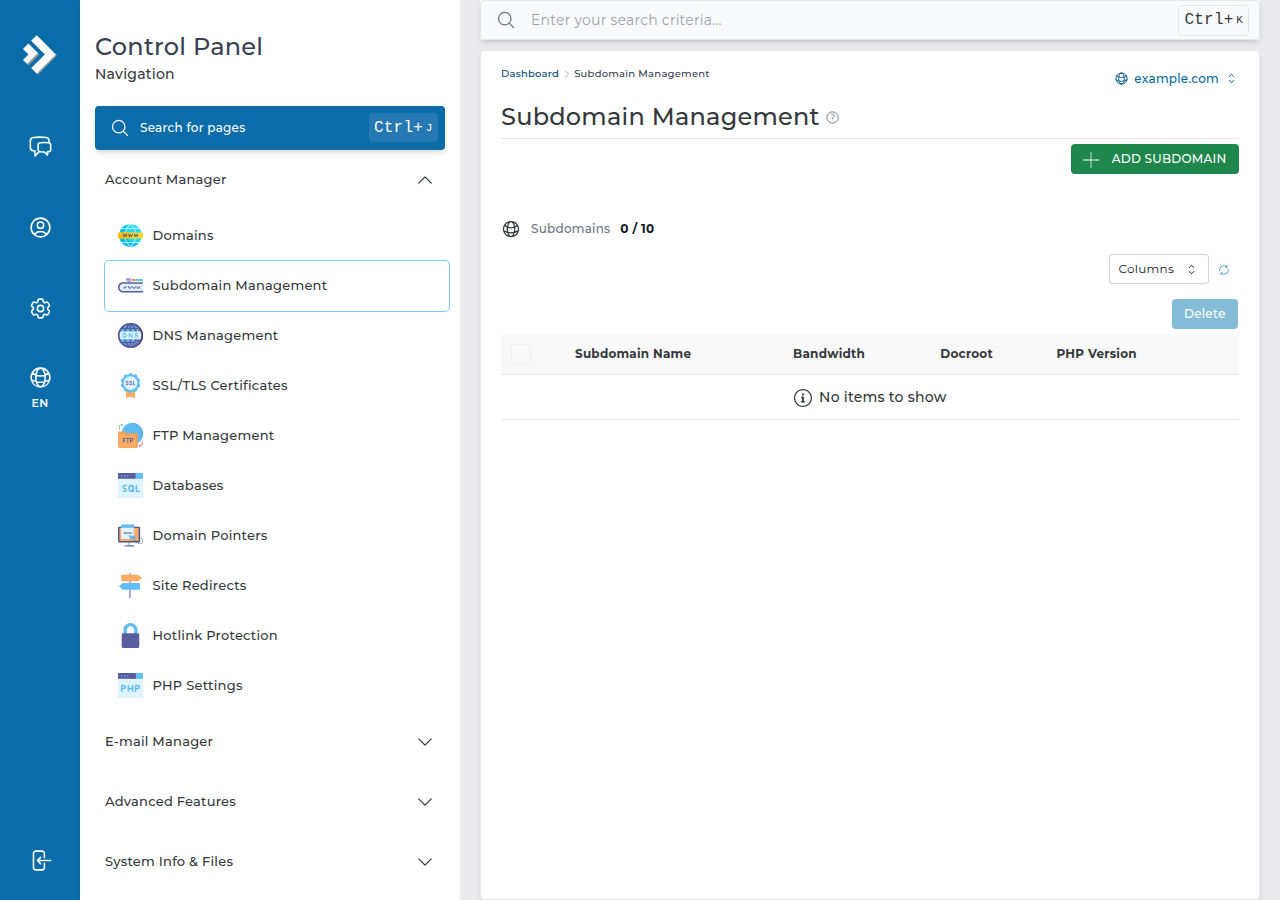
Open DirectAdmin from the client area, select the domain, open Subdomain Management and click Add Subdomain. Type only the prefix, such as blog, and DirectAdmin creates blog.yourdomain.com with its own folder, by default domains/yourdomain.com/public_html/blog. The subdomain loads once its DNS points to your hosting server, which is automatic if the domain uses your hosting nameservers. You don't register or pay for a subdomain separately.
1. Create a subdomain
- Open DirectAdmin.In the client area go to Hosting › My hosting and click the DirectAdmin button on your domain's row. See one-click DirectAdmin login for the other routes.
- Pick the domain.If the account has more than one domain, select the one the subdomain belongs to. DirectAdmin manages subdomains per domain.
- Open Subdomain Management.If you can't see it on the dashboard, type "subdomain" in the search box at the top of DirectAdmin.
- Click Add Subdomain.Enter only the prefix, for example
blog, notblog.yourdomain.com. - Choose the folder.Leave the default, or tick Use a custom document root for this subdomain and enter your own path.
- Create it.The new subdomain appears in the subdomain list.
2. Where the files go
By default DirectAdmin puts a subdomain's files in a folder with the same name inside the main domain's public_html:
domains/yourdomain.com/public_html/          -> yourdomain.com
domains/yourdomain.com/public_html/blog/     -> blog.yourdomain.com
Because that folder sits inside the main site, the same files also open at yourdomain.com/blog/. To keep the two fully apart, give the subdomain a custom document root outside the main site's folder when you create it, or later with Change Document Root in Subdomain Management.
Upload files with the DirectAdmin File Manager or FTP, or install WordPress into the subdomain with Softaculous, which is installed on our DirectAdmin servers.
3. Make the subdomain load: DNS and SSL
Creating the subdomain prepares the server. Visitors reach it only when DNS points the name to your hosting server.
| Your domain's DNS | What to do |
|---|---|
| Uses your hosting nameservers | Nothing. DirectAdmin adds the record for the subdomain itself. |
| Managed elsewhere, such as Cloudflare or another provider | Add an A record for the subdomain name with your server's IP address. |
The nameservers and server IP for your account are on the Point a domain to this hosting card on your hosting service page in the client area. Copy them from there, never from an old article. For record changes, see How to change your domain DNS settings. DNS changes can take several hours to reach every network.
Once the subdomain resolves to the server, issue a free Let's Encrypt certificate that covers it: see How to enable Let's Encrypt SSL certificates in DirectAdmin. A certificate can only be issued after DNS has updated, so a warning on a brand-new subdomain usually means DNS hasn't caught up yet.
4. Change or delete a subdomain
- Change the folder: in Subdomain Management, use Change Document Root for the subdomain and enter the new path. Move the files there first, or the subdomain shows an empty or wrong site.
- See traffic and errors: Subdomain Management links to each subdomain's stats and logs (View Sub-Domain Stats and View Sub-Domain Log).
- Delete: select the subdomain and delete it. DirectAdmin offers a Remove Directory Content option. Tick it only if you also want the subdomain's files deleted; leave it unticked to keep them.
Deleted files can't be undone from the panel. Download anything you need first. Our DirectAdmin hosting also keeps weekly JetBackup backups you can restore from, described in Restoring from JetBackup in DirectAdmin, but a copy taken just before you delete is safer.
5. Limits and common problems
Subdomains don't count as extra websites on Domain India plans, but a DirectAdmin package can still have a subdomain limit. If DirectAdmin says you've reached it, or refuses a name you expect to work, open a support ticket and we'll check your plan.
- "Site can't be reached": DNS doesn't point to the server yet. Check section 3.
- The main site shows instead: the subdomain's folder is empty or the document root points somewhere else.
- 403 Forbidden: the folder has no index file. See Resolving the Forbidden error in DirectAdmin.
Frequently asked questions
How do I create a subdomain in DirectAdmin?
Open DirectAdmin from the client area, select the domain, open Subdomain Management and click Add Subdomain. Enter only the prefix, such as blog, and DirectAdmin creates blog.yourdomain.com with its own folder.
Where are subdomain files stored in DirectAdmin?
By default in a folder with the subdomain's name inside the domain's public_html, for example domains/yourdomain.com/public_html/blog. You can choose a custom document root when you create the subdomain or change it later.
Do I have to pay for a subdomain?
No. A subdomain belongs to a domain you already own, so you create it in the control panel without registering anything.
Why does my new subdomain not open?
Usually DNS does not point to your hosting server yet. If the domain uses your hosting nameservers it works automatically after propagation; if DNS is managed elsewhere, add an A record for the subdomain with the server IP from the client area.
Does deleting a subdomain delete its files?
Only if you tick Remove Directory Content when you delete it. Leave it unticked to keep the files, and download a copy first if they matter.
Ready to add a subdomain? Open your hosting list and click the DirectAdmin button. Need more websites in one account? Compare DirectAdmin hosting plans.
Subdomains, free SSL, Softaculous and weekly JetBackup backups on every DirectAdmin plan.
See DirectAdmin plans