DirectAdmin has no button called "Addon Domain". What cPanel calls an addon domain, DirectAdmin simply calls another domain in your account: a second website with its own domain name, its own folder, email addresses and free SSL, run from the same hosting plan. This guide shows how to add one on Domain India DirectAdmin hosting, point it to the server and get a site live on it.
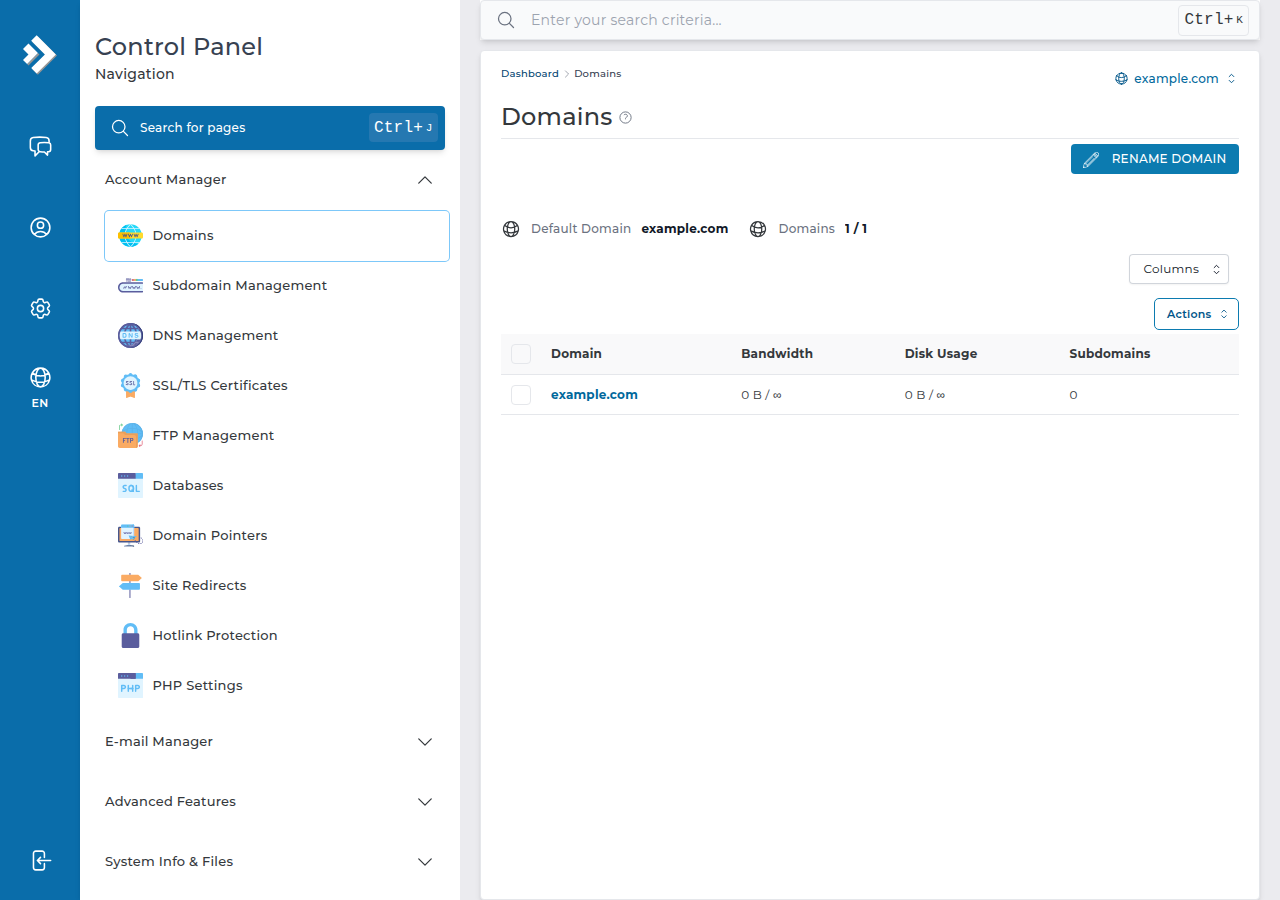
In DirectAdmin, open Domains (under Account Manager) and choose to create a new domain. Enter the name without www, leave bandwidth and disk space on their defaults, keep Secure SSL and PHP Access on, and save. DirectAdmin creates the folder domains/newdomain.com/public_html and the DNS zone for you. Then point the domain's nameservers or A records to your hosting, and upload the site. Each extra domain counts towards your plan's website limit.
1. What an extra domain in DirectAdmin gives you
Each domain you add is a separate website. It gets:
- its own folder:
/home/username/domains/newdomain.com/public_html/; - its own email addresses, such as
[email protected]; - its own DNS zone on the server, created automatically;
- its own free Let's Encrypt SSL certificate, once its DNS points to us.
What it shares is the plan: disk space, databases, mailboxes and resource limits come from one account, so a busy site on one domain can slow the others.
DirectAdmin also has two lighter options. A domain pointer shows the same website under a second name, or redirects to it (cPanel calls this an alias or parked domain). A subdomain, such as shop.yourdomain.com, runs a section of an existing domain. The full comparison is in parked, addon and subdomains explained.
2. Before you start
- Own the domain. It can be registered at Domain India or anywhere else.
- Check your plan's website limit. In the Domain India catalogue on 19 September 2026, DA Starter hosts 1 website, DA Growth 5 and DA Business 25. On a one-website plan, a second domain needs an upgrade.
- Remove it from any other account first. DirectAdmin refuses a domain that already exists elsewhere on the server.
3. Add the domain in DirectAdmin
- Log in to DirectAdmin.In the client area, open My Hosting and click the DirectAdmin button on your account's row. Other ways in are in logging in to DirectAdmin.
- Open Domains.It sits under Account Manager. If you can't see it, type "domain" in the search box at the top of DirectAdmin.
- Create a new domain.Click the button to add or create a domain.
- Enter the domain name.Type it without
wwworhttps://, for examplenewdomain.com. - Leave the limits on their defaults.Bandwidth and disk space can stay on the plan's value or Unlimited; they only cap this domain within your plan, they don't add space.
- Keep Secure SSL and PHP Access ticked.Secure SSL lets the domain have HTTPS; PHP Access lets it run WordPress or any PHP site.
- Save.The domain appears in the Domains list, with its folder created under
domains/.
You don't need to create A, CNAME or MX records by hand. DirectAdmin writes a complete DNS zone for the new domain on the server when you save it.
The server is ready, but visitors still reach the domain's old DNS until you point it at your hosting. Do step 4 next.
4. Point the domain to your hosting
Open your hosting service in the client area. It shows the nameservers and the server IP address for your account; the Access tab also lists the server IP. Then choose one route:
| Route | What you change at the registrar | Best when |
|---|---|---|
| Hosting nameservers | Replace the domain's nameservers with the ones shown for your hosting | Website and email both live on this DirectAdmin account |
| A records | Keep your current DNS and set @ and www to the server IP | Your email or other services stay with another provider |
Copy the values from your own service page, never from an old article or another customer's settings. Step by step: how do I change my nameservers. A change usually works within a few hours and can take up to 24 to 48 hours to reach every network.
5. Turn on HTTPS
Once the domain resolves to our server, DirectAdmin issues a free Let's Encrypt certificate for newdomain.com and www.newdomain.com automatically. If a name shows as failed under Account Manager › SSL/TLS Certificates, DNS has usually not updated yet; wait for DirectAdmin to retry. See enabling Let's Encrypt in DirectAdmin.
6. Put a website on the new domain
- WordPress or another app: Softaculous is installed on our DirectAdmin server. Choose the new domain in the installer and it installs into the right folder.
- Your own files: upload them into
domains/newdomain.com/public_html/with the DirectAdmin File Manager (up to 500 MB per upload) or FTP. For FTP over TLS settings, see what settings do I need to upload my website. - A leftover placeholder: DirectAdmin serves
index.htmlbeforeindex.php. If you upload a PHP site and still see a default page, delete or rename theindex.htmlinpublic_html.
7. Create email for the new domain
Open DirectAdmin's email accounts area, switch to the new domain if the panel asks which domain you mean, and create mailboxes such as [email protected]. They count towards your plan's email account limit. Read mail at https://newdomain.com/webmail or /roundcube once DNS points to us; there is no webmail.newdomain.com address on DirectAdmin hosting. The sending limit on our DirectAdmin server is 1,000 messages per day per account (200 per mailbox by default), shared by all the account's domains. Guides: creating email accounts and how to log in to webmail.
8. Common problems
| Problem | Likely cause | Fix |
|---|---|---|
| DirectAdmin refuses the domain | Typo, plan website limit reached, or the domain exists in another account | Check the name and your plan; ask support if it is in another account |
| The site still shows the old host | DNS still points elsewhere | Update nameservers or A records (section 4) |
| A certificate warning on the new site | DNS changed recently, or SSL not issued yet | Wait for DNS, then issue Let's Encrypt again |
| A 500 error after uploading | A php_value line or an unsupported Options value in .htaccess | See troubleshooting 500 errors |
9. DirectAdmin hosting for more than one website
If you run several websites, DA Growth or DA Business gives room for 5 or 25 sites in one account, each with its own folder, email and free SSL, plus weekly JetBackup backups. Prices on the cards are Domain India list prices, excluding 18% GST.
- 30 GB NVMe SSD Storage
- Unmetered Bandwidth
- 5 Websites
- 50 Email Accounts
- 100 GB NVMe SSD Storage
- Unmetered Bandwidth
- 25 Websites
- 250 Email Accounts
Frequently asked questions
Where is Addon Domains in DirectAdmin?
DirectAdmin has no separate Addon Domains tool. Open Domains, under Account Manager, and create a new domain. Each domain added there is a separate website with its own folder, which is what cPanel calls an addon domain.
Where do I upload files for the new domain?
Upload them to domains/newdomain.com/public_html inside your DirectAdmin account, using the File Manager or FTP. Every domain in the account has its own folder under domains.
Do I need to create DNS records for the new domain in DirectAdmin?
No. DirectAdmin creates the DNS zone on the server when you add the domain. What you must do is point the domain to your hosting at its registrar, with the hosting nameservers or A records to the server IP shown in the client area.
How many domains can I add on Domain India DirectAdmin hosting?
In the Domain India catalogue on 19 September 2026, DA Starter hosts 1 website, DA Growth 5 and DA Business 25. Each extra domain counts as a website.
Why does my new domain still show the old website?
Its DNS still points to the old server. Change the nameservers or A records at the registrar to the values shown for your hosting, then allow a few hours for the change to spread.
Can the new domain have its own email addresses?
Yes. Create mailboxes such as [email protected] in DirectAdmin's email accounts area. They count towards your plan's email account limit, and the account's daily sending limit is shared by all its domains.
Ready to add your next website? Open DirectAdmin from your hosting list, register a new domain if you still need one, or compare DirectAdmin hosting plans for more room. Stuck on a step? Chat with us 24/7 or open a ticket.
DA Growth and DA Business host 5 or 25 websites, each with its own folder, email and free SSL.
See DirectAdmin plans