You can open DirectAdmin with one click from the Domain India client area, with no DirectAdmin password needed. The button signs you in through the Domain India DirectAdmin portal. You can also log in directly on port 2222 with your DirectAdmin username and password. This page covers the one-click route and the most common reasons it fails.
This is the short version. For every login route, where to find your username and panel URL, and a complete troubleshooting table, see how to log in to the DirectAdmin control panel.
Sign in to the client area, open Hosting › My hosting, and click the DirectAdmin button on your domain's row. A new tab opens with DirectAdmin already signed in. The button appears only while the account is Active. To log in without the client area, go to https://yourdomain.com:2222 and use your DirectAdmin username and password.
1. One-click login from the client area
- Sign in.Open the client area sign-in page with your Domain India account email and password.
- Open your hosting list.Choose Hosting › My hosting, or go to /client/services/hosting.
- Click DirectAdmin.On your domain's row, click the DirectAdmin button. DirectAdmin opens in a new tab, already signed in.
- Or open the account first.Click Manage, then the DirectAdmin button at the top of the page.
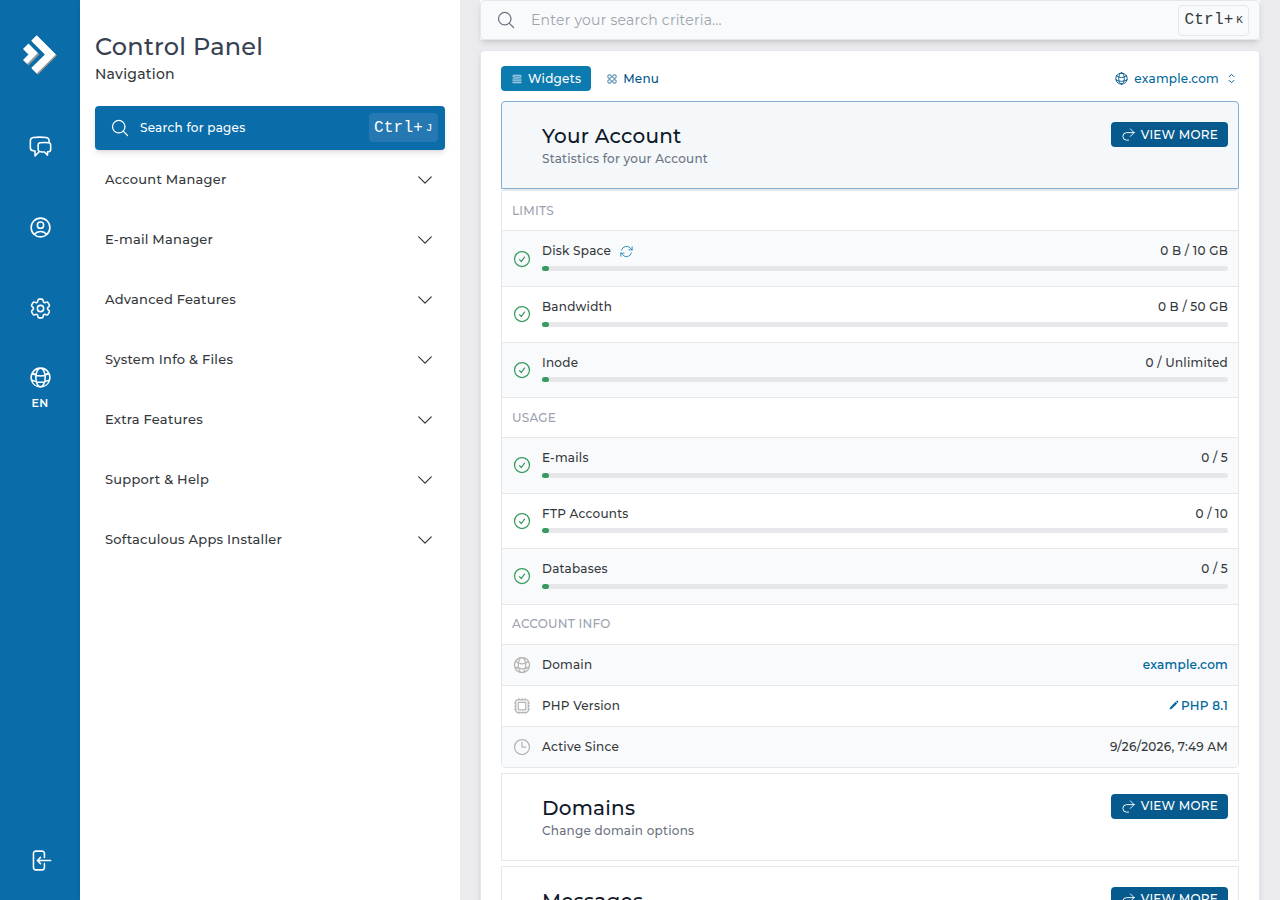
Behind the scenes the button opens DirectAdmin through the Domain India DirectAdmin portal on port 2280, which signs you in with a one-time session. You never type that address yourself; it only works from the button.
2. Direct login on port 2222
Use this to bookmark DirectAdmin or to log in without the client area.
- Go to
https://yourdomain.com:2222once your domain points to your Domain India hosting. - Until then, use the panel URL on the Access tab (Hosting › My hosting › Manage › Access), which uses the server hostname on port 2222.
- Sign in with your DirectAdmin username and password. Your client-area password will not work here.
On some accounts the stored panel URL has the port written twice, for example https://server-hostname:2222:2222. That address will not open. Remove one :2222 so the address ends in a single :2222.
3. When the button does not work
| What you see | Likely cause | What to do |
|---|---|---|
| Nothing happens when you click | A pop-up blocker stopped the new tab | Allow pop-ups for domainindia.com and click again |
| The new tab cannot connect | Your network blocks port 2280 | Try mobile data, or log in directly on port 2222 |
| No DirectAdmin button; the row shows Pay now | An unpaid invoice, so the account is not active | Pay it; the button appears once the status is Active |
| The status is Suspended | Usually an overdue renewal | Pay the invoice, or open a ticket for any other reason |
| Site, webmail and panel all stop loading together | The server firewall blocked your IP after failed logins | Read the block guide below and send us your IP |
If everything works on mobile data but not on your usual connection, your IP address has probably been blocked. Read have I been blocked? and send us the address from any "what is my IP" website, including your IPv6 address if you have one.
4. Forgotten the DirectAdmin password?
You don't need it for the one-click button. If you want a password for direct logins, set a new one yourself: Hosting › My hosting › Manage › Access › Reset password. The steps are in how to reset your DirectAdmin password.
For extra safety, turn on two-factor authentication for the client area, since the client area can open your panel without a password.
5. DirectAdmin hosting at Domain India
DirectAdmin is our lowest-priced Linux panel, with files, email, databases, free SSL, Softaculous and weekly JetBackup backups. The card shows the live price, excluding 18% GST.
- 10 GB NVMe SSD Storage
- 50 GB Monthly Bandwidth
- 1 Website
- 5 Email Accounts
Frequently asked questions
How do I log in to DirectAdmin from the Domain India client area?
Sign in to the client area, open Hosting, My hosting, and click the DirectAdmin button on your domain's row. DirectAdmin opens in a new tab, already signed in, with no DirectAdmin password needed.
Why is there no DirectAdmin button on my hosting row?
The button appears only while the hosting account is Active. If the row shows Pay now or Suspended, pay the outstanding invoice, or open a ticket if the suspension is for another reason.
What is port 2280?
It is the Domain India DirectAdmin portal that the one-click button uses to sign you in. You do not type it yourself. If your network blocks it, log in directly on port 2222.
My panel URL ends in :2222:2222. What should I do?
The port has been written twice. Remove one :2222 so the address ends in a single :2222, then open it again.
Can I use my client-area password on the DirectAdmin login page?
No. The client-area password and the DirectAdmin password are separate. Use the one-click button, or reset the DirectAdmin password from the Access tab.
Ready to get in? Start at your hosting list and click the DirectAdmin button, or read the full DirectAdmin login guide.
Click the DirectAdmin button on your domain's row to go straight in, or open Manage, then the Access tab, to copy your username or reset the password.
Open My Hosting