DirectAdmin is a web hosting control panel: a website you log in to that lets you manage your hosting account without typing server commands. From it you upload files, create email accounts, set up databases, install SSL and install apps such as WordPress. This guide explains what DirectAdmin does, how it compares with cPanel, and how it works on Domain India hosting.
DirectAdmin is a lightweight Linux control panel for managing websites, email, databases, DNS and SSL from your browser. At Domain India it is the lower-cost alternative to cPanel for the same kinds of sites, with Softaculous for one-click apps and weekly JetBackup backups. You open it with one click from the client area, or at https://yourdomain.com:2222.
1. What a control panel does
A hosting server runs a web server, a mail server, a database server and a DNS server. Without a panel, you would manage each one from the command line. A control panel puts all of that behind a browser interface, and it limits each account to its own files, mailboxes and databases, so many customers can share one server safely.
DirectAdmin is one of the three Linux panels Domain India offers on shared hosting, alongside cPanel and Webuzo. It is known for being fast and light: its interface loads quickly and it uses few server resources itself.
2. What you can do in DirectAdmin
Most day-to-day tasks, such as adding a mailbox, resetting an email password or creating a database, take a minute or two and don't need support.
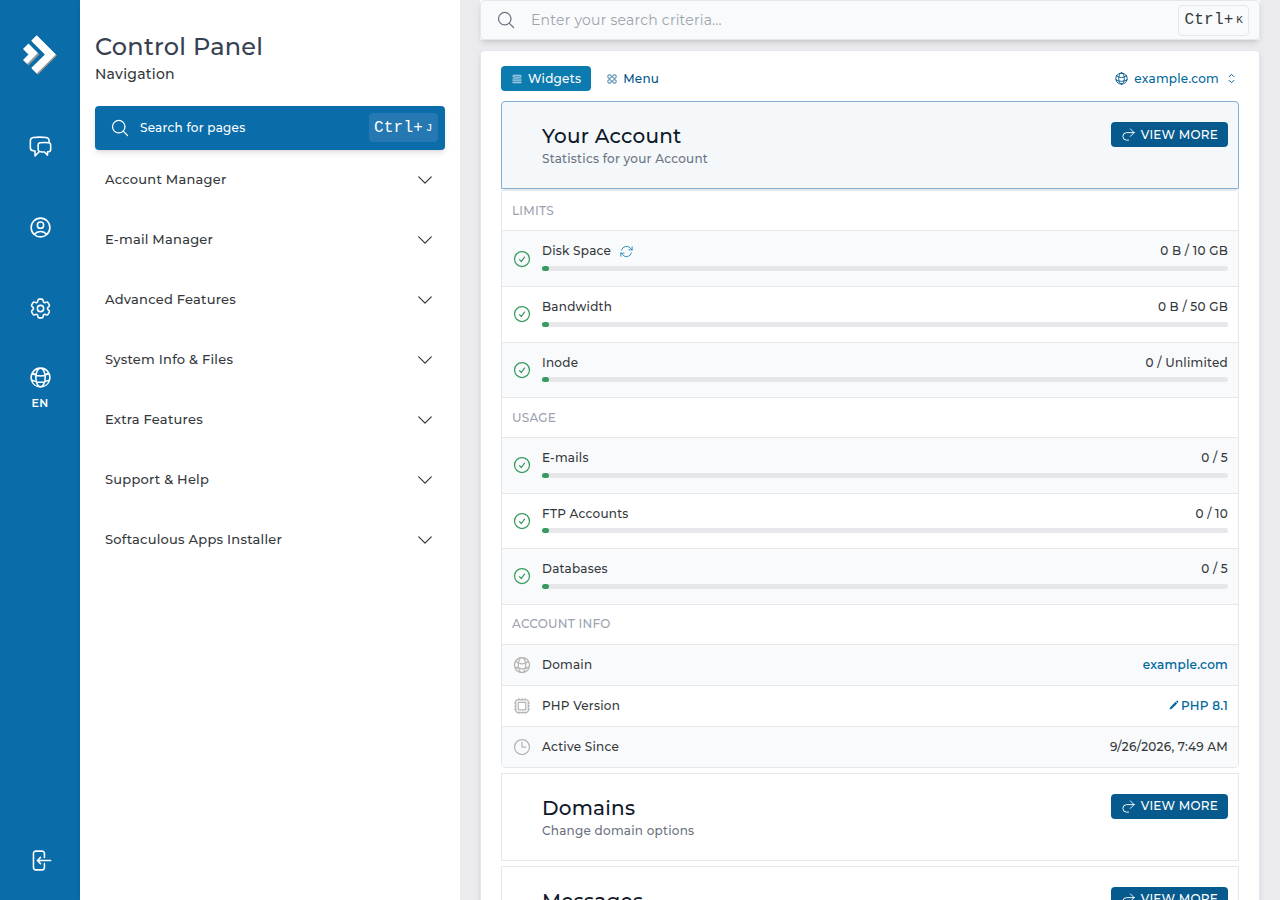
3. DirectAdmin's main strengths
- Light and quick. The panel itself uses little memory and CPU, which leaves more of the server for websites.
- Simple layout. The menus are grouped by task (account, email, files, domains, advanced), so beginners find their way around quickly.
- Two-factor authentication. DirectAdmin supports authenticator-app codes for panel logins. If you don't see the option in your account, ask support.
- Every common hosting task. Files, email, databases, DNS, SSL, cron jobs, PHP version selection and statistics are all built in.
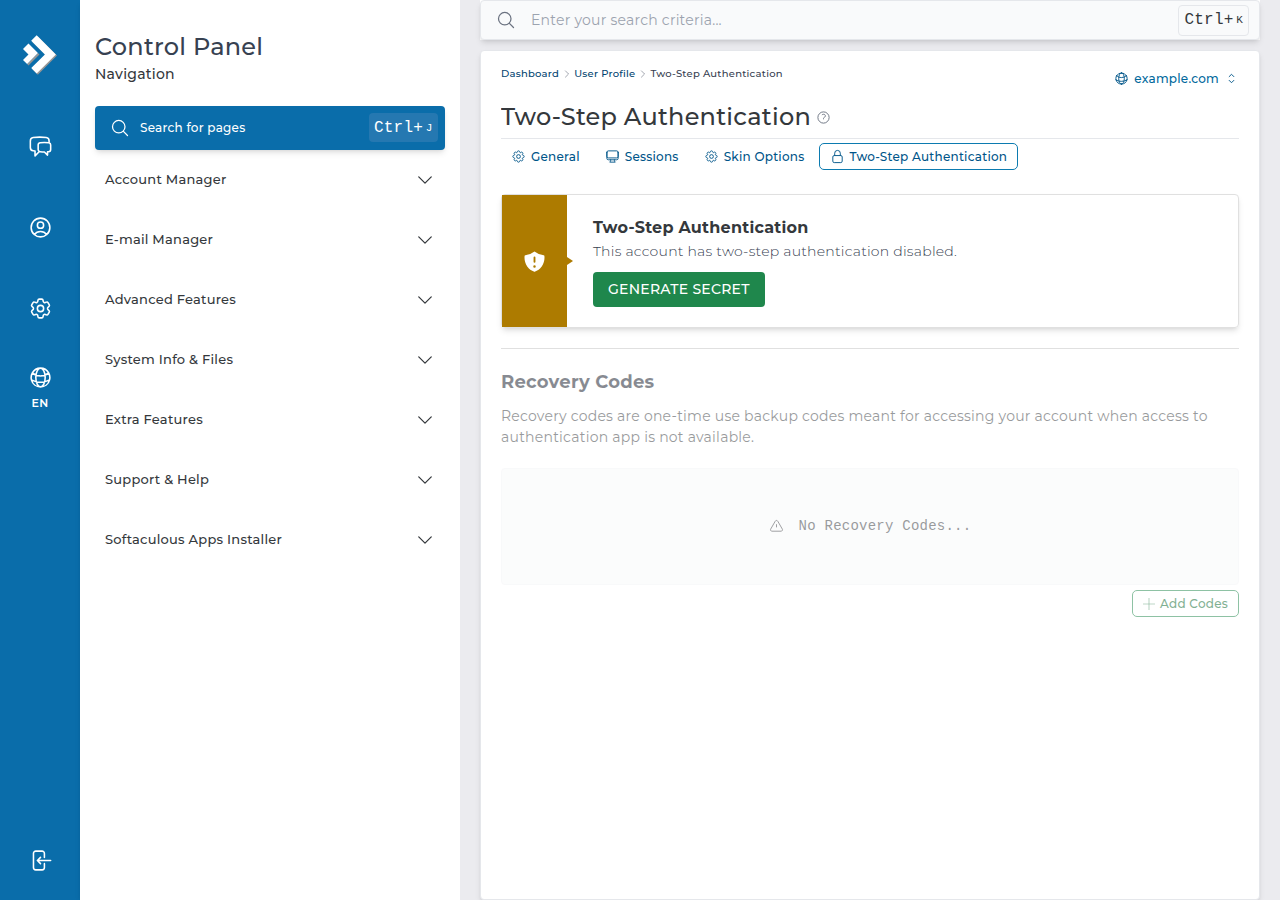
What DirectAdmin does not decide on its own is how secure the server is. That depends on how the host sets up the server underneath it, which is covered in section 5.
4. DirectAdmin compared with cPanel
Both panels run the same kinds of websites: WordPress, PHP applications and static sites, with email at your domain. The differences at Domain India are practical ones.
| Question | DirectAdmin | cPanel |
|---|---|---|
| Starter plan (per month) | ₹100 | ₹125 |
| One-click app installer | Softaculous | Softaculous and WP Toolkit |
| Backups you can restore yourself | Weekly, JetBackup | Weekly, JetBackup |
| Outgoing email limit | 1,000 messages per day | 200 messages per hour per account |
| PHP upload limit | 64 MB (File Manager allows 500 MB) | 256 MB |
| Panel login port | 2222 | 2083 |
Domain India list prices on 19 September 2026, excluding 18% GST. Limits and ports were measured on our servers in September 2026. For the full side-by-side, including Webuzo and Plesk, read cPanel vs DirectAdmin vs Webuzo.
The tasks are the same in both panels, only the menu names differ. If a guide says "cPanel → Email Accounts", open E-mail Manager › E-mail Accounts in DirectAdmin. To find any feature, type its name in the Search for pages box at the top of the DirectAdmin menu (Ctrl+J), or ask support.
5. DirectAdmin on Domain India shared hosting
What we measured on our DirectAdmin server in September 2026:
- Web server: Apache.
.htaccessrules andmod_rewritework. In.htaccess,Optionsaccepts only Indexes, IncludesNOEXEC, MultiViews, SymLinksIfOwnerMatch, FollowSymLinks and None; any other value gives a 500 error. PHP does not run as an Apache module, sophp_valuelines in.htaccessalso give a 500. - Server security: CloudLinux with CageFS, which keeps each account in its own space, and Imunify360, configured the same way for every account on the server.
- PHP versions: several, from PHP 5.6 to 8.3, selectable per account.
- Backups: JetBackup 5 takes a weekly backup (Sunday, five copies kept), and you can download or restore it from the panel. See backup and restore with JetBackup.
- Disabled PHP functions: risky functions such as
exec,proc_openandshell_execare switched off, so Composer scripts don't run; if a Composer install stops with a proc_open message, run it again with--no-scripts. See PHP disabled functions on shared hosting. - SSH: jailed SSH access is available on every shared hosting plan (cPanel, DirectAdmin, Webuzo). It is off by default; ask support to enable it for your account. Login is by SSH key. See enabling SSH on DirectAdmin hosting.
- Node.js and Python: available through the panel's app selector.
- Index file order: DirectAdmin serves
index.htmlbeforeindex.php, so delete a leftoverindex.htmlif your PHP site shows a placeholder page.
6. How to log in to DirectAdmin
- Sign in to the client areaat /client/login.
- Open your hosting.Go to /client/services/hosting.
- Click the DirectAdmin buttonon your domain's row. DirectAdmin opens in a new tab, already signed in.
- Or log in directlyat
https://yourdomain.com:2222with your DirectAdmin username and password. Before your domain points to us, use the panel URL on the Access tab of your hosting service.
The one-click button goes through the Domain India DirectAdmin portal on port 2280. If your office network blocks it, log in directly on port 2222. The full guide, with a troubleshooting table, is one-click DirectAdmin login. Forgotten password? See reset your DirectAdmin password.
7. DirectAdmin on your own VPS
DirectAdmin isn't only for shared hosting. On a Domain India VPS, which is self-managed, you can choose DirectAdmin as an optional paid panel (₹600 a month on the live VPS page) or the free CyberPanel. On a VPS you are the server administrator: you get DirectAdmin's admin and reseller levels, and you look after updates, security and backups yourself. cPanel is not offered on VPS. See VPS hosting.
8. Where Domain India fits
If you want a straightforward panel for a website and email at the lowest price, DirectAdmin shared hosting is the place to start. Plans include free SSL, Softaculous and weekly JetBackup backups, and new shared hosting purchases have a full refund within 30 days.
- 10 GB NVMe SSD Storage
- 50 GB Monthly Bandwidth
- 1 Website
- 5 Email Accounts
- 30 GB NVMe SSD Storage
- Unmetered Bandwidth
- 5 Websites
- 50 Email Accounts
Prefer the panel most tutorials show, or want WP Toolkit? Look at cPanel hosting. Support is on 24/7 live chat, and tickets get a first response within 15 minutes; there is no phone support.
Frequently asked questions
What is DirectAdmin used for?
DirectAdmin is a web hosting control panel. It lets you manage a hosting account from your browser: upload files, create email accounts, set up MySQL databases, edit DNS records, install free SSL certificates and install apps such as WordPress, without using server commands.
Is DirectAdmin better than cPanel?
Neither is better for every site. Both run WordPress, PHP sites and email well. At Domain India, DirectAdmin starts at ₹100 a month against ₹125 for cPanel (list prices on 19 September 2026, excluding 18% GST), while cPanel adds WP Toolkit and is the panel most online tutorials show.
How do I log in to DirectAdmin?
Sign in to the Domain India client area, open your hosting services and click the DirectAdmin button on your domain's row. You can also go to https://yourdomain.com:2222 and sign in with your DirectAdmin username and password.
Can I install WordPress on DirectAdmin?
Yes. Domain India's DirectAdmin hosting includes Softaculous, which installs WordPress and many other apps in a few clicks.
Does DirectAdmin hosting include backups?
Yes. On Domain India's DirectAdmin servers, JetBackup 5 takes a weekly backup every Sunday and keeps five copies, which you can download or restore yourself from the panel. Domain India does not sell a separate backup add-on.
Does DirectAdmin hosting include SSH?
Jailed SSH access is available on every Domain India shared hosting plan, including DirectAdmin. It is off by default; ask support to enable it for your account. You log in with an SSH key.
Can I use DirectAdmin on a VPS?
Yes. DirectAdmin is an optional paid control panel on Domain India VPS plans, which are self-managed, and CyberPanel is a free option. cPanel is not offered on VPS.
Ready to start? Compare plans on DirectAdmin hosting, read cPanel vs DirectAdmin vs Webuzo, or open a ticket if you'd like help choosing.
Free SSL, Softaculous and weekly JetBackup backups, from ₹100 a month plus GST.
See DirectAdmin plans