If your email is on a Domain India DirectAdmin hosting plan, every mail app uses the same few settings: mail.yourdomain.com as the server, IMAP on port 993 and SMTP on port 465, both with SSL/TLS, and your full email address as the username. This page gives those settings for DirectAdmin and the checks that fix most connection problems.
Step-by-step screens for Outlook, Apple Mail, Thunderbird, iPhone and Android are in Email client settings for popular email clients. The settings there are the same for DirectAdmin.
For a mailbox on DirectAdmin hosting, set incoming mail to IMAP, server mail.yourdomain.com, port 993, SSL/TLS. Set outgoing mail to server mail.yourdomain.com, port 465, SSL/TLS (or 587 with STARTTLS), with SMTP authentication on. The username is your full email address and the password is the mailbox password. Test the mailbox in webmail first if an app won't connect.
1. Check which email you have
These settings are for mailboxes you created in DirectAdmin as part of a hosting plan. Domain India Business Email is a separate product with its own settings and webmail at https://mail.yourdomain.com:8443/; use the Business Email client setup guide for it. Not sure which you have? Read Business Email vs the email included with your hosting.
2. DirectAdmin mail settings
We measured these ports as open on our DirectAdmin servers on 20 September 2026. Replace yourdomain.com with your own domain.
| Setting | Value | Encryption |
|---|---|---|
| Incoming, IMAP (recommended) | mail.yourdomain.com, port 993 | SSL/TLS |
| Incoming, POP3 | mail.yourdomain.com, port 995 | SSL/TLS |
| Outgoing, SMTP (recommended) | mail.yourdomain.com, port 465 | SSL/TLS |
| Outgoing, SMTP alternative | mail.yourdomain.com, port 587 | STARTTLS |
| Username | Your full email address | Not applicable |
| SMTP authentication | Required, same login as incoming | Not applicable |
- Username: always the full address, such as
[email protected]. Older guides suggested other formats; don't use them. - Password: the mailbox password you set when you created the address in DirectAdmin, not your DirectAdmin or client area password. You can change it in DirectAdmin's email accounts section.
- Ports and encryption go in pairs. 993, 995 and 465 use SSL/TLS; 587 uses STARTTLS. Mixing them is the most common reason a new account fails.
- Avoid 143 and 110 without encryption. They are open but send your password in plain text. Port 26 is closed.
Choose IMAP unless you have a reason not to: it keeps mail on the server so your phone, laptop and webmail show the same inbox. See IMAP vs POP3.
3. Set up your mail app
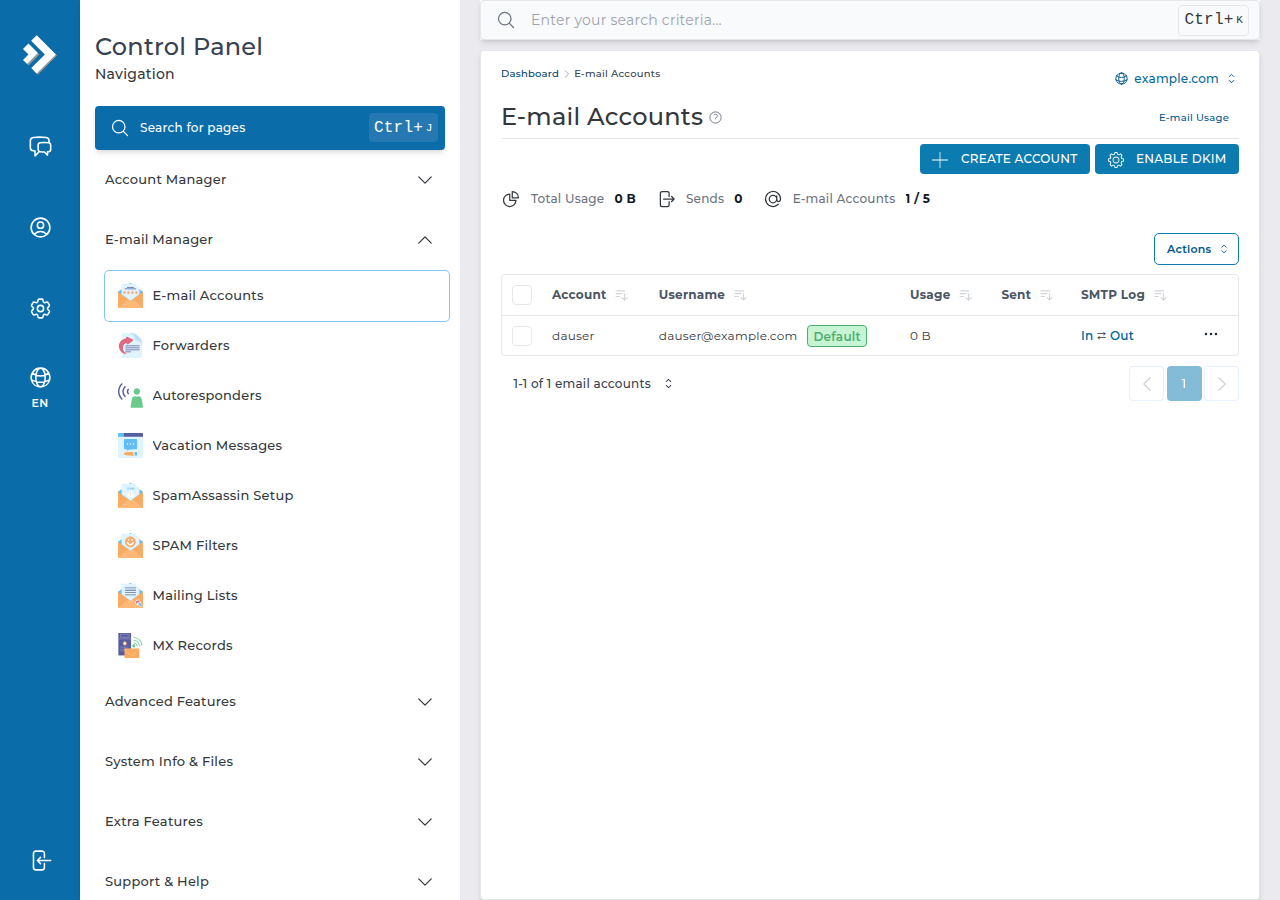
- Create the mailbox in DirectAdminif you haven't already, and note its password. Go to E-mail Manager › E-mail Accounts and click CREATE ACCOUNT.
- Test it in webmail.Open
https://yourdomain.com/webmailorhttps://yourdomain.com/roundcubeand sign in with the full address and password. If this fails, fix the password first. - Add the account in your app.Choose manual or advanced setup, pick IMAP, and enter the settings from the table.
- Turn on outgoing authenticationwith the same username and password as incoming mail, then send yourself a test message.
On DirectAdmin, webmail.yourdomain.com does not exist; use the /webmail or /roundcube address. More in How to log in to webmail.
4. Good to know on DirectAdmin
- Sending limit: outgoing mail on DirectAdmin is limited to 1,000 messages per day per account (200 per mailbox by default). Newsletters to large lists need a dedicated email service.
- DKIM: most domains on our DirectAdmin servers already have a DKIM key, published under the selector
x. If your domain uses outside nameservers, copy that record to your DNS host. See How to check and manage DKIM in DirectAdmin. - Forwarding: DirectAdmin rewrites the sender on forwarded mail (SRS), which helps forwarded messages pass SPF checks.
5. When it won't connect
- Password rejected: use the full address as the username and test the password in webmail.
- Receives but won't send: SMTP authentication is off, or the port and encryption don't match. See I can receive mail but I cannot send it.
- Works on mobile data but not on office Wi-Fi: repeated failed logins from an old password on another device can get that network's IP address blocked. Update the password on every device, then contact support.
The full list of open ports is in Domain India web hosting port numbers.
What mail server do I use for email on Domain India DirectAdmin hosting?
Use mail.yourdomain.com for both incoming and outgoing mail, replacing yourdomain.com with your own domain.
Which ports should I use with DirectAdmin email?
IMAP on 993, POP3 on 995 and SMTP on 465, all with SSL/TLS. SMTP on port 587 with STARTTLS also works on DirectAdmin hosting.
What is my username in Outlook or Thunderbird?
Your full email address, such as [email protected], with the mailbox password you set in DirectAdmin. It is not your DirectAdmin or client area password.
Where is webmail on DirectAdmin hosting?
Open https://yourdomain.com/webmail or https://yourdomain.com/roundcube. The address webmail.yourdomain.com does not exist on DirectAdmin hosting.
How many emails can I send from DirectAdmin hosting?
Up to 1,000 messages per day per account. For bulk newsletters, use a dedicated email marketing service.
Do these settings work for Domain India Business Email?
No. Business Email is a separate product that supports IMAP only and has its own setup guide and webmail at mail.yourdomain.com:8443.
Ready to set up your devices? Follow the app-by-app steps in Email client settings for popular email clients, or open a ticket in the client area if an app still won't connect.
Tell us your email address, the app and device, and the server, port and encryption you entered, and we will check it with you.
Open a support ticket