To use a MySQL database in DirectAdmin, you create the database and its user in Account Manager › Databases, then connect your website with host localhost, the full prefixed names and the user's password. This page is the short DirectAdmin version: creating the database, changing a user's privileges, opening phpMyAdmin and connecting from PHP.
Every panel, WordPress and Laravel settings, SSH tunnels and error fixes are covered in How to Connect to Your MySQL Database (cPanel, DirectAdmin, Webuzo). Deleting databases and users safely is in how to create a MySQL database and user, and delete them.
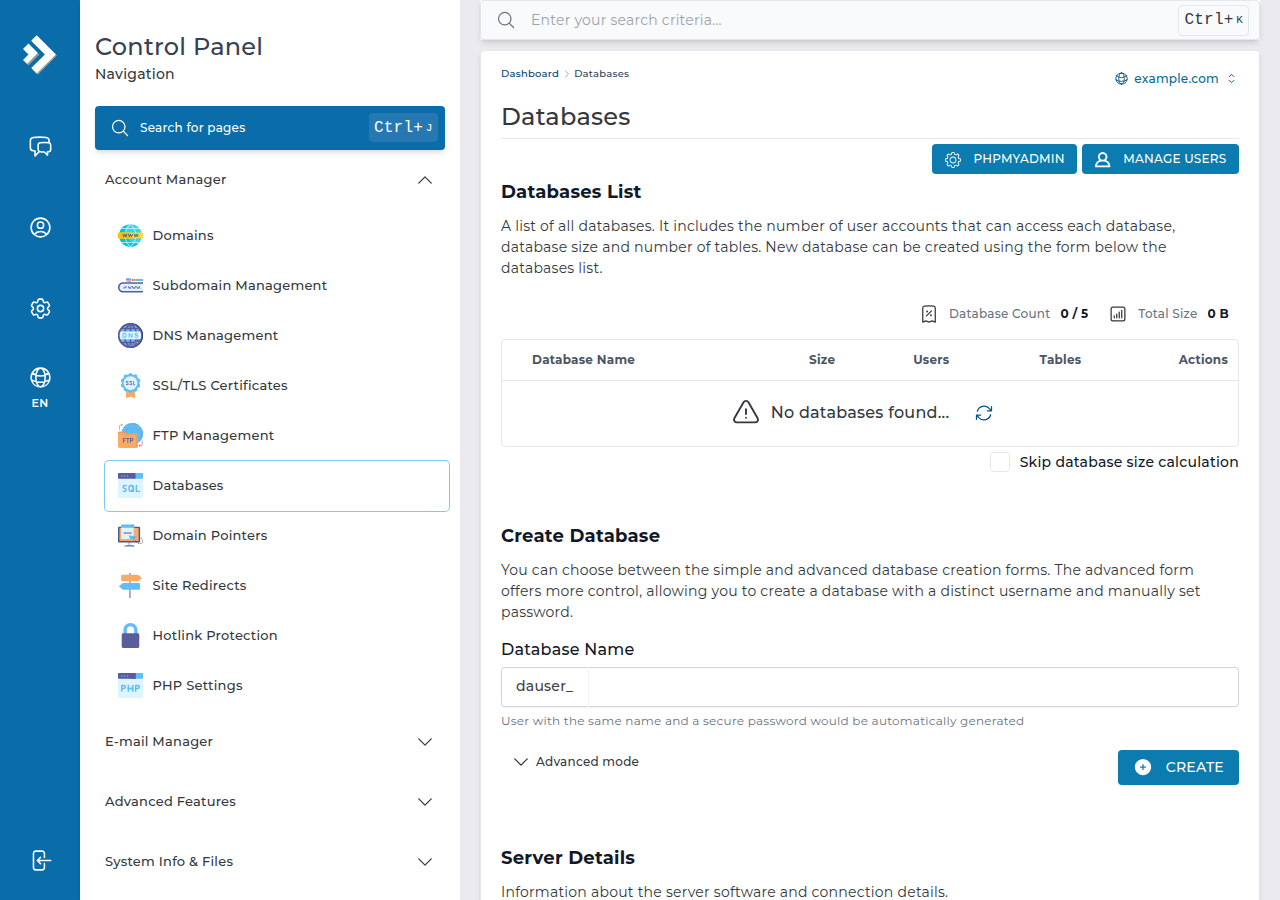
Open DirectAdmin from the client area, go to Account Manager › Databases, type a database name in the Create Database form and click CREATE. DirectAdmin creates a user with the same name and a secure password (open Advanced mode to set your own), and you copy the details it shows. Connect with host localhost and the full names, which start with your DirectAdmin username and an underscore. Port 3306 is closed to outside connections, so use phpMyAdmin or an SSH tunnel for remote work.
1. Create the database and user
- Open DirectAdmin.Sign in to the client area, open My Hosting and click the DirectAdmin button on your domain's row. See one-click DirectAdmin login if the button is missing.
- Open Account Manager › Databases.Use the search box at the top if you cannot see it.
- Create the database.In the Create Database form, enter a short database name and click CREATE. DirectAdmin creates a user with the same name and a secure password. To choose a different user name and your own password, open Advanced mode first.
- Copy the details.DirectAdmin shows the database name, user, password and host once it finishes. Save them somewhere safe; you need them for your website.
DirectAdmin adds your account username as a prefix. If your username is acme and you type shop, the real database name is acme_shop, and your website must use that full name.
If you install WordPress or another app with Softaculous, which is installed on our DirectAdmin servers, the installer creates the database and user for you. You need the manual steps only for custom code, a migration or a manual install.
2. Change a user's privileges or password
On the Databases page, click the database name. From there you can add another user to the database, change a user's password, and tick or untick the privileges that user has.
- For WordPress, WooCommerce and most PHP applications, give the user all privileges on that application's own database. The application creates and changes its own tables during installs and updates.
- Give fewer privileges only when a user needs limited access, for example
SELECTalone for a tool that only reads data.
If you change a password, update your website's configuration file straight away, or the site shows a database error until you do.
3. Open phpMyAdmin
phpMyAdmin is included on our DirectAdmin plans. Open it with the phpMyAdmin button on DirectAdmin's Databases page, and sign in with a database user and password if it asks. Use it to browse tables, run SQL queries, and import or export .sql files.
The PHP upload limit on our DirectAdmin servers is 64 MB (measured September 2026), which caps how large a file you can import through phpMyAdmin. For a bigger database, compress the export, split it, or ask support. Guides: how to access and manage your MySQL database with phpMyAdmin and how to back up a MySQL database using phpMyAdmin.
4. Connect from PHP
Keep the credentials in a file outside public_html, switch on exceptions, and never print the connection error on the page. The error message can show your database user name to visitors.
<?php
$dsn = 'mysql:host=localhost;dbname=acme_shop;charset=utf8mb4';
$options = [
    PDO::ATTR_ERRMODE            => PDO::ERRMODE_EXCEPTION,
    PDO::ATTR_DEFAULT_FETCH_MODE => PDO::FETCH_ASSOC,
];

try {
    $pdo = new PDO($dsn, 'acme_shopuser', 'your-database-password', $options);
} catch (PDOException $e) {
    error_log('Database connection failed: ' . $e->getMessage());
    http_response_code(500);
    exit('Sorry, the site is having a problem. Please try again later.');
}
The host is localhost because the website and the database are on the same server. For mysqli, a separate config file and prepared statements, see connecting to a MySQL database with PHP code in cPanel and DirectAdmin.
Desktop tools such as MySQL Workbench or DBeaver cannot connect directly, and adding your IP address as an access host does not open the server firewall. Use phpMyAdmin, or an SSH tunnel. Jailed SSH access is available on every shared hosting plan (cPanel, DirectAdmin, Webuzo). It is off by default; ask support to enable it for your account. You log in with an SSH key, not a password.
5. Quick fixes
- Access denied for user: the name is missing its prefix, the password is wrong, or the user has no privileges on that database.
- Unknown database: use the full prefixed name exactly as the Databases page shows it.
- Connection timed out from your computer: port 3306 is closed from outside; use phpMyAdmin or an SSH tunnel.
A quick test: if you can sign in to phpMyAdmin with the same user and password, the details are right and the problem is in your configuration. More fixes are in database troubleshooting.
6. Where Domain India fits
Every Domain India DirectAdmin plan includes MySQL databases and phpMyAdmin: 5 databases on DA Starter, 10 on DA Growth and 50 on DA Business. Accounts are backed up weekly with JetBackup 5, and you can restore a database yourself from JetBackup in the panel. The card shows the live price, excluding 18% GST.
- 10 GB NVMe SSD Storage
- 50 GB Monthly Bandwidth
- 1 Website
- 5 Email Accounts
Frequently asked questions
Where do I create a MySQL database in DirectAdmin?
Open Account Manager › Databases in DirectAdmin, type a database name in the Create Database form and click CREATE. DirectAdmin creates a user with the same name and a secure password; use Advanced mode to choose your own user name and password. Copy the details it shows at the end.
What hostname do I use for a DirectAdmin MySQL database?
Use localhost for a website on the same hosting account. You don't need the server IP address or your domain name.
Why does my database name start with my username?
DirectAdmin adds your account username and an underscore to every database and database user name, for example acme_shop. Your website must use the full name, including the prefix.
Can I connect to my DirectAdmin database from my own computer?
Not directly. Port 3306 is closed to outside connections on Domain India shared servers. Use phpMyAdmin in DirectAdmin, or an SSH tunnel once jailed SSH has been enabled on your account by support.
How many databases do Domain India DirectAdmin plans include?
DA Starter includes 5 MySQL databases, DA Growth 10 and DA Business 50.
Ready to set up your site? Compare DirectAdmin hosting plans, read the full MySQL connection guide, or open a support ticket if your database still won't connect.
Every DirectAdmin plan includes MySQL databases, phpMyAdmin, Softaculous, free SSL and weekly backups.
See DirectAdmin plans