DKIM adds a digital signature to every email your domain sends, so receiving servers such as Gmail and Outlook can check that the message really came from you and was not changed on the way. On DirectAdmin hosting it takes two things to work: a DKIM key for the domain, and a matching TXT record in the DNS that your domain actually uses. This guide shows how to check both, turn DKIM on if it is off, and test the result.
On Domain India's DirectAdmin server the DKIM selector is x, so the DNS record is named x._domainkey.yourdomain.com. Most domains already have a key, and if your domain uses our hosting nameservers the record is published for you. If your DNS is somewhere else, such as Cloudflare or your registrar, copy the x._domainkey TXT record from DirectAdmin's DNS Management page to that DNS provider, then test it.
1. What DKIM does, in one minute
When DKIM is on, the mail server signs each outgoing message with a private key kept on the server. The matching public key is published in your domain's DNS as a TXT record. The receiving server reads the signature, looks up the public key, and checks that they match.
A valid DKIM signature helps your mail reach the inbox instead of spam, and it is one of the two checks (with SPF) that a DMARC policy relies on. Large mailbox providers now expect bulk senders to have SPF, DKIM and DMARC, and a domain with none of them is more likely to have its mail filtered.
The DKIM record has three parts:
| Part | On Domain India DirectAdmin | What it means |
|---|---|---|
| Selector | x | A label that lets one domain have more than one DKIM key |
| Record name | x._domainkey.yourdomain.com | Where receivers look up the public key |
| Record value | Starts with v=DKIM1; k=rsa; p= | The public key itself, a long string of characters |
We checked the selector on our DirectAdmin server's mail configuration on 23 September 2026. Other hosts and other panels use different selectors: cPanel, for example, uses default. If a guide tells you to look up default._domainkey for a DirectAdmin domain, it will find nothing.
2. Check whether DKIM is already working
The quickest check needs no login. Send a message from your domain's mailbox to a Gmail address, open it in Gmail, and choose Show original from the message menu. Near the top, Gmail shows a line for DKIM:
DKIM: 'PASS' with domain yourdomain.commeans DKIM is working. Nothing more to do.DKIM: 'FAIL', or no DKIM line at all, means the key or the DNS record is missing or wrong. Carry on below.
You can also look up the record directly. On a computer with a terminal:
dig +short TXT x._domainkey.yourdomain.comOn Windows, nslookup -type=TXT x._domainkey.yourdomain.com does the same job. An online DKIM lookup tool works too: enter your domain and the selector x. If the lookup returns a value starting with v=DKIM1, the record is published.
3. Turn DKIM on in DirectAdmin
Most domains on our DirectAdmin server already have a DKIM key. If yours does not:
- Log in to DirectAdmin.From the client area, open your hosting service and use the control panel login, or see how to log in to your control panel.
- Select the domain.If your account has more than one domain, choose the right one in the domain selector.
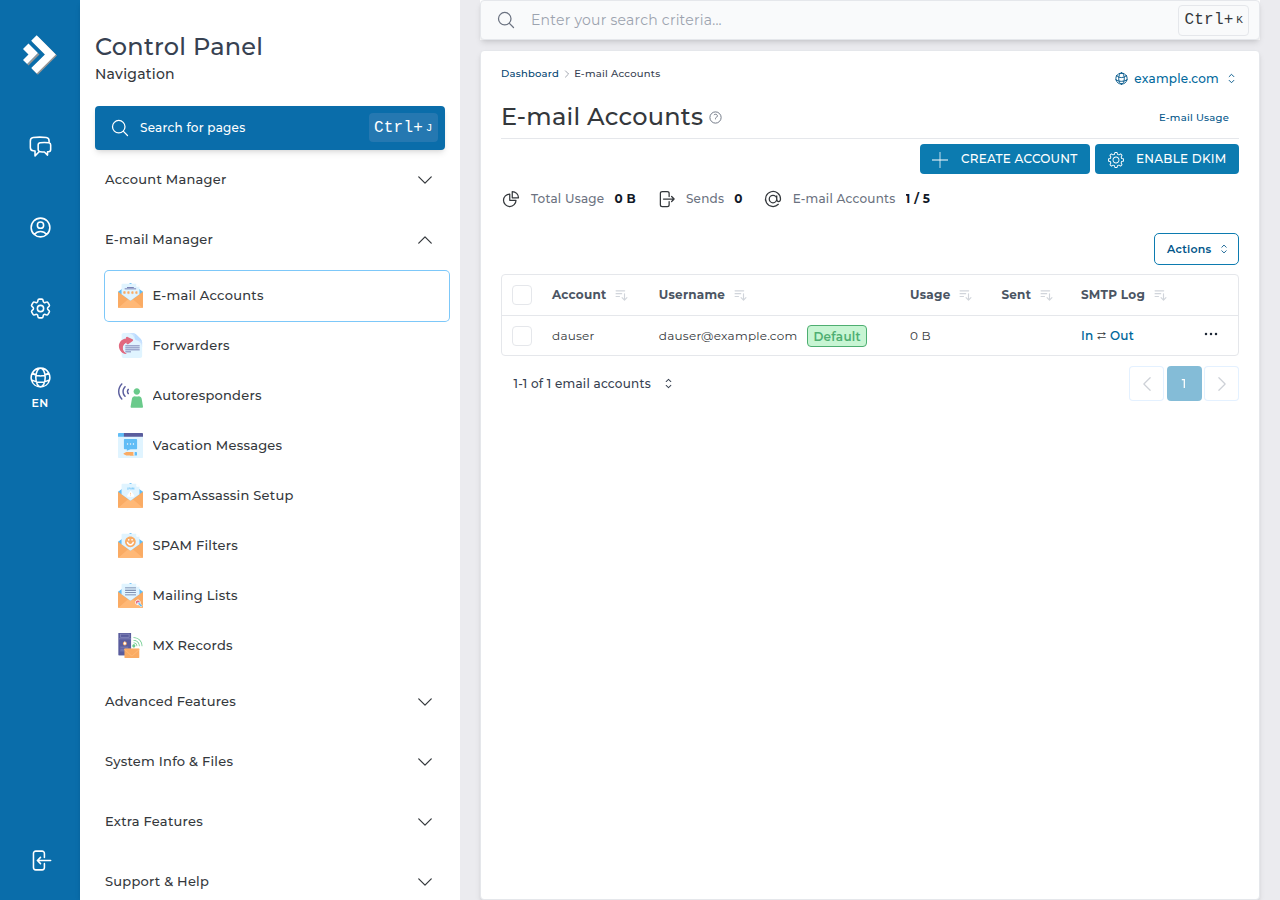
- Open the email accounts page.Go to E-mail Manager › E-mail Accounts. When DKIM is off for the selected domain, DirectAdmin shows an Enable DKIM button there.
- Click Enable DKIM.DirectAdmin creates the key pair for the domain and adds the
x._domainkeyTXT record to the domain's DNS zone on our server.
If you cannot find the button, or it gives an error, open a support ticket with the domain name and we will check it for you. Menu names can move between DirectAdmin versions and skins.
4. Where the DNS record must go
This is the step most DKIM problems come from. DirectAdmin writes the record into its own DNS zone. That zone is only used if your domain points to our hosting nameservers.
| Where your domain's DNS is managed | What to do |
|---|---|
| Our hosting nameservers | Nothing. The record is already live once DKIM is enabled |
| Cloudflare, your registrar or another DNS provider | Copy the TXT record from DirectAdmin to that provider |
Not sure which applies? Check your nameservers in the client area; how do I change my nameservers explains where to look.
To copy the record to another DNS provider:
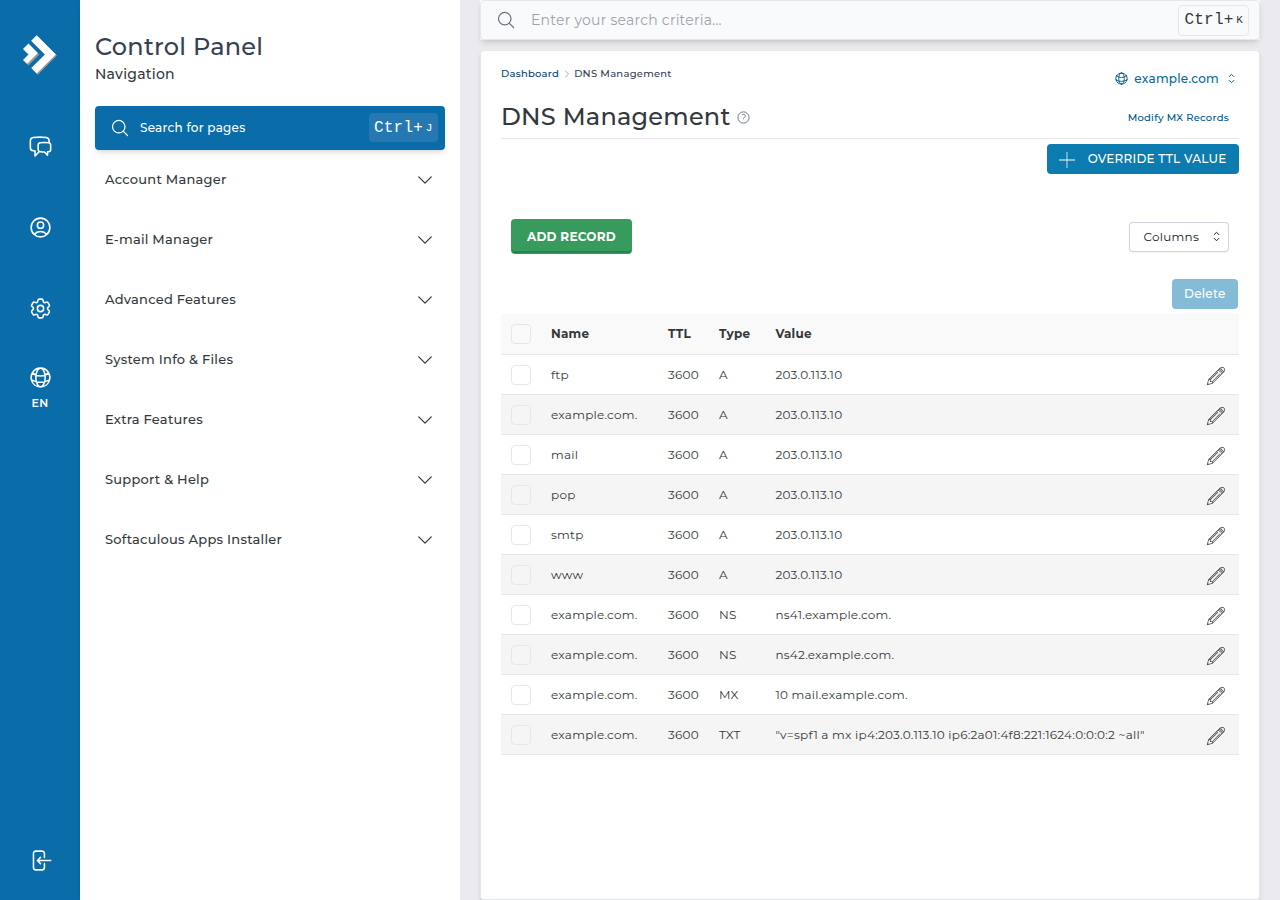
- Open DNS Management in DirectAdmin.Find the TXT record named
x._domainkey. - Copy the value exactly.It starts with
v=DKIM1; k=rsa; p=and is long. Copy all of it, with no added spaces or line breaks. - Create a TXT record at your DNS provider.Name:
x._domainkey(most providers add your domain automatically; some want the fullx._domainkey.yourdomain.com). Type: TXT. Value: the text you copied. - Save and wait.New records usually appear within minutes, but can take longer depending on the provider's settings.
- Test.Repeat the check in section 2.
If you move a domain to a new hosting account or server, a new key is created there. Update the TXT record with the new value, or DKIM will fail for every message the new server signs. Also delete any old x._domainkey record left at another DNS provider you no longer use.
5. Add SPF and DMARC while you're there
DKIM works best with its two partners:
- SPF lists the servers allowed to send mail for your domain. You should have exactly one SPF record, a TXT record starting with
v=spf1. If you also send through another service, such as a newsletter tool, include it in the same record rather than adding a second one. - DMARC tells receivers what to do when a message fails both checks, and where to send reports. A safe first record is a TXT record named
_dmarcwith the valuev=DMARC1; p=none; rua=mailto:[email protected]. Once reports show your real mail passing, you can move top=quarantine.
For a fuller explanation, including how the three fit together on Cloudflare DNS, see SPF, DKIM, DMARC and BIMI explained.
6. When DKIM still fails
| What you see | Likely cause | Fix |
|---|---|---|
| No record found for x._domainkey | Record not published where your DNS lives | Copy it to your DNS provider (section 4) |
| DKIM fail, body hash did not verify | Something changed the message after signing, often a forwarding or mailing-list service | Test with a direct message; forwarded mail can fail DKIM legitimately |
| DKIM fail, key mismatch | DNS still holds an old key | Replace the TXT value with the current one from DirectAdmin |
| DKIM pass but mail still goes to spam | DKIM is only one signal | Add SPF and DMARC, and check your content and sending volume |
| Mail sent from a website form fails | The form sends as a different domain, such as a Gmail address | Send from an address on your own domain |
On our DirectAdmin server, outgoing mail is limited to 1,000 messages per day per account (200 per mailbox by default), so DKIM will not help a mailing list larger than that. For newsletters, use a dedicated sending service and add its DKIM record as well. For other sending problems, see troubleshooting email not sending.
7. DKIM on Domain India hosting
DKIM signing is available on our DirectAdmin and cPanel hosting. DirectAdmin plans use the x selector described here; on cPanel, check and fix DKIM from Email › Email Deliverability. Domain India Business Email, our separate per-mailbox email product, signs every message with DKIM and provides SPF and DMARC records for your domain.
- 10 GB NVMe SSD Storage
- 50 GB Monthly Bandwidth
- 1 Website
- 5 Email Accounts
- Priced per mailbox - start with one
- Email at your own domain ([email protected])
- Add and remove mailboxes yourself
- Webmail with calendar, contacts and tasks
Prices on the cards are live Domain India list prices and exclude 18% GST.
Frequently asked questions
What is the DKIM selector on Domain India DirectAdmin hosting?
The selector is x, so the DKIM record is a TXT record named x._domainkey.yourdomain.com. Other panels use different selectors; cPanel uses default.
How do I enable DKIM in DirectAdmin?
Log in to DirectAdmin, select the domain and open E-mail Manager › E-mail Accounts. If DKIM is off, click Enable DKIM. If you cannot find the button, open a support ticket with the domain name.
Do I need to add the DKIM record to my DNS myself?
Only if your domain's DNS is managed outside our hosting nameservers, for example at Cloudflare or your registrar. In that case, copy the x._domainkey TXT record from DirectAdmin's DNS Management page to your DNS provider exactly as shown.
How can I tell if DKIM is working?
Send a message to a Gmail address, open it and choose Show original. A line reading DKIM PASS with your domain means it works. You can also look up the TXT record x._domainkey.yourdomain.com with dig, nslookup or an online DKIM lookup.
Why does DKIM fail after I moved my site to a new server?
The new server created a new key, but your DNS still publishes the old one. Copy the current x._domainkey value from DirectAdmin and replace the old TXT record at your DNS provider.
Is DKIM enough to stop my mail going to spam?
No. DKIM is one signal. You also need a single correct SPF record and a DMARC record, and your content and sending volume matter too.
Ready to check your domain? Log in to DirectAdmin, compare the x._domainkey record with what your DNS provider publishes, and send a test message to Gmail. If anything doesn't match, open a ticket in the client area or use the public ticket form with your domain name.
Tell us the domain and where its DNS is managed, and we will check the DKIM key and record with you.
Open a support ticket