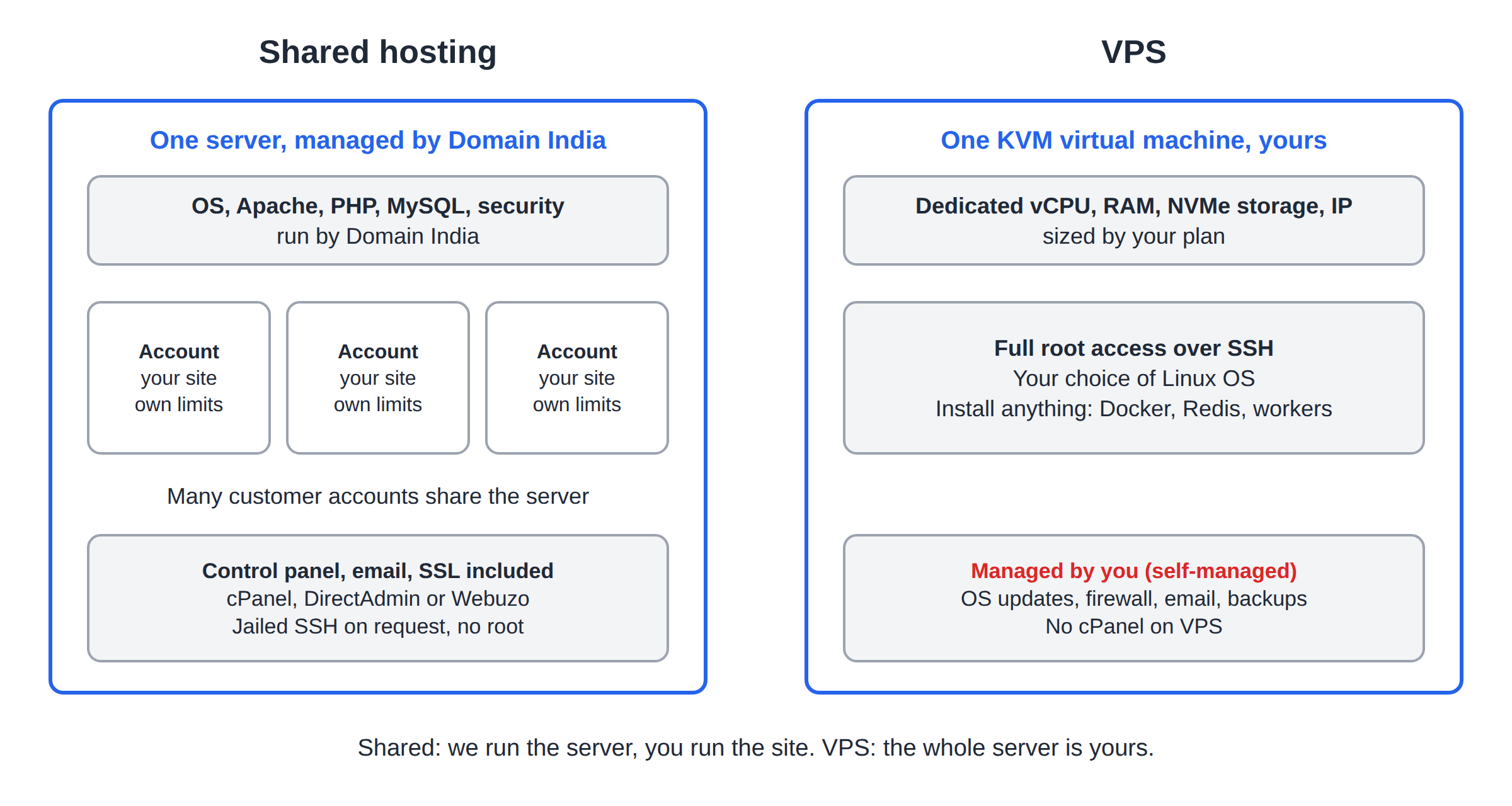
Shared hosting and a VPS both put your website online, but they split the work very differently. On shared hosting we run the server and you look after your website. On a VPS the whole server is yours, including its security and updates. This guide compares the two honestly and shows the signs that it is time to move.
Stay on shared hosting if you run WordPress, PHP sites or email for a business and want us to manage the server; it starts at ₹100 a month. Move to a VPS when you need root access, Docker, background services or dedicated resources, and you (or someone you hire) can manage a Linux server. If you only need to run a Node.js or Python app, the App Platform sits in between: no server to manage, no root access.
1. The short answer
| Feature | Shared hosting | VPS |
|---|---|---|
| Who runs the server | Domain India | You (self-managed by default) |
| Access | Control panel; jailed SSH on request | Full root access over SSH |
| Resources | A shared server with per-account limits | Dedicated vCPU, RAM and NVMe storage per plan |
| Software | What the server provides | Anything that runs on Linux |
| Web server | Apache, set up for you | Your choice, set up by you |
| Control panel | cPanel, DirectAdmin or Webuzo included | None by default |
| Included with the plan | You set it up, or add Business Email | |
| Backups | Weekly, included | Depends on the plan; see the plan card |
| Best for | Business websites, WordPress, email | Apps, custom stacks, developers |
Prices in this guide are Domain India list prices on 19 September 2026, excluding 18% GST.
2. What shared hosting gives you
Shared hosting runs your website on a server that we manage, alongside other customers' accounts. CloudLinux keeps each account in its own limits, so one busy site cannot take over the server.
- Managed for you: the operating system, the Apache web server, PHP, MySQL and the server security are ours to run.
- Ready to use: email accounts, databases, free SSL and a control panel (cPanel, DirectAdmin or Webuzo) come with the plan.
- Weekly backups are included.
- Developer tools with limits: jailed SSH access is available on every shared hosting plan (cPanel, DirectAdmin, Webuzo). It is off by default; ask support to enable it for your account. It is a restricted shell with no root access. The cPanel and DirectAdmin servers also have tools for running small Node.js and Python apps.
Shared hosting starts at ₹100 a month for DirectAdmin or Webuzo and ₹125 a month for cPanel.
- 25 GB NVMe SSD Storage
- 50 GB Monthly Bandwidth
- 1 Website
- 10 Email Accounts
Windows (Plesk) shared hosting is also available for ASP.NET sites. It has no SSH.
3. What a VPS gives you
A VPS (virtual private server) is a KVM virtual machine with its own vCPUs, RAM, NVMe storage and IP address. You get full root access and a choice of Linux operating system.
- Install anything: Docker, Redis, Node.js, Python, Go, a different web server or database, background workers and cron jobs.
- No shared-hosting restrictions: the PHP functions disabled on shared servers, and the per-account process limits, do not apply.
- Your responsibility: our VPS is self-managed by default. You patch the operating system, configure the firewall, set up email and plan your own backups beyond what the plan includes.
- No cPanel on VPS. If you want cPanel, stay on shared cPanel hosting. The VPS page lists the control-panel options for a VPS.
- 1 vCPU
- 2 GB DDR4 RAM
- 64 GB NVMe SSD Storage
- 2 TB Monthly Bandwidth
- 2 vCPU
- 4 GB DDR4 RAM
- 128 GB NVMe SSD Storage
- 3 TB Monthly Bandwidth
4. Signs you have outgrown shared hosting
Consider a VPS when one of these is true:
- You hit resource limits often. Errors such as 503 or 508, or a slow site at busy times, even after caching and clean-up. Check first with Check hosting resource usage; a bigger shared plan may be enough.
- Your software needs something the shared servers block. Composer scripts, Laravel's scheduled artisan commands and some mail libraries need PHP functions that are disabled on shared hosting. See PHP disabled functions on shared hosting.
- You need root. Custom firewall rules, system packages, Docker or a service that listens on its own port.
- You run background work. Queues, workers, long-running scripts or real-time connections.
- You manage many heavy sites and want one machine sized for all of them.
Many slow sites need caching, a lighter theme or a plan with more resources, not a VPS. Upgrading a shared plan keeps the managed server, email and backups. See Can I upgrade my web hosting package at any time?
5. When shared hosting is the right choice
- You run WordPress, a PHP website or an online shop on a standard CMS.
- You want email on your domain without running a mail server.
- Nobody on your team wants to patch a Linux server.
- Your budget is tight and your traffic is modest.
In these cases a VPS adds cost and work without a clear benefit.
6. The middle option: the App Platform
If your reason for a VPS is "I need to run a Node.js or Python app", look at the App Platform first. You deploy from GitHub or with a deploy token, and we run the containers, SSL and routing. Each plan includes a PostgreSQL database. There is no SSH or root access, and it is not meant for WordPress. See Getting started with the App Platform.
- 512 MB RAM per app
- 1 vCPU
- 5 GB NVMe SSD
- PostgreSQL Database
7. Moving from shared hosting to a VPS
- Size the VPS.Pick a plan with more resources than your current usage, with room to grow.
- Set up the server.Install the operating system packages, web server, database and PHP or runtime your site needs, and secure SSH.
- Copy your site.Move files and databases, and set up email, or keep email on shared hosting or Business Email.
- Test before switching.Check the site on the new server by its IP address or a temporary hosts-file entry.
- Point your domain.Update the A records to the VPS IP address. See How to change your domain's DNS settings.
- Cancel the old plan last, after everything has worked on the VPS for a few days.
Tell our support team what you run and where it is struggling. We can look at your usage and suggest whether a bigger shared plan, the App Platform or a VPS fits. Support is on live chat 24/7, and tickets get a first response within 15 minutes.
What is the main difference between shared hosting and a VPS?
On shared hosting Domain India manages the server and your site runs within per-account limits. On a VPS you get your own virtual server with dedicated resources and full root access, and you manage it yourself.
Do I get SSH on shared hosting?
Jailed SSH access is available on every shared hosting plan (cPanel, DirectAdmin and Webuzo). It is off by default; ask support to enable it. It is a restricted shell with no root access. Windows hosting has no SSH.
Is a Domain India VPS managed?
Our VPS is self-managed by default: you get full root access and you look after the operating system, security updates and software.
Can I have cPanel on a VPS?
No. cPanel is not offered on our VPS plans. For cPanel, use shared cPanel hosting; the VPS page lists the panel options for a VPS.
Does a VPS include email?
A VPS does not come with a ready mail setup. You can configure your own mail server, or use Domain India Business Email for your domain.
How much does shared hosting cost compared with a VPS?
On 19 September 2026, shared hosting started at ₹100 a month for DirectAdmin or Webuzo and ₹125 a month for cPanel, excluding 18% GST. VPS prices are shown on the plan cards and the VPS page.
Is the App Platform a replacement for a VPS?
For running a Node.js, Python or Dockerfile-based app without managing a server, yes. It has no SSH or root access, so if you need those, choose a VPS.
Are backups included?
Shared hosting includes weekly backups. On a VPS, check the plan card and set up your own backups for anything important.
Ready to choose? Compare cPanel hosting, DirectAdmin hosting and VPS plans, try the App Platform, or ask us through a support ticket.
Full root access on a KVM VPS with dedicated vCPU, RAM and NVMe storage.
See VPS plans