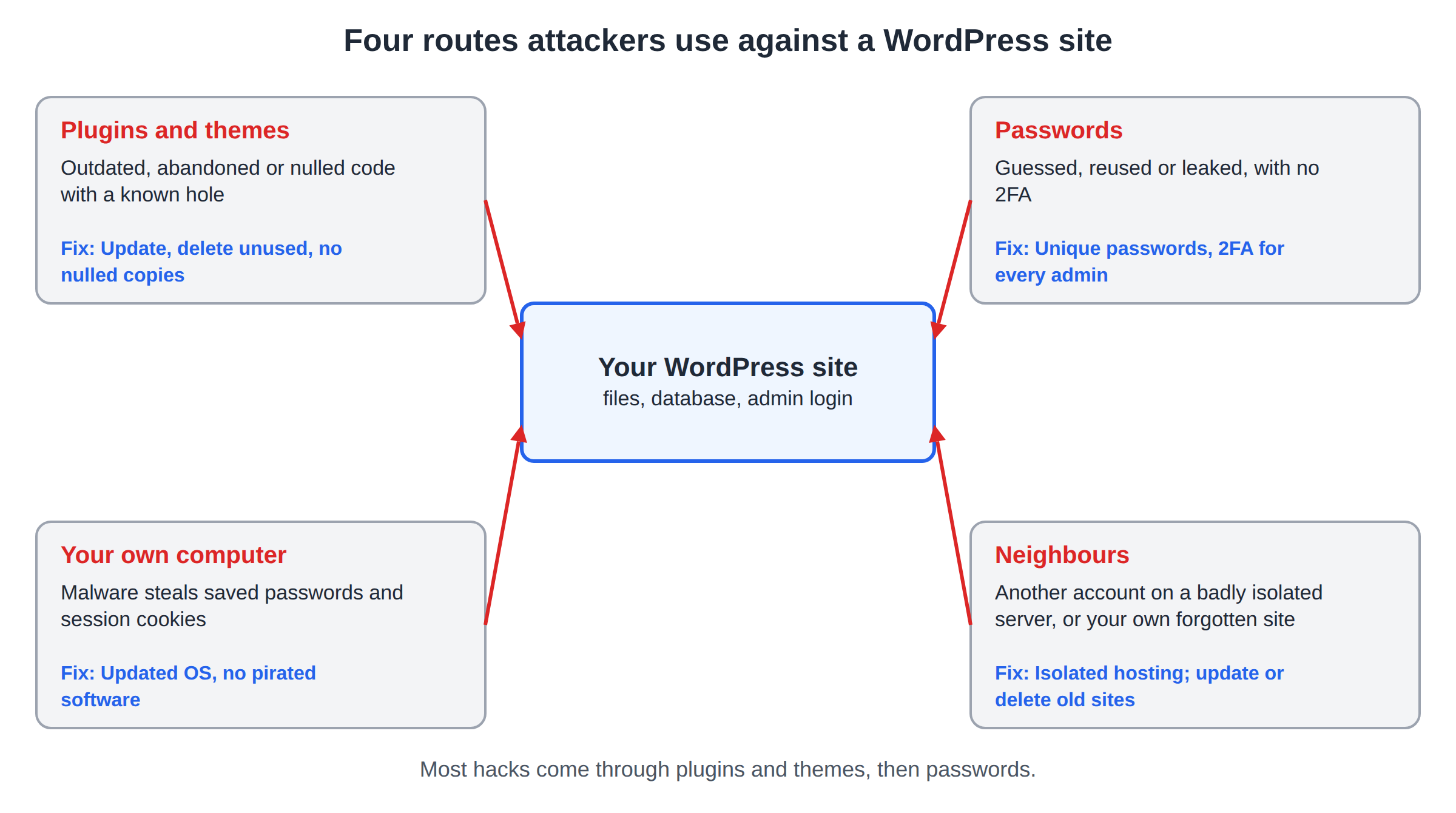
Most WordPress sites are not hacked by someone who chose them. They are found by automated bots that scan millions of sites every day for one known weakness: a plugin with a published security hole, a reused password, an old test copy of the site nobody updates. This guide explains the real routes attackers use against WordPress in 2026, how each one works, and exactly what closes it.
Most WordPress hacks come through vulnerable or abandoned plugins and themes, followed by stolen or guessed passwords. Keep every plugin, theme and WordPress itself updated, delete what you do not use, never install nulled themes, and turn on two-factor authentication for every administrator. Good hosting isolates your account from other customers, but it cannot patch a plugin you never update.
1. What attackers want, and how they find your site
Even a small business site is worth something to an attacker: your search ranking (hidden spam pages and links), your visitors (redirects to scams, fake downloads, card skimmers on WooCommerce checkouts) and your server (phishing pages and spam email sent from your account).
Bots find targets automatically. They request known file paths, such as a vulnerable plugin's folder, wp-login.php or xmlrpc.php, on every site they can reach and attack the ones that answer. A new hole in a popular plugin is often exploited within days of being published, so "my site is too small to be a target" is never true.
If your site is already showing a Google warning, redirecting visitors or sending spam, stop here and follow How to handle the Google attack page warning first. It covers cleanup and the Google review request. This article is about how the attacker got in, so it does not happen again.
2. Every route in, at a glance
| Attack route | How it works | How to prevent it |
|---|---|---|
| Vulnerable plugins and themes | Bots exploit a published hole in an outdated plugin or theme to upload files or create an admin | Update weekly or turn on auto-updates; delete unused plugins and themes |
| Abandoned plugins | The developer stopped releasing fixes, so a known hole stays open for ever | Replace any plugin with no update in over a year or removed from WordPress.org |
| Nulled (pirated) themes and plugins | The "free" copy ships with a hidden backdoor, and it can never be updated | Buy from the developer or use free plugins from WordPress.org |
| Supply-chain takeover | A trusted plugin is sold, or its developer's account is hijacked, and a normal-looking update adds malware | Fewer plugins, reputable developers, watch changelogs and ownership changes |
| SQL injection and XSS | A plugin passes visitor input straight into a database query or a page | Keep plugins updated; the server firewall blocks many common patterns |
| Weak or reused passwords | Credential stuffing tries passwords leaked from other websites; brute force guesses the rest | Unique password from a password manager for every account |
| No two-factor authentication | A stolen password is all the attacker needs | 2FA for every administrator and editor |
| XML-RPC abuse | One request to xmlrpc.php can test hundreds of passwords | Block xmlrpc.php if nothing you use needs it |
| Outdated WordPress core or PHP | Old versions carry fixed, publicly documented holes | Leave automatic core updates on; use a supported PHP version |
| Loose file permissions | Writable files let an attacker or a buggy script change your code | 755 for folders, 644 for files, stricter for wp-config.php, never 777 |
| Insecure hosting neighbours | On a badly isolated server, one hacked account can read or infect others | Hosting with per-account isolation such as CloudLinux CageFS |
| Compromised admin computer | Malware on your PC steals saved passwords and logged-in session cookies | Updated OS and antivirus, no pirated software, log out of admin sessions |
3. Vulnerable and abandoned plugins and themes
This is the main way in. Yearly reports from WordPress security companies agree that more than nine in ten newly disclosed WordPress vulnerabilities are in plugins, a small share in themes, and very few in WordPress core. Each plugin is code from a different developer, with a different level of care.
When a hole is fixed, the fix is public. Attackers compare the old and new code, write an exploit and scan for sites still on the old version. The danger window is the time between the fix and your update.
What to do:
- Turn on auto-updates for plugins and themes you trust (Dashboard > Plugins > "Enable auto-updates"), or update at least once a week.
- Delete, do not just deactivate, every plugin and theme you are not using. A deactivated plugin's files are still on the server and can still be attacked directly. Keep one default theme as a fallback and remove the rest.
- Check for abandoned plugins. On a plugin's WordPress.org page, look at "Last updated". If it is more than a year old, or the page says the plugin was closed, find a maintained replacement.
If jailed SSH is enabled on your account and WP-CLI is available in your jail, it shows what needs attention in one command:
wp plugin list --update=available
wp theme list --update=available
SQL injection and XSS come through plugins too
SQL injection and cross-site scripting (XSS) are types of bug that live inside plugins and themes.
- SQL injection: a plugin puts visitor input (a search box, a form field, a URL parameter) straight into a database query. The attacker's input changes the query, and can read user records or create an administrator.
- XSS: a plugin prints visitor input back into a page without cleaning it. The attacker's script then runs in the browser of whoever views that page. When that is you, logged in as administrator, the script can act as you.
Updates fix these bugs. A web application firewall on the server blocks many common injection patterns, a useful second layer, but not a substitute for updating.
4. Nulled themes and supply-chain takeovers
Nulled themes and plugins
A "nulled" theme or plugin is a paid product with its licence check removed, shared free on download sites. It is one of the surest ways to get hacked:
- Many copies contain a backdoor, often a small obfuscated PHP file or a hidden administrator account, added by whoever shared it.
- It cannot receive updates, so every hole found later stays open.
- The backdoor survives a password change, because it does not need a password.
A free theme from the WordPress.org directory is safer than any nulled copy. If someone else built your site, ask where the theme and plugins came from and whether the licences are active.
When a trusted plugin turns bad
A supply-chain attack is when a legitimate plugin itself starts shipping malware. It happens in two ways:
- A takeover. An attacker steals a plugin developer's account and publishes a malicious update. In June 2024, several plugins on WordPress.org were backdoored this way; the malicious updates tried to create a hidden administrator account on the sites that installed them. WordPress.org has since made two-factor authentication mandatory for plugin authors.
- A sale. A popular plugin is sold to a new owner who adds spam or tracking code in a later update.
You cannot fully prevent this, but you can shrink it: run fewer plugins, prefer developers with a long public track record, read the changelog before large updates, and be suspicious when a plugin suddenly changes owner, name or behaviour. Regular backups let you roll back if a bad update gets through.
5. Weak passwords, credential stuffing and no 2FA
Password attacks are the second big route:
- Brute force: bots try common usernames (admin, your domain name, the author name shown on your posts) with lists of common passwords.
- Credential stuffing: bots try email and password pairs leaked from other websites' data breaches. If you used the same password on a shopping site that was breached, the attacker does not need to guess anything.
What to do:
- Use a unique, long password for WordPress, your hosting control panel, FTP, the database and your email. A password manager makes this practical; see Best password managers for personal and business use.
- Give each person their own account with the lowest role that works, and remove accounts for people who no longer work on the site.
Turn on two-factor authentication
WordPress core does not include two-factor authentication (2FA), so you add it with a plugin. With 2FA, a stolen password alone is not enough: the attacker also needs the code from your phone. Wordfence and Solid Security (formerly iThemes Security) both include app-based 2FA, and the free "Two Factor" plugin on WordPress.org does only this job. Use an authenticator app rather than SMS; see popular 2FA apps.
Once you are logged in, WordPress trusts a cookie in your browser. If malware on your computer steals that cookie, the attacker can use your session without your password or your 2FA code. Section 8 covers how to protect your own computer.
XML-RPC abuse
xmlrpc.php is an old remote-publishing interface. Attackers like it because one request can test hundreds of username and password pairs, which slips past simple "limit login attempts" rules, and because its pingback feature can be used to make your site attack others.
Most sites no longer need it. Some things still do: the Jetpack plugin and some older publishing apps. If you use neither, block it. Most security plugins have a switch for this, or, on hosting that reads .htaccess files, add this to the .htaccess in your WordPress folder:
<Files xmlrpc.php>
    Require all denied
</Files>
Test that your site and any apps you rely on still work afterwards.
6. Outdated core, PHP and loose file permissions
WordPress core and PHP
WordPress core is well reviewed and rarely the way in, as long as it is current. WordPress installs minor and security releases automatically by default, so the main risk is a site where someone switched that off, or one stuck on an old major version because a theme or plugin breaks on newer ones. That is a sign the theme or plugin needs replacing, not a reason to stay behind.
PHP matters too. Old PHP branches stop receiving security fixes. Check your control panel for the PHP versions available and choose a currently supported one that your plugins work with. Test on a copy of the site first if you are jumping several versions.
File permissions
Permissions decide who can read and change your files. Too loose, and a script or another process can rewrite your code.
| Item | Recommended | Never use |
|---|---|---|
| Folders | 755 | 777 |
| Files | 644 | 666 or 777 |
| wp-config.php | 640 or 600 (test that the site still loads) | 644 on a shared server if 640 works |
Also stop anyone who reaches your dashboard from editing theme and plugin code there. Add this line to wp-config.php, above the line that says "That's all, stop editing":
define( 'DISALLOW_FILE_EDIT', true );For more hardening steps, see The complete WordPress hardening guide.
7. Hosting neighbours, account isolation and your own forgotten sites
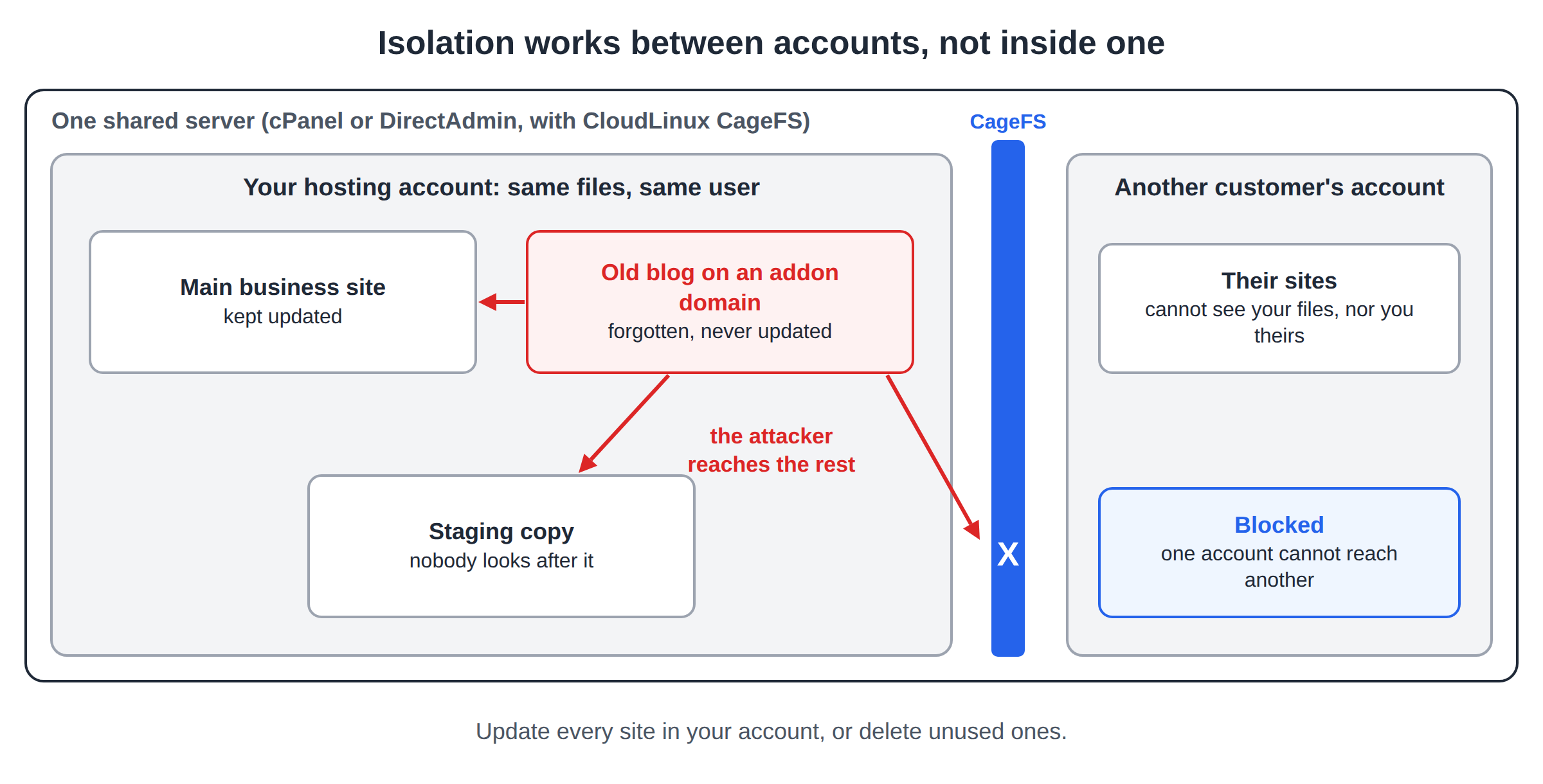
On shared hosting, many customer accounts run on one server. On a poorly set up server, a hacked account can read other accounts' files, including their wp-config.php database passwords, and infect them too. Older security guides that call shared hosting "insecure" are describing that situation.
Modern shared hosting prevents this with per-account isolation. Domain India's cPanel and DirectAdmin hosting runs on CloudLinux, which puts each account in its own resource container so one busy or hacked account cannot slow its neighbours. On cPanel and DirectAdmin, CloudLinux CageFS also gives each account its own filesystem view, so it cannot see other accounts' files or the server's sensitive system files.
Every website inside one hosting account shares the same files and user. A forgotten test copy, an old blog on an addon domain, or a staging site nobody updates can be hacked, and from there the attacker can reach every other site in that account. Update every site in the account, or delete the ones you no longer need.
This is a common reason behind "we updated everything and got hacked again".
8. Compromised admin computers
Sometimes the attacker gets into the computer you manage the site from instead. Password-stealing malware (infostealers) comes bundled with pirated software, cracked games, fake browser extensions and email attachments. It copies the passwords saved in your browser and FTP client, plus your logged-in session cookies, and the attacker logs in as you.
What to do:
- Keep your operating system and browser updated, and run reputable antivirus.
- Never install cracked or pirated software on a computer you use for work.
- Install browser extensions only from known publishers, and remove ones you do not use.
- Store passwords in a password manager rather than saving them in an FTP client or a text file.
- Use SFTP instead of plain FTP, so logins are not sent in clear text; see What settings do I need to upload my website.
- Be wary of emails that ask you to "verify" your hosting or WordPress login.
9. Your WordPress hardening checklist
- Update everything.WordPress core, every plugin and every theme. Turn on auto-updates for the plugins you trust.
- Delete what you do not use.Inactive plugins, extra themes, old test sites, staging copies and forgotten addon-domain sites.
- Replace risky code.Remove any nulled theme or plugin and any plugin with no update in over a year.
- Fix the accounts.Unique strong passwords, 2FA for every administrator and editor, lowest workable role for each person, and no accounts for people who have left. Review Users > Profile > Application Passwords too, and revoke any you do not recognise.
- Close easy doors.Block
xmlrpc.phpif you do not need it, addDISALLOW_FILE_EDIT, and set 755 folders and 644 files. - Install one security plugin.A well-established one such as Wordfence, Solid Security or Sucuri Security, set to email you about new administrators and file changes. Two security plugins together often conflict.
- Check your backups.Know where your backups are, and restore a test copy once so you know it works. Keep your own copy off the server too.
- Every month.Review users, look for plugins that need updates or have been abandoned, and check that the site still sends you security alerts.
If jailed SSH is enabled on your account and WP-CLI is available in your jail, two commands are useful monthly checks: wp user list --role=administrator shows every administrator, and wp core verify-checksums reports any WordPress core file that differs from the official release.
For a broader walk-through of running WordPress well, see Mastering WordPress: a comprehensive step-by-step guide.
10. Where Domain India hosting fits
The hosting company secures the server; you secure the WordPress site on it. Domain India's cPanel, DirectAdmin and Webuzo shared hosting plans include these server-side layers:
- CloudLinux account isolation, with CageFS on cPanel and DirectAdmin.
- Imunify360 security, including malware scanning.
- A web application firewall (WAF), which blocks many common attack patterns before they reach WordPress.
- DDoS protection and free SSL certificates.
- Jailed SSH access on request. It is off by default; ask support to enable it for your account. WP-CLI works if it is available in your jail, and the tools inside the jailed shell vary, so ask support. See how to enable and use jailed SSH.
- Backups you can restore yourself on cPanel and DirectAdmin; see how to restore with JetBackup.
What hosting cannot do is update your plugins, remove a nulled theme you installed, or stop someone who logs in with your real password. The checklist above is still your part.
- 25 GB NVMe SSD Storage
- 50 GB Monthly Bandwidth
- 1 Website
- 10 Email Accounts
- 10 GB NVMe SSD Storage
- 50 GB Monthly Bandwidth
- 1 Website
- 5 Email Accounts
On Domain India list prices on 19 September 2026, excluding 18% GST, DirectAdmin Starter is ₹100 a month and cPanel Starter is ₹125 a month. Compare every plan on cPanel hosting and DirectAdmin hosting.
What is the most common way WordPress sites get hacked?
Through vulnerable or abandoned plugins and themes. Yearly reports from WordPress security companies find that more than nine in ten newly disclosed WordPress vulnerabilities are in plugins. Keeping plugins and themes updated, and deleting ones you do not use, closes most of that risk.
Is WordPress itself insecure?
No. WordPress core is widely reviewed and installs its security releases automatically by default. Most hacks come through plugins, themes, weak or reused passwords, or the site owner's computer, not through an up-to-date WordPress core.
Why are nulled themes dangerous?
A nulled theme is a pirated copy of a paid theme. Many copies contain hidden backdoors, and none of them can receive security updates. Use a theme bought from its developer or a free theme from the WordPress.org directory instead.
Should I disable XML-RPC in WordPress?
If you do not use Jetpack or an app that publishes through XML-RPC, yes. Attackers use xmlrpc.php to try many passwords in one request. You can block it with a security plugin or with a rule in the .htaccess file on servers that read .htaccess.
Can another website on the same shared server hack my site?
On hosting with per-account filesystem isolation such as CloudLinux CageFS, other customers' accounts cannot see your files. Every website inside your own hosting account shares the same files, though, so one outdated site in your account can put your other sites in it at risk.
Does two-factor authentication stop all WordPress hacks?
No. 2FA stops attackers who only have your password, which blocks brute force and credential stuffing. It does not fix a vulnerable plugin, and it does not help if malware on your computer steals your logged-in session.
Ready to harden your site? Work through the checklist in section 9, read The complete WordPress hardening guide, or, if your site is already showing warnings, start with cleaning up after a hack. If you need help with your hosting account, open a support ticket.
Every Domain India shared hosting plan includes CloudLinux account isolation, Imunify360 security, a web application firewall and free SSL.
See cPanel hosting plans