You were working in cPanel and suddenly landed back on the login page. On many hosting servers the message says your IP address has changed. On Domain India's cPanel servers a change of IP address does not end your session, so if you are logged out here, the cause is something else: usually an expired session, cookies, or an old login link. This guide explains each cause and the quickest way back in.
On Domain India cPanel hosting, sessions are not tied to your IP address, so mobile data, VPNs and changing connections don't log you out. If you are sent back to the login page, the session expired after inactivity, your browser cleared or blocked its cookies, you logged out in another tab, or you opened an old bookmarked cPanel address or a one-time login link a second time. Click the cPanel button in Hosting › My Hosting in the client area for a fresh session. If you actually see "your IP address has changed", the page probably comes from a server that isn't ours, such as your previous host.
1. How cPanel sessions work
When you log in, cPanel creates a session: a cookie in your browser plus a security token in the address bar (the cpsess number you see in cPanel addresses). Every click sends both back to the server. If either is missing, expired or doesn't match, cPanel shows the login page again.
Some hosts also tie each session to the public IP address you logged in from, and end it when your address changes. That option is switched off on Domain India's cPanel servers, so switching between Wi-Fi and mobile data, or a VPN changing servers, doesn't log you out.
2. Why you were logged out
| What happened | Why it logs you out | What to do |
|---|---|---|
| You left cPanel idle for a long time | The session expired | Log in again; nothing is wrong |
You opened a bookmarked cPanel address that contains cpsess | That security token belonged to an old session | Bookmark https://yourdomain.com:2083 instead, or use the client area button |
| You reused a one-click login link | Links from the client area's cPanel button work once | Click the button again for a new link |
| You logged out in another tab, or closed a private window | Logging out ends the session in every tab | Log in again |
| Your browser cleared or blocked cookies | Without the cookie the server can't recognise the session | Allow cookies for your domain, or turn off "clear cookies on exit" for it |
| A browser extension or privacy mode interfered | Some blockers strip cookies or headers | Try a normal window with extensions off |
3. "Your IP address has changed": where that message comes from
That message comes from servers that tie sessions to an IP address. Domain India's cPanel servers don't, so if you see it:
- Check which server you are on. If your domain still points to your previous host,
yourdomain.com:2083opens that host's cPanel, not ours. Check the domain's nameservers in the client area, or use the server hostname or IP from the Access tab of your hosting service, as explained in How to log in to cPanel. - On another host, the cause is a public IP that changes during your session: mobile data, a VPN that switches servers, a connection that alternates between IPv4 and IPv6, or an office network with two internet lines. Use one stable connection, or pin your VPN to one server, while you work there.
4. Get back in quickly: the one-click login
The fastest way back is the client area. It creates a new session, with no cPanel password needed.
- Sign in to the client area.Go to client area sign-in.
- Open your hosting list.Choose Hosting › My Hosting, or go to /client/services/hosting.
- Click the cPanel buttonon your domain's row. cPanel opens in a new tab, already signed in. You can also click Manage, then Open cPanel.
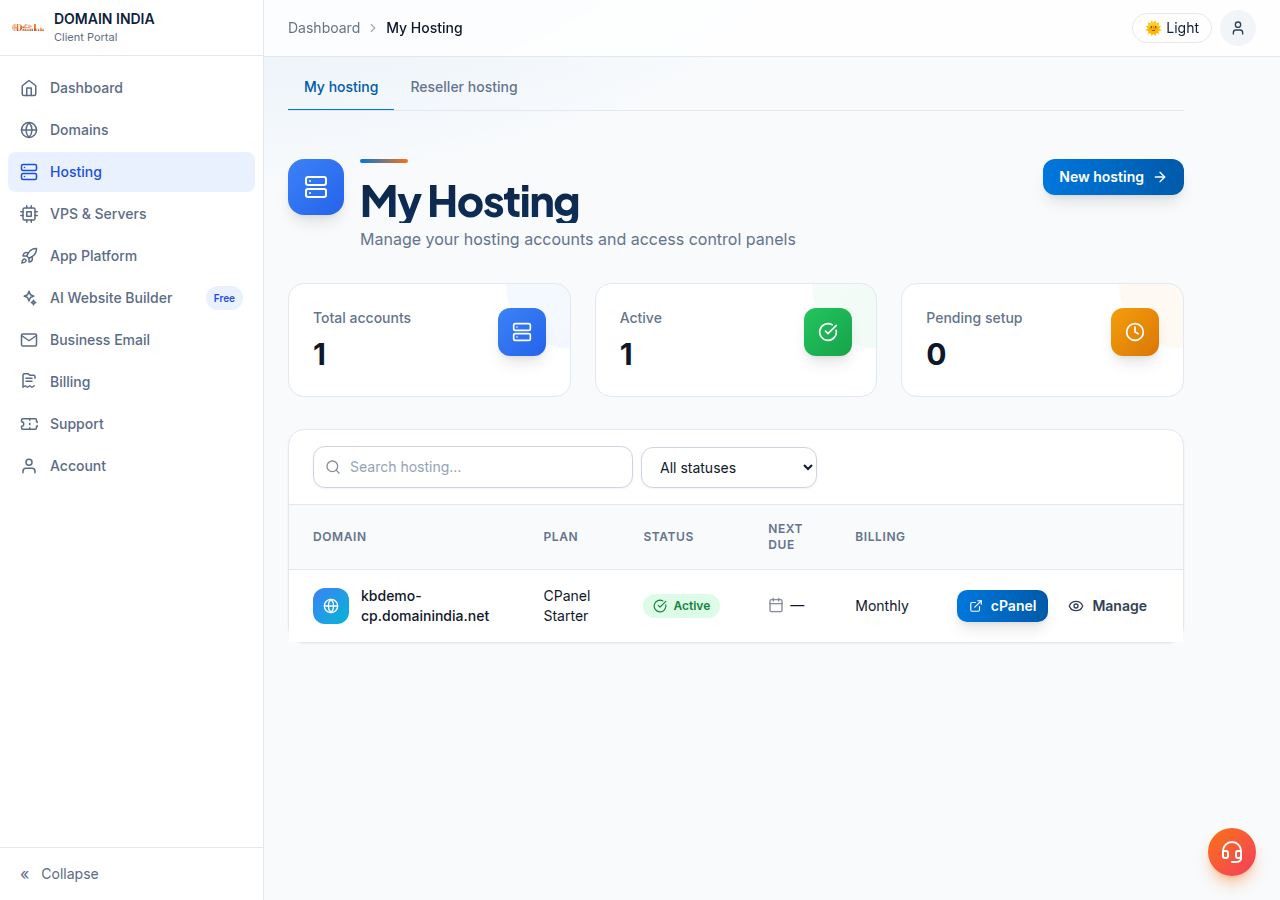
All login routes are in How to log in to cPanel.
5. Advice to ignore
- Installing a "cPanel proxy" script. Older guides, including an earlier version of this one, suggested uploading a third-party script to pass panel traffic through your website. Such scripts see your cPanel password and are no longer maintained. Don't install one.
- Turning off IPv6 or buying a fixed IP to fix logouts on Domain India hosting. Our cPanel servers don't end sessions when your IP changes, so it won't help here.
6. When it is a different problem
| What you see | Likely cause | Where to go |
|---|---|---|
| Back on the login page after a while, no error | The session expired, or the cookie was cleared | Log in again (section 2) |
| cPanel, webmail and your website all time out from one connection but work on mobile data | Your IP was blocked by the server firewall after failed logins | I can't reach my server: have I been blocked? |
| "Login invalid" on the login form | Wrong or old password | Reset cPanel password |
| "Your IP address has changed" | Probably another host's server | Section 3 |
Being logged out never blocks you: you can log straight back in. A firewall block means nothing loads from your connection until it is removed.
7. Getting help from Domain India
If you are logged out again and again within a few minutes on a normal browser window, open a ticket. Include your domain, the exact message or a screenshot, the time it happened, and your browser. Never send your password.
Support is available on 24/7 live chat, and tickets get a first response within 15 minutes; resolution can take longer depending on the issue. There is no phone support.
Frequently asked questions
Why was I logged out of cPanel?
On Domain India cPanel hosting the usual reasons are an expired session after inactivity, cookies that were cleared or blocked, logging out in another tab, or opening an old bookmarked cPanel address or a one-time login link again. Click the cPanel button in the client area for a fresh session.
Does changing my IP address log me out of cPanel?
Not on Domain India's cPanel servers. Sessions are not tied to your IP address, so switching between Wi-Fi and mobile data or using a VPN doesn't end your session here. Some other hosts do tie sessions to an IP.
I see "Your IP address has changed". What does it mean?
That message comes from servers that tie sessions to an IP address, which ours don't. You are probably on another host's cPanel, for example because your domain still points to your previous host. Log in through the client area's cPanel button, or use the server details on the Access tab.
Is my cPanel account hacked if I am logged out?
No. Being logged out on its own doesn't mean anything is wrong with your account. If you also see changes you didn't make, change your password and contact support.
Why does my bookmarked cPanel link stop working?
A cPanel address that contains cpsess carries a security token from one session, so it stops working when that session ends. Bookmark https://yourdomain.com:2083 instead, or use the client area's cPanel button.
What is the fastest way back into cPanel after being logged out?
Sign in to the Domain India client area, open Hosting › My Hosting and click the cPanel button on your domain's row. It opens a fresh session without asking for your cPanel password.
Ready to get back in? Open your hosting list and click the cPanel button. If nothing loads at all, read I can't reach my server: have I been blocked?, and if you keep being logged out, open a support ticket.
Click the cPanel button on your domain's row for a fresh session. No cPanel password needed.
Open My Hosting