File permissions decide who can read, change and run each file in your hosting account. Get them right and your site works and stays hard to tamper with; get them wrong and you see "403 Forbidden", "500 Internal Server Error" or, worse, a site that anyone can write to. This guide explains the numbers and shows three ways to change them on DirectAdmin hosting: the File Manager, an FTP client and SSH.
On DirectAdmin hosting, use 644 for files and 755 for folders, and tighten config files that hold passwords (such as wp-config.php) to 640 or 600 if the site still works. Never use 777. Change one item in DirectAdmin's File Manager by selecting it and choosing its permissions option; change a whole site at once with an FTP client or SSH, setting files and folders separately.
1. What the numbers mean
Every file and folder has three sets of permissions:
- Owner: your hosting account user.
- Group: a group of users on the server.
- World (others): everyone and everything else, including other processes.
Each set gets a digit made by adding up read, write and execute:
| Right | Value | On a file | On a folder |
|---|---|---|---|
| Read (r) | 4 | View the contents | List what is inside |
| Write (w) | 2 | Change or delete the file | Create, rename or delete items inside |
| Execute (x) | 1 | Run it as a program | Open the folder and reach items inside |
So 644 means owner 6 (4+2, read and write), group 4 (read), world 4 (read). 755 means owner 7 (read, write, execute), group and world 5 (read and execute). You will also see them written as letters, for example -rw-r--r-- for 644 and drwxr-xr-x for a 755 folder.
2. The permissions your site should have
| Item | Permission | Why |
|---|---|---|
| Files: .html, .php, .css, .js, images | 644 | You can edit; the web server can only read |
| Folders | 755 | You have full access; the web server can open them |
| Config files with passwords (wp-config.php, .env, config.php) | 640 or 600 | Hides secrets from other users, if your app still works |
| Upload or cache folders your app writes to | 755 | Your PHP scripts run as your user, so 755 is enough |
On our DirectAdmin server, PHP runs through PHP-FPM as your own account user (measured on our DirectAdmin server, 24 September 2026). That matters: your scripts write files as you, the owner, so a folder never needs to be writable by group or world for your site to save uploads. If a plugin's instructions say "set this folder to 777", 755 will work here.
777 lets anything that can reach the file change it. It is one of the most common ways websites get infected, and it fixes nothing on this server that 755 would not. If you find 777 on files or folders, change them back to 644 and 755. If your site was already altered, follow the security checklist for hacked websites.
Folders you should not change
Our DirectAdmin server sets the account's top folders for you: your home folder is 710, the domains folder is usually 711 and each site's public_html is 755. Leave these alone. Making them tighter blocks the web server from reaching your site and gives a 403; making them looser gains nothing.
Your website files live in /home/username/domains/yourdomain.com/public_html, one folder per domain. The File Manager guide shows where each panel keeps them.
3. Change permissions in DirectAdmin's File Manager
This is the easiest way to fix one file or a handful.
- Open DirectAdmin.Sign in to the client area, open your hosting service and use the button that opens DirectAdmin, or sign in with the details from your welcome email. See how to log in to your control panel if a login fails.
- Open File Managerfrom the dashboard, or type "file" in the panel's search box.
- Go to the folder.Open
domains, then your domain, thenpublic_html, and on to the folder that holds the item. - Select the itemby ticking its checkbox. You can tick several items that need the same value.
- Open the permissions option.Choose Permissions (or chmod) from the toolbar or the right-click menu; in some versions you can click the number in the permissions column instead.
- Set the value.Type the number, for example
644, or tick the read, write and execute boxes for owner, group and world. - Save and check.Confirm, then look at the permissions column to see the new value.
Menu labels differ slightly between DirectAdmin versions and skins. If you can't find the option, ask support and tell us which file you want to change.
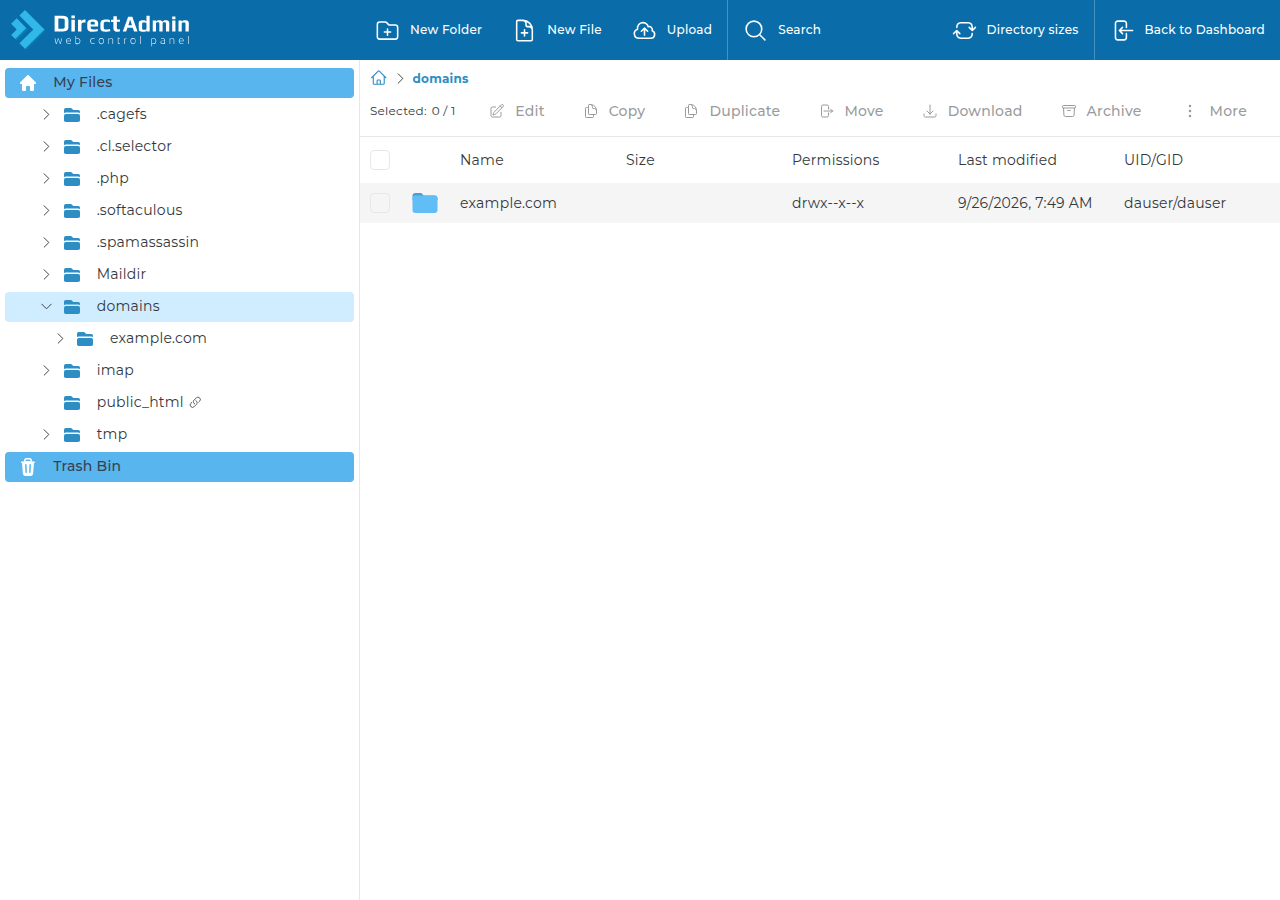
If the File Manager offers to apply permissions to everything inside a folder, don't use it to set one number on a mixed folder. 644 on folders makes them unreachable (403 errors), and 755 on every file marks them all as programs. Set folders and files separately with an FTP client or SSH, as below.
4. Change permissions with an FTP client
FTP clients such as FileZilla can set permissions for a whole site and can treat files and folders separately.
- Connectwith FTP over explicit TLS, using the FTP details from your client area. What settings do I need to upload my website? lists them.
- Right-click the folder(for example
public_html) and choose File permissions. - Fix the folders.Enter
755, tick Recurse into subdirectories, choose Apply to directories only and click OK. - Fix the files.Right-click the same folder again, enter
644, tick Recurse into subdirectories, choose Apply to files only and click OK. - Tighten secrets.Right-click
wp-config.phpor your.envfile on its own and set600. Load the site to make sure it still works; if not, use640.
5. Change permissions over SSH
Jailed SSH access is available on every shared hosting plan (cPanel, DirectAdmin, Webuzo). It is off by default; ask support to enable it for your account. Login uses an SSH key, not a password. See enabling and accessing jailed SSH.
Once you are in, these commands reset a whole site. Replace the path with your own domain:
cd ~/domains/yourdomain.com/public_html

# check what you have
ls -la

# folders to 755, files to 644
find . -type d -exec chmod 755 {} +
find . -type f -exec chmod 644 {} +

# tighten the config file that holds your database password
chmod 600 wp-config.php

# find anything still world-writable
find . -perm -o+w -ls
Run the commands from inside public_html, never from your home folder, so that you don't change the permissions of mail or system folders.
6. Fixing errors caused by permissions
| What you see | Likely cause | Fix |
|---|---|---|
| 403 Forbidden on the whole site | public_html or a parent folder tightened | Set public_html back to 755 and leave home and domains as they are |
| 403 on one page, image or folder | File not readable (600 or 000) or folder missing execute | Set the file to 644 or the folder to 755 |
| 500 error after changing permissions | Unusual values on scripts or .htaccess, such as execute-only or group-writable CGI scripts | Set files to 644 and folders to 755, then check the error log |
| "Permission denied" when saving in File Manager | File not owned by your account | Ask support; you can't change a file you don't own |
| Plugin says a folder "is not writable" | Folder set to 555 or lower | Set it to 755 |
For a full diagnosis, read Understanding and resolving HTTP error 403 and Troubleshooting a 500 Internal Server Error. Your error log shows the exact file the server refused, which is usually faster than guessing.
7. Permissions on Domain India DirectAdmin hosting
Our DirectAdmin hosting runs PHP-FPM as your own user, so the standard 644 and 755 work for WordPress and most other PHP apps with no special folders. Weekly JetBackup backups mean that if a permission change goes badly wrong, you can restore the affected files from JetBackup in your panel; see backing up and restoring with JetBackup.
- 10 GB NVMe SSD Storage
- 50 GB Monthly Bandwidth
- 1 Website
- 5 Email Accounts
- 30 GB NVMe SSD Storage
- Unmetered Bandwidth
- 5 Websites
- 50 Email Accounts
Card prices are Domain India list prices on 19 September 2026, excluding 18% GST. Compare every plan on DirectAdmin hosting.
Frequently asked questions
What permissions should files and folders have on DirectAdmin hosting?
Use 644 for files and 755 for folders. Configuration files that hold passwords, such as wp-config.php or .env, can be 640 or 600 as long as the site still works. Never use 777.
Is 777 ever needed on Domain India DirectAdmin hosting?
No. PHP runs as your own account user through PHP-FPM, so your scripts can already write to folders set to 755. 777 only lets others change your files and is a common cause of infections.
How do I change permissions for a whole website at once?
Use an FTP client such as FileZilla: set 755 recursively on directories only, then 644 recursively on files only. With jailed SSH enabled, use find with chmod to set folders and files separately.
Why do I get 403 Forbidden after changing permissions?
A folder in the path is probably too tight, or a file is not readable. Set public_html and the folders inside it to 755 and the files to 644. Do not change the permissions of your home folder or the domains folder.
Why can't I change the permissions of some files?
You can only change files your account owns. If File Manager or FTP reports permission denied on a file, open a support ticket with the file path so we can check its owner.
What does chmod mean?
chmod is the Linux command that changes a file's permissions. File Manager and FTP clients use it behind the scenes when you set a number such as 644.
Ready to tidy up your site? Start with the File Manager guide, or open a support ticket with the file path and the error you see if a permission change doesn't fix it.
Every DirectAdmin plan includes File Manager, FTP over TLS, weekly JetBackup backups and jailed SSH on request.
See DirectAdmin plans