To add the email included with your Domain India hosting to Outlook, Thunderbird, Apple Mail or your phone, you need the incoming server, the outgoing server, a port for each and the matching encryption. For almost every hosting mailbox that is mail.yourdomain.com on ports 993 and 465. This page explains each setting, where your control panel shows the exact values for your account, and what to change when a connection fails.
The one-screen quick reference is Email server details: port numbers and SSL settings. App-by-app screens are in Email client settings for popular email clients.
Incoming: IMAP, server mail.yourdomain.com, port 993, SSL/TLS. Outgoing: SMTP, server mail.yourdomain.com, port 465, SSL/TLS, with authentication on. The username is your full email address and the password is the mailbox password. Port 587 with STARTTLS also works on cPanel, DirectAdmin and Webuzo, but not on Windows (Plesk) hosting. If your app warns about the certificate, use the server hostname your control panel shows instead.
1. Check which email you have
These settings are for mailboxes you create in cPanel, DirectAdmin, Webuzo or Plesk as part of a hosting plan.
Domain India Business Email is a separate product with its own settings: it supports IMAP only, with no POP3, and its webmail is at https://mail.yourdomain.com:8443/. If that is what you have, use Business Email client setup instead. Not sure? See Business Email vs the email included with your hosting.
2. The settings
Replace yourdomain.com with your own domain. We measured these ports as open on our shared servers on 20 September 2026.
| Setting | Incoming (IMAP) | Incoming (POP3) | Outgoing (SMTP) |
|---|---|---|---|
| Server | mail.yourdomain.com | mail.yourdomain.com | mail.yourdomain.com |
| Port | 993 | 995 | 465 (or 587 on Linux hosting) |
| Encryption | SSL/TLS | SSL/TLS | SSL/TLS on 465, STARTTLS on 587 |
| Username | Full email address | Full email address | Full email address |
| Authentication | Normal password | Normal password | Required, same as incoming |
Ports and encryption go together. 993, 995 and 465 pair with SSL/TLS (some apps just say "SSL"). 587 pairs with STARTTLS (some apps say "TLS"). A mismatched pair, such as 465 with STARTTLS, is the most common reason a new account won't connect.
Choose IMAP unless you have a reason not to. IMAP keeps mail on the server, so your laptop, phone and webmail all show the same mailbox. POP3 downloads mail to one device. See IMAP vs POP3.
3. Which server name to use
mail.yourdomain.com is created for you on cPanel and DirectAdmin hosting, and it works once your domain's DNS points to your Domain India hosting. When we tested real customer domains on our cPanel and DirectAdmin servers in September 2026, the mail ports presented a certificate covering the customer's own domain in almost every case, so the app connects without a warning.
Use the server hostname instead when:
- your app shows a certificate warning for
mail.yourdomain.com(the certificate for your domain hasn't been issued yet, or doesn't covermail); - your domain's DNS is not with us yet, for example during a move from another host.
The server hostname is the name in the panel address on your hosting service's Manage › Access tab in the client area (the part before the colon and port number). It is also in your hosting welcome email and, on cPanel, on the Connect Devices page. Your username and password stay the same whichever name you use. Never click "accept the certificate permanently" to get past a warning; fix the name instead.
4. Find the exact settings in your control panel
- cPanel.Open Email › Email Accounts and click Connect Devices next to the address. The page lists the secure SSL/TLS settings for that mailbox and offers automatic setup files for some mail apps.
- DirectAdmin.Open E-mail Manager › E-mail Accounts for your domain. If you don't see a settings panel, use the table above, which applies to DirectAdmin mailboxes.
- Webuzo.Use the table above with
mail.yourdomain.com, or the server hostname from your welcome email. - Windows (Plesk).Use the table above with port 465 and SSL/TLS for sending. Port 587 is closed on our Windows servers, so never use it there.
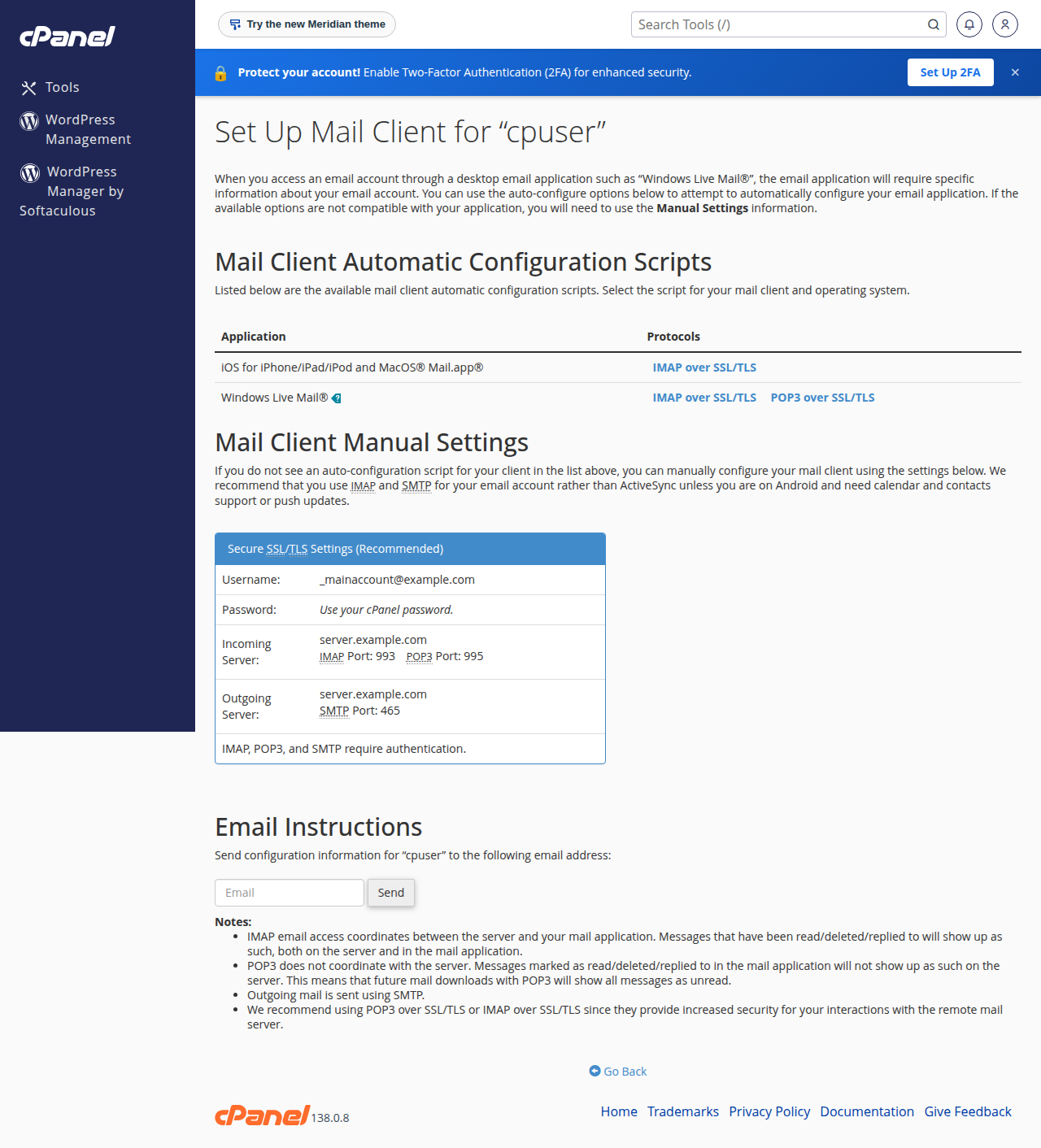
5. Username, password and authentication
- Username: always the complete email address, such as
[email protected], never just the part before the @. - Password: the mailbox password set in your control panel. It is not your client area or control panel password. To change it, use your panel's email accounts page.
- Outgoing authentication: turn on "My outgoing server (SMTP) requires authentication" and choose "use same settings as my incoming mail server".
- SPA or NTLM: leave "Secure Password Authentication" off. The encryption comes from SSL/TLS, and our servers use normal password authentication.
6. Limits worth knowing
| Limit | cPanel hosting | DirectAdmin hosting |
|---|---|---|
| Largest message you can send or receive | 50 MB | 50 MB |
| Outgoing messages | 200 per hour per account | 1,000 per day |
Attachments grow by about a third when they are encoded for email, so a 30 MB file takes around 40 MB of message size. For large files, share a download link instead. A new cPanel mailbox gets 1,024 MB of storage by default, which you can change in Email Accounts.
7. When it won't connect
| Symptom | Likely cause | Fix |
|---|---|---|
| Times out on every port | Wrong server name, or DNS not pointing to us yet | Use the server hostname from Manage › Access |
| Certificate warning | App is using a name the certificate doesn't cover | Use the server hostname |
| Receives but won't send | SMTP authentication off, or wrong port and encryption pair | Turn authentication on; use 465 with SSL/TLS |
| Password rejected, but it works in webmail | Username is not the full address, or an old password is saved | Enter the full address and retype the password |
| Worked yesterday, now nothing connects from the office | Repeated failed logins got your IP address blocked | Update the password on every device, then contact support with your public IP |
Test in webmail first: if you can log in at https://yourdomain.com/webmail (on Windows hosting, MailEnable webmail at webmail.yourdomain.com), the mailbox and password are fine and the problem is in the app. See How to log in to webmail.
Don't use port 25 in a mail app: most internet providers block it for home and office connections. Port 26 is closed on every Domain India server. The unencrypted ports 110 and 143 are open but send your password in plain text. The full list is in Domain India web hosting port numbers.
Frequently asked questions
What are the incoming and outgoing mail servers for Domain India hosting email?
Use mail.yourdomain.com for both, replacing yourdomain.com with your own domain. Incoming is IMAP on port 993 with SSL/TLS; outgoing is SMTP on port 465 with SSL/TLS and authentication turned on.
What is the SMTP port for Domain India hosting?
Port 465 with SSL/TLS on every Domain India hosting plan. Port 587 with STARTTLS also works on cPanel, DirectAdmin and Webuzo hosting, but not on Windows (Plesk) hosting.
Why does my email app show a certificate warning?
The name you entered isn't covered by the certificate the server presents, usually because your domain's certificate hasn't been issued yet or DNS isn't pointing to us. Use the server hostname from the panel address on your hosting service's Access tab, or from cPanel's Connect Devices page.
Is the username my email address or my cPanel username?
Your full email address, such as [email protected], with that mailbox's password. The cPanel username and password are only for logging in to the control panel.
Should I use IMAP or POP3?
IMAP, in almost every case. It keeps mail on the server so every device shows the same mailbox. POP3 downloads mail to one device and suits only a single computer that keeps its own copies.
How many emails can I send per hour?
On cPanel hosting, 200 messages per hour per account. On DirectAdmin hosting, 1,000 per day (200 per mailbox by default). For newsletters and bulk mail, use a dedicated email-sending service.
Do these settings work for Domain India Business Email?
Not entirely. Business Email is a separate product that supports IMAP only, with no POP3, and has its own setup guide.
Ready to set up your devices? Follow the app-by-app steps in Email client settings for popular email clients. If sending fails, read I can receive mail but I cannot send it, or open a ticket in the client area.
Tell us the email address, the app and device, and the server, port and encryption you entered, and we will check it with you. Support is on 24/7 live chat, and tickets get a first response within 15 minutes.
Open a support ticket