FTP and SFTP let you copy files between your computer and your Domain India hosting account with a program such as FileZilla. They sound alike but work differently: FTP with TLS works on every hosting account straight away, while SFTP needs SSH access, which is switched on by request. This guide gives the settings for each type of hosting, shows how to create an extra FTP account in cPanel, and explains which option to use when.
For most people: connect with FTP on port 21 using "Require explicit FTP over TLS", your server hostname, passive mode, and your control panel username and password (or an extra FTP account such as [email protected]). SFTP on port 22 works on cPanel, DirectAdmin and Webuzo only after support enables jailed SSH for you, and it logs in with an SSH key, not a password. Windows (Plesk) hosting has no SSH or SFTP: use FTP on port 21.
1. FTP with TLS or SFTP: which one?
| Feature | FTP with explicit TLS (FTPS) | SFTP |
|---|---|---|
| What it is | Normal FTP, encrypted before you log in | File transfer over an SSH connection |
| Port | 21 | 22 |
| Works on | cPanel, DirectAdmin, Webuzo and Windows (Plesk) | cPanel, DirectAdmin and Webuzo, once jailed SSH is enabled |
| Setup needed | None; works from day one | Ask support to enable SSH, then add your SSH key |
| Login | Control panel username and password, or an extra FTP account | Main account username with an SSH key; passwords are not accepted |
| Extra FTP accounts for other people | Yes | No |
Both are encrypted. Plain FTP without TLS sends your username and password in clear text, so always pick the TLS option in your FTP program.
2. Connection settings by hosting type
| Hosting | FTP | SFTP |
|---|---|---|
| cPanel | Port 21, explicit TLS | Port 22, if jailed SSH is enabled; key login |
| DirectAdmin | Port 21, explicit TLS | Port 22, if jailed SSH is enabled; key login |
| Webuzo | Port 21 | Port 22, if jailed SSH is enabled; use a key |
| Windows (Plesk) | Port 21, explicit TLS | Not available: port 22 is closed |
For the host, use the server hostname from your welcome email or from the client area: open your hosting service and choose Manage › Access, which shows your username, server IP and panel address. The server's TLS certificate is issued for its hostname, so connecting by domain name or IP gives a certificate-name warning. On our cPanel and DirectAdmin servers the certificates are valid; on any server, if FileZilla shows a warning you do not understand, contact support rather than accepting it. See using SSL/TLS encryption in FTP clients.
3. Connect with FileZilla
FileZilla is free for Windows, macOS and Linux. Download it from filezilla-project.org and decline any extra software the installer offers.
- Open the Site Manager.Go to File › Site Manager and click New site.
- Choose the protocol.For FTP: FTP - File Transfer Protocol with Require explicit FTP over TLS. For SFTP: SFTP - SSH File Transfer Protocol.
- Enter the host and port.Your server hostname, port 21 for FTP or 22 for SFTP.
- Enter your login.For FTP, Logon Type Normal with your username and password. For SFTP, Logon Type Key file and select your private key.
- Check passive mode.For FTP, on the Transfer Settings tab, set Transfer mode to Passive.
- Connect and upload.Your computer is on the left and the server on the right. Open your website folder on the right and drag files across from the left.
Your website folder is public_html on cPanel and Webuzo, domains/yourdomain.com/public_html on DirectAdmin, and httpdocs on Windows (Plesk). Full details, including databases, are in what settings do I need to upload my website.
4. Create an extra FTP account in cPanel
Give a designer or developer their own FTP login instead of your cPanel password. It works for FTP only and is locked to the folder you choose.
- Open FTP Accounts.Log in to cPanel (see how to log in to cPanel) and open FTP Accounts in the Files section.
- Enter a login name.Type a name such as
designerand pick the domain. The login becomes[email protected]. - Set a strong password.Use the password generator or a password manager.
- Choose the directory.cPanel suggests a folder named after the account. Change it to the folder the person needs, for example
public_htmlfor the whole website or a single theme folder. The account cannot see anything above it. - Set the quota.Enter a limit in MB, or choose Unlimited.
- Click Create FTP Account.The account can log in straight away.
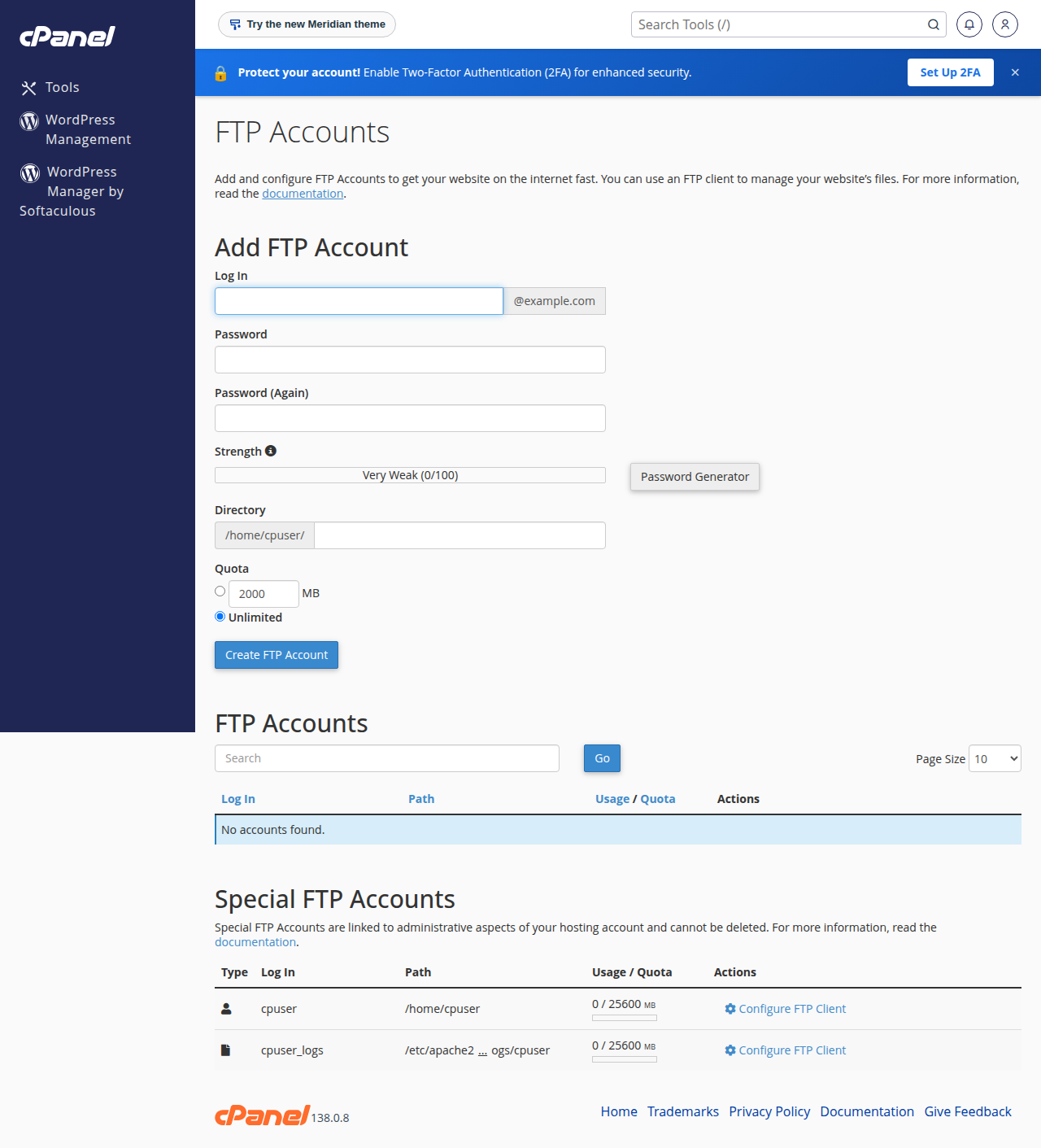
To change the password or quota, or delete the account, use the options next to it in the list. Deleting an FTP account removes only the login; the files stay. For DirectAdmin, see creating and managing FTP accounts in DirectAdmin.
Limit each extra account to the folder the person works on, and delete it when the work is finished. Never share your control panel password: it also opens your email, databases and settings.
5. Set up SFTP with jailed SSH
Jailed SSH access is available on every shared hosting plan (cPanel, DirectAdmin, Webuzo). It is off by default; ask support to enable it for your account by live chat or a ticket. The shell is jailed: you work only inside your own account.
- Ask support to enable SSH for your hosting account.
- Create an SSH key on your computer, for example with
ssh-keygen -t ed25519, and keep the private key safe. - Add the public key. In cPanel, go to Security › SSH Access › Manage SSH Keys, import the public key, then Authorize it. On DirectAdmin and Webuzo, add it to
.ssh/authorized_keysin your home folder, or send the public key to support. - Connect with SFTP on port 22 with your control panel username and your private key.
Password login over SSH is switched off, so your panel password will not work for SFTP. Inside the jail, scp, tar and unzip are available but rsync is not. The full guide is enabling and accessing jailed SSH.
Port 22 is closed on our Windows server, so there is no SSH or SFTP there. Upload with FTP on port 21 using explicit TLS, or the Plesk File Manager. See the Plesk Windows hosting guide.
6. Fixing common problems
| Problem | Likely cause | Fix |
|---|---|---|
| "530 Login authentication failed" | Short username for an extra account, or wrong password | Type the full [email protected]; reset the password in your panel |
| "Failed to retrieve directory listing" or a timeout after login | Active mode, or a router or firewall blocking the data connection | Set Passive mode; try another network |
| SFTP: "Permission denied (publickey)" or asks for a password | SSH not enabled, or the key is not added or authorised | Ask support to enable SSH; add and authorise your public key |
| SFTP on Windows hosting fails | No SSH on Windows (Plesk) | Use FTP on port 21 with explicit TLS |
| Works on mobile data but not from the office | Your IP was blocked after failed logins | Stop retrying; contact support with your public IP address |
More error messages: FileZilla error messages and solutions. For a few files, your panel's File Manager works in the browser with no FTP program at all.
7. Hosting at Domain India
Every Domain India shared hosting plan includes FTP with TLS, extra FTP accounts and a browser File Manager, plus jailed SSH on request for developers on cPanel, DirectAdmin and Webuzo. cPanel Starter costs ₹125 a month and DA Starter ₹100 a month, each for one website; these are Domain India list prices on 19 September 2026, excluding 18% GST. Compare cPanel hosting, DirectAdmin hosting and Windows hosting.
What are the FTP settings for Domain India hosting?
Host: your server hostname from the welcome email or the client area. Port: 21. Protocol: FTP with Require explicit FTP over TLS. Transfer mode: passive. Username and password: your control panel login, or an extra FTP account such as [email protected].
Does Domain India shared hosting support SFTP?
Yes, on cPanel, DirectAdmin and Webuzo hosting, once support enables jailed SSH for your account; it is off by default. SFTP uses port 22 and logs in with an SSH key, not a password.
Can I use SFTP on Windows (Plesk) hosting?
No. Port 22 is closed on the Windows server, so there is no SSH or SFTP. Use FTP on port 21 with explicit TLS, or the Plesk File Manager.
Why does SFTP reject my control panel password?
Password login over SSH is switched off on our shared servers. Add your public SSH key to the account and connect with the matching private key.
Is FTP over TLS as secure as SFTP?
Both encrypt your login and files. FTP with explicit TLS works on every Domain India hosting account without extra setup, so it is the usual choice; SFTP suits developers who already use SSH.
How do I create an FTP account in cPanel?
Open FTP Accounts in the Files section of cPanel, enter a login name and password, choose the directory the account may use, set a quota and click Create FTP Account. The login is the full name, such as [email protected].
Can an extra FTP account use SFTP?
No. Extra FTP accounts work with FTP only. SFTP uses the main hosting account with an SSH key.
Ready to connect? Find your hostname and username in your hosting services, then follow the FileZilla steps above. If you would like SSH switched on or a login still fails, open a support ticket: support is on 24/7 live chat, and tickets get a first response within 15 minutes.
Tell us your domain, the username you are using and the exact error. Never send a password or private key.
Open a support ticket