Before you buy hosting, check that it can run your technology: your programming language, your framework, your database and the tools you deploy with. This guide shows which technologies run on which Domain India product: shared Linux hosting (cPanel, DirectAdmin and Webuzo), Windows hosting with Plesk, the App Platform (PaaS) and VPS. It ends with a quick guide to picking the right product for your stack.
PHP, WordPress and MySQL-compatible databases run on Domain India's cPanel, DirectAdmin and Webuzo shared hosting, which uses the Apache web server. Jailed SSH is available on every shared plan but is off by default, so ask support to enable it. The cPanel and DirectAdmin servers run small Node.js and Python apps from the control panel; Webuzo has no such tool we could confirm, and Perl is not measured. For production Node.js and Python apps, the App Platform is the dependable home. For ASP.NET and MSSQL, choose Windows (Plesk) hosting. For a Dockerfile or PostgreSQL, choose the App Platform, and for root access, Docker or any other software, choose a VPS.
1. The four product families
Every Domain India hosting product falls into one of four families. The family decides what you can run, more than the plan size does.
| Product family | Operating system | How you manage it | Best for |
|---|---|---|---|
| Shared hosting: cPanel, DirectAdmin, Webuzo | Linux (CloudLinux on cPanel and DirectAdmin) | Control panel, File Manager, FTP; jailed SSH on request (off by default) | WordPress, PHP sites, Laravel apps built on your computer |
| Windows hosting | Windows Server with IIS | Plesk panel, Web Deploy, FTP | ASP.NET, ASP.NET Core, MSSQL |
| App Platform (PaaS) | Linux containers | Dashboard, GitHub deploy, deploy token | Node.js, Python and PHP apps, APIs, SaaS, anything with a Dockerfile |
| VPS | Linux of your choice (Windows Server: contact sales) | Full root access over SSH | Custom stacks, Docker, several apps, your own databases |
In the tables below:
- Yes means we measured it on our servers or the product's live page and plan features confirm it.
- Listed means the plan or product page lists it, but we have not measured it on the server for this guide. Ask support before you depend on it.
- Check with support means we could not confirm it. Ask before you buy.
- No means the platform is not built for it. Each "No" says which product to use instead.
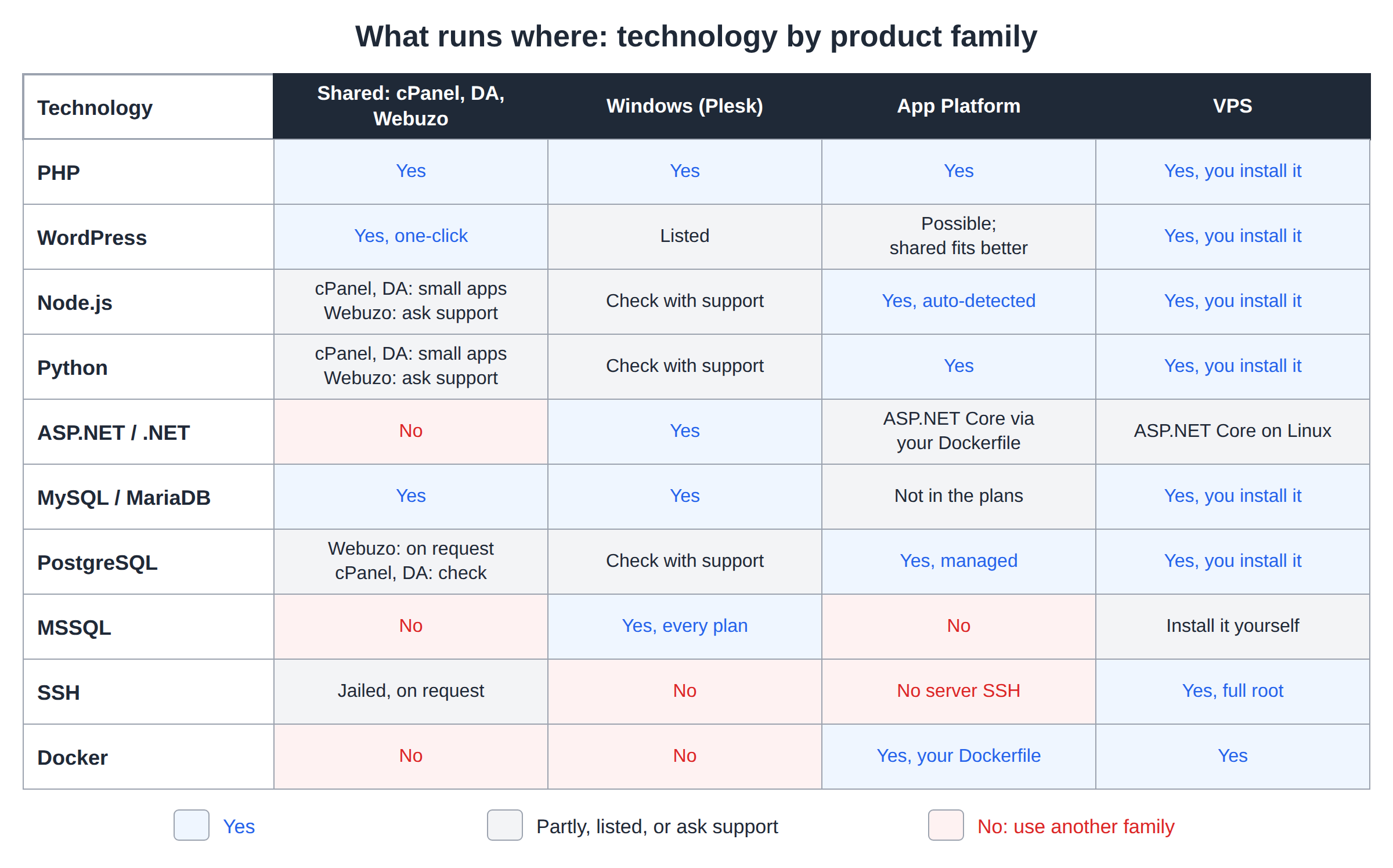
2. Languages and frameworks
| Technology | Shared (cPanel / DirectAdmin / Webuzo) | Windows (Plesk) | App Platform | VPS |
|---|---|---|---|---|
| PHP | Yes. cPanel: 5.1 to 8.5, default 8.3. DirectAdmin: 5.6 to 8.3. Webuzo: check your panel | Yes | Yes, PHP starter or your Dockerfile | Yes, you install it |
| WordPress and other PHP CMSs | Yes, one-click with Softaculous (cPanel also has WP Toolkit) | Listed on the product page; Linux hosting is the usual choice | Possible, but shared hosting fits better | Yes, you install it |
| Laravel and other PHP frameworks | Yes, with Composer over jailed SSH or built on your computer and uploaded (see section 6) | Check with support | Yes, as a PHP app | Yes, you install it |
| Node.js | cPanel: 20, 22 and 24 (Setup Node.js App). DirectAdmin: 14, 16, 18, 19, 20, 22 and 24. Webuzo: ask support | Check with support | Yes, detected and built automatically | Yes, you install it |
| Python (Django, Flask) | cPanel: 3.9, 3.11 and 3.12 (Setup Python App). DirectAdmin: 2.7 and 3.8 to 3.13. Webuzo: ask support | Check with support | Yes, Python starter or your Dockerfile | Yes, you install it |
| Ruby (Rails), Perl and CGI | Listed on some product pages; not measured, ask support | Check with support | Via your own Dockerfile | Yes, you install it |
| ASP.NET and .NET | No, use Windows hosting | Yes: .NET 6 to 9, ASP.NET Core and .NET Framework | ASP.NET Core via your own Dockerfile | ASP.NET Core on Linux; .NET Framework needs Windows Server |
| Classic ASP | No | Yes | No | Needs Windows Server |
| Java, Go and other languages | Check with support | Check with support | Via your own Dockerfile | Yes, you install it |
Exact versions change as we add and retire them. The measured list for our shared servers, with dates, is in what software versions Domain India web hosting runs. Your control panel always shows what your server offers today:
- cPanel: MultiPHP Manager sets the PHP version for each domain. See how to change PHP versions in cPanel.
- DirectAdmin: see how to change the PHP version in DirectAdmin.
- Node.js and Python on shared hosting: see deploying a Node.js app and deploying a Python app. For Perl, or for Node.js and Python on Webuzo, open a ticket and tell us the version your app needs before you build on it.
Older PHP versions stay installed so that legacy sites keep running, but they no longer get security fixes. For anything new, use PHP 8.3 or newer.
A plugin or package that works on one PHP version can break on another. Switch a staging copy first, or check your theme and plugin requirements. Read PHP version compatibility before you upgrade a live site.
3. Databases
| Database | Shared (cPanel / DirectAdmin / Webuzo) | Windows (Plesk) | App Platform | VPS |
|---|---|---|---|---|
| MySQL / MariaDB | Yes, with phpMyAdmin. Port 3306 is closed from outside (see below) | Yes | Not included in the plans | Yes, you install it |
| PostgreSQL | Webuzo: on request. cPanel and DirectAdmin: check with support | Check with support | Yes, managed PostgreSQL | Yes, you install it |
| Microsoft SQL Server (MSSQL) | No, use Windows hosting | Yes, included with every plan | No | Install it yourself (SQL Server for Linux, or Windows Server: contact sales) |
| SQLite | Listed; works wherever PHP's SQLite extension is enabled | Check with support | Inside your app's persistent storage | Yes |
We don't print database version numbers here, because they depend on the server and change with updates. Open phpMyAdmin and read the Server version line to see yours.
On shared plans the number of databases depends on the plan, for example 5 MySQL databases on cPanel Starter and 10 on cPanel Growth. On Windows plans it is 1 MSSQL database on ASP Starter and 5 on ASP Business.
The MySQL port 3306 is closed to outside connections on every shared server. To work on a database from your own computer, use an SSH tunnel once jailed SSH is enabled on your account (it is off by default; ask support), or ask support about the panel's remote MySQL allow list; the firewall may still block a direct connection. See how to connect to the MySQL database.
On the App Platform, the database is created in one click and your app receives its connection string as DATABASE_URL. The platform takes scheduled overnight dumps and keeps a week of history. See PostgreSQL on the App Platform.
4. Developer tools and access
| Tool | Shared (cPanel / DirectAdmin / Webuzo) | Windows (Plesk) | App Platform | VPS |
|---|---|---|---|---|
| SSH | Jailed SSH on every plan, off by default: ask support to enable it, then log in on port 22 with an SSH key | No, port 22 is closed; deploy with Web Deploy or FTP | No server SSH; logs and settings are in the dashboard | Yes, full root |
| Git | cPanel: Git Version Control in the panel, and git inside the jailed shell. DirectAdmin and Webuzo: ask support | Listed on the product page | Yes, deploy from GitHub or with a deploy token | Yes |
| Composer (PHP) | cPanel and DirectAdmin: not pre-installed; download composer.phar over jailed SSH and run it with php, adding --no-scripts if it stops with a proc_open message, or build on your computer and upload. Webuzo: ask support | Check with support | Inside your build | Yes |
| WP-CLI | Listed; needs jailed SSH, and tools inside the jail vary, so ask support | Check with support | Not applicable | Yes, you install it |
| Cron jobs / scheduled tasks | Yes, from the control panel | Check with support | Background workers: yes. Scheduled jobs: check with support | Yes |
| Docker | No, use the App Platform or a VPS | No | Yes, build from your own Dockerfile | Yes, full Docker and Kubernetes support |
| One-click app installer | Softaculous (cPanel also has WP Toolkit) | Plesk application installer | Starter templates for Node.js, Python and PHP | Optional control panel |
Guides for these tools:
- Enable and use jailed SSH
- Deploy with Git
- Set up cron jobs
- Install Laravel with Softaculous, or build it locally and upload
- Deploying from GitHub on the App Platform
- Deploy tokens on the App Platform
5. Shared hosting: cPanel, DirectAdmin and Webuzo
All three panels run the Apache web server, not LiteSpeed, and all three support .htaccess and mod_rewrite. The cPanel and DirectAdmin servers run CloudLinux 8.10. The differences are the PHP versions on offer, the panel you prefer and the price.
| Feature | cPanel | DirectAdmin | Webuzo |
|---|---|---|---|
| Web server | Apache, with nginx in front as a cache | Apache | Apache |
| Operating system | CloudLinux 8.10 | CloudLinux 8.10 | Not measured |
| PHP versions | 5.1 to 8.5, default 8.3 | 5.6, 7.2, 7.3, 7.4, 8.1, 8.2, 8.3 | Check your panel |
| PHP switching | MultiPHP Manager, per domain | The panel's PHP settings | The panel's PHP settings |
| App installer | Softaculous and WP Toolkit | Softaculous Premium | Softaculous Premium |
| SSH | Jailed, off by default; ask support | Jailed, off by default; ask support | Jailed, off by default; ask support |
| Node.js and Python | Node.js 20, 22, 24; Python 3.9, 3.11, 3.12 | Node.js 14 to 24; Python 2.7, 3.8 to 3.13 | No app tool found; ask support |
| PostgreSQL | Check with support | Check with support | On request |
| Backups | Weekly | Weekly | Nightly |
| From | ₹125/month | ₹100/month | ₹100/month |
For WordPress caching on these servers, use WP Super Cache or W3 Total Cache, not LiteSpeed Cache. If your app needs one exact PHP, Node.js or Python version, open a ticket before you order and we will confirm what the server offers.
- 25 GB NVMe SSD Storage
- 50 GB Monthly Bandwidth
- 1 Website
- 10 Email Accounts
6. PHP extensions and disabled functions on shared hosting
Most PHP applications need common extensions such as mysqli, pdo_mysql, curl, gd, mbstring, intl, zip, xml and openssl. These are standard on modern PHP builds. Which extensions are loaded depends on the server's PHP build; if one your application needs is missing, ask support. The ionCube loader, used by some commercial scripts, is listed on our DirectAdmin plans; ask support for the other panels.
Shared hosting also switches off PHP functions that could let one website reach past its own account. On our cPanel servers about 50 functions are disabled for the whole PHP engine, including proc_open, popen, fsockopen and stream_socket_client, and the list applies to command-line PHP as well as websites. That is why Composer steps that start other programs, Laravel's scheduled artisan commands and SMTP mail transports fail there, while PHP's own mail() works. The DirectAdmin and Webuzo servers carry their own lists, so check yours with ini_get('disable_functions') rather than assume.
If a script fails with an error like exec() has been disabled for security reasons, that is the reason, and it cannot be switched on for one account. Read PHP disabled functions on shared hosting and disallowed PHP extensions and resource overconsumption for the details and workarounds.
For what each extension does, see a comprehensive list of PHP modules and their functions.
Shared plans are built for websites and web apps that answer requests. Background daemons, socket servers, streaming servers, game servers and heavy workers belong on the App Platform (for workers) or a VPS. Running them on shared hosting can get your processes stopped for resource overuse.
7. Which product should I pick for my stack?
Start from what you are building, then pick the family that runs it without workarounds.
| Your stack | Pick | Why |
|---|---|---|
| WordPress, Joomla, Drupal or another PHP CMS | Shared hosting (cPanel, DirectAdmin or Webuzo) | One-click install, MySQL and email accounts in every plan |
| Custom PHP site or Laravel app with MySQL | Shared hosting | PHP version switching and cron; build with Composer on your computer and upload |
| Small Node.js or Python site alongside a PHP site | cPanel or DirectAdmin shared hosting | The panel's Node.js and Python app tools run small apps; use the App Platform for production apps |
| ASP.NET, ASP.NET Core or MSSQL | Windows (Plesk) hosting | IIS, .NET, MSSQL and Web Deploy from Visual Studio |
| Node.js API, Next.js app or Python API | App Platform | Node.js is detected automatically; deploy from GitHub; free SSL |
| App that needs PostgreSQL | App Platform | Managed PostgreSQL with one-click setup |
| App packaged as a Dockerfile | App Platform | Builds and runs your own Dockerfile |
| App that runs other programs (FFmpeg, headless Chrome, Composer scripts) | App Platform or VPS | Nothing is disabled in your own container or server |
| Docker Compose stack, several services, Redis, queues, custom software | VPS | Full root access; install anything |
| Java, Go or another runtime with system packages | App Platform (Dockerfile) or VPS | Neither needs us to pre-install the runtime |
Every step from shared hosting to App Platform to VPS gives you more control and more work. On shared hosting we run the server, PHP and MySQL. On the App Platform we run the servers and you run the app. On a VPS you run everything: Linux updates, security, backups and the stack itself.
- 512 MB RAM per app
- 1 vCPU
- 5 GB NVMe SSD
- PostgreSQL Database
8. Domain India plans and prices
Domain India list prices on 19 September 2026, per month, excluding 18% GST.
| Product | Entry plan | Price from | What you get |
|---|---|---|---|
| DirectAdmin hosting | DA Starter | ₹100/month | 1 website, 10 GB NVMe, 5 MySQL databases, weekly backups, Softaculous Premium |
| Webuzo hosting | Webuzo Starter | ₹100/month | 1 website, 10 GB NVMe, 5 MySQL databases, nightly backups, Softaculous Premium |
| cPanel hosting | cPanel Starter | ₹125/month | 1 website, 25 GB NVMe, 5 MySQL databases, 10 email accounts, weekly backups |
| Windows hosting | ASP Starter | ₹165/month | 1 website, 10 GB, 1 MSSQL database, Plesk, Web Deploy |
| App Platform | App Starter | ₹100/month | 1 app, 512 MB RAM, 5 GB NVMe, PostgreSQL database, free SSL, GitHub deploy |
| VPS | VPS Starter | ₹553/month | 1 vCPU, 2 GB RAM, 64 GB NVMe, full root access, KVM |
Bigger plans in each family add websites, databases, storage and resources. Compare them on the product pages below.
9. What changed since the old list
This article once listed more than 200 individual items. Many of them no longer matter: CentOS 5, Flash, FrontPage extensions and Fantastico are gone. Old PHP versions are a different case. Our cPanel servers still have PHP 5.x and 7.x installed so that legacy sites keep running, but those versions get no security fixes, so use a supported version for anything new. Rather than keep a long list that goes out of date, this guide covers the technologies people actually build with in 2026 and points you to the control panel for exact versions, because the panel always shows what your server runs today.
If something you need is not in these tables, open a support ticket and ask before you order.
Frequently asked questions
Does Domain India shared hosting support Node.js and Python?
Yes, on cPanel and DirectAdmin, for small apps. Measured in September 2026, the cPanel servers offer Node.js 20, 22 and 24 and Python 3.9, 3.11 and 3.12 through Setup Node.js App and Setup Python App, and the DirectAdmin server offers Node.js 14 to 24 and Python 2.7 and 3.8 to 3.13. Webuzo has no such tool we could confirm, so ask support. For production Node.js and Python APIs and apps, the App Platform is the dependable choice: it detects Node.js automatically and runs Python from a starter template or your own Dockerfile.
Which PHP versions are available on Domain India hosting?
Measured in September 2026, the cPanel servers offer PHP 5.1 to 8.5 with 8.3 as the default for new accounts, and the DirectAdmin server offers PHP 5.6, 7.2, 7.3, 7.4, 8.1, 8.2 and 8.3. For Webuzo, check the PHP settings in your panel. Older versions exist only for legacy sites; use PHP 8.3 or newer for anything new.
Can I run ASP.NET or MSSQL on cPanel hosting?
No. cPanel, DirectAdmin and Webuzo run on Linux. For ASP.NET, ASP.NET Core and Microsoft SQL Server, choose Domain India Windows hosting, which uses Plesk and IIS and includes MSSQL on every plan, from ₹165 a month excluding GST.
Can I use Docker on shared hosting?
No. Shared hosting accounts cannot run Docker. Use the Domain India App Platform to build and run your own Dockerfile, from ₹100 a month, or a VPS for full Docker and Kubernetes support, from ₹553 a month. Prices exclude GST.
Does Domain India offer PostgreSQL?
Yes. Every App Platform plan includes a managed PostgreSQL database. On a VPS you can install PostgreSQL yourself. On Webuzo shared hosting PostgreSQL is available on request; for cPanel and DirectAdmin, ask support.
Do shared hosting plans include SSH?
Jailed SSH access is available on every Domain India shared hosting plan (cPanel, DirectAdmin, Webuzo). It is off by default; ask support to enable it for your account, then log in on port 22 with an SSH key. Windows (Plesk) hosting has no SSH. Cron jobs are available from the control panel, and you can build with Composer on your own computer and upload the result.
Can I install any software I want?
Only on a VPS, where you have full root access and can install any software or operating system package. Shared and Windows hosting run a managed stack. The App Platform runs whatever you package in your own Dockerfile.
Why does my PHP script say a function is disabled?
Shared hosting disables PHP functions that start other programs or open raw network sockets, so that one hacked website cannot attack other accounts on the server. On Domain India's cPanel servers this includes proc_open, popen and fsockopen, for websites and command-line PHP. It cannot be enabled for one account. Rewrite the script to avoid the function, or move it to the App Platform or a VPS.
Ready to choose? Compare cPanel, DirectAdmin and Webuzo shared hosting, Windows hosting, the App Platform and VPS plans, or open a ticket to confirm a version before you order. For a wider comparison, read the ultimate guide to choosing the best web hosting solution.
Tell us your language, framework and database, and we will tell you which plan runs it before you order.
Ask our team