Every Domain India Linux shared hosting plan comes with tools that install and build websites for you, at no extra charge. The main one is Softaculous, a one-click installer for WordPress and hundreds of other open-source applications. cPanel plans add WP Toolkit for managing WordPress, and cPanel and DirectAdmin both include the SitePad drag-and-drop website builder. This guide shows what is on each panel, which applications are worth knowing, and how to install one safely.
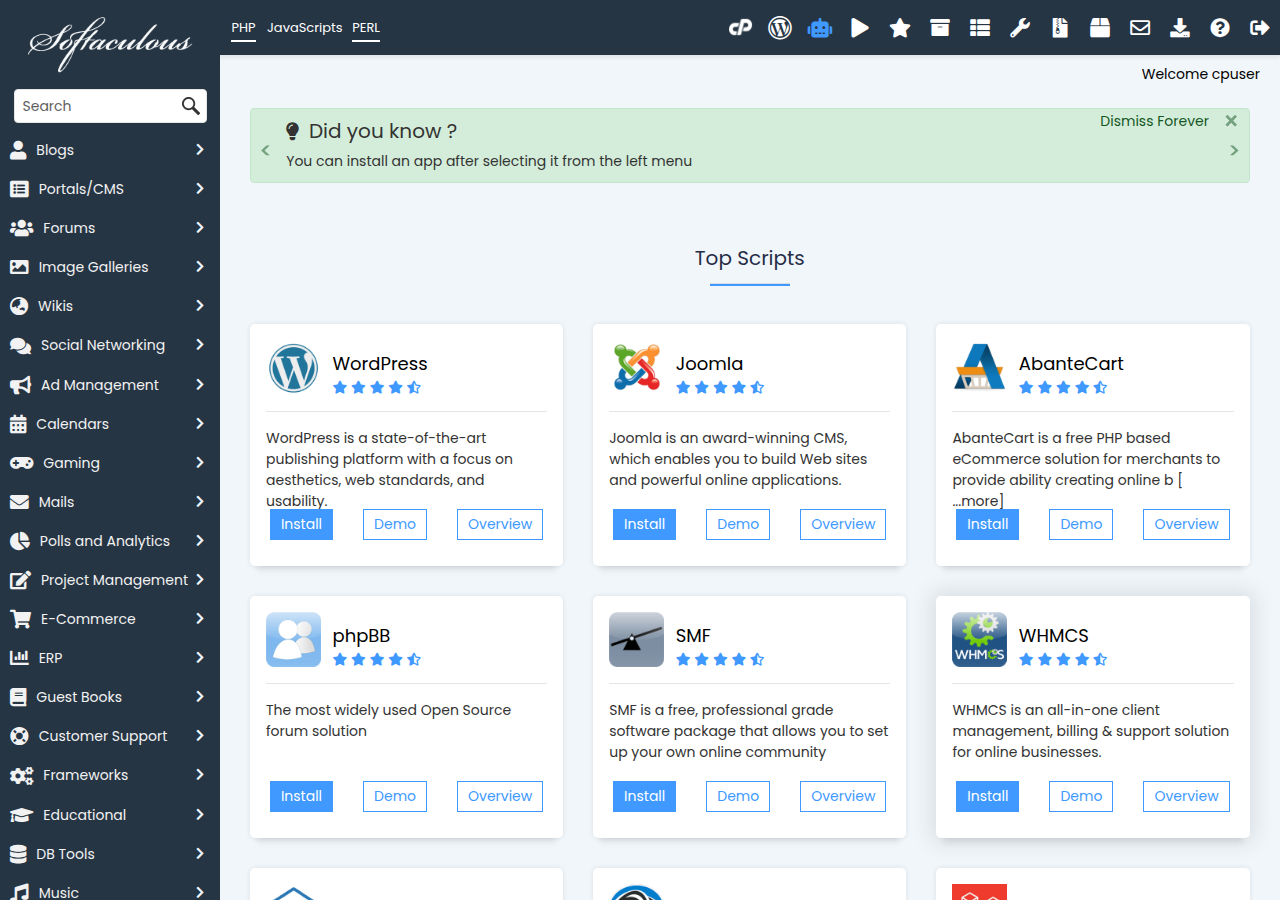
Softaculous is included on cPanel, DirectAdmin and Webuzo: pick an application, fill in a short form, and it creates the database and installs the app in a minute or two. WP Toolkit (cPanel) manages WordPress sites, and SitePad (cPanel and DirectAdmin) builds a site by drag and drop. All are included with the plan. Before relying on an app, check that it runs within shared hosting limits, and keep it updated.
1. What each control panel includes
Measured on our servers, 22 and 23 September 2026:
| Tool | cPanel | DirectAdmin | Webuzo |
|---|---|---|---|
| Softaculous app installer | Yes | Yes | Yes, built in |
| WP Toolkit | Yes | No | Ask support |
| SitePad website builder | Yes | Yes | Ask support |
| Weekly backups | JetBackup | JetBackup | Included |
Not sure which panel you have? The button on your row in Hosting › My hosting is labelled after it. See cPanel, DirectAdmin and Webuzo compared for the wider differences.
2. What Softaculous does
Installing a web application by hand means downloading it, uploading the files, creating a database and user, and running a setup script. Softaculous does all of that from one form. It also:
- lists every app you have installed, with its folder and admin link;
- tells you when an installed app has a new version, and can upgrade it for you;
- can remove an app together with its database, when you no longer need it.
The applications themselves are free, open-source software. Some offer paid themes or add-ons from their own developers, which are separate from your hosting.
3. Applications worth knowing
These are in the Softaculous library on our cPanel server (checked 23 September 2026). The library on DirectAdmin and Webuzo may differ slightly, so search inside Softaculous for the exact list on yours.
4. Install an application with Softaculous
- Open your control panel.In the client area go to Hosting › My hosting and click the panel button on your domain's row. It signs you in on cPanel and DirectAdmin; on Webuzo, log in at
https://yourdomain.com:2003instead. - Open Softaculous.On cPanel it is in the Software section as Softaculous Apps Installer. On DirectAdmin and Webuzo, search the panel for "Softaculous".
- Choose the app.Search or browse the categories, read the description and requirements, and click Install.
- Pick where it goes.Choose the domain, and leave the directory empty to install at the root of the site, such as
yourdomain.com. Type a folder name to install atyourdomain.com/folderinstead. - Set the admin account.Choose an admin username that is not "admin", a strong password, and an email address you read.
- Install.Softaculous shows the site address and admin link when it finishes. Bookmark the admin link.
Installing into a folder that already holds a website can overwrite or mix files. If your domain already shows a site, take a backup, or install into a new folder first and move it once you are happy.
Step-by-step guides with each panel's screens: WordPress on cPanel, on DirectAdmin and on Webuzo.
5. WP Toolkit on cPanel
WP Toolkit is cPanel's own WordPress manager. It installs WordPress, and from one screen it shows every WordPress site in the account, updates WordPress, plugins and themes, and applies security hardening. Use it or Softaculous to install WordPress, not both on the same site, so that one tool keeps track of it. The differences are covered in WP Toolkit compared with Softaculous.
6. SitePad website builder
SitePad builds a website by drag and drop, from ready-made themes, with no code. It suits a simple brochure site when you don't want to learn WordPress. On cPanel it is in the Software section as SitePad Website Builder. See building a website with SitePad.
If you would rather describe your business and have a site built for you, Domain India's AI Website Builder is a separate, paid product that needs no control panel.
7. Check it will run on shared hosting
A one-click install does not guarantee an app suits shared hosting:
- Disabled PHP functions. Our shared servers disable some PHP functions for security. Anything that needs them, such as Composer scripts or Laravel's scheduled artisan commands, will fail. See PHP disabled functions on shared hosting.
- Resource limits. Each account has CPU, memory and process limits. Heavy apps such as Magento or a busy Nextcloud may need a bigger plan or a VPS. See check hosting resource usage.
- Background jobs. Apps that need long-running workers suit a VPS or the App Platform better.
8. Keep your apps updated and secure
- Update promptly. Most hacked sites run old versions of an app, plugin or theme. Softaculous and WP Toolkit tell you when updates are available.
- Remove what you don't use. An abandoned test install is still reachable, and still attackable.
- Use SSL. Free SSL is included; install apps on
https://addresses. - Know your backups. JetBackup keeps weekly backups on cPanel and DirectAdmin, which you can restore yourself. Take a copy before any major upgrade too.
If a site is ever compromised, start with the security checklist for a hacked website.
9. Where Domain India fits
All three Linux panels include Softaculous; cPanel adds WP Toolkit. The live plan cards below show current prices, excluding 18% GST.
- 25 GB NVMe SSD Storage
- 50 GB Monthly Bandwidth
- 1 Website
- 10 Email Accounts
- 10 GB NVMe SSD Storage
- 50 GB Monthly Bandwidth
- 1 Website
- 5 Email Accounts
Frequently asked questions
Is Softaculous free with Domain India hosting?
Yes. Softaculous is included on cPanel, DirectAdmin and Webuzo shared hosting at no extra charge, and the applications it installs are free open-source software.
Where is Softaculous in cPanel?
In the Software section of cPanel, as Softaculous Apps Installer. Open cPanel from Hosting, My hosting in the client area.
Should I install WordPress with Softaculous or WP Toolkit?
Either works on cPanel. Pick one and use it for that site, so one tool tracks its updates. WP Toolkit is cPanel's own WordPress manager; Softaculous also installs hundreds of other apps.
Is there a website builder included with my hosting?
Yes. SitePad, a drag-and-drop website builder, is included on cPanel and DirectAdmin hosting. Domain India's AI Website Builder is a separate paid product.
Why does my Laravel app fail after a Softaculous install?
Shared hosting disables some PHP functions that Composer scripts and Laravel's scheduled artisan commands need. Simple Laravel sites can run, but for full framework features use a VPS or the App Platform.
Does Softaculous update my apps automatically?
Softaculous tells you when an installed app has a new version and can upgrade it for you. Check its list of installations regularly, and take a backup before major upgrades.
Ready to build? Open your hosting list and click your panel button, then open Softaculous. New to hosting? Compare cPanel hosting and DirectAdmin hosting, or open a ticket if an install fails.
Every Linux shared plan includes the Softaculous installer, free SSL and weekly backups. cPanel plans add WP Toolkit.
See cPanel hosting plans