Every PHP release makes sites faster and safer, but it also removes old functions and turns bad habits into warnings or errors. That's why a site can break when you switch PHP versions. This guide explains which PHP versions are still supported in 2026, what changed between them, and how to test your site before you switch on Domain India hosting.
The steps to change the version in cPanel, DirectAdmin and Webuzo, and the versions each server offers, are in How to change your PHP version. This page is about checking that your code will work first.
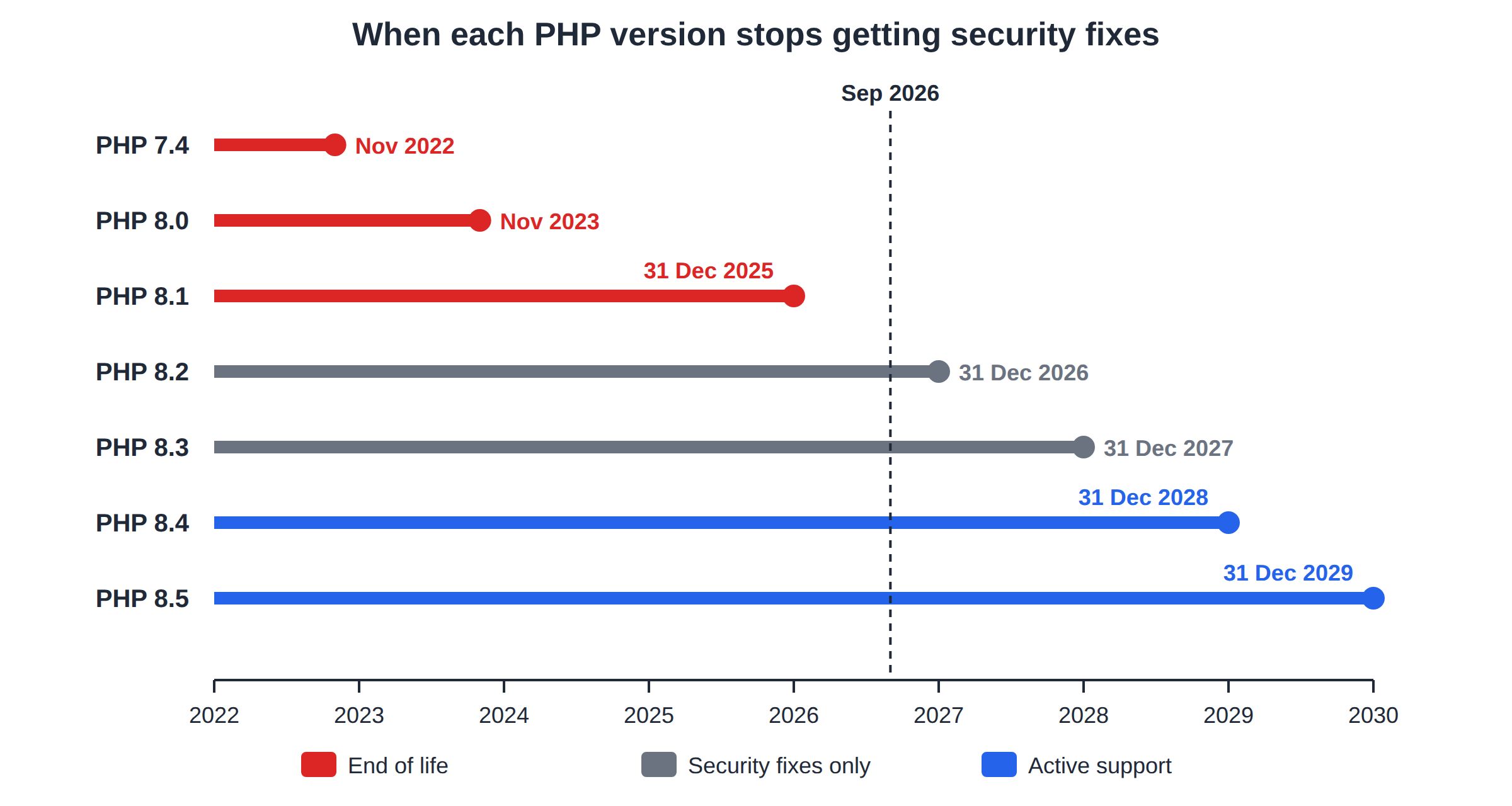
In September 2026, PHP 8.4 and 8.5 get full support, 8.2 and 8.3 get security fixes only, and everything older gets none. Most breakage comes from functions removed in PHP 8.0 and from outdated plugins. Update your CMS, plugins and theme, test the new version on a copy of your site, and keep the old version one click away in case you need to switch back.
1. Which PHP versions are supported in 2026
Under the release policy PHP adopted in 2024, each version gets two years of active support and then two years of security fixes, ending on 31 December. The status on 23 September 2026:
| Version | Status in September 2026 | Security fixes end |
|---|---|---|
| 7.4 and older | End of life | Ended (7.4 in November 2022) |
| 8.0 | End of life | Ended November 2023 |
| 8.1 | End of life | Ended 31 December 2025 |
| 8.2 | Security fixes only | 31 December 2026 |
| 8.3 | Security fixes only | 31 December 2027 |
| 8.4 | Active support | 31 December 2028 |
| 8.5 | Active support | 31 December 2029 |
An end-of-life version gets no security fixes, even for serious holes. If your site runs 8.1 or older, plan the upgrade now. If it runs 8.2, plan it before the end of 2026.
2. What Domain India offers
Measured on our shared servers in September 2026:
- cPanel: PHP 5.1 to 8.5, chosen per domain in MultiPHP Manager. New accounts use 8.3.
- DirectAdmin: PHP 5.6, 7.2, 7.3, 7.4, 8.1, 8.2 and 8.3, chosen per domain.
- Webuzo: not measured; ask support.
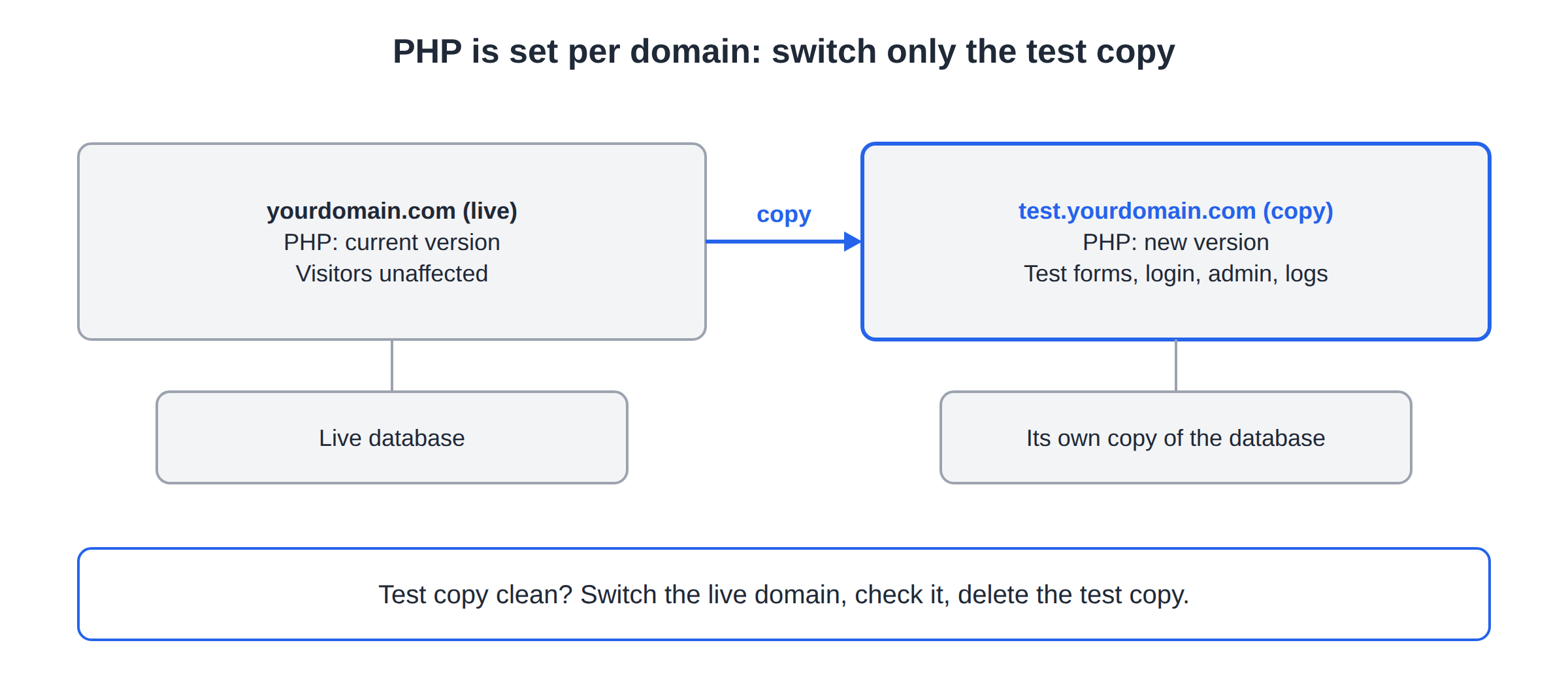
Because the version is set per domain, you can test a new version on a copy of your site without touching the live one (see section 5).
3. What changed between versions
These are the changes that most often break real sites. The official PHP migration guides list every change.
PHP 7.0: the old MySQL functions went
mysql_connect() and every other mysql_* function were removed. Very old scripts that still use them fail on every PHP 7 and 8 version.
// Removed
$conn = mysql_connect($host, $user, $pass);

// Use mysqli or PDO instead
$conn = new PDO("mysql:host=$host;dbname=$db", $user, $pass);
PHP 8.0: removals and stricter behaviour
each(),create_function()andmoney_format()were removed. Replacewhile (list($k, $v) = each($arr))withforeach ($arr as $k => $v).- Many warnings became errors: for example,
count()on something that isn't an array or countable object now throws aTypeError. - Comparing a number with a non-numeric string changed:
0 == "foo"is nowfalse. Use===where the type matters.
PHP 8.1: deprecations that fill logs
- Passing
nullto a built-in function that expects a string, such asstrlen(null)ortrim(null), is deprecated. This is the most common notice from older WordPress plugins. strftime()andFILTER_SANITIZE_STRINGare deprecated. Usedate()orIntlDateFormatter, andhtmlspecialchars().- New features include enums, readonly properties and fibers.
PHP 8.2: dynamic properties
Setting a property that a class never declared is deprecated:
class User {
    public string $name;   // declare it, and the notice goes away
}
utf8_encode() and utf8_decode() are deprecated too; use mb_convert_encoding().
PHP 8.3, 8.4 and 8.5
- 8.3 has few breaking changes. It adds typed class constants and
json_validate(). - 8.4 deprecates implicitly nullable parameters: write
?Type $x = nullinstead ofType $x = null. It also moved the IMAP, OCI8 and Pspell extensions out of PHP's core, so scripts that read mailboxes withimap_open()should be checked. New features include property hooks and asymmetric visibility. - 8.5 adds the pipe operator (
|>) and a built-in URI extension, with a further set of deprecations; read its migration guide before you switch custom code.
A deprecated feature still works, but it logs a notice and will be removed in a later version. A removed feature stops the script with a fatal error. Fix deprecations while they are only notices, and keep display_errors off on a live site so visitors don't see them.
4. Check your code before you switch
- WordPress, Joomla and other CMSs: update the core, every plugin and the theme first. Most compatibility problems are fixed by an update; a plugin that hasn't been updated in years is the usual culprit. Check each plugin's page for the PHP versions it supports.
- Custom code: run a static analyser such as PHPStan or Rector on your own computer, set to the PHP version you plan to use. Run these tools locally: some PHP functions they depend on are disabled on shared hosting (see PHP disabled functions on shared hosting).
- Frameworks: Laravel, Symfony and similar frameworks state a minimum PHP version for each release. Upgrade the framework and the PHP version together.
5. Test the new version safely
- Take a copy.Download your files and export your database, so you can restore them if needed.
- Make a test copy on a subdomain, such as
test.yourdomain.com, with its own copy of the database. - Switch only the subdomainto the new PHP version in MultiPHP Manager (or Account Manager › PHP Settings in DirectAdmin).
- Test everything:home page, login, forms, search, checkout and the admin area. Read the error log for new warnings; see A guide to reviewing error logs.
- Switch the live domainonce the test copy is clean, and check the site straight away. Then delete the test copy.
To confirm which version a site runs, upload a file containing <?php echo PHP_VERSION;, open it, then delete it. phpinfo() is disabled on our cPanel servers.
6. If the site breaks after the switch
- 500 error or blank page: switch the domain back to the previous version first, so the site works again. Then find the cause in the error log. See Troubleshooting 500 Internal Server Error.
- "Call to undefined function": the function was removed. Update the plugin or code that calls it.
- A missing extension: open a ticket with the extension name and the PHP version.
Upgrade one step at a time where you can, for example 7.4 to 8.1, then to 8.3, so each problem is smaller and easier to trace.
7. Where Domain India fits
cPanel hosting gives you the widest choice, from legacy PHP 5.x for an old script to PHP 8.5 for new work, switchable per domain. DirectAdmin offers PHP up to 8.3. The card shows the current list price; 18% GST is added at checkout.
- 25 GB NVMe SSD Storage
- 50 GB Monthly Bandwidth
- 1 Website
- 10 Email Accounts
If you need a PHP version or extension that shared hosting doesn't offer, a VPS gives you full control.
Which PHP versions are still supported in 2026?
In September 2026, PHP 8.4 and 8.5 receive full support, PHP 8.2 receives security fixes until 31 December 2026, and PHP 8.3 until 31 December 2027. PHP 8.1 and older no longer receive any fixes.
Why did my site break after I changed the PHP version?
Usually a plugin, theme or script uses a function that the newer version removed, or relies on behaviour that changed. Switch back to the previous version, check the error log to find the file, and update or replace it.
Is it safe to jump from PHP 7.4 straight to 8.3?
It can work, but PHP 8.0 removed several functions and made many warnings into errors. Update your software first and test the new version on a copy of the site before switching the live domain.
What is the difference between a deprecated and a removed feature?
A deprecated feature still works but logs a notice and will be removed later. A removed feature no longer exists, so code that uses it stops with a fatal error.
Which PHP versions does Domain India offer?
Measured in September 2026, the cPanel servers offer PHP 5.1 to 8.5, with 8.3 as the default for new accounts, and the DirectAdmin server offers PHP 5.6, 7.2, 7.3, 7.4, 8.1, 8.2 and 8.3. For Webuzo, ask support.
How can I test a new PHP version without affecting my live site?
Copy the site to a subdomain with its own database, set only the subdomain to the new PHP version, and test it. The PHP version is set per domain, so the live site is not affected.
Ready to upgrade? Follow How to change your PHP version, open your hosting services to reach your control panel, or open a support ticket if you need help planning the switch.
Tell us the domain, the application and the PHP version you want to move to, and we will confirm what your server offers.
Ask our support team