Choosing web hosting is really choosing who looks after what. On shared hosting the provider runs the server and you run the website; on a VPS you run both; on an app platform you only bring the code. This guide explains each type of hosting, what to compare between plans, the warning signs to avoid, and where each Domain India plan fits. Prices are Domain India list prices on 19 September 2026, excluding 18% GST.
Most business websites, blogs and WordPress sites belong on shared hosting with a control panel: from ₹100 a month with DirectAdmin or ₹125 with cPanel. If you would rather not manage a website at all, the AI Website Builder (from ₹200) includes hosting. Custom apps and APIs fit the App Platform (from ₹100), and you need a VPS (from ₹553) only when you need root access and can manage a server yourself.
1. Start with one question: what are you running?
The right hosting follows from what you are putting online and how much of the technical work you want to do. Answer this first, and the list of options gets short very quickly.
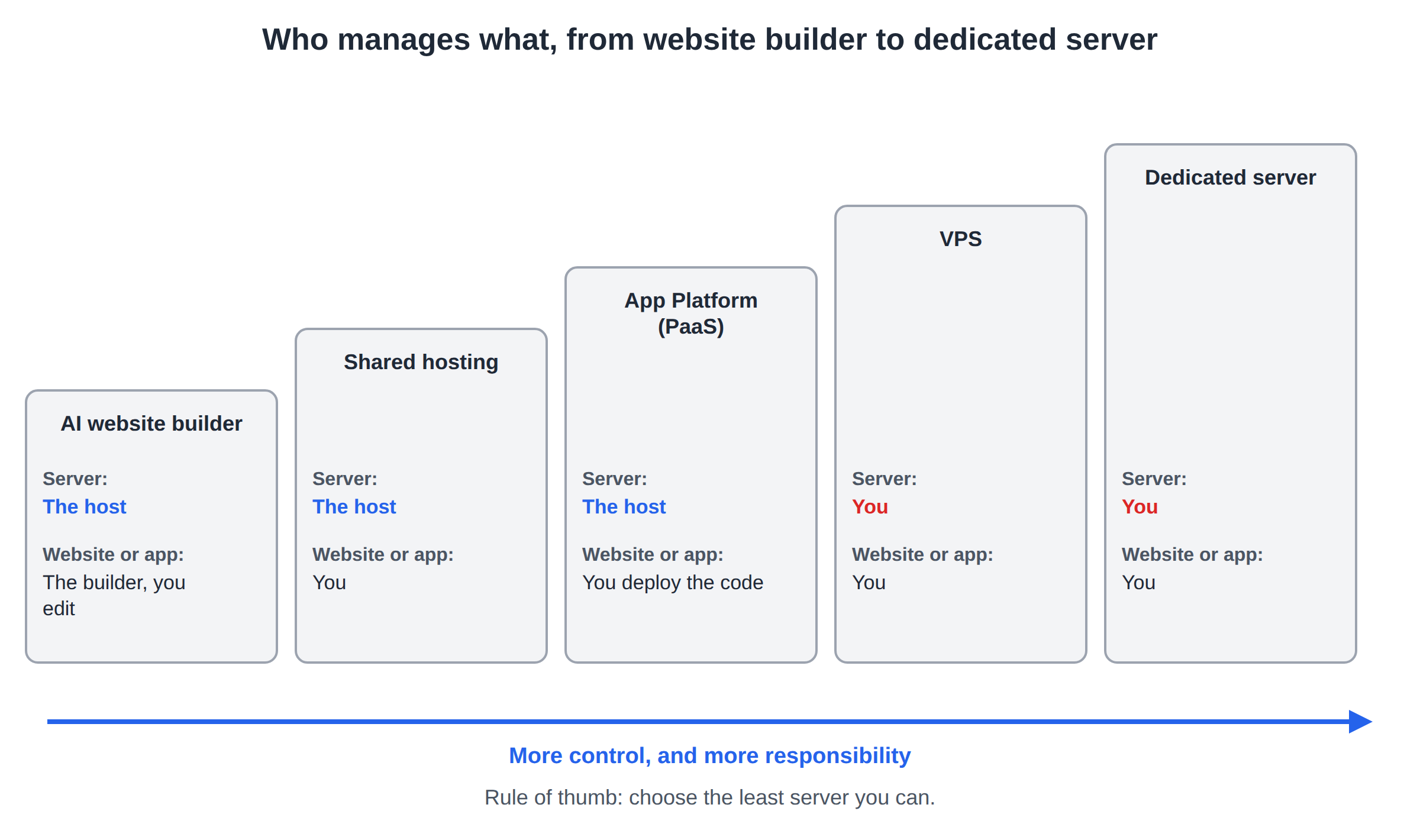
| You are running | Hosting type | Who manages the server | Who manages the website or app |
|---|---|---|---|
| A company website, blog or WordPress site | Shared hosting (cPanel, DirectAdmin or Webuzo) | The host | You |
| A simple business website, and you want no technical work | AI website builder | The host | The builder, with you editing |
| An ASP.NET or .NET site with an MSSQL database | Windows hosting | The host | You |
| A Node.js, Python or PHP app, API or SaaS | App platform (PaaS) | The host | You deploy the code |
| Custom software, Docker, background services | VPS | You | You |
| Heavy, steady workloads that need a whole machine | Dedicated server | You | You |
A useful rule: choose the least server you can. Every step up, from shared hosting to a VPS to a dedicated server, gives you more control and more responsibility. More power does not make a website faster if the time needed to run it well is not there.
2. Shared hosting: the right start for most websites
On shared hosting, many accounts run on one well-equipped server. The host installs, secures, updates and monitors the server; you get a control panel to manage your files, databases, email accounts and SSL. It is the cheapest way to run a real website and needs no server knowledge.
It suits company websites, blogs, portfolios, WordPress and WooCommerce sites, and PHP applications such as Laravel. For security, the cPanel servers disable some PHP functions, so a few developer features, such as Composer scripts and Laravel's scheduled artisan commands, do not run on the server itself there; see PHP disabled functions on shared hosting. Good shared hosting isolates each account, so a busy or hacked neighbour does not slow or break your site. Domain India uses CloudLinux for this on its cPanel and DirectAdmin servers.
Choosing the control panel
The control panel is the screen you will use every day, so it matters more than most spec-sheet numbers.
| Panel | Strength | Good for |
|---|---|---|
| cPanel | The most widely used panel, with the most tutorials and guides online | Most small business sites, and anyone who wants the familiar option |
| DirectAdmin | Lighter and lower-cost, with the everyday tools most sites need | A first website on a tight budget |
| Webuzo | Simple panel with Softaculous one-click apps | Simple sites that run on PHP 8.0 or 8.1 (the only versions on our Webuzo server) |
| Plesk | Windows hosting with IIS, ASP.NET and MSSQL | .NET sites (see section 3) |
All three Linux panels can run WordPress with a one-click installer. If you are unsure, pick the panel you or your developer already know. For a side-by-side look, read Comparison between cPanel, DirectAdmin and Webuzo.
3. Special cases: WordPress hosting and Windows hosting
WordPress hosting is shared hosting tuned for WordPress, often with staging sites, extra caching and WordPress-focused tools. It helps busy WordPress sites and agencies that run many of them. A normal WordPress site runs well on standard cPanel or DirectAdmin hosting, which also gives you a one-click WordPress installer and free SSL. Domain India shared hosting runs the Apache web server, so for page caching use a plugin such as WP Super Cache or W3 Total Cache rather than LiteSpeed Cache. Pay for WordPress-specific plans only when you need a feature they add.
Windows hosting is for websites built on Microsoft technology: ASP.NET, .NET and MSSQL databases, running on IIS with the Plesk panel. If your site is PHP or WordPress, you do not need Windows hosting. If your developer built it in .NET, you do.
4. App Platform (PaaS): for apps, not websites
If you are building software rather than a website, such as a customer portal, an API, a dashboard or a SaaS product, an app platform is usually a better fit than both shared hosting and a VPS. You deploy your code, with Deploy Now in the client area or a deploy token from your CI, and the platform builds it, runs it and gives it SSL. You never log in to a server.
Domain India's App Platform detects and builds Node.js apps automatically, runs Python, PHP and other languages from your own Dockerfile, and includes a managed PostgreSQL database. It is the practical middle ground: the freedom to run your own code, without the job of maintaining Linux.
If your project is one or a few apps with a database, start on the App Platform. Move to a VPS only when you need something the platform cannot give you, such as root access, custom system software or several unrelated services on one machine.
5. VPS, dedicated servers and cloud: when you need your own server
A VPS (virtual private server) is a slice of a physical server with its own CPU, RAM, storage and IP address. You get full root access and can install anything: Docker, custom databases, background workers or a control panel. The price for that freedom is responsibility. You handle Linux updates, security, firewall rules, your own backups, and anything that breaks at 2 a.m.
A dedicated server is a whole physical machine that no other customer shares. It makes sense for heavy, steady workloads, large databases or strict isolation requirements. It needs the same server skills as a VPS, or a person who has them.
Cloud hosting spreads your application across several machines, so it can add capacity when traffic rises and survive a machine failure. It is built for containerised applications, not for a typical business website. If you think you need a dedicated server or a cloud cluster, ask Domain India support what is available before you plan around it.
A small website on a VPS nobody maintains is slower and less secure than the same site on well-run shared hosting. Choose a VPS when your project needs root access, and you, a developer or a paid service will look after the server.
6. What to compare between plans and providers
Once you know the hosting type, compare plans on the things that affect your site, not on the longest feature list.
| Check | Why it matters | What to look for |
|---|---|---|
| Storage type | Disk speed affects database-driven sites such as WordPress | NVMe SSD storage; check the size too, including room for email |
| Resources | CPU and RAM decide how many visitors you can serve at once | Clear limits for CPU, memory and processes, not only "unlimited" claims |
| Backups | Your recovery plan when a plugin update or a hack goes wrong | How often backups run, where they are stored, and whether you can restore them yourself |
| Security | Most small sites are hacked through old software, not targeted attacks | Account isolation, a web application firewall, malware scanning and free SSL |
| Support | Something will go wrong eventually | A ticket system with a record of every request, and staff who know the platform |
| Control panel | You will use it every week | A panel you or your developer already know |
| Migration | Moving an existing site is where mistakes happen | Whether the host moves your site for you, and how email and DNS are handled |
| Renewal price | Hosting is a yearly or monthly cost, not a one-time purchase | The renewal price, not only the first-term offer |
Two more points are worth checking. Server location affects speed for your visitors, so ask where the servers are. Refund terms differ by product. At Domain India, for example, new shared and reseller hosting purchases have a full refund within 30 days, while renewals are non-refundable and a VPS is non-refundable once provisioned (see the refund policy).
7. Red flags to watch for
8. Match your situation
| Your situation | Start with | Move up when |
|---|---|---|
| First website for a shop, clinic or consultant | DirectAdmin Starter or cPanel Starter | You need more websites, email accounts or storage |
| You want a website but no technical work at all | AI Website Builder Starter | You want more websites, a visitor chatbot or an online cart |
| Company site plus a blog or a few side projects | cPanel Growth | You host many sites, or client sites (then look at reseller hosting) |
| WordPress site that is growing | cPanel or DirectAdmin, one step up from Starter | You need staging or WordPress-specific tools |
| ASP.NET or MSSQL application | Windows hosting | The app needs dedicated resources |
| Startup building a SaaS, API or portal | App Platform | You need root access or custom system software |
| Developer running Docker or several services | VPS Starter | You need more CPU and RAM (VPS Basic and up) |
| Web designer hosting client websites | Reseller hosting | You outgrow the account limit |
The safe pattern is to start with the smallest plan that fits today and upgrade when your site actually needs it. Moving up within the same type of hosting is simple; moving between types, such as from shared hosting to a VPS, is a migration and worth planning.
9. Where Domain India's plans fit
Here are the entry plans for each type of hosting. All prices are Domain India list prices on 19 September 2026, per month, excluding 18% GST.
| Type | Entry plan | Price | What you get |
|---|---|---|---|
| Shared hosting, DirectAdmin | DirectAdmin Starter | ₹100/month | 1 website, 10 GB NVMe, 5 email accounts, weekly backups, Softaculous |
| Shared hosting, Webuzo | Webuzo Starter | ₹100/month | 1 website, 10 GB NVMe, 5 email accounts, Softaculous, PHP 8.0 and 8.1 only |
| Shared hosting, cPanel | cPanel Starter | ₹125/month | 1 website, 25 GB NVMe, 10 email accounts, 5 databases, weekly backups |
| Shared hosting, cPanel | cPanel Growth | ₹200/month | 5 websites, 50 GB NVMe, 50 email accounts, 10 databases, weekly backups |
| Website builder | AI Website Builder Starter / Pro / Business | ₹200 / ₹599 / ₹999 per month | 1 / 5 / 15 websites, hosting, your own domain and free SSL included |
| Windows hosting | ASP Starter | ₹165/month | 1 website, Plesk, ASP.NET, 1 MSSQL database, free SSL |
| App Platform | App Starter / Developer / Pro | ₹100 / ₹250 / ₹500 per month | 1 / 3 / 6 apps, PostgreSQL database, free SSL, deploy from the client area or CI |
| VPS | VPS Starter | ₹553/month | 1 vCPU, 2 GB RAM, 64 GB NVMe, full root access, self-managed |
To compare every current plan side by side, see our web hosting plans.
- 10 GB NVMe SSD Storage
- 50 GB Monthly Bandwidth
- 1 Website
- 5 Email Accounts
- 25 GB NVMe SSD Storage
- 50 GB Monthly Bandwidth
- 1 Website
- 10 Email Accounts
What our shared hosting includes:
- Security: on the cPanel and DirectAdmin servers, CloudLinux account isolation and Imunify360 malware scanning with its web application firewall rules, set up server-wide for every account.
- Backups: cPanel and DirectAdmin plans include weekly JetBackup backups (Sunday, 5 copies kept) that you can download or restore from the panel. Webuzo accounts are backed up every night to a separate Domain India backup server, and support restores them on request. Domain India does not sell a separate backup add-on, so keep your own copy of anything you cannot afford to lose.
- Developer tools: a choice of PHP versions (up to 8.5 on cPanel and 8.3 on DirectAdmin; only 8.0 and 8.1 on Webuzo), and jailed (restricted) SSH access on every plan. SSH is off by default; ask support to enable it for your account. The tools available inside the jailed shell vary, so ask support before you plan around a specific one.
- SSL: a free SSL certificate.
- Migration: DirectAdmin and Webuzo plans list priority migration, and our cPanel page offers free migration. Ask support to plan the move with you.
For most WordPress sites, cPanel or DirectAdmin hosting is enough. On a VPS, cPanel is not offered; you can run it without a panel, or add CyberPanel (free), Webuzo (₹210/month) or DirectAdmin (₹600/month).
It is not hosting you manage. You describe your business, AI builds the site, and you edit it by chatting. Hosting and SSL are part of every paid plan. The builder does not include mailboxes; add business email at ₹60 per mailbox per month if you need it.
For total first-year costs including a domain, see How much does it cost to build a website for a small business.
10. After you choose: move in and keep an eye on it
- Point your domain.Register a new domain, or update your existing domain's nameservers or DNS records so it points to your new hosting.
- Move or build your site.Install WordPress with the one-click installer, deploy your app, or ask support to migrate your existing site.
- Turn on SSL.Make sure the site loads on
https://with no browser warning. - Check your backups.Find the backup tool in your panel and take a first backup you can download.
- Measure speed.Test key pages with Google PageSpeed Insights and fix the biggest problems it reports.
- Watch your usage.Check CPU, memory and storage in your panel every few months, and upgrade before limits slow your site.
Good hosting is a foundation, not a ranking factor on its own. Once the site is fast and secure, read A Beginner's Guide to Search Engine Optimization (SEO) to help people find it.
Frequently asked questions
What is the best type of web hosting for a small business website?
For most small business websites, shared hosting with a control panel such as cPanel or DirectAdmin is the best fit. The host manages the server, and you get email accounts, databases and free SSL. At Domain India it starts at ₹100 a month with DirectAdmin or ₹125 with cPanel, excluding GST.
What is the difference between shared hosting and a VPS?
On shared hosting, many accounts share one server that the host manages for you. A VPS gives you your own virtual server with its own allocated CPU and RAM and full root access, but you manage the operating system, security and backups yourself. Choose a VPS only when you need that control.
Do I need special WordPress hosting to run WordPress?
No. WordPress runs well on standard cPanel or DirectAdmin hosting with a one-click installer. WordPress-specific plans add tools such as staging and extra caching, which help busy sites and agencies.
Which is better: cPanel, DirectAdmin or Webuzo?
cPanel is the most widely used, with the most tutorials, and offers the newest PHP versions. DirectAdmin is lighter and costs less. Webuzo is a simple panel with one-click apps and nightly backups, but on Domain India it offers only PHP 8.0 and 8.1, and restores go through support. For most sites, choose cPanel or DirectAdmin.
When should I use an app platform instead of hosting or a VPS?
Use an app platform when you are deploying your own application code, such as a Node.js, Python or PHP app or an API, and do not want to manage a server. Domain India's App Platform starts at ₹100 a month and includes a PostgreSQL database.
Do I need Windows hosting?
Only if your website or application is built with ASP.NET or .NET or uses an MSSQL database. PHP and WordPress sites run on Linux shared hosting.
Can I upgrade my hosting later?
Yes. Start with the plan that fits today and move to a larger plan in the same product when you need more resources. Moving to a different type of hosting, such as from shared hosting to a VPS, is a migration; open a support ticket so it can be planned.
Can I get a refund if the hosting is not right for me?
At Domain India, a new shared or reseller hosting purchase has a full refund within 30 days. Hosting renewals are non-refundable, a VPS is non-refundable once provisioned, and domain registrations are non-refundable once registered. Refunds are requested by support ticket and go to the original payment method only.
Ready to choose? Compare cPanel, DirectAdmin and Webuzo hosting, the AI Website Builder, Windows hosting, the App Platform and VPS plans.
Start with the plan that fits what you are building today, and upgrade when your site grows.
Compare hosting plans