When a website on DirectAdmin hosting won't load, the cause is almost always in one of five places: the domain, the hosting account, the firewall, the site's own files, or the account's resource limits. The exact thing your browser shows tells you which one. This guide helps you match the symptom to the cause, run the quick checks, and go to the detailed guide for the fix.
Note exactly what the browser shows, then check the matching cause. "Site can't be reached" points to the domain or DNS. A timeout on your connection only, while the site works on mobile data, is a firewall block. A 500, 403 or 508 error is in your site or its limits. A default or old page usually means a leftover index.html, because DirectAdmin serves it before index.php. Read the error log before you change anything, and open a ticket if the checks don't find it.
1. Match the symptom to the cause
| What the browser shows | What it usually means | Go to |
|---|---|---|
| Site can't be reached, DNS_PROBE or NXDOMAIN | The domain has expired, or its nameservers or records don't point to your hosting | Section 3 |
| Connection timed out on your connection, but it works on mobile data | Your IP address is blocked by the server firewall | Section 4 |
| An account suspended page | The hosting service is suspended, often for an unpaid invoice | Section 2 |
| A default page, an old page or the wrong website | A leftover index.html, or the domain points to the wrong server or folder | Section 5 |
| 500 Internal Server Error | A .htaccess line, permissions, PHP or a plugin | Section 6 |
| 403 Forbidden | Permissions, an index file missing, or a blocking rule | Section 6 |
| 508 Resource Limit Is Reached, or 503 | The account hit a CloudLinux limit | Section 7 |
| Certificate or privacy warning | SSL not issued yet, or the domain points elsewhere | Section 8 |
First, try the site from a second network, such as mobile data, and in a private browser window. If it loads there, the problem is your connection (section 4) or your browser's cache, not the website.
2. Check the hosting and the domain are active
- Check the hosting.Open My hosting in the client area and look at the service's status. If it is suspended, check Invoices for an unpaid one and pay it, or open a ticket to ask why.
- Check the domain.Open your domains and check the domain hasn't expired and has no pending verification. A .in domain waiting for identity verification (eKYC) is completed at /client/kyc.
- Still stuck?Why is my domain suspended explains every reason a domain stops working and how to fix each one.
3. Check the domain points to your hosting
Your website only loads from DirectAdmin if the domain's DNS points to that server.
- Open the hosting service in the client area, choose Manage, and note the nameservers or server IP on the Point a domain to this hosting card or the Access tab.
- Look up what the domain uses now:
nslookup yourdomain.com
nslookup -type=ns yourdomain.com- If the IP or nameservers differ, change them where the domain is registered. See how to change your nameservers.
A nameserver change usually takes effect within a few hours and can take up to 24-48 hours everywhere. Understanding DNS propagation explains why different networks see the change at different times.
4. Check whether your IP is blocked
If the site, webmail, FTP and the DirectAdmin panel all time out on your office or home connection but work on mobile data, the server firewall has probably blocked your public IP address. Repeated wrong passwords, often from an old saved password in an email app or FTP client, are the usual cause.
Fix the device with the wrong password first, then find your public IP (search "what is my IP") and send it to support by live chat or a ticket. The full guide is Resolving IP bans.
5. A default, old or wrong page
On Domain India DirectAdmin hosting, if public_html contains both index.html and index.php, visitors see index.html. A placeholder page left behind after installing WordPress or another PHP app hides your real site. Rename or delete the old index.html.
Also check where the files are. Each domain's website lives in domains/yourdomain.com/public_html in your home folder, and an addon domain has its own folder under domains. Files uploaded to the wrong domain's folder won't appear. Use the DirectAdmin File Manager to check, and log in from the client area as described in how to log in to DirectAdmin.
6. Error pages: 500, 403 and 404
Read the error log before you change anything. DirectAdmin shows each domain's error log under System Info & Files › Site summary & logs (the Error log button), keeps older archives in domains/yourdomain.com/logs, and PHP errors usually go to an error_log file in the folder of the failing script. See How to access and analyze logs in DirectAdmin.
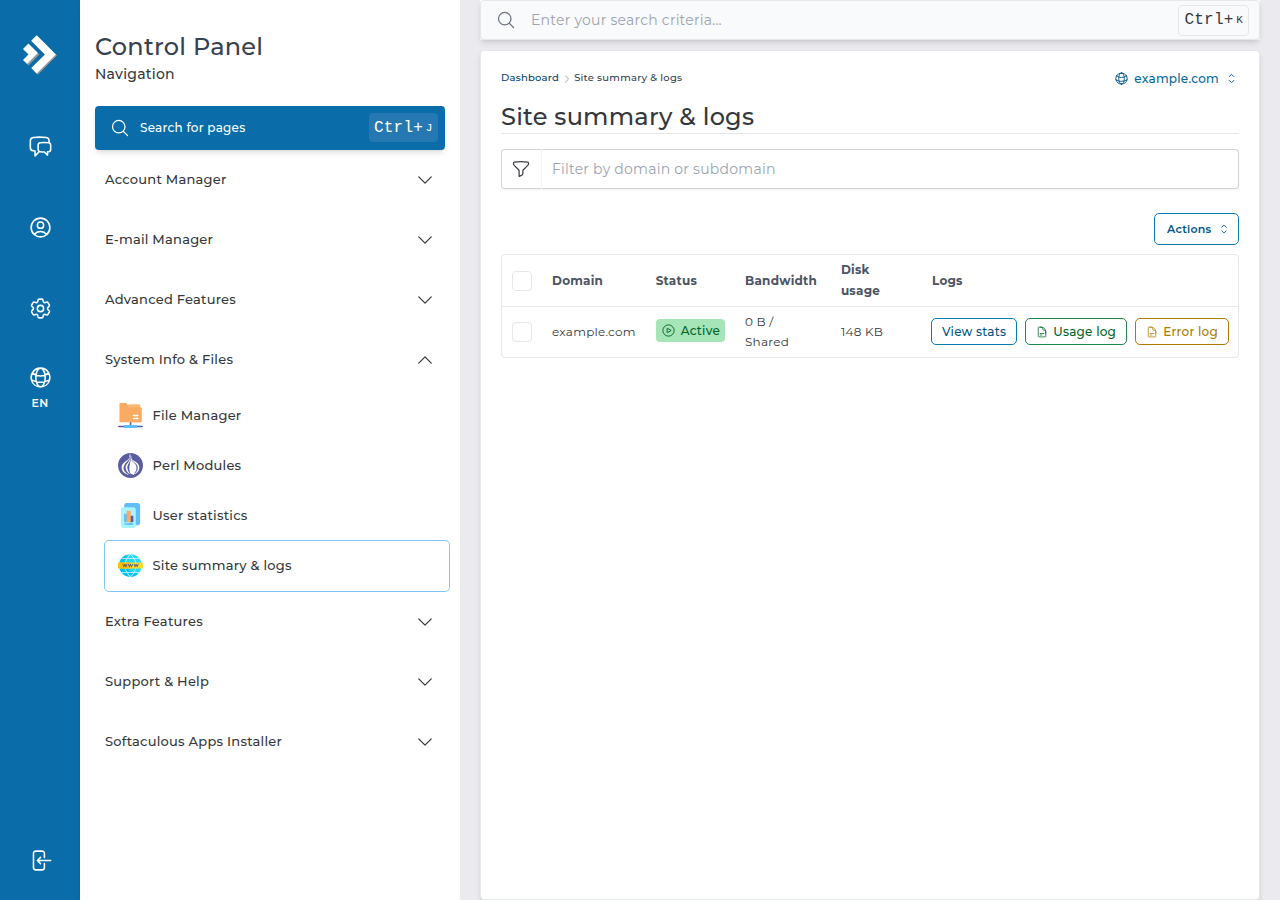
Common causes on DirectAdmin hosting:
.htaccess: rename it to test, don't delete it. Aphp_valueorphp_flagline always gives a 500, because PHP doesn't run as an Apache module.Optionsaccepts only Indexes, IncludesNOEXEC, MultiViews, SymLinksIfOwnerMatch, FollowSymLinks and None; anything else gives a 500.- Permissions: use 644 for files and 755 for folders, never 777.
public_htmlshould be 755. - A plugin or theme: on WordPress, rename
wp-content/pluginstoplugins.offin File Manager, then test. If the site comes back, rename it back and disable plugins one at a time. - Long scripts: on DirectAdmin, PHP's
max_execution_timedefaults to 30 seconds.
Full fixes: Troubleshooting 500 Internal Server Error, Resolving the Forbidden error in DirectAdmin and Resolving 404 errors.
7. Resource limits and disk space
Our DirectAdmin servers run CloudLinux, which gives each account fixed limits. A 508 "Resource Limit Is Reached" page means the account hit its entry-process limit; memory and process limits show up as 500 or 503 errors instead. Find when the faults happened, then fix the cause: cache pages, block abusive bots and move heavy jobs to quiet hours. Upgrade only if faults continue. The DirectAdmin guide is Addressing Resource Limit Reached issues.
A full disk also breaks sites, because PHP can't write sessions, caches or uploads. Check your disk usage in DirectAdmin, and clear old backup archives, logs and unused files. Deleted files in the File Manager go to a Trash Bin, which keeps them for 30 days.
8. SSL warnings
A "your connection is not private" warning usually means the free Let's Encrypt certificate hasn't been issued yet, or covers only part of the site. On DirectAdmin the certificate is issued automatically once the domain and www point to the server, and it renews itself; Account Manager › SSL/TLS Certificates shows any name that failed and why. See Free SSL with Let's Encrypt in DirectAdmin.
9. When to contact support
Open a ticket with the domain name, the exact error or a screenshot, when it started, what you changed just before, and your public IP address if the site times out only for you. The more precise the symptom, the faster we find it.
Contact support if the DirectAdmin panel itself won't load, the account looks active but every page fails, or the checks above don't find the cause. If you find unfamiliar files or Google warns that the site is dangerous, see the hacked website checklist.
Why is my DirectAdmin website showing an old page instead of WordPress?
DirectAdmin serves index.html before index.php. If an old index.html is still in public_html, visitors see it instead of WordPress. Rename or delete that file.
My site works on mobile data but not on my office Wi-Fi. Why?
The server firewall has probably blocked your office's public IP, usually after repeated wrong passwords from an email app or FTP client. Fix the saved password, then send your public IP to support by live chat or a ticket.
Where is the error log on DirectAdmin hosting?
Each domain's error log is under System Info & Files, Site summary & logs, in DirectAdmin (the Error log button), older archives are in domains/yourdomain.com/logs, and PHP errors usually go to an error_log file in the folder of the failing script.
Why does a php_value line in .htaccess give a 500 error?
PHP on Domain India shared hosting doesn't run as an Apache module, so php_value and php_flag lines in .htaccess cause a 500. Remove them.
What does 508 Resource Limit Is Reached mean?
The account hit its CloudLinux entry-process limit, meaning too many PHP requests were running at once. Cache pages, block abusive bots and move heavy jobs to quiet hours; upgrade only if faults continue.
How long after changing nameservers will my site load?
Usually within a few hours, and up to 24-48 hours on every network. Keep the old hosting running until the change has spread.
Still not loading? Check the service on My hosting, read the linked guide for your symptom, or open a ticket. Support is on 24/7 live chat, and tickets get a first response within 15 minutes, though resolution can take longer.
Send the domain, the exact error and when it started, and we will check the server side for you.
Open a ticket