Yes, SSL is free on Domain India DirectAdmin hosting. DirectAdmin issues a Let's Encrypt certificate by itself once your domain points at your hosting, so you secure your domain at no cost and the certificate renews itself. This page gives the short version. The full walkthrough, with every failure and its fix, is in the main guide.
Point your domain to your DirectAdmin hosting and wait: DirectAdmin issues the free Let's Encrypt certificate automatically, with no request form, and renews it by itself well before it expires. To confirm, open Account Manager › SSL/TLS Certificates in DirectAdmin and check the certificate list. If a name is listed there as failed, the cause is almost always DNS.
For step-by-step screens, forcing HTTPS and a table of failures, read How to enable Let's Encrypt SSL certificates in DirectAdmin.
1. What is already set up for you
We read these settings on our DirectAdmin server on 30 September 2026:
| Setting | Value | What it means |
|---|---|---|
| Enable ACME | Ticked by default | Certificates are issued and renewed automatically; there is nothing to request |
| ACME provider | Default (Let's Encrypt) | The certificate is free |
| Names tried | Your domain, www, mail, ftp, pop and smtp | A name gets a certificate only if it reaches our server |
| Prefer wildcard certificates | Ticked by default | One wildcard certificate is issued where possible; otherwise a certificate with the exact names |
| Renewal | Automatic, well before expiry | Nothing to do while DNS stays the same |
| Failed names | Listed on the page with the reason | Usually DNS; fix it and DirectAdmin retries |
| Repeated failures | Automatic issuing can be switched off for that domain | Check that Enable ACME is still ticked, then ask support |
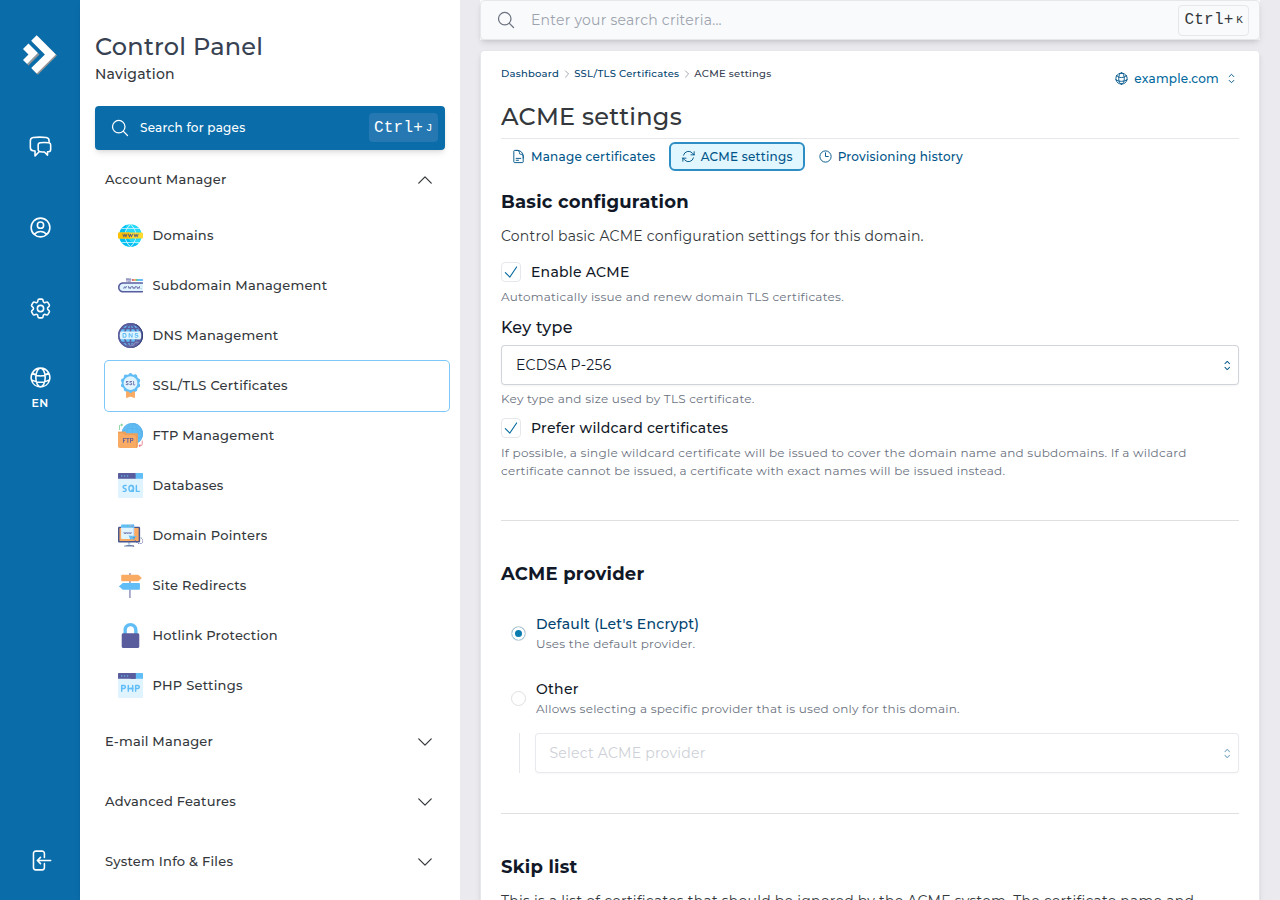
Let's Encrypt certificates are domain validated: they prove you control the domain and encrypt traffic, which is what almost every website, blog and shop needs. If you need a paid certificate for a specific reason, ask support, or upload a certificate you bought elsewhere.
2. Check that the certificate was issued
- Check DNS.Your domain's A record, or its nameservers, must point to your DirectAdmin hosting, and the site must open over
http://. Use the values on your hosting service's page in the client area; see How do I change my nameservers. - Wait.DirectAdmin issues the certificate on its own once the domain reaches our server. There is no option to choose and no form to save.
- Open DirectAdminfrom your hosting services in the client area.
- Open Account Manager › SSL/TLS Certificates.On the Manage certificates tab, the Certificate list shows each certificate with its DNS names and expiry date.
- Check for failures.A name DirectAdmin could not secure is listed under Automatic certificate provisioning with the reason. Fix it as shown in section 4.
3. Send visitors to HTTPS
A certificate does not redirect visitors by itself. Turn on DirectAdmin's HTTPS redirect for the domain if your panel shows it, or add this to the .htaccess file in public_html:
RewriteEngine On
RewriteCond %{HTTPS} off
RewriteRule ^ https://%{HTTP_HOST}%{REQUEST_URI} [L,R=301]
Use one method, not both. In WordPress, also change the two addresses under Settings › General to https://. If the padlock still warns, the page loads images or scripts over http://; see Loading mixed (insecure) display content.
4. Why a name fails
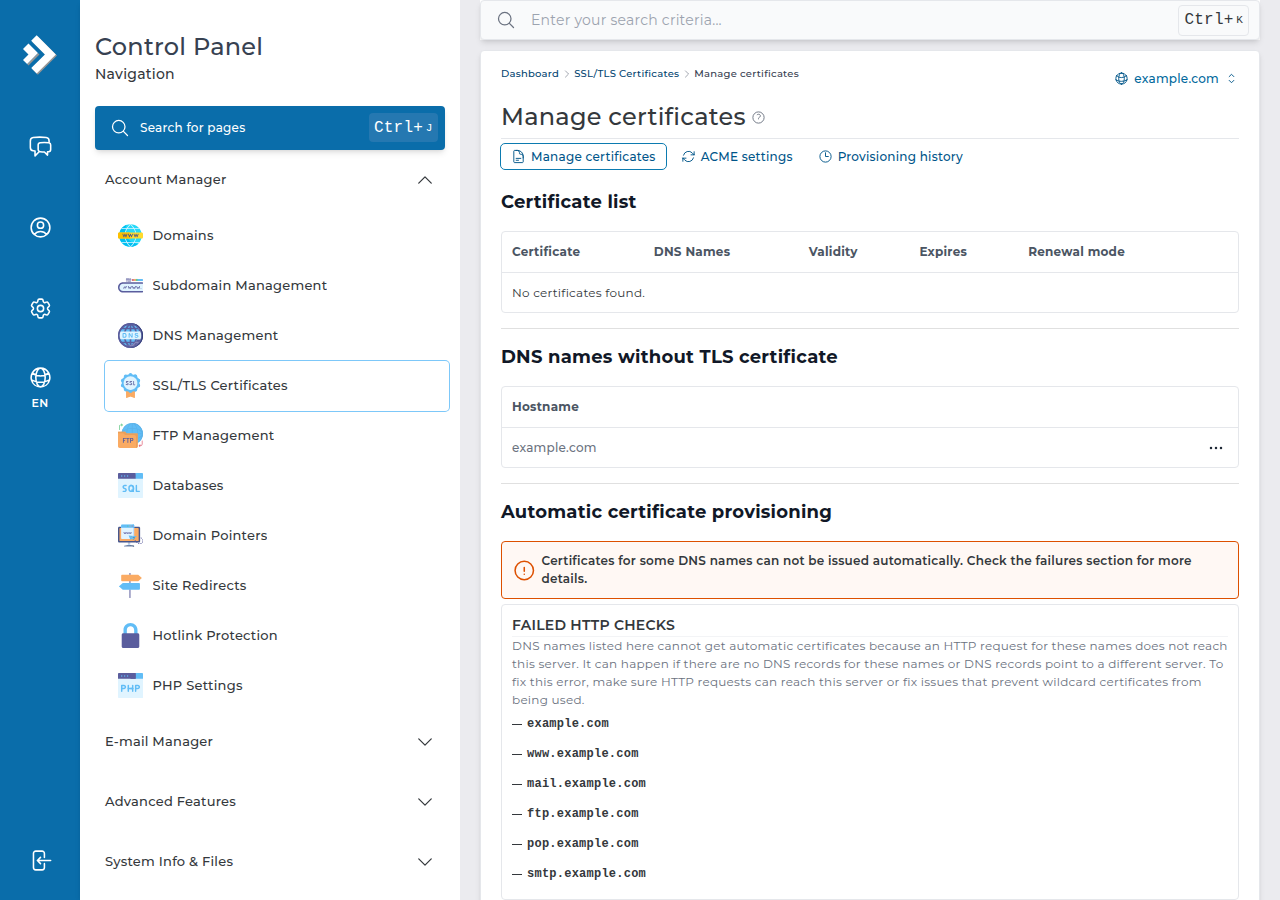
| What you see | Usual cause | Fix |
|---|---|---|
| Your domain under failed HTTP checks | The domain still points to another host, or a proxy such as Cloudflare answers | Point the A record to our server, pause the proxy, wait for DNS |
Only www or another name is listed | That name has no DNS record, or it points to another server | Add a record pointing to your hosting if you want the name covered |
| CAA error | A CAA record allows only another certificate authority | Add letsencrypt.org to the CAA record |
| Worked before, renewal now fails | DNS moved, or a rule blocks /.well-known/acme-challenge/ | Restore DNS, remove the blocking rule |
| Nothing is issued although DNS is right | Automatic issuing may have been switched off for the domain after repeated failures | Check that Enable ACME is ticked on the ACME settings tab |
After you fix the cause, wait: DirectAdmin retries on its own. If the name still fails, open a support ticket with the domain name.
You do not request a wildcard certificate (*.yourdomain.com) either. With Prefer wildcard certificates ticked, DirectAdmin issues a single wildcard certificate when that is possible and a certificate with the exact names when it is not.
5. DirectAdmin hosting at Domain India
Every Domain India shared hosting plan includes free SSL: AutoSSL with Let's Encrypt on cPanel and Let's Encrypt in DirectAdmin. DirectAdmin plans start at ₹100 a month, excluding 18% GST (Domain India list price on 19 September 2026), and include weekly JetBackup backups. On cPanel, see AutoSSL in cPanel instead.
- 10 GB NVMe SSD Storage
- 50 GB Monthly Bandwidth
- 1 Website
- 5 Email Accounts
Prices on the cards exclude 18% GST.
Is Let's Encrypt SSL free on Domain India DirectAdmin hosting?
Yes. DirectAdmin issues a free Let's Encrypt certificate automatically once your domain points at your Domain India DirectAdmin hosting. You do not request it, and it renews automatically.
When does DirectAdmin renew a Let's Encrypt certificate?
Renewal is automatic and happens well before the certificate expires. You do nothing while the domain keeps pointing to the server. If a renewal fails, the cause is usually a DNS change.
Why has my Let's Encrypt certificate not been issued?
Usually because the domain or www does not point to the DirectAdmin server yet, a proxy answers instead, or a CAA record allows only another certificate authority. Fix the DNS and wait; DirectAdmin retries on its own. If it still fails, open a support ticket with the domain name.
Can I get a wildcard SSL certificate in DirectAdmin?
DirectAdmin decides this by itself. Prefer wildcard certificates is ticked by default, so one wildcard certificate is issued when possible; otherwise DirectAdmin issues a certificate with the exact names.
Do I need to buy an SSL certificate for my DirectAdmin website?
No. A free Let's Encrypt certificate encrypts your site and removes the browser's "Not secure" warning, which is what most websites need. You can still upload a certificate bought elsewhere if you need one.
Ready to secure your site? Check your DNS with How do I change my nameservers, open DirectAdmin from your hosting services, or compare DirectAdmin hosting plans.
Send us the domain and the reason DirectAdmin shows for the failed name, and we will check the DNS and the certificate with you.
Open a support ticket