Roundcube is the webmail application on Domain India cPanel and DirectAdmin hosting. It lets you read and send the email on your hosting plan from any web browser, with nothing to install. This short guide gives the Roundcube address for each type of hosting and the quickest way in from your control panel.
On cPanel hosting, open https://yourdomain.com/webmail (or https://webmail.yourdomain.com, or port 2096) and log in with your full email address and the mailbox password; Roundcube opens. On DirectAdmin, use https://yourdomain.com/webmail or https://yourdomain.com/roundcube. Webuzo and Windows (Plesk) hosting use their own webmail, not Roundcube, and Business Email has its own address: https://mail.yourdomain.com:8443/.
This page covers Roundcube only. For every Domain India email product, login problems, blocked IP addresses and certificate warnings, see How to Log In to Webmail.
1. Which webmail do you have?
The address depends on where your mailbox lives. Replace yourdomain.com with your own domain.
| Your email is on | Webmail application | Address |
|---|---|---|
| cPanel hosting | Roundcube | https://yourdomain.com/webmail, https://webmail.yourdomain.com or https://yourdomain.com:2096 |
| DirectAdmin hosting | Roundcube | https://yourdomain.com/webmail or https://yourdomain.com/roundcube |
| Webuzo hosting | Webuzo Email | https://yourdomain.com/webmail |
| Windows (Plesk) hosting | Plesk webmail | Usually https://webmail.yourdomain.com |
| Business Email | Business Email webmail | https://mail.yourdomain.com:8443/ |
There is no webmail.yourdomain.com address on DirectAdmin or Webuzo hosting, and https://mail.yourdomain.com:8443/ is Business Email's webmail, not a hosting webmail address. Not sure which product you have? See Business Email vs the Email Included With Your Hosting.
2. Log in to Roundcube from your browser
- Open the address.Type the address for your hosting from the table above. Always start it with
https://. - Enter your full email address.Use
[email protected], not justyou. - Enter the mailbox password.This is the password of that email account, not your Domain India client area password and not your control panel password.
- Click Log in.Your inbox opens in Roundcube.
Bookmark the address once it works. On a phone, you can also add it to your home screen.
3. Open Roundcube from your control panel
If you can log in to your control panel, you do not need the mailbox password.
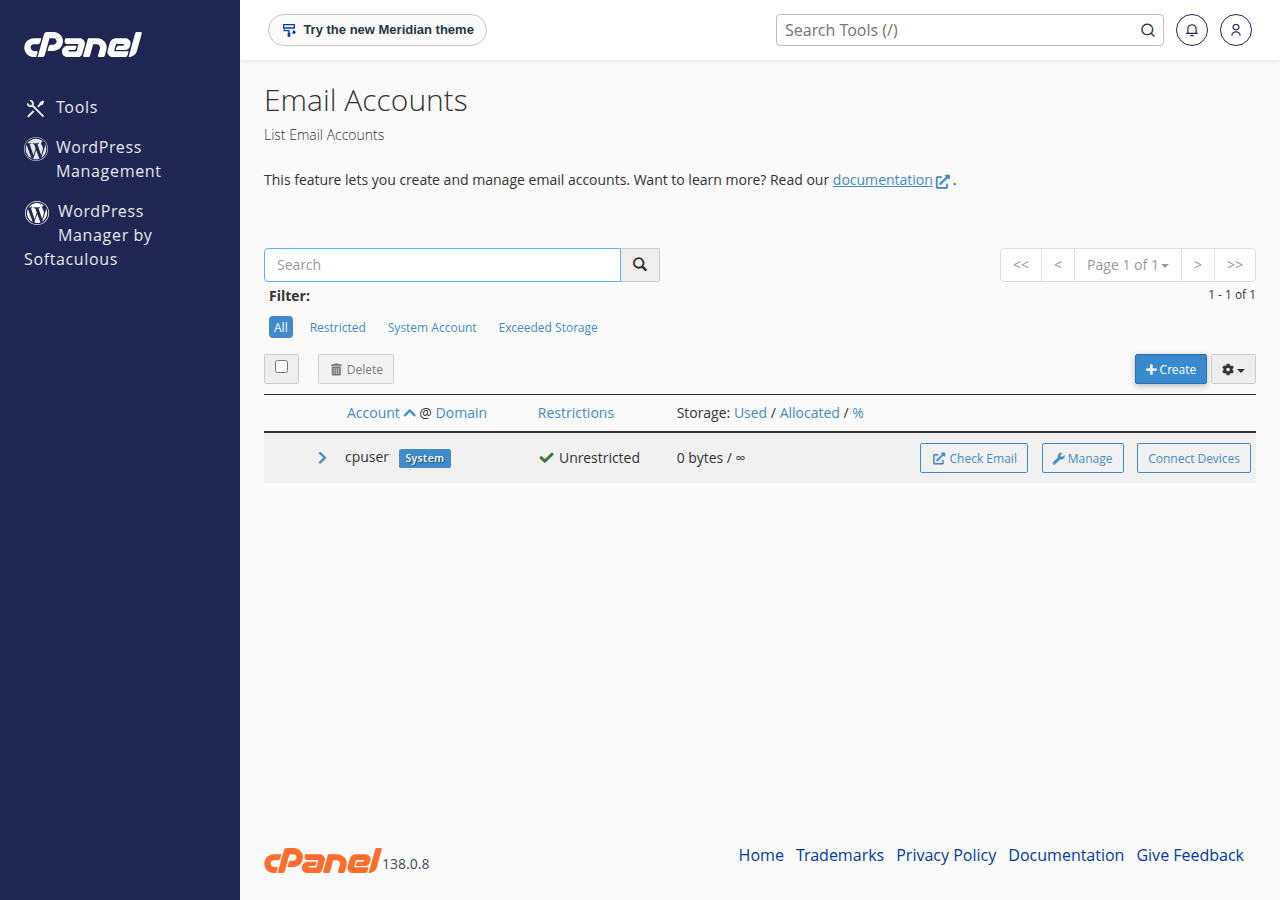
- cPanel: open Email Accounts in the Email section, find the mailbox and click Check Email. Its webmail opens directly. The same screen lets you set a new mailbox password.
- DirectAdmin: open the E-mail Manager area and use the webmail (Roundcube) link there. Reset a mailbox password under E-mail Accounts.
Need help getting into the panel first? See how to log in to cPanel.
4. First things to set in Roundcube
After your first login, open Settings in Roundcube:
- Identities: set the display name your recipients see.
- Preferences → User Interface: set your language and time zone.
- Folders: choose which folders show in the sidebar.
- Signature: add one under Identities; see How to Set Up Email Signature in Webmail.
For filters, contacts and other features, see the Roundcube Webmail Features Guide.
5. If you can't log in
- Check that the username is your full email address, and type the password rather than pasting it.
- Reset the mailbox password in your control panel's email accounts screen.
- If the login page stops loading after several failed attempts, the server's firewall may have blocked your IP address. Stop retrying and open a ticket with your domain name and your public IP address.
- If your browser warns about the certificate, you may be using an address the certificate does not cover, or your domain's DNS has just changed. Use one of the addresses above.
The full webmail guide covers each of these in detail.
What is the Roundcube webmail address on Domain India cPanel hosting?
https://yourdomain.com/webmail, https://webmail.yourdomain.com or https://yourdomain.com:2096, with your own domain in place of yourdomain.com. Log in with your full email address and the mailbox password.
What is the Roundcube address on Domain India DirectAdmin hosting?
https://yourdomain.com/webmail or https://yourdomain.com/roundcube. DirectAdmin hosting has no webmail.yourdomain.com address.
Does Business Email use Roundcube?
No. Business Email has its own webmail at https://mail.yourdomain.com:8443/ (it also works without :8443). Type the https; plain http is refused.
Which password do I use for Roundcube?
The password of the mailbox itself. Your Domain India client area password and your control panel password will not work. You can set a new mailbox password in your control panel.
Can I open webmail without the mailbox password?
Yes, if you can log in to your control panel. In cPanel, open Email Accounts and click Check Email next to the mailbox. In DirectAdmin, use the webmail link in the E-mail Manager area.
Ready to go further? Set up your mailbox on your phone with Android or iPhone and iPad, or compare cPanel hosting, DirectAdmin hosting and Business Email.
Need email that runs separately from your website? Business Email includes webmail with calendar, contacts and tasks, and starts with one mailbox.
See Business Email