Two-factor authentication (2FA) makes a login need two things: your password and a six-digit code from an app on your phone. Where it is available on your server, cPanel has its own 2FA setting, and so does cPanel Webmail for each email account. This guide shows how to turn them on, how to change phones safely, and how they fit with 2FA on your Domain India client area.
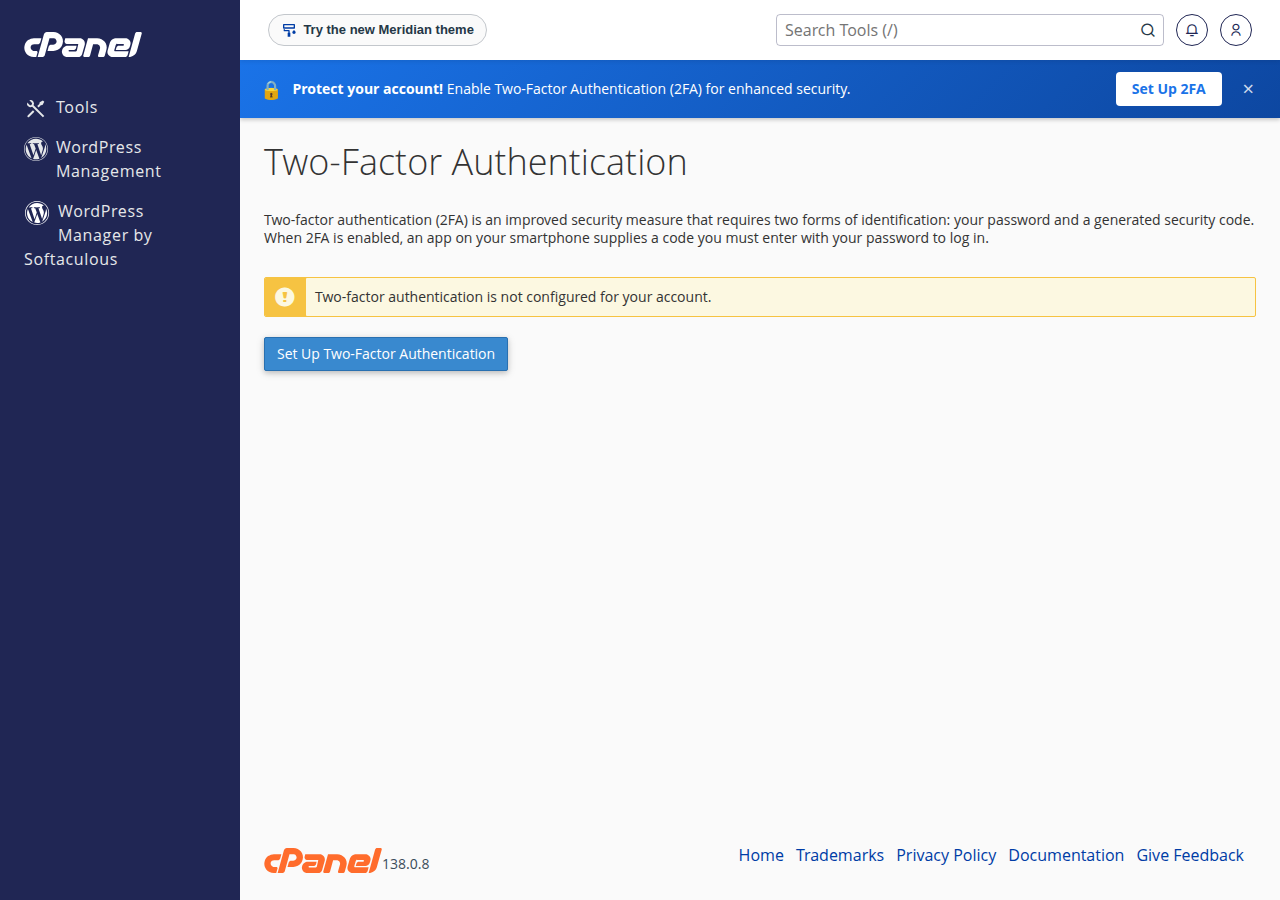
In cPanel, open Security › Two-Factor Authentication, click Set Up Two-Factor Authentication, scan the QR code with an authenticator app, enter the six-digit code and save. Email users can do the same from their Webmail settings where the option is shown. cPanel 2FA protects direct logins to cPanel; your Domain India client area is a separate login with its own 2FA, and you should turn on both.
Your client area controls your domains, hosting, invoices and control-panel access, so it is the most important login to protect. See Enable two-factor authentication for the client-area steps.
1. What cPanel 2FA protects
Your hosting has more than one door:
| Login | Where you use it | Its 2FA |
|---|---|---|
| Domain India client area | domainindia.com, signing in to manage services | Account › Security in the client area |
| cPanel | Direct login at yourdomain.com:2083 | Security › Two-Factor Authentication in cPanel, where available |
| Webmail | Direct login at yourdomain.com/webmail or :2096 | Two-Factor Authentication in the Webmail settings, where shown |
Each login has its own secret, so each appears as a separate entry in your authenticator app, and the codes are not interchangeable. If you open cPanel from the client area rather than typing the cPanel address, the client area's own sign-in is what protects that route, which is another reason to turn on client-area 2FA.
2. What you need
- An authenticator app on your phone, such as Google Authenticator, Microsoft Authenticator, Authy or Duo Mobile. Any app that scans a QR code and shows six-digit time-based codes works. See popular 2FA apps for a comparison.
- Your cPanel login. If you don't have it, see how to log in to cPanel.
- The correct time on your phone. Codes are worked out from the current time, so set the phone's date and time to automatic.
3. Turn on 2FA in cPanel
- Log in to cPaneland go to the Security section.
- Open Two-Factor Authentication.If you don't see it, your account may not include the feature; ask support.
- Click Set Up Two-Factor Authentication.cPanel shows a QR code, plus an account name and secret key for manual entry.
- Add the account to your app.In the app, tap add (usually +) and scan the QR code. If the camera will not scan it, choose manual entry and type the account name and secret key.
- Enter the security code.Type the six-digit code your app is showing into the Security Code field.
- Save.Click Configure Two-Factor Authentication. From the next login, cPanel asks for a code after your password.
Before you rely on 2FA, make sure you can still reach cPanel if you lose your phone. Keep the client-area route working (with its own 2FA on), and if your authenticator app supports encrypted backup or sync, turn it on and check that the cPanel entry appears on a second device.
4. Turn on 2FA for Webmail
Email accounts log in to Webmail separately from cPanel. Where your Webmail shows the option, each mailbox user can protect their own login:
- Log in to Webmail with the full email address and its password.
- Open the account menu or settings and choose Two-Factor Authentication.
- Scan the QR code, enter the six-digit code and save, as for cPanel.
Webmail 2FA protects the Webmail login only. Mail apps such as Outlook, Thunderbird or a phone's mail app still connect over IMAP, POP3 and SMTP with the mailbox password, so keep that password long and unique.
5. Signing in with 2FA
Log in as usual with your username and password. On the next screen, open your authenticator app, find the entry for this cPanel account or mailbox, and type the current code. Codes change every 30 seconds; if one is rejected, wait for the next and try again.
If codes are always rejected, the phone's clock is the usual cause. Turn on automatic date and time on the phone and try again.
6. Changing phones or turning 2FA off
Plan a phone change before you wipe or hand in the old phone:
- Log in to cPanelusing the old phone's code.
- Open Security › Two-Factor Authentication.Choose Reconfigure Two-Factor Authentication to link a new phone; this replaces the old secret, so the old phone's entry stops working. To switch 2FA off completely, choose Remove Two-Factor Authentication.
- Scan the new QR codewith the app on the new phone and confirm with its code.
- Delete the old entryfrom the old phone's app.
Do the same in Webmail for each mailbox that uses 2FA.
7. Lost your phone?
If another device still has the authenticator entry, use it to log in, then reconfigure 2FA. If not, open a ticket from the email address on your Domain India account, say which cPanel account or mailbox you are locked out of, and support will tell you what is needed to confirm it is yours. Never put your password in the ticket.
8. Other control panels
On DirectAdmin, open Advanced Features › Two-Step Authentication. On Webuzo, ask support whether a two-factor option is available for your account. Whatever your panel, turning on client-area 2FA protects the route most people use to reach it.
9. More ways to secure your hosting
- Use a long, unique cPanel password and change it if anyone else has had it; see how to change your hosting account password.
- Give developers their own FTP account or email account instead of your cPanel password, and remove them when the work ends.
- Keep WordPress, plugins and themes updated. If your site has already been changed by someone else, follow the security checklist for hacked websites.
10. Where Domain India fits
Every Domain India hosting service, cPanel, DirectAdmin, Webuzo or Windows (Plesk), is managed from the same client area, so 2FA there protects all of them at once. Our cPanel plans are on the cPanel hosting page.
- 25 GB NVMe SSD Storage
- 50 GB Monthly Bandwidth
- 1 Website
- 10 Email Accounts
Prices on the card are live and exclude 18% GST. If you get stuck, support is on 24/7 live chat, and tickets get a first response within 15 minutes. There is no phone support.
How do I enable two-factor authentication in cPanel?
Log in to cPanel, open Security, then Two-Factor Authentication, and click Set Up Two-Factor Authentication. Scan the QR code with an authenticator app, type the six-digit code into the Security Code field and click Configure Two-Factor Authentication. If the option is not shown, ask support whether your account includes it.
Does cPanel 2FA also protect my Domain India client area?
No. The client area is a separate login with its own two-factor setting under Account, Security. Turn on both; the client area can open cPanel for you, so it needs its own protection.
Which apps work with cPanel two-factor authentication?
Any app that scans a QR code and shows six-digit time-based codes, such as Google Authenticator, Microsoft Authenticator, Authy or Duo Mobile.
Can I turn on 2FA for Webmail?
Where Webmail shows a Two-Factor Authentication option in its settings, each mailbox user can turn it on for their own Webmail login. It does not affect mail apps that connect over IMAP, POP3 or SMTP.
Why is my cPanel 2FA code not accepted?
The code may have expired, or the phone's clock may be wrong. Wait for the next code, and set the phone's date and time to automatic.
How do I move cPanel 2FA to a new phone?
While you still have the old phone, log in to cPanel, open Two-Factor Authentication, choose Reconfigure, and scan the new QR code with the new phone. The old phone's entry then stops working.
I lost my phone and cannot log in to cPanel. What do I do?
If another device has the authenticator entry, use it. Otherwise open a ticket from your Domain India account email, name the cPanel account or mailbox, and support will tell you what is needed to confirm ownership.
Ready to lock down your account? Start with client-area 2FA, then add it in cPanel and Webmail. If anything is unclear, open a support ticket.
Protect the account that controls your domains and hosting first. It takes about two minutes with an authenticator app.
Open Security