An email quota is the most storage one mailbox may use. When a mailbox reaches it, new mail is refused and the sender gets a "mailbox full" bounce, often without you ever knowing. This guide explains how quotas relate to your hosting plan's disk space, how to set or change them in cPanel and DirectAdmin, what size to choose, and what to do when a mailbox fills up.
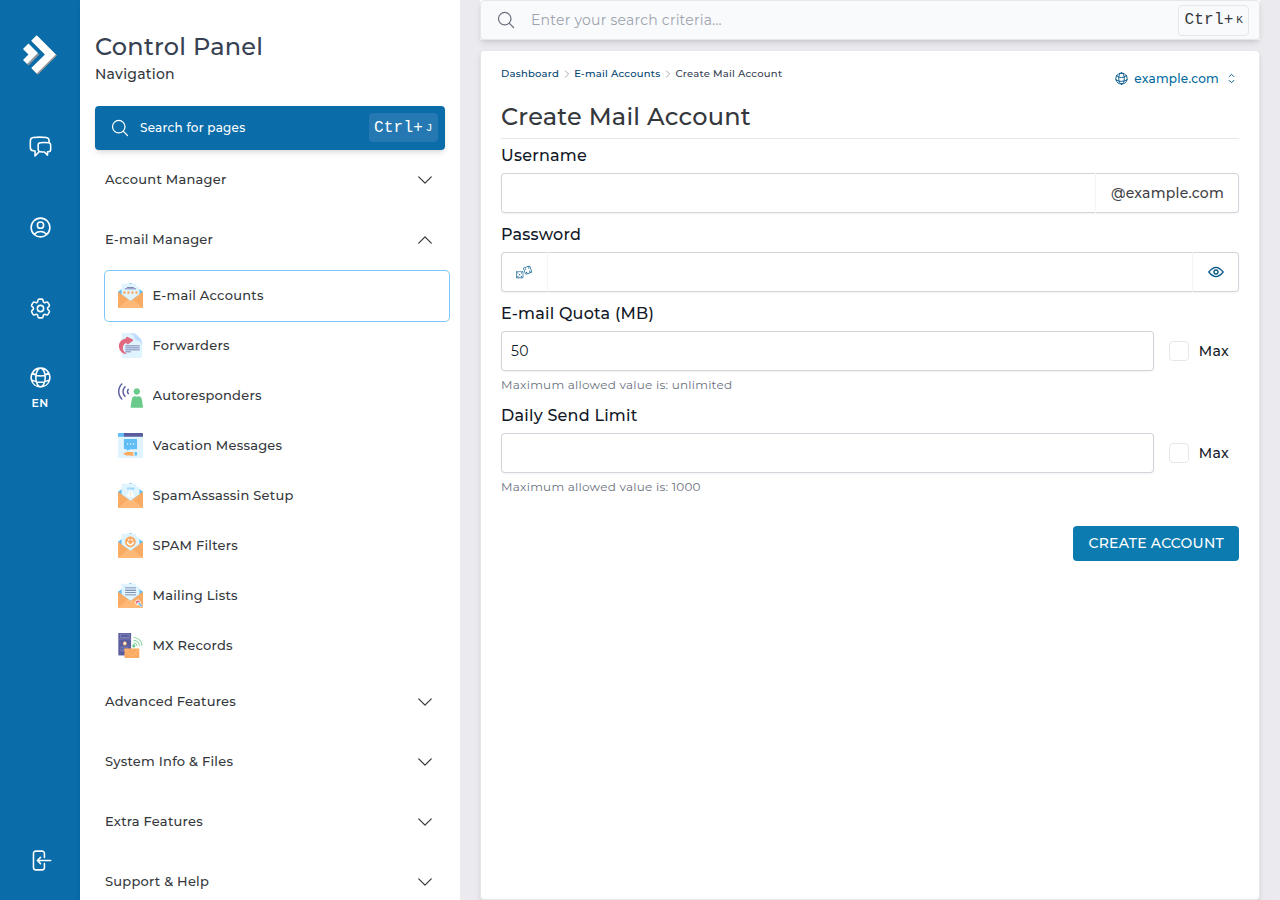
In cPanel, open Email › Email Accounts, click Manage next to the address, change Allocated Storage Space and click Update Email Settings. In DirectAdmin, open E-mail Manager › E-mail Accounts, edit the address and change E-mail Quota (MB). Every mailbox shares your plan's disk space with your website, so give each one a fixed size rather than Unlimited, and raise it when the person needs more. Mail that bounced while a mailbox was full is not redelivered.
1. Two limits: the mailbox quota and the account's disk space
A mailbox can refuse mail when it reaches its own quota, and also when the whole hosting account is full, even if the mailbox itself has room. So when mail bounces, check both. See check hosting resource usage for the account total.
2. Set or change a quota in cPanel
- Log in to cPanelfrom your hosting service in the client area. See how to log in to cPanel.
- Open Email Accountsin the Email section. Each address shows its storage used and allocated.
- Click Managenext to the address.
- Change Allocated Storage Space.Enter a size in MB, or choose Unlimited.
- Click Update Email Settings.The new quota applies straight away.
On our cPanel server, a new mailbox is offered 1,024 MB (1 GB) by default when you create it, and you can change that at creation or later (measured 24 September 2026). You can't give a mailbox more space than your plan has left.
3. Set or change a quota in DirectAdmin
- Log in to DirectAdminfrom your hosting service. See how to log in to DirectAdmin.
- Open E-mail Manager › E-mail Accountsand choose the domain if you host more than one.
- Edit the address.
- Change E-mail Quota (MB)and save.
We checked these labels read-only on our DirectAdmin server (DirectAdmin 1.710, Evolution skin) in September 2026. For Webuzo or Windows (Plesk) hosting, the quota is on the mailbox's settings page; if you can't find it, ask support.
4. How big should a mailbox be?
| Use | Suggested quota | Why |
|---|---|---|
| Light use, mostly text | 500 MB to 1 GB | Text email is small; 1 GB lasts a long time |
| Everyday business use with attachments | 1 to 2 GB | Invoices, PDFs and photos add up quickly |
| Shared inbox such as sales@ or info@ | 2 to 5 GB | Several people, many attachments, long history |
| Anything larger | Clean up or archive first | Large mailboxes are slow to sync and quickly use up your plan |
These are starting points, not limits. Watch usage for a few months and adjust.
On a mailbox, Unlimited means "up to whatever the plan has left". One neglected inbox can then fill the whole account, and a full account can stop your website from saving uploads, updates or database changes. Give each mailbox a fixed size and raise it when needed.
5. Lowering a quota
You can lower a quota, but the mail already stored stays. If a mailbox holds more than its new quota, it is over quota at once and refuses new mail until enough is deleted. Clean up first (section 6), then lower the quota.
6. When a mailbox is full
What happens: incoming mail is refused, and the sender gets a bounce with a code such as 552 5.2.2 or 452 4.2.2 and the words "mailbox full" or "over quota". Nothing already stored is lost. Raising the quota or deleting mail fixes it at once, but mail that bounced is not delivered afterwards, so ask important senders to resend. The codes are explained in understanding email bouncebacks.
Freeing space:
- Empty Trash and Spam. Deleted mail stays on the server, counting against the quota, until the folder is emptied.
- Delete or save large attachments. In cPanel, Email › Email Disk Usage shows each folder's size and can delete messages in bulk, for example by age or size. Deletion is permanent.
- Clear Sent items, often the biggest folder in a mailbox that sends invoices or photos.
- Archive old mail to your computer with a mail app, then delete it from the server.
See checking email storage for where to see usage in each panel and in webmail.
With IMAP, your phone, computer and webmail show the same mailbox. Deleting a message on one device deletes it everywhere, so save anything you need before you clean up.
JetBackup keeps weekly backups on our cPanel and DirectAdmin servers and can restore email if you delete something by mistake. Mail that arrived after the last weekly backup can't be recovered. See backup and restore with JetBackup.
7. Where Domain India fits
Every cPanel and DirectAdmin plan includes email accounts that use the plan's disk space, managed in the same panel as your website. For the full picture of passwords, forwarders and settings, read managing your email accounts. If you'd rather keep email separate from your website's storage, Domain India Business Email is a separate platform priced per mailbox, with its own webmail at mail.yourdomain.com:8443; see Business Email vs the email included with your hosting.
Frequently asked questions
How do I increase an email quota in cPanel?
Open Email, then Email Accounts, click Manage next to the address, change Allocated Storage Space to a larger size in MB, and click Update Email Settings. The change applies immediately, as long as your hosting plan has disk space left.
How do I change a mailbox quota in DirectAdmin?
Open E-mail Manager, then E-mail Accounts, edit the address and change E-mail Quota (MB), then save. Choose the domain first if your account hosts more than one.
What happens to email sent to a full mailbox?
It is refused, and the sender receives a bounce saying the mailbox is full or over quota. Mail already stored is safe. Once you free space or raise the quota, new mail arrives again, but bounced messages must be sent again.
Should I set my mailbox quota to Unlimited?
It is better not to. Unlimited lets one mailbox use all the disk space left on your hosting plan, which can stop your website from working properly. Set a fixed size, such as 1 or 2 GB, and raise it when needed.
My mailbox has space but mail still bounces. Why?
Your whole hosting account may be out of disk space, which stops delivery even when the mailbox is under its own quota. Check your account's disk usage in the control panel and free space or upgrade your plan.
What is the default quota for a new mailbox in cPanel?
On Domain India's cPanel server, the create-mailbox form offers 1,024 MB (1 GB) by default. You can change it when you create the mailbox or at any time afterwards.
Ready to sort out your mailboxes? Log in to your panel from your hosting services, or open a support ticket with the address and the bounce message if mail still isn't arriving.
Send us the email address and a copy of the bounce message, and we will check the mailbox and your account's disk space.
Open a support ticket