PHP runs most of the websites on our shared servers, and most of the trouble developers hit is not the language but the gap between a laptop and a hosting account. This guide covers the core PHP features worth using today and, beside each one, the setting or limit on Domain India shared hosting that decides whether it works.
Pick your PHP version first, then write modern PHP against it. Your control panel has a PHP selector — use it, and check what it reports from inside a script, because the web server and the command line can run different builds. Declare strict_types, use enums and match, talk to MySQL only through PDO prepared statements, and log errors instead of displaying them. Then learn the three shared-hosting limits that break working code: memory_limit, the upload sizes and the disabled functions. If you need exec, sockets or a queue worker, you need a VPS or the App Platform; Composer itself runs over jailed SSH, with the limits in section 8.
1. Choose your PHP version before you write anything
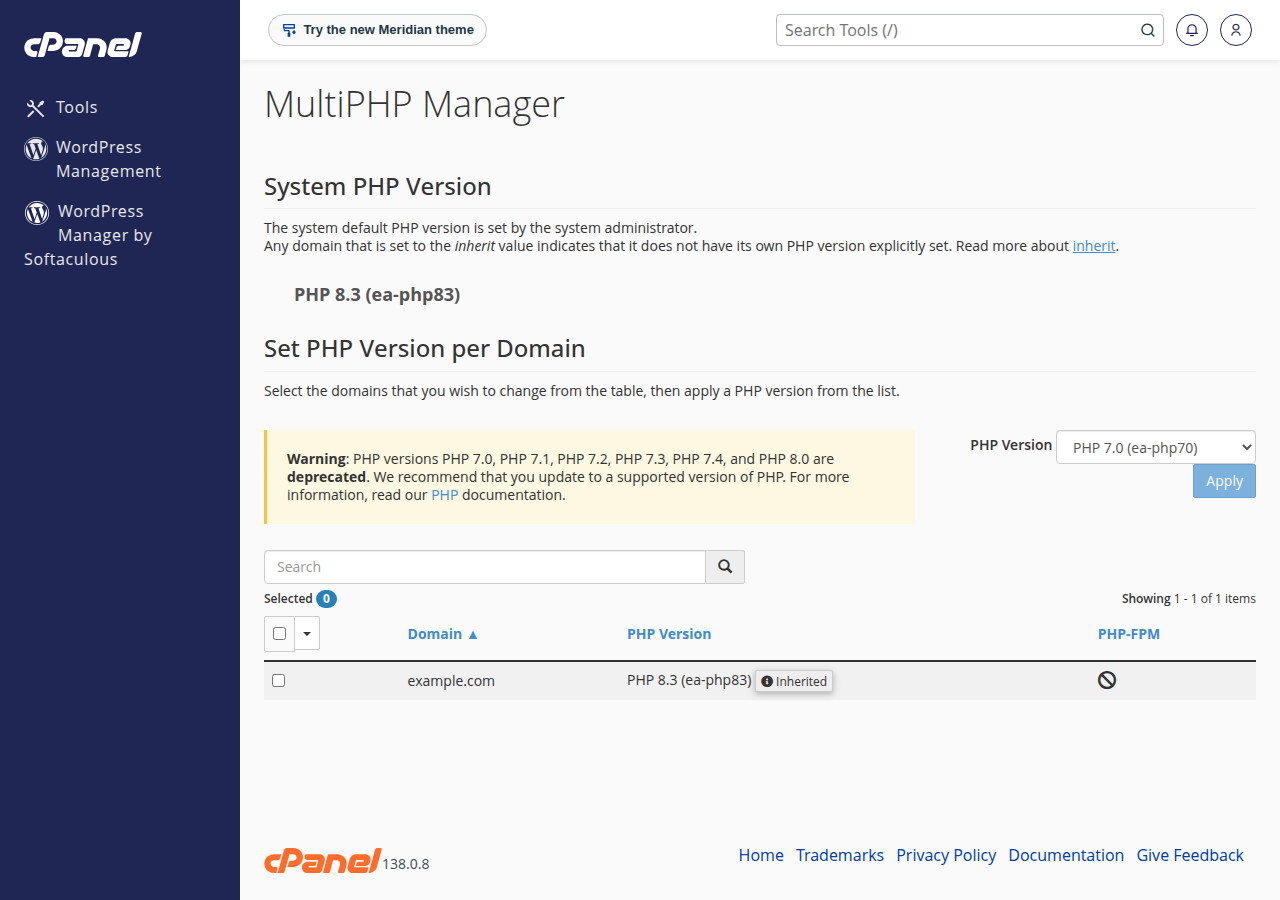
Every other decision follows from the version you run: code written for PHP 8.4 is a parse error on 8.1, and an application built for 7.4 usually stops dead on 8.x. On Domain India shared hosting you choose the version yourself, per account and usually per domain:
- cPanel — Software › MultiPHP Manager: How to change PHP versions in cPanel.
- DirectAdmin — the PHP version selector in the panel on port 2222: Change PHP version in DirectAdmin.
- Webuzo — the panel (Configuration › MultiPHP Manager) has its own PHP options.
On our cPanel shared servers PHP 5.1 through 8.5 is installed and selectable per account, measured on our servers on 20 September 2026. That range exists so a legacy site keeps running while it is migrated, not as a menu of equally good choices, and it changes as branches are released and retired. Open the selector and read the list it shows you, then choose using php.net's published support calendar rather than habit:
| PHP branch | Released | Active support ended | Security fixes until |
|---|---|---|---|
| 8.2 | December 2022 | 31 December 2024 | 31 December 2026 |
| 8.3 | November 2023 | 31 December 2025 | 31 December 2027 |
| 8.4 | November 2024 | 31 December 2026 | 31 December 2028 |
| 8.5 | November 2025 | 31 December 2027 | 31 December 2029 |
PHP 8.1 and everything older stopped receiving security fixes at the end of 2025. Those builds may still appear in the selector so an old site keeps running while you migrate it, but nothing new should be written against them.
A version jump changes behaviour, not just speed. Test on a staging copy or a subdomain first, keep the error log open, and be ready to switch back — the selector reverses the change as easily as it made it. PHP version compatibility lists what breaks between branches.
2. Read and change your PHP settings
Before debugging anything, make PHP tell you what it thinks its configuration is. Save this as phpcheck.php in your web root, open it in a browser, then run it over SSH with php phpcheck.php and compare the two.
<?php
declare(strict_types=1);

printf("PHP %s running as %s%s", PHP_VERSION, PHP_SAPI, PHP_EOL);
printf("Loaded php.ini: %s%s", php_ini_loaded_file() ?: '(none)', PHP_EOL);
printf("memory_limit: %s%s", ini_get('memory_limit'), PHP_EOL);
printf("upload_max_filesize: %s%s", ini_get('upload_max_filesize'), PHP_EOL);
printf("post_max_size: %s%s", ini_get('post_max_size'), PHP_EOL);
printf("max_execution_time: %s%s", ini_get('max_execution_time'), PHP_EOL);
printf("display_errors: %s%s", ini_get('display_errors') ?: 'off', PHP_EOL);
printf("error_log: %s%s", ini_get('error_log') ?: '(server default)', PHP_EOL);
The browser output describes the build the web server runs for that domain; the SSH output describes the command-line build, often a different version with a different php.ini. That mismatch explains most "it works on the command line but not on the site" tickets.
| Setting | What it controls | Why you would raise it |
|---|---|---|
memory_limit | RAM one script may use | "Allowed memory size exhausted" on an import |
upload_max_filesize | The largest single uploaded file | Media uploads rejected with no error message |
post_max_size | The whole POST body, uploads included | Must exceed upload_max_filesize, or uploads still fail |
max_execution_time | Seconds a web request may run | A long import timing out |
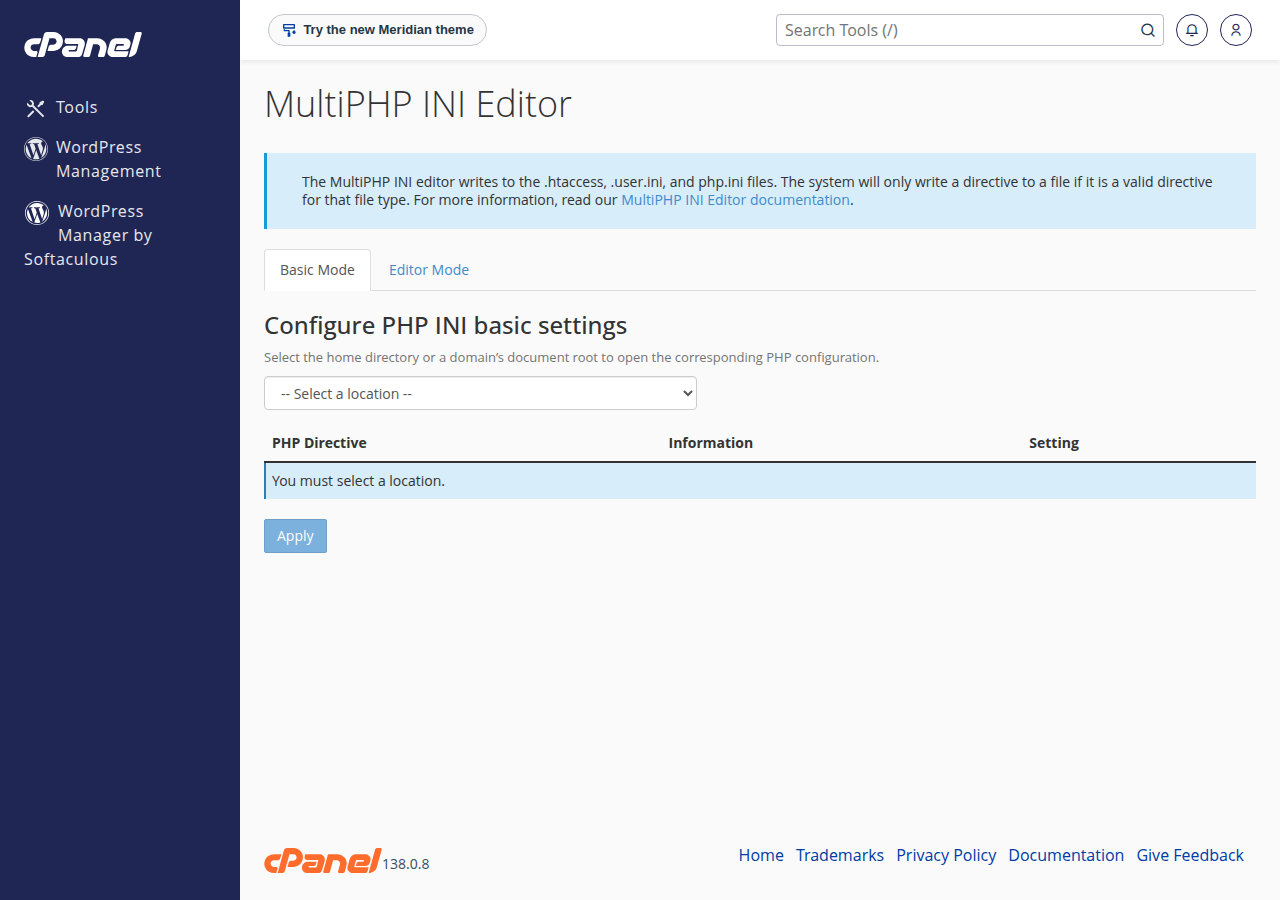
Use the panel's editor rather than hand-editing files. On cPanel that is MultiPHP INI Editor — see How to edit php.ini in cPanel. The panel writes the directive into the right file for the build your account uses, which is what goes wrong when someone creates a stray php.ini by hand and wonders why it is ignored; php_ini_loaded_file() tells you which file is actually read. When a raised limit still has no effect, work through Resolving PHP memory allocation errors and custom php.ini configuration; uploads are covered in PHP upload filesize limit.
Not everything can be changed from code: ini_set('memory_limit', '512M') works, while ini_set('upload_max_filesize', '64M') does nothing, because PHP parsed the request body before your code ran. Directives marked PHP_INI_PERDIR or PHP_INI_SYSTEM in the manual belong in the configuration.
3. Extensions: what you have and what you can add
An extension is compiled code loaded into the engine — PDO, curl, mbstring, gd, intl, openssl, fileinfo, zip. Most "undefined function" errors are a missing extension, not a missing library. Read the answer from your account:
<?php
declare(strict_types=1);

$want = ['pdo_mysql', 'curl', 'mbstring', 'openssl', 'fileinfo', 'gd', 'intl', 'zip', 'Zend OPcache'];

foreach ($want as $extension) {
    printf("%-14s %s%s", $extension, extension_loaded($extension) ? 'loaded' : 'MISSING', PHP_EOL);
}

print_r(get_loaded_extensions());
On cPanel, each PHP version comes with a server-wide set of extensions that you can't switch on or off yourself: check what is loaded with the script above (phpinfo() is switched off on some of our servers), and if one you need is missing, open a ticket naming the extension and the PHP version. DirectAdmin lets you switch extensions on and off within the set the server provides, covered in Installing and managing PHP extensions in DirectAdmin. Compiling a new extension needs root, which means a VPS, and A comprehensive list of PHP modules explains what the common ones do.
An extension is part of the engine and must be provided by the host; a library is plain PHP you upload or install with Composer — which has its own limits here, covered in section 8.
4. Errors: loud in development, logged in production
The most useful habit in PHP is refusing to let a failure pass quietly: turn warnings into exceptions, catch everything at the top, log it.
<?php
declare(strict_types=1);

error_reporting(E_ALL);
ini_set('display_errors', PHP_SAPI === 'cli' ? '1' : '0');
ini_set('log_errors', '1');

set_error_handler(static function (int $severity, string $message, string $file, int $line): bool {
    throw new ErrorException($message, 0, $severity, $file, $line);
});

set_exception_handler(static function (Throwable $e): void {
    error_log(sprintf('[%s] %s in %s:%d', $e::class, $e->getMessage(), $e->getFile(), $e->getLine()));
    http_response_code(500);
    echo 'Something went wrong. The error has been logged.';
});

echo intdiv(1, 0);
The last line throws DivisionByZeroError, the handler catches it, and the visitor sees one plain sentence while the detail goes to the log. Catching Exception alone would miss it: TypeError, ValueError and DivisionByZeroError extend Error, not Exception, and only Throwable covers both. Pass JSON_THROW_ON_ERROR to every json_decode() for the same reason.
error_log() writes to whatever error_log points at — your phpcheck.php output says where. In cPanel the account's errors also appear under Metrics › Errors, and every panel has a log viewer: see Reviewing error logs in cPanel and DirectAdmin.
A stack trace shown to a visitor prints file paths, database names and sometimes credentials into the page, and search engines index it. Keep display_errors off in production and read the log. If you must see errors in the browser for one short session, How to enable display_errors shows the per-directory way — turn it off the moment you are done.
5. The language core worth using in 2026
PHP has changed more in the last five years than in the fifteen before. These core features remove whole classes of bug:
<?php
declare(strict_types=1);

enum Status: string
{
    case Active    = 'active';
    case Suspended = 'suspended';

    public function label(): string
    {
        return match ($this) {
            Status::Active    => 'Active',
            Status::Suspended => 'Suspended',
        };
    }
}

final readonly class Invoice
{
    public function __construct(
        public int $number,
        public int $totalPaise,
        public Status $status,
    ) {}
}

$invoice = new Invoice(number: 1001, totalPaise: 67850, status: Status::from('active'));
echo $invoice->status->label(), ' invoice #', $invoice->number, PHP_EOL;

$customer = null;
echo $customer?->email ?? 'no customer on file', PHP_EOL;

echo implode(' ', array_map(strtoupper(...), ['php', 'core', 'features'])), PHP_EOL;

try {
    $invoice->number = 5;
} catch (Error $e) {
    echo 'readonly refused the write: ', $e->getMessage(), PHP_EOL;
}
That needs PHP 8.2 or newer, because final readonly class arrived in 8.2. The rest is older: enums, readonly properties and the strtoupper(...) first-class callable syntax came in 8.1; match, named arguments, constructor property promotion and ?-> came in 8.0. Later branches add typed class constants and #[\Override] (8.3), property hooks and array_find() (8.4), and the pipe operator (8.5) — use those only once your selector shows you are on that branch.
| Job | Old habit | What to write now |
|---|---|---|
| Branch on a value | switch with break on every arm | match, which is strict and returns a value |
| A fixed set of options | class constants or bare strings | an enum, with methods on it |
| A value object | a class with private setters | a readonly class |
| Many optional parameters | positional null, null, true | named arguments |
| Checking argument types | is_int() by hand | typed parameters plus strict_types |
Stop writing the rest. mysql_* went in PHP 7, along with each(), create_function() and magic quotes. Dynamic properties and ${var} interpolation were deprecated in 8.2, and implicitly nullable parameters — function f(string $x = null) — in 8.4, so write ?string $x = null. Deprecations become fatal errors a branch or two later, so fix them when the log first mentions them.
6. MySQL through PDO
Use PDO with real prepared statements and exceptions. This runs as it stands, on SQLite in memory, so you can watch an injection fail:
<?php
declare(strict_types=1);

$pdo = new PDO('sqlite::memory:', null, null, [
    PDO::ATTR_ERRMODE            => PDO::ERRMODE_EXCEPTION,
    PDO::ATTR_DEFAULT_FETCH_MODE => PDO::FETCH_ASSOC,
]);

$pdo->exec('CREATE TABLE users (id INTEGER PRIMARY KEY, email TEXT UNIQUE, name TEXT)');
$pdo->prepare('INSERT INTO users (email, name) VALUES (?, ?)')
    ->execute(['[email protected]', "Meera D'Souza"]);

$statement = $pdo->prepare('SELECT id, name FROM users WHERE email = ?');

$statement->execute(["[email protected]' OR '1'='1"]);
var_dump($statement->fetch());          // false: hostile input matched nothing

$statement->execute(['[email protected]']);
print_r($statement->fetch());           // the real row, apostrophe intact
For MySQL on your account the connection looks like this. ATTR_EMULATE_PREPARES => false makes PDO send the statement and the values to MySQL separately instead of building the SQL string itself:
<?php
declare(strict_types=1);

$name = getenv('DB_NAME') ?: 'cpuser_appdb';

$pdo = new PDO(
    "mysql:host=localhost;dbname={$name};charset=utf8mb4",
    getenv('DB_USER') ?: 'cpuser_appuser',
    getenv('DB_PASS') ?: '',
    [
        PDO::ATTR_ERRMODE            => PDO::ERRMODE_EXCEPTION,
        PDO::ATTR_DEFAULT_FETCH_MODE => PDO::FETCH_ASSOC,
        PDO::ATTR_EMULATE_PREPARES   => false,
    ]
);
Three things are specific to shared hosting: the host is localhost; your database and database user both carry your account prefix, so a database you called appdb is really cpuser_appdb; and the credentials file belongs one level above public_html, where the web server can never serve it. Creating the database and user is covered in How to connect to the MySQL database.
The MySQL port is firewalled on our shared servers, so a client on your laptop cannot connect directly. Use an SSH tunnel — Securing MySQL access with SSH tunnels sets one up for the common clients. SSH may need enabling on your account first: SSH access on shared hosting.
7. Files, uploads and large data
Never trust what the browser says a file is: the filename and the MIME type in $_FILES both come from the client, and only the bytes are evidence.
<?php
declare(strict_types=1);

function storeUpload(array $file, string $destDir, int $maxBytes = 2000000): string
{
    if (($file['error'] ?? UPLOAD_ERR_NO_FILE) !== UPLOAD_ERR_OK || $file['size'] > $maxBytes) {
        throw new RuntimeException('Upload rejected, error code ' . (int) $file['error']);
    }

    $mime    = (new finfo(FILEINFO_MIME_TYPE))->file($file['tmp_name']);
    $allowed = ['image/jpeg' => 'jpg', 'image/png' => 'png', 'application/pdf' => 'pdf'];

    if (!isset($allowed[$mime])) {
        throw new RuntimeException("Type {$mime} is not allowed");
    }

    $name = bin2hex(random_bytes(16)) . '.' . $allowed[$mime];

    if (!move_uploaded_file($file['tmp_name'], $destDir . '/' . $name)) {
        throw new RuntimeException('Could not move the upload into place');
    }

    return $name;
}
finfo reads the real bytes, so a PHP script renamed photo.png is rejected. Store uploads outside public_html and serve them through a script, or at least stop PHP executing in the upload folder. When an upload disappears and $_FILES is empty, the cause is almost always post_max_size: PHP discarded the request body before your code ran, so there is no error code left to read.
For anything large, stream it: a generator keeps memory flat however big the file is.
<?php
declare(strict_types=1);

function lines(string $path): Generator
{
    $handle = fopen($path, 'rb');

    if ($handle === false) {
        throw new RuntimeException("Cannot open {$path}");
    }

    try {
        while (($line = fgets($handle)) !== false) {
            yield rtrim($line, "\r\n");
        }
    } finally {
        fclose($handle);
    }
}

$total = 0;

foreach (lines('/home/cpuser/exports/orders.csv') as $line) {
    $total += (int) explode(',', $line)[2];
}

printf('Total %d, peak memory %.1f MB%s', $total, memory_get_peak_usage(true) / 1048576, PHP_EOL);
file() or file_get_contents() on a large export needs more RAM than the file's own size, which is exactly how you meet Allowed memory size exhausted.
8. Mail, cron and the functions that are switched off
This is the section that surprises developers moving from a laptop or a VPS, so read it before you settle on an architecture.
Around fifty PHP functions are disabled engine-wide on our cPanel shared servers, for web requests and the command line alike — among them proc_open, popen, fsockopen, stream_socket_client, curl_multi_exec and escapeshellcmd. Our DirectAdmin shared servers disable the same process functions — exec, system, passthru, shell_exec, proc_open, popen — on every PHP version, and on most websites curl_exec and curl_multi_exec as well. It is a deliberate security boundary on a server shared by many accounts, and it cannot be lifted per account. The consequences are concrete:
- Composer is not pre-installed, but with jailed SSH (on request) you can download
composer.pharand runphp composer.phar install. Composer scripts shell out throughproc_open, so if it stops with a proc_open message, run it again with--no-scripts. Or buildvendor/locally or in a CI job and upload it; Installing PHP libraries with Composer on cPanel hosting covers both routes. - SMTP libraries fail on cPanel, because opening a socket to a mail server needs
fsockopenorstream_socket_client. Use PHP'smail()with the envelope sender set — the exact settings are in PHP sendmail settings. - Anything that spawns a process fails, including Laravel's scheduler, queue workers, and image or video tooling that calls a binary.
The full list is in PHP disabled functions on shared hosting — read it before you conclude your code is broken.
Scheduled work belongs in a cron job, not behind a URL: a script at https://example.in/cron.php can be triggered by anyone, as often as they like. Set it up in the panel's cron section — How to set up a cron job — naming the interpreter explicitly so the job uses the version you chose.
<?php
declare(strict_types=1);
// Cron line: /usr/local/bin/php /home/cpuser/scripts/cleanup.php --days=30 >> /home/cpuser/logs/cleanup.log 2>&1

$dir = __DIR__ . '/cache';

if (!is_dir($dir)) {
    fwrite(STDERR, "No such directory: {$dir}" . PHP_EOL);
    exit(1);
}

$days    = (int) (getopt('', ['days:'])['days'] ?? 30);
$cutoff  = time() - $days * 86400;
$removed = 0;

foreach (new DirectoryIterator($dir) as $entry) {
    if ($entry->isFile() && $entry->getMTime() < $cutoff) {
        unlink($entry->getPathname());
        $removed++;
    }
}

fwrite(STDOUT, "Removed {$removed} file(s)" . PHP_EOL);
exit(0);
Run it as often as it needs, not every minute: account resource limits apply to cron as they do to page views.
9. OPcache and the cheap performance wins
OPcache keeps the compiled form of your PHP files in memory so the engine stops recompiling the same code on every request — the largest free speed-up a PHP site can get. Check it for your own account:
<?php
declare(strict_types=1);

if (!function_exists('opcache_get_status')) {
    echo 'The OPcache extension is not loaded.', PHP_EOL;
    return;
}

$status = opcache_get_status(false);

if (!is_array($status) || empty($status['opcache_enabled'])) {
    echo 'OPcache is loaded but switched off for this SAPI.', PHP_EOL;
    return;
}

printf(
    'Cached scripts: %d, hit rate %.1f%%%s',
    $status['opcache_statistics']['num_cached_scripts'],
    $status['opcache_statistics']['opcache_hit_rate'],
    PHP_EOL
);
A low hit rate usually means the cache is too small for the number of files, or that a custom php.ini turned OPcache off; How to enable OPcache for PHP and the PHP OPcache guide cover the settings. The command-line build often has OPcache off on purpose, so the number that matters is the browser's.
After that, every win is doing less work per request: cache the slowest query or API response with a timestamp, index the columns you filter on, and set a timeout on every outbound HTTP call so one slow third party cannot hold your PHP workers. Our shared servers run Apache, so WordPress page caching should come from WP Super Cache or W3 Total Cache. See also Top PHP settings to optimize performance.
10. When shared hosting is not enough
Shared hosting is the right home for most PHP: a company site, WordPress, an application that runs inside a request and finishes. You get a panel, a PHP selector, free SSL, email, weekly backups and no server to maintain. It is the wrong home for one kind of project, and it is better to know that on day one than after a week of failed deploys.
- WordPress, Joomla, Drupal and other CMS sites
- A PHP application using PDO, curl, GD and the usual extensions
- Work that happens inside the request, with cron for the rest
- Teams who want a control panel, not a terminal
- Composer scripts on the server, or any deploy step that shells out
- Queue workers, WebSockets or a daemon that stays alive
exec,proc_open, sockets, or an extension we do not provide- A specific PHP build, a system-level
php.ini, or Docker
A VPS gives you root and the whole machine: install any PHP branch, compile any extension, run Composer and Supervisor, open ports. You also take on patching and monitoring it.
- 1 vCPU
- 2 GB DDR4 RAM
- 64 GB NVMe SSD Storage
- 2 TB Monthly Bandwidth
The App Platform sits between the two. You push code from Git and we run the containers, the database and the SSL — no server administration, no disabled-functions list. It is the practical answer for a Laravel or Symfony application, an API or a dashboard that needs Composer and background work but not a whole server.
- 512 MB RAM per app
- 1 vCPU
- 5 GB NVMe SSD
- PostgreSQL Database
Prices on those cards are Domain India list prices, exclude 18% GST, and are the ones you see at checkout on the day you order.
Two questions settle it. Does your deploy need Composer scripts, or any other command that starts another process? Does anything need to keep running between requests? If either answer is yes, start on the App Platform or a VPS. If both are no, shared hosting will serve you for less.
Frequently asked questions
Which PHP version should I use for a new project?
Open your control panel's PHP selector and choose the newest branch that still has active support on php.net and that your application supports. Never pick an end-of-life branch for new code; older builds exist so legacy sites keep running while they are migrated.
How do I find out which PHP version my site is actually using?
Put a file in your web root containing echo PHP_VERSION, ' ', PHP_SAPI; and open it in a browser, then run the same file over SSH with php file.php. The two can differ, because the web server and the command line use separate builds with separate configuration.
Why does raising a limit in my code not help?
ini_set('memory_limit', ...) works, but directives that must be set before the request starts — upload_max_filesize and post_max_size — are ignored from code, because PHP has already parsed the request body. Set those in the panel's PHP INI editor.
Why does Composer stop with a proc_open error on my shared hosting account?
Composer isn't pre-installed, and Composer scripts start other processes through functions that are disabled engine-wide on our shared servers for security. With jailed SSH (on request), download composer.phar and run php composer.phar install; if it stops with a proc_open message, run it again with --no-scripts. Or build vendor/ on your own machine or in a CI job and upload it, or move the project to a VPS or the App Platform.
Can I connect to my hosting MySQL database from a client on my laptop?
Not directly: port 3306 is closed from outside on our shared servers. Open an SSH tunnel and point the client at the local end of it. Your application on the server connects to localhost as normal.
Where does PHP write its error log on my account?
To the path shown by ini_get('error_log'). In cPanel the account's errors are also listed under Metrics; DirectAdmin and Webuzo have their own log viewers. Keep log_errors on and display_errors off on any live site.
Ready to build? If you are starting a PHP site, pick a plan on cPanel hosting or DirectAdmin hosting and set your version in the selector on day one. If the project needs Composer scripts, workers or root, look at the App Platform or a VPS. Stuck on a setting, a limit or an error log? Open a ticket with the domain and the exact error text — live chat is open around the clock and tickets get a first response within 15 minutes.
Choose your PHP version per domain, edit php.ini from the panel, check which extensions are loaded (and ask support for one that is missing), read your own error log, and move up the day you outgrow shared hosting.
See hosting plans