When WordPress says "The uploaded file exceeds the upload_max_filesize directive in php.ini", or a form upload silently fails, you have hit PHP's upload limit. Two PHP settings control it, and on shared hosting a web server layer in front of PHP has its own ceiling too. This guide gives the default limits we measured on Domain India hosting, shows how to check the value your site really gets, and how to change it safely.
On Domain India's cPanel server, PHP accepts uploads up to 256 MB by default (upload_max_filesize and post_max_size are both 256M), and the web front end also stops at 256 MB, so that is the practical maximum for a browser upload. On DirectAdmin the default is 64 MB, and on Webuzo about 8 MB, because post_max_size there is 8M. To change it, use cPanel's MultiPHP INI Editor, or a .user.ini file on any panel. Never put php_value lines in .htaccess: on our servers that makes the whole site return a 500 error. For anything bigger than 256 MB, upload by FTP instead.
1. The two settings that matter
| Setting | What it limits | Rule of thumb |
|---|---|---|
| upload_max_filesize | The largest single file PHP accepts | Set it to the biggest file you need to upload |
| post_max_size | The whole request: the file plus all other form fields | Equal to or larger than upload_max_filesize |
| max_file_uploads | How many files one request may carry | 20 by default on our cPanel server |
| max_execution_time and max_input_time | How long PHP waits for a script and for the upload data | 120 seconds by default on our cPanel server |
If post_max_size is smaller than the file, PHP drops the whole request. The form arrives empty and many applications show no error at all, which is why an upload can "do nothing" without a message.
2. Default limits on Domain India hosting
We read these values from our servers.
| Server | upload_max_filesize | post_max_size | Other ceiling |
|---|---|---|---|
| cPanel | 256M on every PHP version from 7.0 to 8.5 | 256M | The web front end accepts requests up to 256 MB |
| DirectAdmin | 64M on every installed PHP version | 64M | Not measured |
| Webuzo | 20M | 8M | The 8M post_max_size is the lower value, so uploads stop at about 8 MB unless you raise it |
On cPanel, raising PHP above 256M does not let browsers upload bigger files. The front end that sits in front of the web server rejects a larger request before PHP sees it, usually with a "413 Request Entity Too Large" error. Files bigger than that belong on FTP (section 7).
3. Check the limit your site really gets
A setting in a file is only a request; the value PHP actually uses can differ. Check it before and after any change.
- WordPress: open Tools › Site Health › Info › Server. It lists the upload maximum, PHP post maximum size and PHP memory limit. The Media › Add New screen also shows "Maximum upload file size".
- Any PHP site: create a file with a hard-to-guess name, such as
limits-8c2e.php, in the folder your site runs from:
<?php
echo 'upload_max_filesize: ', ini_get('upload_max_filesize'), "\n";
echo 'post_max_size: ', ini_get('post_max_size'), "\n";
echo 'PHP version: ', PHP_VERSION;
Open it in your browser, note the values, then delete the file. phpinfo() is disabled on our cPanel servers, so a phpinfo page won't help. On cPanel, a cache in front of the web server can show an old copy for a while; add ?t=1 to the address when you check again after a change.
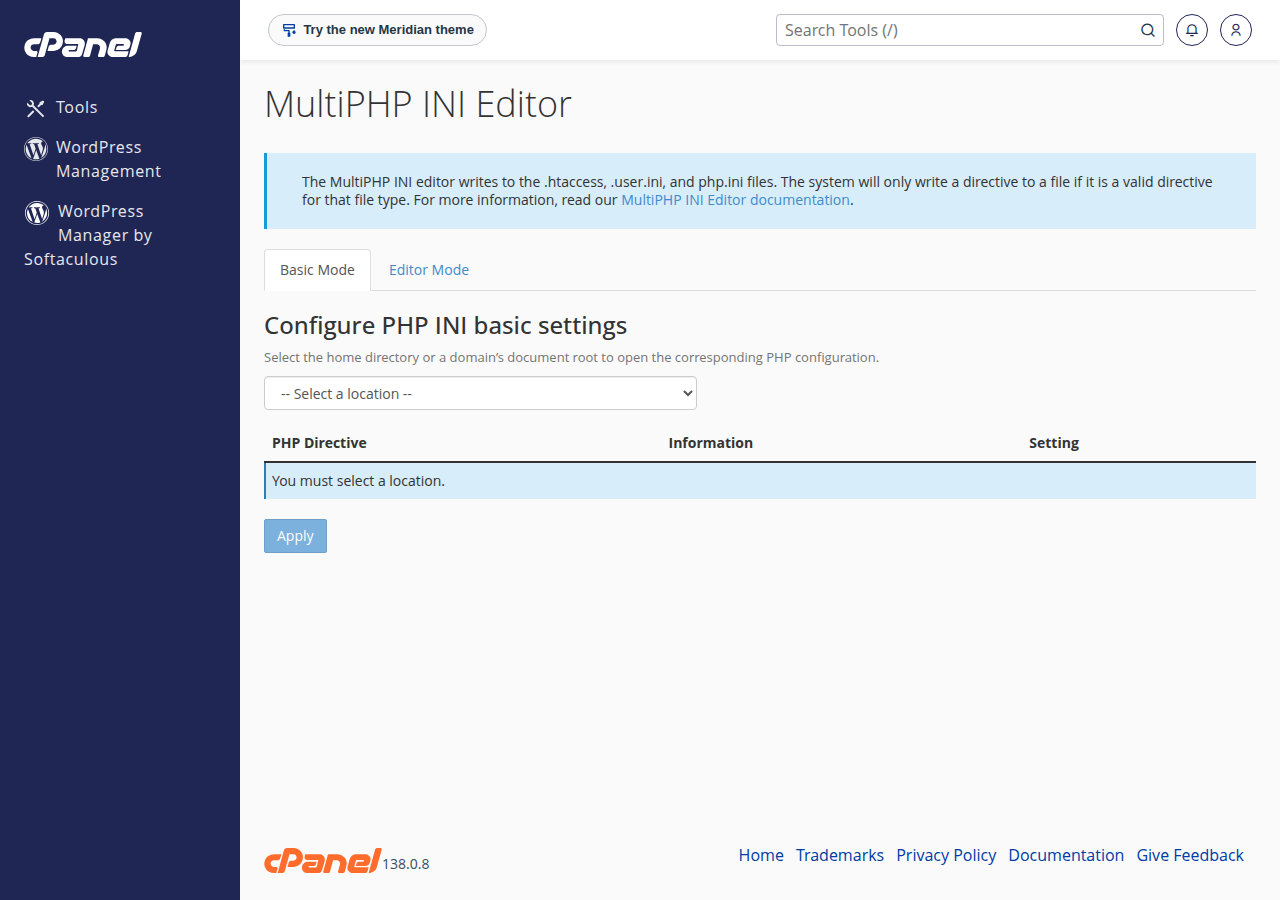
4. Change it in cPanel: MultiPHP INI Editor
- Open the editor.Sign in to cPanel (see how to log in to cPanel) and open MultiPHP INI Editor in the Software section.
- Choose your domain.In Basic Mode, select the domain or folder your site runs from.
- Set both values.Change
upload_max_filesizeandpost_max_sizeto what you need, for example 128M. Keeppost_max_sizeat least as large asupload_max_filesize. - Apply and test.Click Apply, then confirm the new values with Site Health or your check file.
The editor writes the setting in the format our PHP handler understands, which is why it is the first choice. If a setting isn't offered or won't change, use a .user.ini file (section 5) or open a ticket with the domain and the value you need.
On Webuzo, open the PHP INI Editor page (type its name in the search box at the top of the panel), or use a .user.ini file, and raise post_max_size together with upload_max_filesize. On DirectAdmin, open Account Manager › PHP Settings and add overrides for upload_max_filesize and post_max_size under Add New Override, or use a .user.ini file.
5. The .user.ini file
A .user.ini file in your site's folder applies PHP settings to that folder and its subfolders. It works with the way PHP runs on our shared servers. Create it with the File Manager in the folder your site runs from, usually public_html, and add one line per setting:
upload_max_filesize = 128M
post_max_size = 128M
PHP caches these files, so a change can take up to 5 minutes to apply. If the value doesn't change, look for another php.ini or .user.ini in the same folder or a parent folder that overrides it, and check that you changed the PHP version your site actually uses (see how to change your PHP version). The server can still lock a value, in which case support can help.
6. Why the old .htaccess method breaks your site
Older guides, including an earlier version of this one, told you to add these lines to .htaccess:
php_value upload_max_filesize 128M
php_value post_max_size 128MThose directives only work when PHP runs as an Apache module. None of our shared servers run PHP that way; they use PHP-FPM or CGI. Apache doesn't recognise the lines, and the whole site returns a 500 Internal Server Error. If your site broke after an .htaccess edit, remove the php_value lines and set the values in the MultiPHP INI Editor or .user.ini instead. More causes are covered in our 500 Internal Server Error guide.
7. Bigger than 256 MB? Don't upload it through the browser
A browser upload of several hundred megabytes is fragile: one network drop and it starts again from zero. And on cPanel, anything over 256 MB can't pass the front end at all. Better routes:
- FTP with TLS on port 21, which is limited only by your free disk space. See how to use SSL/TLS encryption in FTP clients.
- SSH, if jailed SSH has been enabled for your account (it is off by default; ask support). You log in with an SSH key and can copy files with
scpor SFTP. - For WordPress, upload the file by FTP into
wp-content/uploads, then register it in the Media Library with a media import plugin.
For a large database, phpMyAdmin on cPanel imports files up to 50 MB; compress the dump or ask support. The File Manager's own limits are explained in the maximum file size you can upload via the cPanel File Manager.
8. Keep the other limits in step
A bigger upload also needs time and memory to process:
- Time. An upload that takes longer than
max_input_timeis cut off. On a slow connection, a 200 MB file can take several minutes. - Memory. Plugins that process uploads, such as image resizers or importers, may need more
memory_limit. See resolving PHP memory errors for safe values. - Disk space. An upload can't be bigger than the space left on your plan.
Raise values only as far as you need. A very high limit doesn't make uploads faster; it only lets a broken or abusive script use more of your account's resources.
9. Where Domain India hosting fits
Domain India's cPanel plans already allow 256 MB uploads by default, which covers WordPress themes, plugins, most media and typical backups. If you work with large files regularly, more disk space helps more than a higher PHP limit:
- 50 GB NVMe SSD Storage
- 100 GB Monthly Bandwidth
- 5 Websites
- 50 Email Accounts
The card shows the Domain India list price on 19 September 2026, excluding 18% GST. If you need limits beyond what shared hosting allows, a VPS lets you set any value. Support is on 24/7 live chat, and tickets get a first response within 15 minutes.
10. Frequently asked questions
What is the PHP upload limit on Domain India hosting?
On Domain India's cPanel server, upload_max_filesize and post_max_size both default to 256M on every PHP version, and the web front end also accepts up to 256 MB per request. On the DirectAdmin server the default is 64M. On Webuzo, upload_max_filesize is 20M but post_max_size is 8M, so uploads stop at about 8 MB until you raise post_max_size.
How do I increase upload_max_filesize in cPanel?
Open MultiPHP INI Editor in the Software section of cPanel, choose Basic Mode, select your domain, set upload_max_filesize and post_max_size, and click Apply. If the setting is not offered, add both lines to a .user.ini file in your site's folder or ask support.
Can I set upload_max_filesize in .htaccess?
No. On Domain India shared hosting PHP does not run as an Apache module, so php_value and php_flag lines in .htaccess make the whole site return a 500 error. Use the MultiPHP INI Editor or a .user.ini file instead.
I set 1024M but still cannot upload a 500 MB file. Why?
On Domain India's cPanel server the web front end in front of PHP accepts requests up to 256 MB, so a larger upload is rejected before PHP sees it. Upload large files by FTP with TLS instead.
What is the difference between upload_max_filesize and post_max_size?
upload_max_filesize caps a single uploaded file, and post_max_size caps the whole request, including every file and form field. post_max_size must be equal to or larger than upload_max_filesize, or the upload fails.
My .user.ini change is not working. What should I check?
Wait up to 5 minutes, because PHP caches .user.ini files. Then check for another php.ini or .user.ini that overrides it, confirm you edited the folder your site runs from, and check the values with an ini_get file or WordPress Site Health.
Ready to change your limits? Sign in to your control panel from My Hosting in the client area, or compare cPanel hosting plans and DirectAdmin hosting plans.
Tell us the domain, the value you need and what you are uploading, and our support team will help you set it.
Open a support ticket