On Domain India's shared hosting you don't edit the server's main php.ini, and you don't need to. You change PHP settings for your own site, either in cPanel's MultiPHP INI Editor or with a small .user.ini file in your site's folder. This page shows both, lists the settings people change most, and explains the older methods that no longer work.
In cPanel, open MultiPHP INI Editor in the Software section, pick your domain in Basic Mode, change the value and click Apply. On any panel, a .user.ini file in your site's folder (usually public_html) with one setting = value per line does the same job. Never put php_value in .htaccess: on our servers it makes the whole site return a 500 error. Check the result with a short ini_get() file, because phpinfo() is disabled on our cPanel servers.
Our main PHP settings guide is How to fix "Allowed memory size exhausted" PHP errors and change memory_limit. It covers checking values, the panel, .user.ini, WordPress limits and your plan's memory ceiling in detail. For uploads, see PHP upload filesize limit.
1. Edit PHP settings with the MultiPHP INI Editor
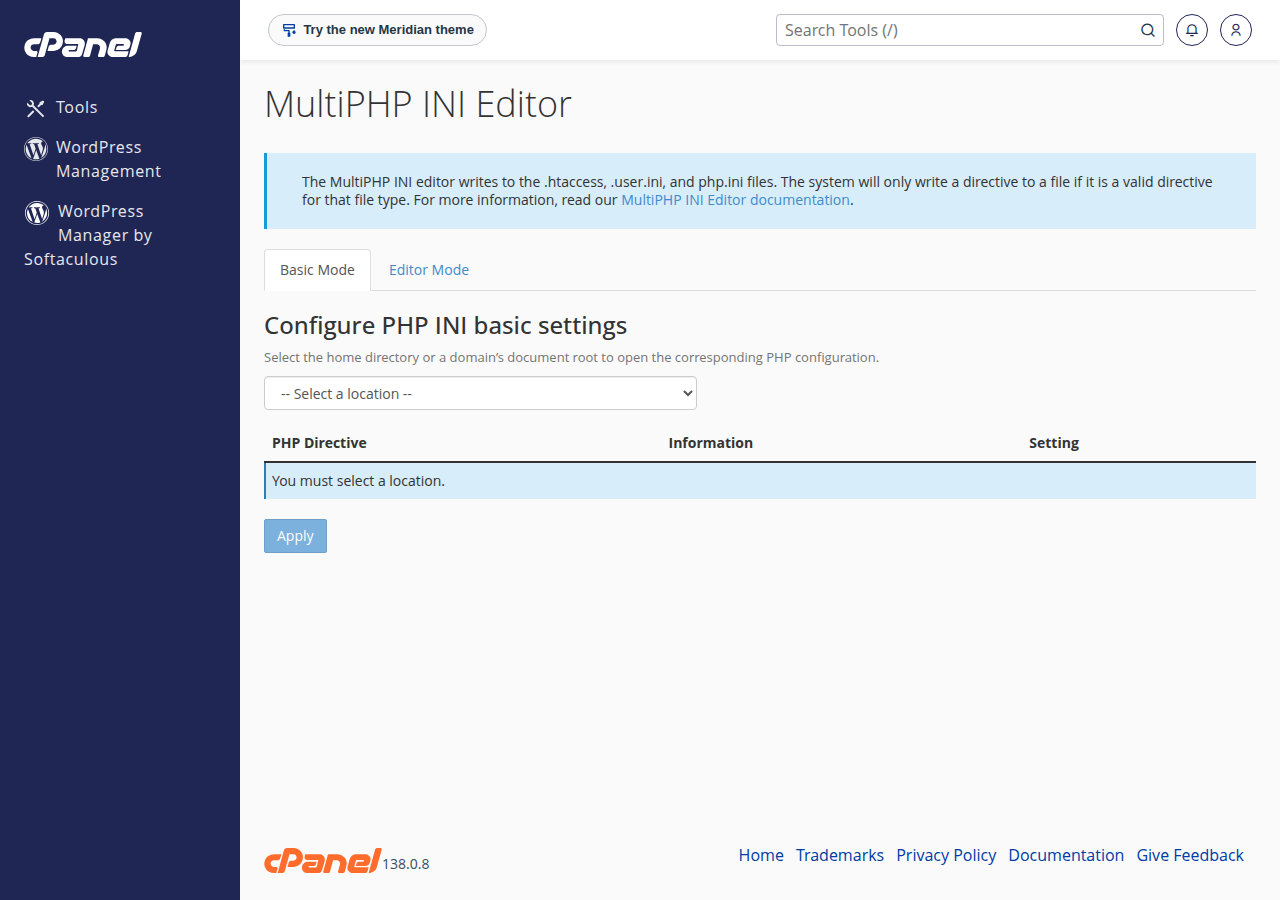
- Open cPanel.Go to your hosting services in the client area and open cPanel, or see how to log in to cPanel.
- Open MultiPHP INI Editor.It is in the Software section.
- Choose your domain.In Basic Mode, select the domain or folder your site runs from.
- Change the value.Set, for example,
upload_max_filesizeandpost_max_sizeto 128M, ormemory_limitto 256M, if the editor offers them. - Apply and check.Click Apply, then confirm the new value with the check file in section 3.
The editor also has an Editor Mode tab, where you type directives yourself for the selected domain. The editor writes each setting in the format our PHP handler understands, which is why it is the first choice. If a setting isn't offered or won't change, use a .user.ini file or open a ticket with the domain and the value you need.
2. The .user.ini file (any panel)
Our shared servers run PHP through PHP-FPM or CGI, not as an Apache module. With that setup, a .user.ini file in your site's folder applies to that folder and its subfolders. Create it with the File Manager, usually in public_html:
memory_limit = 256M
upload_max_filesize = 128M
post_max_size = 128M
max_execution_time = 120
PHP caches these files, so a change can take up to 5 minutes to apply. On DirectAdmin and Webuzo we don't name a PHP settings menu here; use .user.ini, or ask support to set the value.
| Method | On Domain India shared hosting |
|---|---|
| cPanel MultiPHP INI Editor | First choice where the setting is offered |
| .user.ini in your site's folder | Works on every panel; applies to that folder and below |
| php.ini copied into your folder | Not reliable; use .user.ini instead |
| php_value or php_flag in .htaccess | Never: the whole site returns a 500 error |
php_value and php_flag only work when PHP runs as an Apache module, and none of our shared servers run it that way. Apache doesn't recognise the lines and the whole site returns a 500 Internal Server Error. If your site broke after an .htaccess edit, remove those lines. See the 500 Internal Server Error guide.
3. Check the value PHP really uses
Create a file with a hard-to-guess name, such as check-4b7d.php, in your site's folder:
<?php
foreach (['memory_limit', 'upload_max_filesize', 'post_max_size', 'max_execution_time'] as $k) {
    echo $k, ': ', ini_get($k), "\n";
}
echo 'PHP version: ', PHP_VERSION;
Open it in your browser, note the values, then delete it. On cPanel a cache in front of the web server can show an old copy for a while, so add ?t=1 to the address when you check again. In WordPress, Tools › Site Health › Info › Server shows the same values.
4. Settings people change most
| Setting | What it controls | Sensible value |
|---|---|---|
| memory_limit | Memory one PHP request may use | 256M covers almost every WordPress site |
| upload_max_filesize | Largest single uploaded file | What you need; cPanel default is 256M, DirectAdmin 64M |
| post_max_size | Whole request, file plus form fields | Equal to or larger than upload_max_filesize |
| max_execution_time | Seconds a script may run | 60; on cPanel most web requests stop after about 60 seconds whatever this says, so higher values help only command-line scripts |
| max_input_vars | Form fields PHP reads | 3000 to 5000 for big menus or theme options |
| display_errors | Show errors on the page | Off on a live site; log them instead |
For debugging, keep display_errors = Off and turn on log_errors = On so errors go to the error_log file in your site's folder, which you can read in the File Manager. OPcache is already on for cPanel; see the PHP OPcache guide before changing it. Settings are kept per PHP version, so check them again after you change your PHP version.
Some settings you can't override. About 50 functions are disabled on our cPanel servers for security, and a disable_functions line of your own won't re-enable them; see PHP disabled functions on shared hosting. If you need full control of php.ini, a VPS is self-managed with root access.
Frequently asked questions
Where is php.ini in cPanel?
On Domain India shared hosting you don't edit the server's main php.ini. Change PHP settings for your site in cPanel's MultiPHP INI Editor in the Software section, or with a .user.ini file in your site's folder.
How do I edit PHP settings in cPanel?
Open MultiPHP INI Editor in the Software section, choose Basic Mode, select your domain, change the value and click Apply. If a setting is not offered, add it to a .user.ini file in your site's folder or ask support.
Can I put PHP settings in .htaccess?
No. On Domain India shared hosting PHP does not run as an Apache module, so php_value and php_flag lines in .htaccess make the whole site return a 500 error.
My change to .user.ini is not working. What should I check?
Wait up to 5 minutes, because PHP caches .user.ini files. Then look for another php.ini or .user.ini in the same or a parent folder that overrides it, and check that you changed the PHP version your site actually uses.
How do I see my current PHP settings if phpinfo() is disabled?
Upload a small PHP file that prints ini_get() for the settings you need, open it in your browser and delete it afterwards. In WordPress, Tools, Site Health, Info, Server shows the main values.
Can I enable exec or shell_exec with my own php.ini?
No. Those functions are disabled server-wide on Domain India's cPanel and DirectAdmin servers for security, and a setting in your own file cannot re-enable them. A VPS gives you full control over PHP.
Ready to change a setting? Open cPanel from your hosting services, or read the full PHP settings guide.
Tell us the domain, the setting and the value you need, and our support team will help you set it.
Open a support ticket