Most PHP settings you see in "speed up PHP" lists are limits, not accelerators: they decide how much memory or time a script may use, not how fast it runs. The things that really make PHP faster are a current PHP version, OPcache and page caching. This guide explains which settings matter, sensible values, which ones you can change on Domain India shared hosting, and what to tune on your own VPS.
Use the newest PHP version your site supports, keep OPcache on and cache your pages: those three matter more than any php.ini value. Set memory_limit to 256M for WordPress, keep max_execution_time modest, size uploads to what you need, and turn display_errors off on a live site. On shared hosting, change settings with cPanel's MultiPHP INI Editor or a .user.ini file, never php_value in .htaccess. OPcache memory and realpath_cache_size are server-wide and can only be tuned on a VPS.
1. What actually makes PHP fast
After those, the settings below prevent failures and waste rather than add speed. Slow database queries and heavy plugins cost far more than any php.ini value; see my website is slow.
2. How to change PHP settings on shared hosting
On Domain India shared hosting you change settings for your own site, not the server's main php.ini:
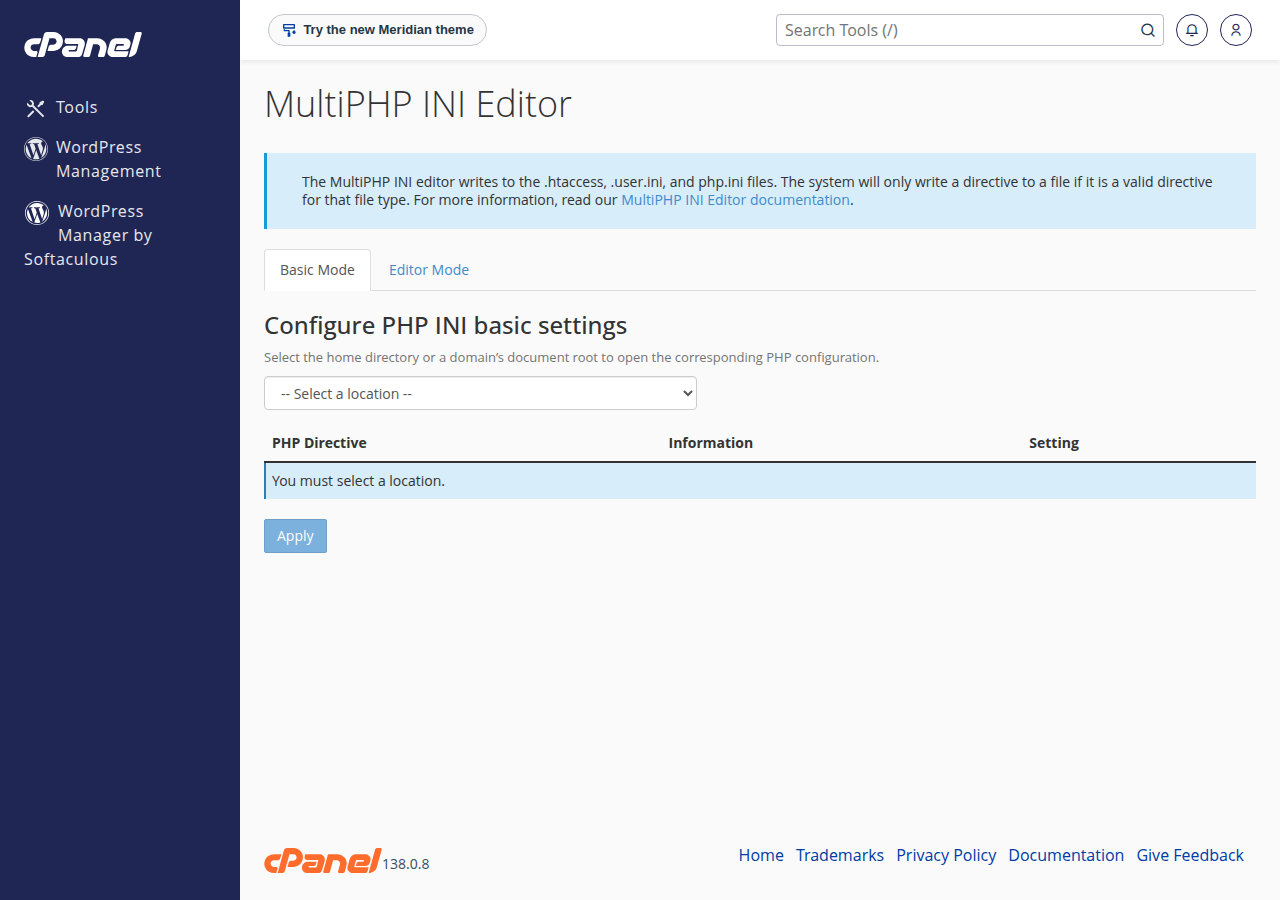
- cPanel: open MultiPHP INI Editor in the Software section, choose Basic Mode, select your domain, change the value and click Apply.
- Any panel: create a
.user.inifile in your site's folder, usuallypublic_html, with onesetting = valueper line. PHP caches it, so a change can take up to 5 minutes to apply.
Our shared servers run PHP through PHP-FPM or CGI, not as an Apache module. A php_value or php_flag line in .htaccess makes the whole site return a 500 error. If your site broke after such an edit, remove the line. Full details are in how to edit php.ini in cPanel.
phpinfo() is disabled on our cPanel servers, so check a value with a small temporary file that prints ini_get('memory_limit'), then delete it.
3. The settings that matter, with sensible values
| Setting | What it does | Sensible value | Change it on shared hosting? |
|---|---|---|---|
| memory_limit | Memory one request may use | 128M simple sites, 256M WordPress and WooCommerce | Yes |
| max_execution_time | Seconds a script may run | 30 to 60 for web pages | Yes, but see the timeout note below |
| max_input_time | Seconds PHP may spend reading the request | 60 | Yes |
| upload_max_filesize | Largest single uploaded file | What your site needs | Yes |
| post_max_size | Whole request, file plus form fields | Equal to or larger than upload_max_filesize | Yes |
| max_input_vars | Form fields PHP reads | 3000 to 5000 for big menus or theme options | Yes |
| display_errors | Show errors on the page | Off on a live site | Yes |
| log_errors | Write errors to a log file | On | Yes |
| opcache.memory_consumption and other OPcache sizes | Size of the code cache | Server default | No, server-wide |
| realpath_cache_size | Cache of resolved file paths | Server default | No, server-wide |
memory_limit applies to each request, and all the PHP processes in your account share your plan's memory. Raising it doesn't make anything faster; it only lets a heavier script finish. Don't use -1. See the PHP memory limit quick fix.
max_execution_time on our cPanel servers defaults to 120 seconds, but on most sites PHP-FPM stops a web request after about 60 seconds, and the web server in front of PHP ends any request at 90 seconds with a 504 Gateway Timeout. Raising the value beyond that doesn't help a web request: move long jobs to a cron job or split them into batches. On DirectAdmin the default is 30 seconds. See resolving gateway errors in WordPress.
Uploads: the default upload limit is 256M on cPanel and 64M on DirectAdmin. Set upload_max_filesize and post_max_size together; see PHP upload filesize limit.
Errors: on a live site use display_errors = Off and log_errors = On. For error_reporting, E_ALL & ~E_DEPRECATED is the usual production value, with E_ALL on your development copy. Errors printed on a page leak file paths to visitors, and an error log that grows without limit wastes disk space.
Compression: leave zlib.output_compression off. On our cPanel servers the front web server already compresses HTML, CSS, JavaScript and JSON, and DirectAdmin compresses server-wide, so PHP compressing again only wastes CPU.
4. OPcache on Domain India servers
OPcache is enabled for websites on our cPanel servers. On our DirectAdmin servers it is enabled on every PHP version except PHP 8.3. OPcache memory and file-count settings are server-wide, so the tuning snippets found online (opcache.memory_consumption=256 and similar) do nothing in a .user.ini on shared hosting. The PHP OPcache guide shows how to check it for your own site.
There is no APCu, Redis or Memcached on our shared plans, so object-cache plugins that need them won't work there. Page caching with a plugin is the right tool on shared hosting.
5. Pick the right PHP version
On cPanel you can choose PHP versions up to 8.5, with 8.3 as the default for new accounts. DirectAdmin offers versions up to 8.3. Use the newest version your site and plugins support, test after switching, and keep in mind that settings are stored per PHP version, so check them again after a change. See how to change your PHP version.
6. Tuning PHP on your own VPS
This section applies to a VPS you manage yourself, where you edit the server's php.ini and PHP-FPM pool and restart PHP-FPM after each change. It does not apply to shared hosting.
; php.ini or a conf.d file
opcache.enable=1
opcache.memory_consumption=256
opcache.interned_strings_buffer=16
opcache.max_accelerated_files=20000
opcache.validate_timestamps=1
opcache.revalidate_freq=60
realpath_cache_size=4096K
realpath_cache_ttl=600- OPcache sizes: make sure the whole codebase fits. If the hit rate drops or the cache fills, raise
memory_consumptionandmax_accelerated_files. - validate_timestamps: setting it to 0 skips file checks entirely for a little more speed, but then you must reload PHP-FPM after every deployment or visitors keep seeing old code.
- PHP-FPM pool:
pm.max_childrenis the number of requests PHP can handle at once. Set it from your RAM: divide the memory you can give PHP by the average memory of one PHP process. Too high and the server swaps; too low and requests queue. - JIT: PHP 8's JIT helps CPU-heavy code such as image or maths work, and rarely helps typical WordPress or Laravel sites, which wait on the database.
Read the PHP OPcache guide and essential security and optimisation tips for your VPS before changing a production server.
7. Troubleshooting
| Problem | Likely cause | Fix |
|---|---|---|
| A new value doesn't show | .user.ini cached, or you changed another PHP version | Wait 5 minutes and check the PHP version your site uses |
| Site returns 500 after an edit | php_value or php_flag in .htaccess | Remove the line and use the INI editor or .user.ini |
| An error after about 60 seconds, or a 504 Gateway Timeout at 90 seconds | The request runs longer than the server allows | Batch the work or run it from cron |
| Allowed memory size exhausted | A plugin or script needs more memory | Raise memory_limit to 256M, then find the heavy plugin |
| Old page after a change | A page cache or the server's cache | Clear your cache plugin and reload with ?t=1 added to the address |
8. Where Domain India fits
cPanel hosting gives you the PHP version selector, the MultiPHP INI Editor and OPcache already on, which is everything a typical PHP or WordPress site needs.
- 25 GB NVMe SSD Storage
- 50 GB Monthly Bandwidth
- 1 Website
- 10 Email Accounts
If you need to tune OPcache, PHP-FPM or server-wide settings yourself, a VPS is self-managed with full root access.
- 1 vCPU
- 2 GB DDR4 RAM
- 64 GB NVMe SSD Storage
- 2 TB Monthly Bandwidth
The cards show live Domain India prices, excluding 18% GST.
Which PHP settings improve performance the most?
The biggest gains come from a current PHP version, OPcache and page caching. Settings such as memory_limit and max_execution_time are limits that prevent failures; they do not make code run faster.
What memory_limit should I use for WordPress?
256M covers almost every WordPress and WooCommerce site. If the memory error continues at 256M or 512M, a plugin or theme is the cause and needs updating or replacing.
How do I change PHP settings on Domain India shared hosting?
In cPanel, open MultiPHP INI Editor, choose Basic Mode, select your domain, change the value and click Apply. On any panel you can put the settings in a .user.ini file in your site's folder. Do not use php_value in .htaccess, which causes a 500 error.
Can I change OPcache settings on shared hosting?
No. OPcache memory and file-count settings are server-wide. OPcache is already enabled for websites on our cPanel servers, and on our DirectAdmin servers for every PHP version except 8.3. On a VPS you can tune all OPcache settings.
Why does my script stop after about 60 seconds even with a higher max_execution_time?
On our cPanel servers, most sites stop a web request after about 60 seconds (PHP-FPM ends it), and the web server in front of PHP ends any request at 90 seconds with a 504 error. Run long jobs from cron or split them into smaller batches.
Is Redis or Memcached available for PHP on shared hosting?
No. Our shared hosting plans have no Redis, Memcached or APCu. Use a page-caching plugin on shared hosting, or a VPS if your application needs an object cache.
Ready to tune your site? Open cPanel from your hosting services, read how to edit php.ini in cPanel, or open a support ticket if a setting won't change.
Tell us the domain, the setting and the value you need, and our support team will help you set it.
Open a support ticket