When email stops working, the fastest fix comes from naming the symptom first: mail will not send, mail does not arrive, a bounce comes back, messages land in spam, or webmail will not open. Each has its own causes and its own detailed guide. This page is the starting point: it helps you find which problem you have, checks the settings everyone should confirm first, and sends you to the right guide.
First confirm which email you have: the mailboxes included with your hosting plan, or Domain India Business Email, which has its own guides. For hosting mailboxes, use mail.yourdomain.com with IMAP on port 993, POP3 on 995 and SMTP on 465, all with SSL/TLS, SMTP authentication on and your full email address as the username. If those are right, match your symptom in section 1 to its guide. Shared hosting also limits outgoing mail: 200 messages per hour on most cPanel plans and 1,000 per day per account (200 per mailbox by default) on DirectAdmin.
1. Start here: match your symptom
Write down the exact error message before you change anything. It usually tells you which of these you have.
| What is happening | Most likely cause | Read this guide |
|---|---|---|
| Mail arrives, but nothing you send goes out | SMTP authentication off, wrong port, or your network blocking a port | I can receive mail but I cannot send it |
| You send, but nothing arrives in your inbox | Mailbox full, MX record pointing elsewhere, a filter or forwarder | Troubleshooting email not receiving |
| A "delivery failed" message comes back to you | The receiving server refused the mail and says why | Understanding email bouncebacks |
| Your mail reaches people, but in their spam folder | Missing or wrong SPF, DKIM or DMARC records | Email going to spam: how to fix |
| Webmail will not open or will not accept your password | Wrong address, wrong login, or a blocked IP address | How to log in to webmail |
| A mailbox problem: password, quota, forwarders, spam filter | Account settings in your control panel | Managing your email accounts |
2. Check which email service you have
Domain India offers email in two different ways, and their settings are not the same.
https://mail.yourdomain.com:8443/. It offers IMAP only, with no POP3, and has its own setup and sending-limit guides.Not sure which one you have? Read Business Email vs the email included with your hosting, or ask support with your domain name. Business Email users should go straight to setting up Outlook, Apple Mail and your phone for Business Email and Business Email sending limits.
3. Confirm the basic settings
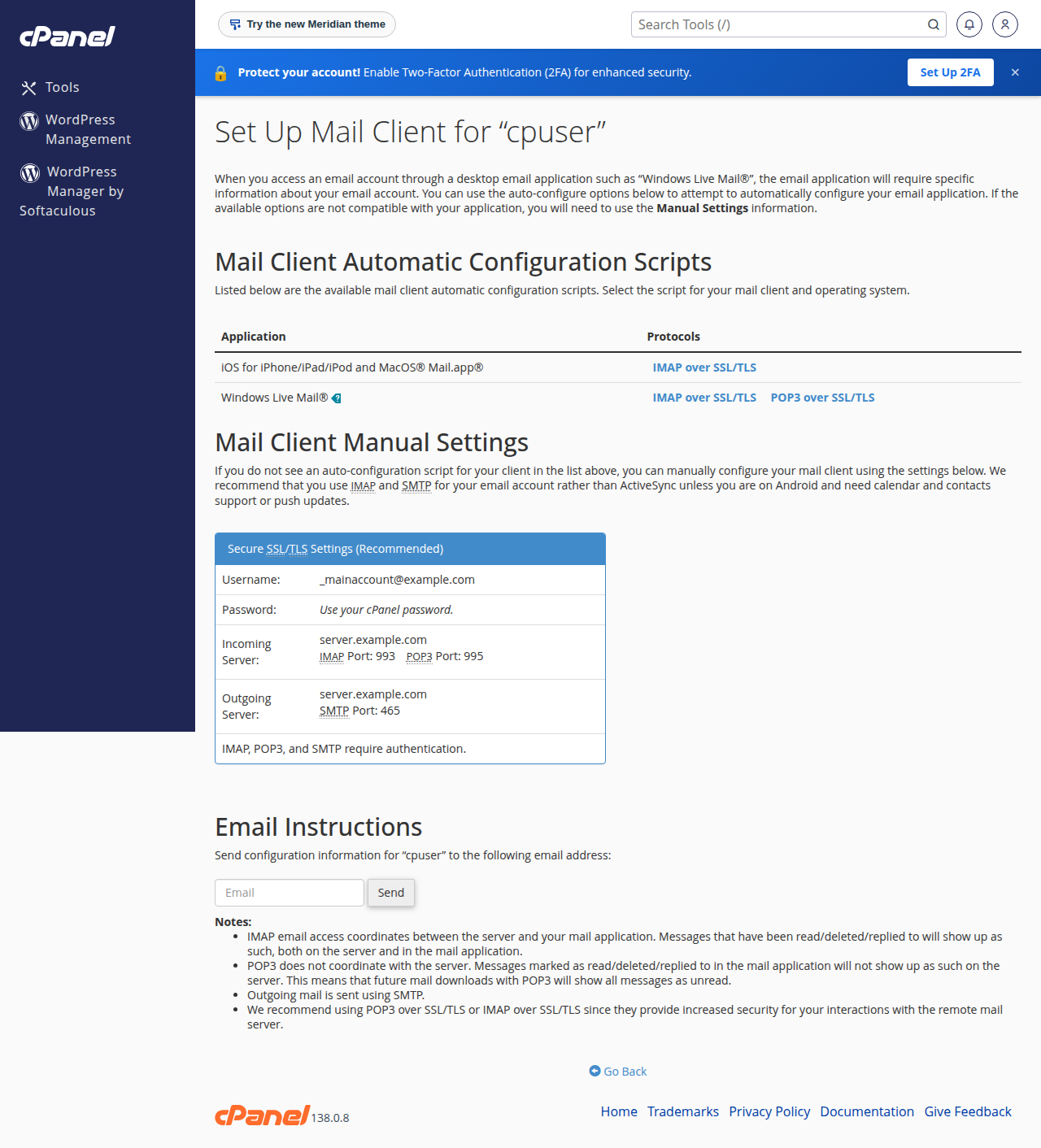
Compare your mail app with this table. These ports were measured as open on our shared servers on 20 September 2026.
| Setting | cPanel, DirectAdmin and Webuzo | Windows (Plesk) |
|---|---|---|
| Incoming and outgoing server | mail.yourdomain.com | mail.yourdomain.com |
| IMAP (recommended) | 993 with SSL/TLS | 993 with SSL/TLS |
| POP3 | 995 with SSL/TLS | 995 with SSL/TLS |
| SMTP (recommended) | 465 with SSL/TLS | 465 with SSL/TLS |
| SMTP alternative | 587 with STARTTLS | Not available: port 587 is closed |
| Username | Your full email address | Your full email address |
| SMTP authentication | On | On |
Three points cause most failures:
- The username is the full address,
[email protected], not justyou. - The password is the mailbox password, not your control panel or client area password.
- Port 26 is closed on every Domain India server, so older guides that suggest it no longer work. Port 25 is often blocked by internet providers; use 465.
If mail.yourdomain.com gives a certificate warning, do not click past it. In cPanel, Email › Email Accounts › Connect Devices shows the exact server name for your account. The full port list is in Domain India web hosting port numbers.
4. Mail will not send
When receiving works but sending fails, the mailbox itself is almost always fine. Work through these in order:
- Turn on SMTP authentication.Our servers send mail only for users who log in. Without it you see "relaying denied" or "authentication required".
- Match the port and encryption.465 goes with SSL/TLS; 587 goes with STARTTLS. A mismatch fails at once.
- Try another network.If sending works on mobile data but not on your office Wi-Fi, that network is blocking the port.
- Update an old password everywhere.Many apps store the incoming and outgoing passwords separately.
The complete guide, including suspended accounts and full disks, is I can receive mail but I cannot send it.
A phone or laptop that keeps retrying an old password causes repeated failed logins, and the server firewall then blocks that IP address automatically. Everyone on the same connection loses mail at once, while it still works on mobile data. Update or remove the account on every device, then see I can't reach my server: have I been blocked?
5. Mail is not arriving
Check these in order before assuming mail was lost:
- The Spam or Junk folder, in webmail as well as in your app. Webmail always shows what is really on the server.
- The mailbox quota. A full mailbox refuses new mail and the sender gets a bounce. Free space or raise the quota as described in managing your email accounts.
- The domain's MX record. It must point to the server that holds your mailboxes. If you recently moved your DNS or your website, the MX record may now point somewhere else.
- Forwarders and filters that move mail to another address or folder.
- A suspended hosting account, for example with an unpaid renewal invoice. Mail stops in both directions. Check your service under Services and any open invoices.
The detailed checks are in troubleshooting email not receiving.
6. A bounce message came back
A bounce is the receiving server explaining why it refused your mail. Look for two things in it: the status code (a 4xx code is a temporary problem that may retry; a 5xx code is permanent) and the plain-language reason, such as "mailbox full", "user unknown" or a mention of SPF or DMARC.
Understanding email bouncebacks decodes the common messages one by one and says what to do for each. Keep the full bounce, including its headers, if you plan to contact support.
7. Mail goes to spam, or your server is on a blocklist
When your messages leave your Sent folder but land in the recipient's spam folder, the problem is usually with your domain's authentication records, not your mail app.
_dmarc telling receivers what to do when SPF or DKIM fails.In cPanel, Email Deliverability shows whether SPF and DKIM are valid for each domain and offers the correct records. Copy the records it gives you rather than typing an example from a guide. If you also send through a newsletter tool, a CRM or Google Workspace, that service must be included in the same single SPF record.
Read SPF, DKIM and DMARC for setup, and email blacklist removal if a bounce names a blocklist.
8. Sending limits on shared hosting
Shared hosting limits how much mail one account can send, so a single compromised script or a bulk mailing cannot damage the reputation of the server everyone else relies on. We measured these limits on our servers on 22 September 2026:
| Hosting | Outgoing mail limit |
|---|---|
| cPanel (all plans) | 200 messages per hour per account |
| DirectAdmin | 1,000 messages per day per account (200 per mailbox by default) |
| Webuzo and Windows (Plesk) | Ask support for your account's limit |
Mail from webmail, from mail apps and from website scripts such as contact forms and WooCommerce order emails all counts towards the same limit. Everyday business mail stays well inside it. Newsletters and bulk campaigns do not, and they should go through a dedicated email delivery service instead. See do you limit the amount of mail I can send per hour.
Hitting the limit without sending bulk mail is a warning sign: a hacked contact form or a stolen password may be sending spam in your name. Change the mailbox passwords and ask support to check the account.
9. Webmail will not open
Webmail needs only a browser, so it also tells you whether a problem is in your mail app or in the mailbox.
| Your hosting | Webmail address |
|---|---|
| cPanel | yourdomain.com/webmail, webmail.yourdomain.com or yourdomain.com:2096 |
| DirectAdmin | yourdomain.com/webmail or yourdomain.com/roundcube |
| Webuzo | yourdomain.com/webmail |
| Business Email | https://mail.yourdomain.com:8443/ |
There is no webmail.yourdomain.com on DirectAdmin or Webuzo. Sign in with the full email address and the mailbox password. If the page does not load on one network but does on mobile data, your IP address may be blocked (see section 4). Clearing the browser cache or trying a private window fixes most login loops. Full steps: how to log in to webmail.
10. Where Domain India products fit
Every cPanel, DirectAdmin and Webuzo hosting plan includes email accounts at your domain, managed in the same panel as your website.
- 25 GB NVMe SSD Storage
- 50 GB Monthly Bandwidth
- 1 Website
- 10 Email Accounts
If you want email that keeps running independently of your website, or you do not host your website with us, Business Email is priced per mailbox and starts with one. It includes DKIM signing on every message and SPF and DMARC records for your domain.
- Priced per mailbox - start with one
- Email at your own domain ([email protected])
- Add and remove mailboxes yourself
- Webmail with calendar, contacts and tasks
Prices on the cards are Domain India list prices and exclude 18% GST.
11. When to contact support
On shared hosting the mail service is managed for the whole server, so you cannot read its logs or restart it, and you do not need to: we check the logs for your address. If you run your own mail server on a VPS, start with troubleshooting SMTP relay issues in VPS hosting.
Contact us when the settings in section 3 are right and the matching guide has not solved it. Live chat runs 24/7, and tickets get a first response within 15 minutes; a fix can take longer depending on the problem. We do not offer phone support. Include:
- the email address that has the problem;
- the mail app and device, and the server, port and encryption it uses;
- the exact error message, or the full bounce;
- what you have already tried, and your public IP address if you cannot connect at all.
Frequently asked questions
What are the email settings for Domain India hosting?
Use mail.yourdomain.com as both the incoming and the outgoing server. Use IMAP on port 993 or POP3 on port 995, and SMTP on port 465, all with SSL/TLS. Turn SMTP authentication on and use your full email address and mailbox password to log in. On cPanel, DirectAdmin and Webuzo, port 587 with STARTTLS also works for sending; it is closed on Windows (Plesk) hosting.
Why can I receive email but not send it?
Receiving and sending use separate connections. Sending uses SMTP, which needs authentication switched on, a matching port and encryption, and a network that does not block the port. Turn on SMTP authentication, use port 465 with SSL/TLS, and try on mobile data to rule out a blocked port on your usual network.
How many emails can I send per hour on shared hosting?
On Domain India cPanel hosting the limit is 200 messages per hour per account. DirectAdmin hosting allows 1,000 messages per day per account (200 per mailbox by default). For Webuzo and Windows hosting, ask support. Newsletters and bulk mail should go through a dedicated email delivery service.
Why do my emails go to the recipient's spam folder?
Usually because your domain is missing a valid SPF, DKIM or DMARC record, or has two SPF records, which makes both invalid. In cPanel, Email Deliverability shows whether SPF and DKIM are valid and gives the correct records. Also make sure any other service that sends as your domain is included in your single SPF record.
Is port 26 available for sending email?
No. Port 26 is closed on every Domain India server, so older instructions that recommend it no longer work. Use port 465 with SSL/TLS, or 587 with STARTTLS on cPanel, DirectAdmin and Webuzo hosting.
Do these steps apply to Domain India Business Email?
Only partly. Business Email is a separate platform with its own webmail at https://mail.yourdomain.com:8443/, IMAP only with no POP3, and its own sending limits. Use the Business Email client setup and sending limits guides for its settings.
Can I restart the mail server or read the mail logs myself?
Not on shared hosting. The mail service is managed for the whole server, and customers do not have access to restart it or read the server-wide logs. Contact support with your email address and the error, and we will check the logs for you.
Ready to fix it? Find your symptom in section 1 and open its guide, and keep managing your email accounts handy for passwords and quotas. If it still is not working, open a ticket in the client area or use the public ticket form, and follow it on Track ticket.
Tell us the email address, your mail app, the port and encryption it uses, and the exact error, and we will check your account.
Open a support ticket