Emails that were in your inbox yesterday and are gone today are almost never lost by the mail server. In nearly every case, something removed or moved them: a mail app downloading over POP3, a deletion on another device, a filter, a spam setting, or simply a different folder or mailbox from the one you are looking at. This guide walks through the causes in the order they usually turn out to be true, and shows how to stop it happening again.
It covers mailboxes on cPanel, DirectAdmin, Webuzo and Windows (Plesk) hosting. Domain India Business Email runs on a separate platform, with its webmail at mail.yourdomain.com:8443. Not sure which you have? See Business Email vs the email included with your hosting.
First log in to webmail with your full email address and look in every folder, including Spam and Trash. If the mail is not there, the most common cause is a computer that collects mail over POP3 and removes it from the server. Other causes are a deletion on another device synced over IMAP, an email filter or spam Auto-Delete rule, or a full mailbox refusing new mail. Switch every device to IMAP, review your filters, and ask support if messages are still missing.
1. Check webmail first
Webmail shows exactly what is on the server, with no mail app in between. It is the fastest way to tell whether mail was removed from the server or is only missing from one device.
- Open webmail.On cPanel hosting use
https://yourdomain.com/webmail. The addresses for every panel are in how to log in to webmail. - Log in with the full email address,such as
[email protected], and that mailbox's password. - Look in every folder:Inbox, Spam, Trash, Archive and any folders you created. Use the search box to look for a sender or subject.
- Compare with your phone or computer.If the mail is in webmail but not on a device, the problem is that device's settings (sections 3 and 4). If it is not in webmail either, it has left the server (sections 2, 5 and 6).
On cPanel, logging in to webmail with the cPanel account username instead of a full email address opens the account's default mailbox, not your address. It looks like your inbox has been emptied. Always log in with the whole address, including the part after the @.
2. A computer or app using POP3
This is the most common cause. POP3 is the older way of collecting mail. A mail app using POP3 downloads messages to one computer and, by default in many apps, deletes them from the server. Every other device then sees them disappear, and webmail shows an empty inbox.
Signs that POP3 is the cause:
- mail vanishes at regular times, when a particular computer is switched on;
- the messages are all present on one desktop's Outlook but nowhere else;
- an old computer or a former employee's laptop still has the account set up.
How to fix it:
- Change that computer to IMAP. IMAP keeps mail on the server and shows the same folders on every device. Most apps cannot switch an existing account from POP3 to IMAP, so add the account again as IMAP, then remove the POP3 one once the IMAP copy has synced. See IMAP vs POP3: which to choose.
- If you must keep POP3, switch on the option to leave a copy on the server. In classic Outlook for Windows it is under the account's More Settings › Advanced, labelled "Leave a copy of messages on the server". Other apps have a similar setting.
- Find the forgotten device. If you cannot tell which computer is collecting the mail, change the mailbox password. Any device still downloading with the old password stops, and its owner will soon ask why.
POP3 only downloads the inbox. Messages the server put in your Spam folder stay on the server, so they are visible in webmail but never reach a POP3 computer.
3. Deleted on another device
With IMAP, everything is in sync. That is its advantage, and it also means a deletion anywhere is a deletion everywhere. If a colleague, an assistant or a family member reads the same mailbox on their phone and deletes or archives messages, they disappear from your screen too.
- Check the Trash and Archive folders in webmail. Deleted mail usually goes to Trash first.
- Some phone apps have a swipe action set to delete or archive. Check the app's swipe settings.
- If several people need the same mail, give each person their own mailbox and use a forwarder, so one person's clean-up does not empty everyone's inbox. See how to create or delete an email forwarder.
4. The app is not showing a folder
Sometimes the mail is on the server but your app hides it:
- The Spam folder is not subscribed. On many phones and in some Outlook set-ups, server folders stay hidden until you subscribe to them in the app's folder settings.
- The app only syncs recent mail. Phone apps often download only the last few days or weeks. Change the sync period in the account settings.
- A focused or filtered view. Outlook's Focused Inbox and similar features move mail out of the main view without deleting it.
5. Filters and spam settings
Rules on the server can move or delete mail before you ever see it.
| Setting | Where in cPanel | What it can do |
|---|---|---|
| Spam Box | Email › Spam Filters | Moves messages marked as spam to the Spam folder |
| Auto-Delete | Email › Spam Filters | Permanently deletes messages above its score, with no copy |
| Email Filters | Email › Email Filters | Moves, forwards or discards mail for one address |
| Global Email Filters | Email › Global Email Filters | Does the same for every address on the account |
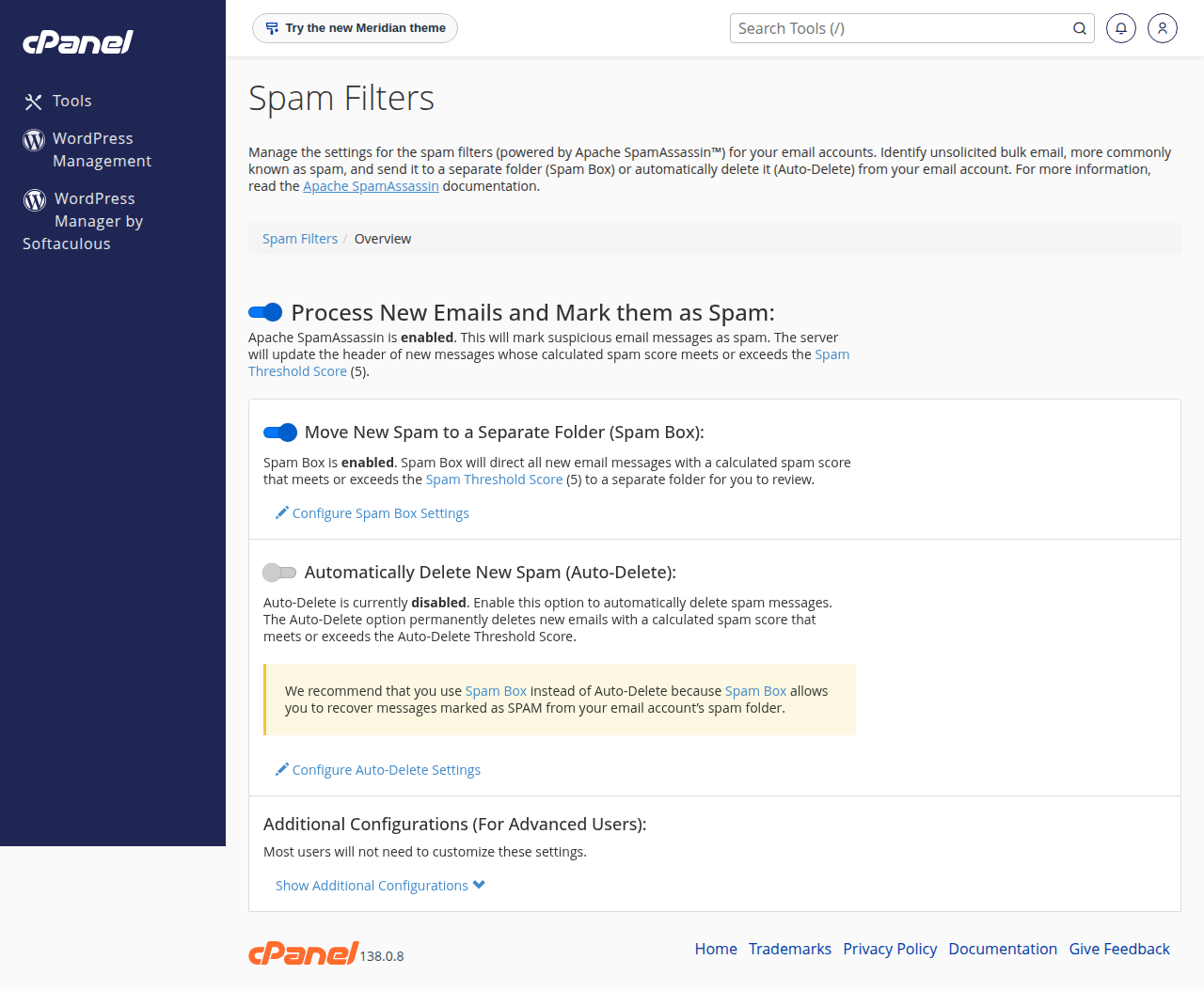
Auto-Delete deserves a special look. On 23 September 2026, 64 domains on our cPanel server had Auto-Delete set at a score of 5, which deletes every message marked as spam, including genuine mail marked by mistake. If you use Auto-Delete, raise its score to 10 or more, or switch it off. The full guide is in SpamAssassin and Spam Box.
Also check each Email Filter for a rule that discards mail or moves it to a folder you never open. Filters created long ago by a former staff member are a frequent surprise.
On DirectAdmin, Webuzo and Windows (Plesk), the panel has its own filter settings under a different name. See managing email filters in DirectAdmin, or ask support.
6. Mail that never arrived: full mailboxes and forwarding
Some "disappearing" mail never reached the mailbox in the first place.
- A full mailbox. When a mailbox reaches its storage quota, new mail is refused and the sender gets a bounce. Old mail is not deleted to make room. On our cPanel server, the email account form suggests a 1,024 MB quota for a new mailbox, and a busy mailbox can fill that. See how to check email storage.
- The hosting account's disk is full. If the whole account is out of space, mail stops being delivered to every address on it.
- Forwarded mail marked as spam. On our cPanel server, a message that SpamAssassin scores as clear spam is not forwarded to an outside address; the sender gets the error "This mail cannot be forwarded because it was detected as spam". Forwarding to Gmail can also fail for other reasons explained in the forwarder guide.
- Mail delivered somewhere else. If your domain's MX records point to another provider, such as Google Workspace, mail goes there and never reaches your hosting mailbox.
If you think a message was sent but never arrived, open a ticket with the sender, the recipient and the time it was sent. The mail logs belong to the whole server and cPanel's Track Delivery tool is not available on our servers, so support searches the logs and tells you whether the message was accepted and delivered.
7. Scripts and apps that collect mail
Helpdesk software, CRMs and some website plugins connect to a mailbox to read incoming mail. If they connect over POP3, or are set to delete messages after reading them, they empty the mailbox exactly like a POP3 computer. Ask the developer or vendor to switch the connection to IMAP and to leave messages on the server, or give the tool its own mailbox.
8. Getting deleted mail back
If mail was deleted from the server, the weekly account backup may still hold it. Domain India takes weekly backups with JetBackup 5 on cPanel and DirectAdmin, and you can restore from JetBackup in your panel. A backup only contains messages that were on the server when it ran, so mail that arrived and was deleted within the same week may not be in any backup. See how to restore or download a backup using JetBackup.
Mail downloaded by a POP3 computer is on that computer. Look in its mail app, including its local folders and archive files, before anything else.
9. Where Domain India products fit
Every Domain India shared hosting plan includes email on your domain, with webmail and IMAP so that every device sees the same mailbox.
- 25 GB NVMe SSD Storage
- 50 GB Monthly Bandwidth
- 1 Website
- 10 Email Accounts
If several people need reliable shared access to business mail, Business Email runs on its own platform and is priced per mailbox.
- Priced per mailbox - start with one
- Email at your own domain ([email protected])
- Add and remove mailboxes yourself
- Webmail with calendar, contacts and tasks
Plan cards show Domain India list prices on 19 September 2026, excluding 18% GST.
Frequently asked questions
Why are my emails disappearing from my inbox?
Usually because something removed them from the server: a computer collecting mail over POP3, a deletion on another device synced over IMAP, an email filter, or a spam Auto-Delete setting. Log in to webmail with your full email address and check every folder, then check each device and your filters.
How do I stop Outlook deleting emails from the server?
Use IMAP instead of POP3, so mail stays on the server. If you must keep POP3, open the account's More Settings, then Advanced, and switch on Leave a copy of messages on the server.
My webmail inbox is empty but my emails were there yesterday. What happened?
First check you logged in with your full email address. On cPanel, the cPanel username opens a different mailbox. If you did, a device using POP3 has probably downloaded and removed the mail. Look for it on the computer that collects your mail.
Can a full mailbox delete my old emails?
No. A full mailbox refuses new mail and the sender receives a bounce, but existing messages are not deleted. Free up space or raise the mailbox quota to receive mail again.
Can deleted emails be recovered?
Sometimes. Domain India takes weekly JetBackup backups on cPanel and DirectAdmin hosting, and you can restore from JetBackup in your panel. Mail that arrived and was deleted between two backups cannot be recovered from them.
Where does spam go on Domain India hosting?
With Spam Box switched on, which is the case on almost every cPanel account, messages marked as spam go to the Spam folder of that mailbox. Check it in webmail. POP3 apps never download it.
Ready to track down the missing mail? Start in webmail from how to log in to webmail, then check your filters from your hosting services. If you still cannot find it, open a ticket in the client area or use the public ticket form.
Tell us the mailbox, the sender and roughly when the missing messages arrived, and we will check the server logs for your account.
Open a support ticket